
The ARC Raiders Fatal Error is one of the most confusing issues for PC players during startup or loading. The good news is that this error does not mean your account is banned. In most cases, it is triggered by the game’s anti-cheat system detecting a background process that violates integrity rules.
This guide is written for PC players who want safe, reliable solutions. You’ll learn exactly what causes the error, how to identify flagged software, and how to fix ARC Raiders Fatal Error and crashing on PC using proven methods that go beyond basic advice.

- ✅ Reduce Lag and High Ping.
- ✅ Boost FPS at the Same Time.
- ✅ Support 2000+ Popular Online Games.
- ✅ Fix High Ping Easily
- ✅ Change Server without Latency
Part 1. What Is ARC Raiders Fatal Error on PC?
Part 2. Why ARC Raiders Shows “Fatal Error Detected Software”
Part 3. How to Fix ARC Raiders Fatal Error & Crashing on PC (Step-by-Step)
Part 4. How to Fix Embark Game Boot Fatal Error Detected Software Permanently
Part 5. How to Enhance Your Game Experience with LagoFast Game Booster
Part 6. Advanced Troubleshooting for Persistent ARC Raiders Fatal Error
Part 1: What Is ARC Raiders Fatal Error on PC?
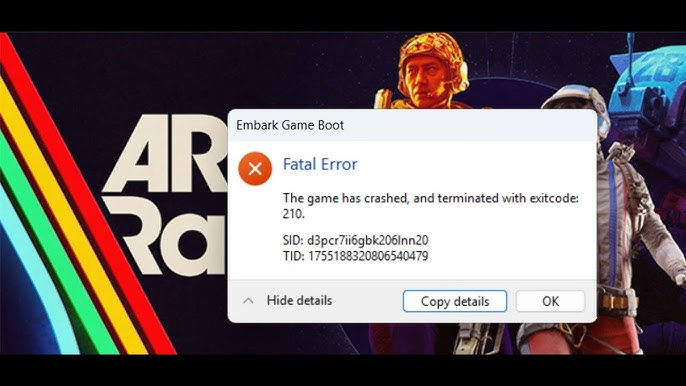
In ARC Raiders, a fatal error usually appears at launch or shortly after clicking Play. The message often references detected software or a system integrity violation.
This error is almost always tied to Easy Anti-Cheat, which monitors active processes during game launch. If it detects disallowed tools, the game is blocked immediately.
Key points to understand:
- The error is process-based, not installation-based.
- Software is flagged only when actively running.
- Repeated launches while flagged software is active can lead to penalties.
Understanding these distinctions is critical to safely resolving the issue.
Part 2: Why ARC Raiders Shows “Fatal Error Detected Software”
ARC Raiders, developed by Embark Studios, uses aggressive boot-time integrity scans. Unlike older shooters, it actively validates running processes and system behavior during startup.
Common triggers include:
- AutoHotkey or background scripts
- Macro software from keyboards or mice
- Overlay injectors (FPS counters, debuggers)
- Memory editors or monitoring tools
- Virtual machine or emulation services
Even legitimate productivity tools can trigger detection if they hook input or system calls. This explains why ARC Raiders Fatal Error PC happens to many players without cheating.
Part 3: How To Fix ARC Raiders Fatal Error & Crashing on PC (Step-by-Step)
Step 1: Identify the Flagged Process
When the error appears, note the file path displayed. Accuracy is critical.
- Write down the full path
- Check whether it points to a script, executable, or driver
Step 2: Disable the Process via Task Manager
- Press Ctrl + Shift + Esc
- Open the Processes tab
- Locate the flagged program → End Task
- If it respawns automatically, check startup services
Step 3: Disable Startup and Background Services
- Open Task Manager → Startup
- Disable macro tools, overlay utilities, or unknown entries
- Restart your PC before launching ARC Raiders again
This ensures hidden services do not re-trigger the fatal error.
Part 4: Fix Embark Game Boot Fatal Error Detected Software Permanently
Temporary fixes help, but permanent stability requires deeper cleanup:
Uninstall or Reconfigure Input Tools
If you use AutoHotkey or macro software:
- Create separate profiles for gaming and work
- Ensure scripts do not auto-launch on boot
- Avoid global hooks while ARC Raiders is running
Verify System Integrity
- Run
sfc /scannowin Command Prompt (Admin) - Keep Windows fully updated
- Avoid modified DLLs or unsigned drivers
Verify Game Files
- Use your game launcher to verify ARC Raiders file integrity
- Reboot after verification completes
These steps prevent false positives during anti-cheat scans.
Part 5: How to Enhance Your Game Experience with LagoFast Game Booster
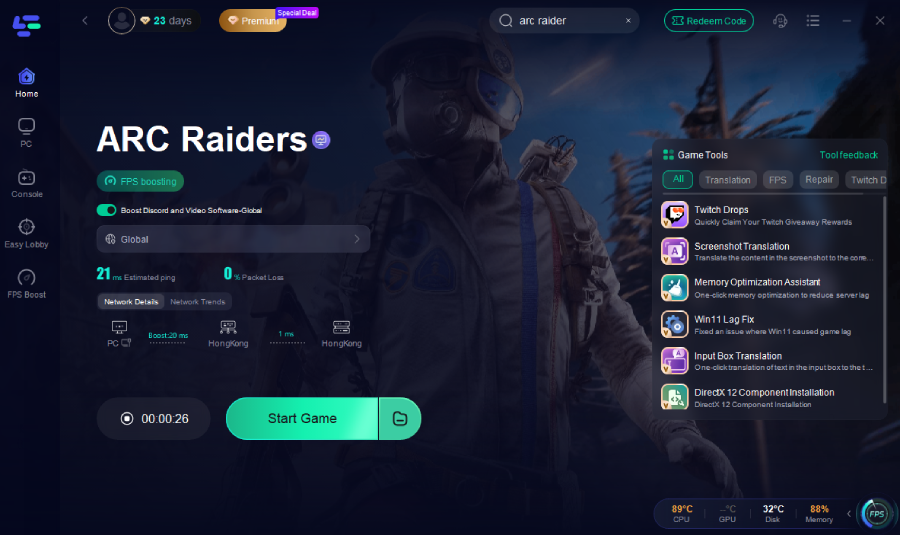
Some ARC Raiders crashes stem from unstable routing, packet loss, or background service conflicts. LagoFast Game Booster can optimize your network without interfering with anti-cheat systems.
Benefits of LagoFast
- Reduces High Ping: Finds the fastest route to servers
- Eliminates Packet Loss: Stabilizes connection for inputs
- Fixes Error Codes: Improves network handshake and reduces connection-related errors
- Multi-Platform Support: Works on PC and console
How to Use LagoFast
Step 1: Click the "Free Trial" button below to download and install LagoFast for free.
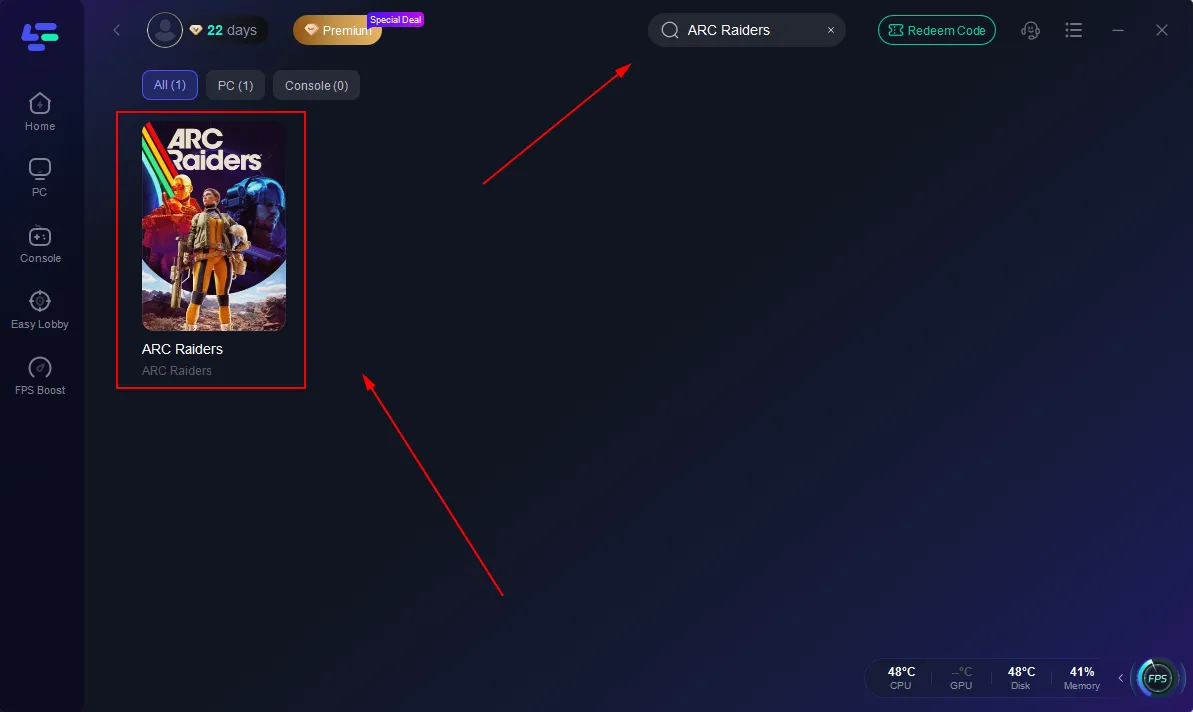
Step 2: Launch LagoFast, search for "ARC Raiders" in the search bar, and select the game.
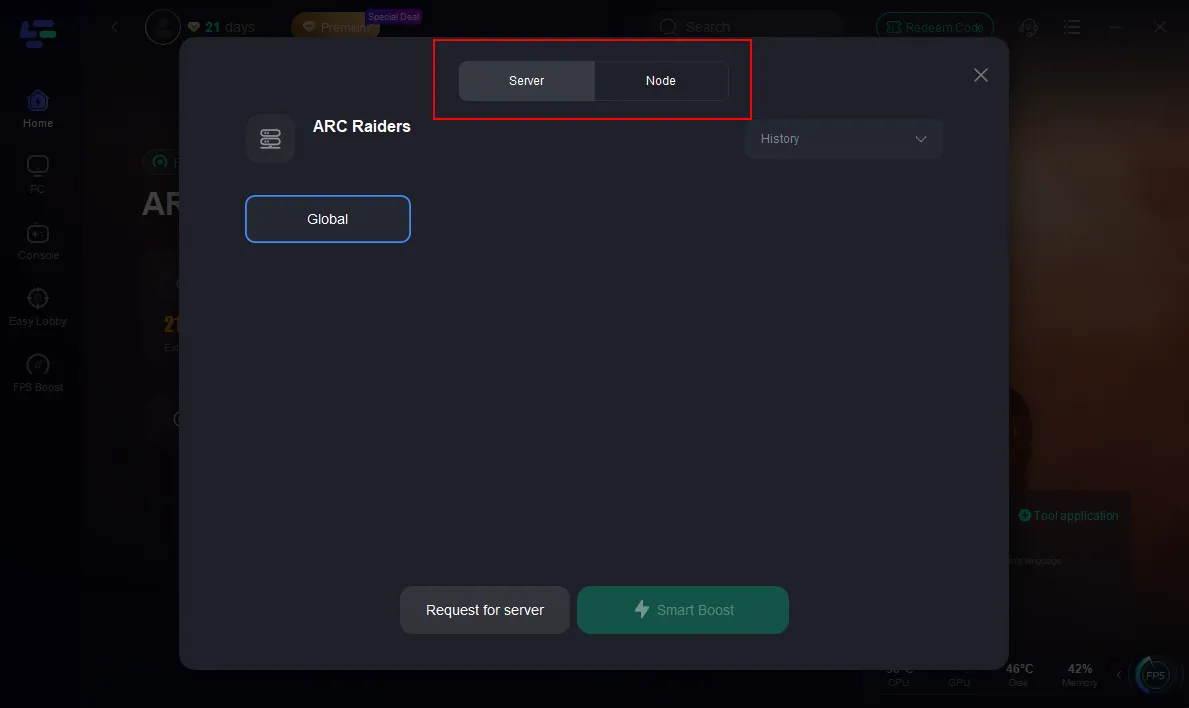
Step 3: Click the "Select Server" button to connect to a stable server node, then activate optimization via "Smart Boost".
Step 4: After enabling real-time optimization, check the live ping and packet loss rates, then click "Start Game" to begin playing.
Part 6: Advanced Troubleshooting for Persistent ARC Raiders Fatal Error
If errors persist:
Check Virtualization and Emulators
- Disable unused VMs or Android emulators
- Turn off Hyper-V if not required
Clean Boot Testing
- Perform a Windows clean boot
- Launch ARC Raiders with minimal services
- Re-enable services gradually to isolate the trigger
Anti-Cheat-Safe Third-Party Checks
- Use tools like Process Explorer to monitor running software
- Avoid altering system DLLs or game files directly
This method is time-consuming but highly effective for persistent ARC Raiders anti-cheat error.
Part 7: FAQs
Does ARC Raiders Fatal Error mean I am banned?
No. This error does not indicate a ban. It blocks the session until flagged processes are disabled.
Can I keep AutoHotkey installed?
Yes, as long as no scripts are actively running when ARC Raiders launches.
Will repeated fatal errors cause account penalties?
Yes, if you continue launching the game while flagged software is active. Always disable the process first.
Is reinstalling ARC Raiders necessary?
Only if file verification fails or files are corrupted. Reinstallation alone does not bypass anti-cheat detection.
Conclusion
Fixing ARC Raiders Fatal Error on PC requires understanding how anti-cheat systems evaluate active processes, not installed software. By identifying flagged programs, disabling background tools correctly, and maintaining system integrity, most players can resolve the issue safely. For long-term stability, optimizing your PC environment and network conditions is crucial. Using tools like LagoFast Game Booster ensures smoother gameplay without interfering with anti-cheat detection.
With these steps, ARC Raiders fatal error PC occurrences can be minimized, letting you enjoy a stable and secure gaming experience.
Boost Your Game with LagoFast for Epic Speed
Play harder, faster. LagoFast game booster eliminates stutter and lags on PC, mobile, or Mac—win every match!
Quickly Reduce Game Lag and Ping!
Boost FPS for Smoother Gameplay!