
If you’re grinding in EA Sports FC 26 and notice your players stuttering, passes not registering, or sudden disconnections, chances are you’re dealing with packet loss. This frustrating issue disrupts online matches by preventing game data from reaching EA’s servers correctly. The result? Delayed inputs, rubber-banding, and in worst cases, a complete disconnect. In this guide, we’ll explain what FC 26 packet loss is, why it happens, and most importantly—how you can fix it on PC, console, and mobile for smoother, lag-free matches.

- ✅ Reduce Lag and High Ping.
- ✅ Boost FPS at the Same Time.
- ✅ Support 2000+ Popular Online Games.
- ✅ Change Server without Latency.
- ✅ End Stuck & Crashing Issues.
- What Is Packet Loss in FC 26?
- Common Causes of FC 26 Packet Loss
- How to Fix FC 26 Packet Loss on PC
- How to Fix Packet Loss on Console (PS5, Xbox Series X/S)
- How to Fix Packet Loss on Mobile (FC 26 Mobile)
- How LagoFast Fixes FC 26 Packet Loss Across PC, Mobile, and Console
1. What Is Packet Loss in FC 26?
Packet loss occurs when data packets traveling between your device and EA’s game servers get lost along the way. Instead of a smooth stream of communication, your connection becomes fragmented.
In FC 26, this often looks like:
- Delayed or unresponsive controls.
- Opponents teleporting or rubber-banding across the pitch.
- Sudden disconnections, especially during FUT matches.
- Inconsistent gameplay even with low ping.
2. Common Causes of FC 26 Packet Loss
- Unstable Wi-Fi Connections – Wireless interference can drop packets mid-game.
- Overloaded Servers – EA’s servers may struggle during peak FUT or Weekend League hours.
- ISP Issues – Routing problems or bandwidth congestion on your internet provider’s side.
- Outdated Hardware – Old routers or cables failing to handle modern gaming demands.
- Background Traffic – Streaming, downloads, or other devices competing for bandwidth.
3. How to Fix FC 26 Packet Loss on PC
- Use a Wired Connection – Switch from Wi-Fi to Ethernet for stability.
- Close Background Apps – Shut down downloads, streams, and unnecessary programs.
- Update Network Drivers – Ensure your PC drivers are up-to-date for better compatibility.
- Restart Router & Modem – A quick reset can fix temporary routing errors.
4. How to Fix Packet Loss on Console (PS5, Xbox Series X/S)
- Switch to Wired LAN – Always prefer Ethernet over Wi-Fi for gaming.
- Optimize DNS Settings – Changing to Google DNS or Cloudflare can reduce routing errors.
- Minimize Household Usage – Pause downloads or streaming on other devices during matches.
5. How to Fix Packet Loss on Mobile (FC 26 Mobile)
- Stay on a Stable Network – Use strong Wi-Fi or 5G, avoid public hotspots.
- Limit Background Apps – Turn off streaming and auto-updates while playing.
- Play During Off-Peak Hours – Avoid peak congestion when servers are overloaded.
6. How LagoFast Fixes FC 26 Packet Loss Across PC, Mobile, and Console
Nothing is more frustrating in EA Sports FC 26 than packet loss. Missed passes, delayed shots, or sudden disconnections can ruin matches in Ultimate Team or Pro Clubs. LagoFast is built to tackle this exact problem with smart routing, stable server connections, and real-time monitoring—so you can keep playing without interruption.
Key Benefits of Using LagoFast for FC 26 Packet Loss
- Reduced Packet Loss – Keeps passes, shots, and movement smooth.
- Lower Ping & Stability – Avoid lag spikes and sudden disconnects.
- Real-Time Network Tracking – See live packet loss and ping stats.
- Smart Routing – Always connect to the most reliable server path.
- Cross-Platform Coverage – Works on PC, mobile, and console.
LagoFast on PC
PC players struggling with packet loss can stabilize connections in a few easy steps:
Step 1. Download LagoFast by clicking the "Free Trial" button.
Step 2. Before you start your game, search for it within the LagoFast application to ensure it's supported.
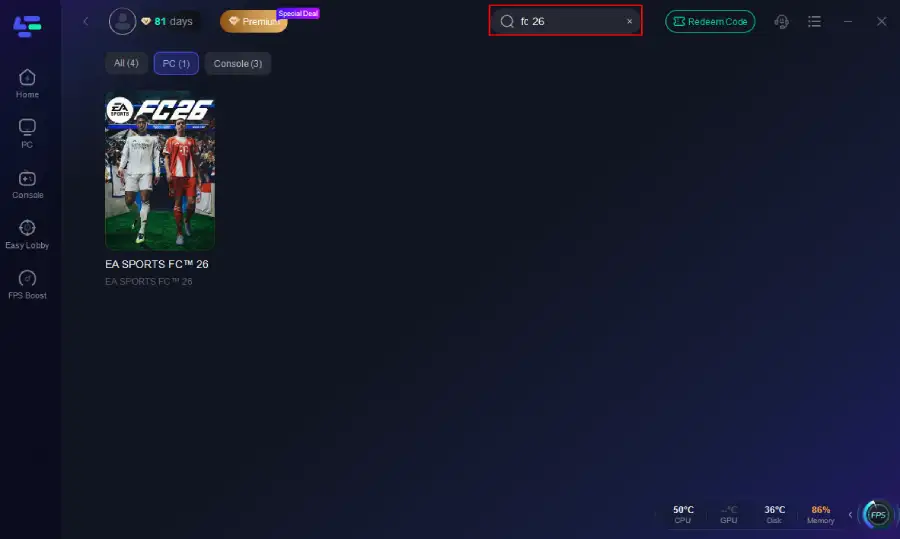
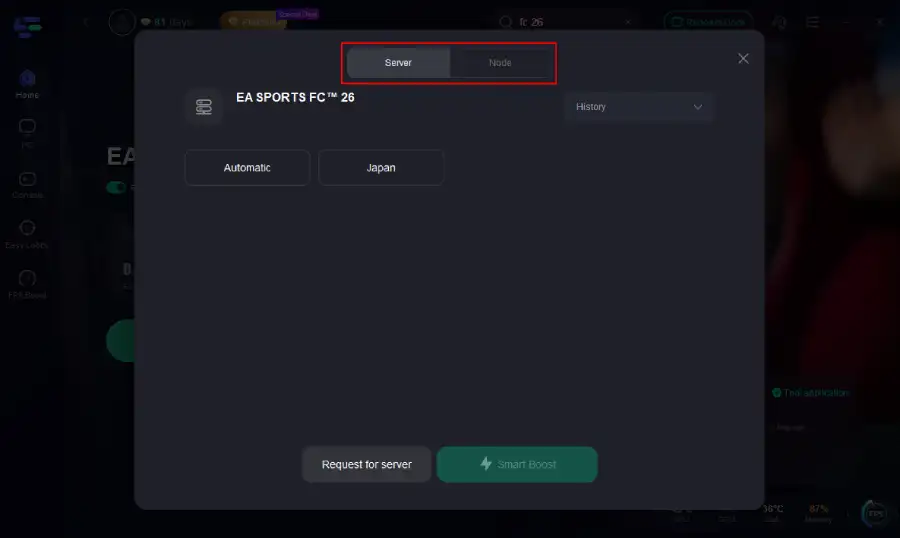
Step 3. Navigate to "Select Server" to choose the most stable server. Follow up by selecting the best Node available on the right to optimize your connection.
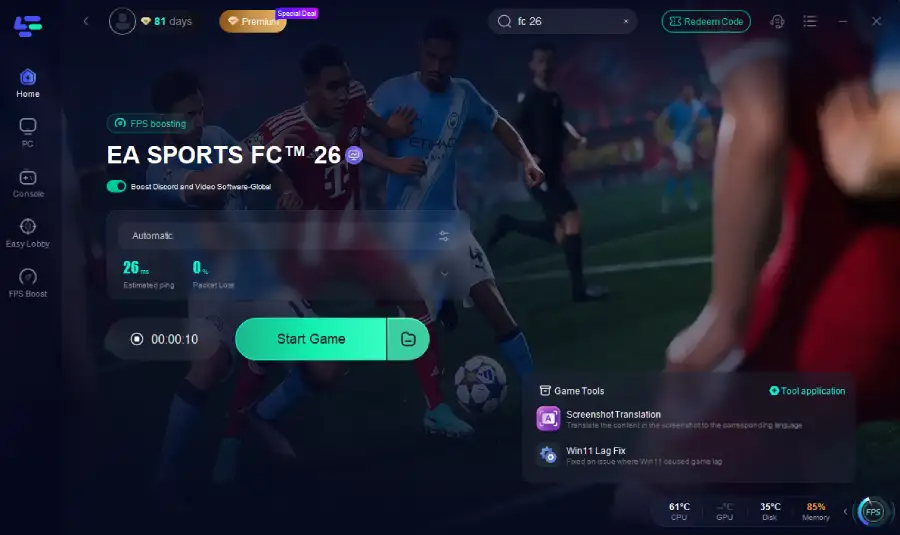
Step 4.Click the "Smart Boost" button to get real-time data on your game's ping, packet loss, and network type, which helps in monitoring and adjusting for optimal performance.
LagoFast on Console
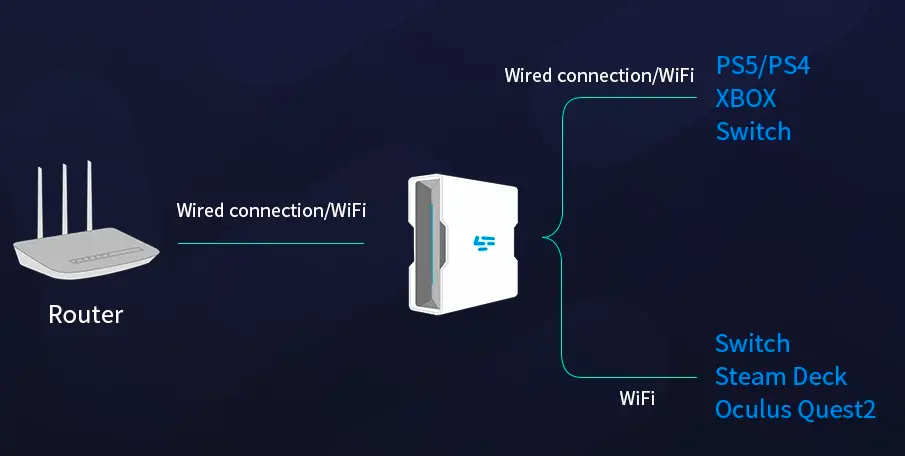
Console gamers can take advantage of the LagoFast Box:
Step 1: Download the LagoFast Console App on your phone to control the LagoFast Box.
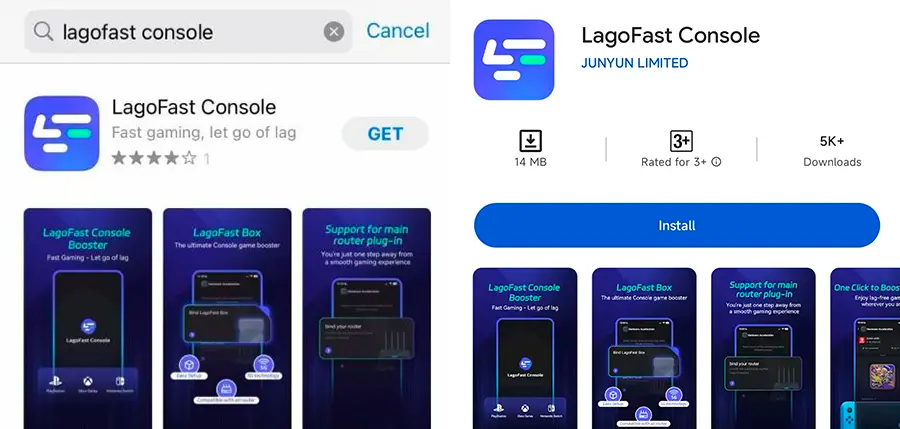
Step 2: Establish a connection between your LagoFast Box, router, and console, choosing between a wired or wireless connection.
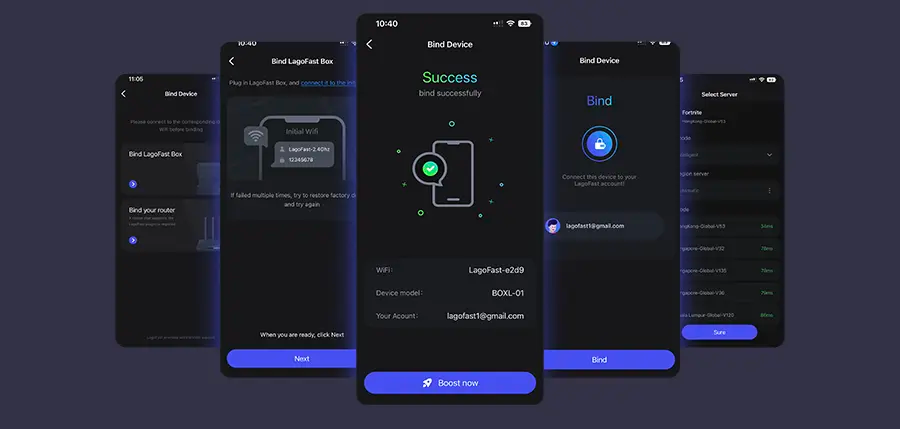
Step 3: Launch the LagoFast Console App and boost FC 26. Once you have completed the binding process with the LagoFast Box, proceed to boost this game within the LagoFast Console App.
LagoFast on Mobile
On FC 26 Mobile, packet loss is common over Wi-Fi or unstable data networks. LagoFast helps by:
- Installing the LagoFast Mobile Booster from the App Store or Google Play.
- Searching for FC 26 and choosing the closest server.
- Hitting Boost to reduce packet loss and view real-time network stats while you play.
FC 26 packet loss doesn’t have to cost you matches. With LagoFast, you can cut connection drops, lower ping, and stabilize gameplay whether you’re on PC, console, or mobile. Instead of fighting your network, focus on your strategy, and let LagoFast keep your connection running smoothly.
Conclusion
FC 26 packet loss is one of the most frustrating issues players face, often ruining competitive matches at the worst times. The good news? By optimizing your setup—using Ethernet, adjusting DNS, and relying on smart tools like LagoFast—you can drastically reduce packet loss and keep gameplay smooth. Winning in FC 26 shouldn’t come down to connection drops. Fix your packet loss, and let your skills decide the match.

Boost Your Game with LagoFast for Epic Speed
Play harder, faster. LagoFast game booster eliminates stutter and lags on PC, mobile, or Mac—win every match!
Quickly Reduce Game Lag and Ping!
Boost FPS for Smoother Gameplay!