

French Version: Comment corriger le lag dans EA FC 26 sur PC, PS5 et Xbox | Guide complet
Arabic Version: حل مشكلة Lag في EA FC 26 على جميع المنصات
Many FC 26 players across PC, PlayStation, and Xbox platforms have reported issues such as lag spikes, stuttering, and unstable gameplay. These issues cause players to either get stuck during in-game cutscenes or experience severe input delays, making them miss the best opportunities to react in matches. This guide will focus on the problem of FC 26 lag, exploring its causes and introducing the best fixes!

- ✅ Reduce Lag and High Ping.
- ✅ Boost FPS at the Same Time.
- ✅ Fix Packet Loss on PC and Console.
- ✅ Change Server without Latency.
- ✅ End Stuck & Crashing Issues.
Part 2: How to Reduce FC 26 Lag on PC
Part 3: How to Fix FC 26 Lag on PS5 and Xbox
Part 1: Why Is FC 26 So Laggy
In general, the common causes of FC 26 lag are as follows:
1. Unstable Internet Connection
FC 26 is heavily dependent on real-time online play. If your internet connection is weak, you’ll face input delay, rubber-banding, or freezing.
2. Server Issues
Sometimes it’s not your fault—EA’s servers can get overloaded or have outages, leading players to ask: “Why are the EA servers so laggy?”.
3. PC Hardware Limitations
Outdated or underpowered GPUs, CPUs, or insufficient RAM can cause FPS drops and stuttering on PC.
4. Overheating (PC & Console)
High system temperatures force your device to throttle performance, leading to lag and stutter.
5. Background Applications or Downloads
Other programs consuming bandwidth or CPU power can cause significant FC 26 lag spikes.
6. Outdated Software or Drivers
Old drivers, system updates, or even missing game patches can lead to performance issues.
Hot Related: EA FC 26 Release Date, Platforms, & Gameplay Features
Part 2: How to Reduce FC 26 Lag on PC
For fixing FC 26 lag, PC players always have more options to optimize performance compared to consoles. If you’re facing FC 26 lagging & stuttering on your computer, try fixes below:
1. One-Step Fix through LagoFast:
As a professional game booster, LagoFast not only provides server nodes covering more than 60 countries worldwide, allowing players to connect to more stable servers, but also uses intelligent algorithms to monitor data performance in real time during gameplay, enabling optimization without the need to pause. It also offers many other advantages:
- Multi-Path Optimization: Utilizes advanced routing to ensure optimal connection quality.
- Seamless Switching: Dynamically transitions to the lowest-latency connection during gameplay for buttery-smooth controls.
- FPS Boost: Enhances frame rates and clarity through hardware-accelerated tools like Frame Generation and DLSS Boost.
- Cross-Platform Support: Support players to play games seamlessly across mobile, PC, and console devices.
How to Reduce FC 26 lag with LagoFast on PC:
Step 1. Download LagoFast by clicking the "Free Trial" button.
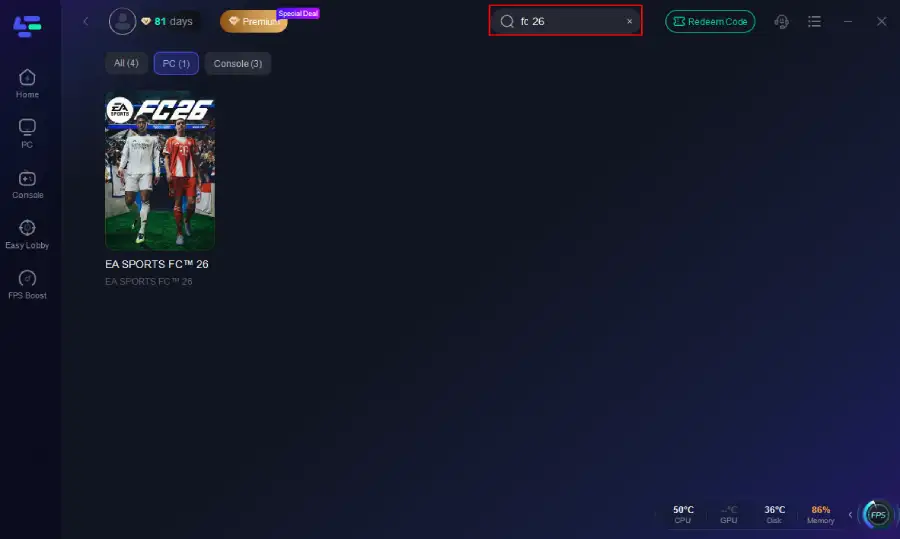
Step 2. Before you start your game, search for it within the LagoFast application to ensure it's supported.
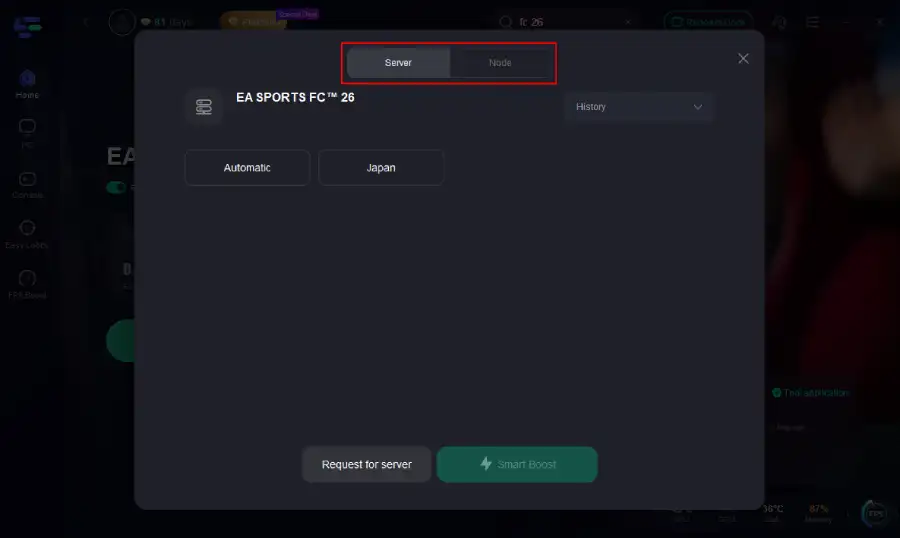
Step 3. Navigate to "Select Server" to choose the most stable server. Follow up by selecting the best Node available on the right to optimize your connection.
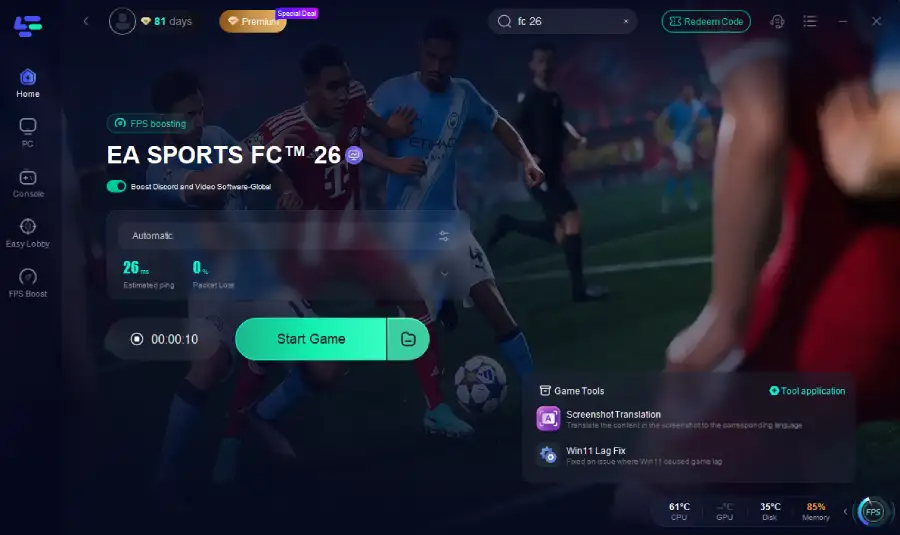
Step 4.Click the "Smart Boost" button to get real-time data on your game's ping, packet loss, and network type, which helps in monitoring and adjusting for optimal performance.
2. Optimize In-Game Graphics Settings
- Lower resolution if your system struggles at 1080p or 1440p.
- Set graphics presets to Medium or Low for smoother gameplay.
- Enable V-Sync or cap FPS to avoid screen tearing.
- Disable unnecessary visual effects like motion blur.
3. Update Drivers and Game Patches
- Update your GPU drivers via NVIDIA GeForce Experience or AMD Adrenalin.
- Check for Windows updates to ensure compatibility.
- Always keep FC 26 updated via Steam, EA App, or Epic Games.
3. Improve Network Stability
- Use a wired Ethernet connection instead of Wi-Fi for lower latency.
- Restart your modem and router before gaming sessions.
- If you consistently face high ping, consider using a game booster or VPN service to connect to faster routes.
4. Close Background Programs
- Shut down unnecessary apps such as browsers, streaming services, or Discord overlays.
- Pause system updates or downloads during gameplay.
5. Adjust Windows & Power Settings
- Set Windows to High Performance Mode in the Power Options.
- Disable background apps in Task Manager startup.
- Turn off Game DVR and Xbox Game Bar if they’re causing stutter.
6. Monitor System Temperatures
- Use software like MSI Afterburner to check GPU/CPU temps.
- Clean your PC fans and ensure proper airflow.
- By applying these fixes, you should see a major improvement in FPS stability and reduced stuttering.
You May Like: Is FC 26 Crossplay?
Part 3: How to Fix FC 26 Lag on PS5 and Xbox
While consoles don’t allow as much customization as PCs, there are still effective ways to minimize lag.
1.LagoFast Box
Similarly, if you want to fix FC 26 latency issues on your console with just one click, LagoFast Box can help. Its many advantages make it the best choice for ensuring a smooth and seamless gaming experience on your PS5 or Xbox:
Step 1. Download the LagoFast Console App to control the LagoFast Box

Step 2. Connect your LagoFast Box to your router and Console. You can use either wired connection or wireless connection.

Step 2. Launch LagoFast Console App and Boost FC 26. After you finish LagoFast Box binding, you can boost the game in LagoFast Console App.

2. Use a Wired Connection
- Plug your console directly into the router with an Ethernet cable.
- Wired connections drastically reduce packet loss and latency compared to Wi-Fi.
3. Clear Cache by Power Cycling
- Completely turn off your console.
- Unplug the power cable for 2–3 minutes.
- Restart the system—this clears temporary files that may cause stuttering.
3. Update Console Firmware and Game Patches
- Make sure your PlayStation or Xbox is running the latest system update.
- Keep FC 26 patched with the latest updates from EA.
4. Free Up Storage Space
- Consoles with nearly full hard drives may slow down.
- Delete unused apps and games to optimize performance.
5. Optimize Your Network
- Ensure no one else is streaming 4K videos or downloading files during your match.
- Enable QoS (Quality of Service) on your router to prioritize gaming traffic.
6. Check EA Server Status
Sometimes the lag isn’t your fault at all—EA servers may be experiencing issues.
You can check server status on EA’s official support pages or Twitter updates.
7. Prevent Overheating
- Place your console in a well-ventilated area.
- Regularly clean dust from vents and fans.
These steps can significantly improve your gaming experience and reduce both FC 26 lag spikes and stuttering on consoles.
Related Article: How to Fix FC 26 Packet Loss
Conclusion
Experiencing lag while playing FC 26 is quite common, and different causes can lead to different performance issues. Using LagoFast can help players connect to more stable servers and reduce network latency. So what are you waiting for? Download LagoFast now and fix your FC 26 lag with just one click!
Boost Your Game with LagoFast for Epic Speed
Play harder, faster. LagoFast game booster eliminates stutter and lags on PC, mobile, or Mac—win every match!
Quickly Reduce Game Lag and Ping!
Boost FPS for Smoother Gameplay!