

If you’re an avid competitive gamer, there’s nothing more frustrating than running into issues with FACEIT. Whether it’s the platform not loading, matches not starting, or anti-cheat errors, these problems can seriously disrupt your gaming experience. This guide will walk you through the most common “FACEIT not working” problems and how to fix them quickly.

- What Is FACEIT?
- Common FACEIT Issues
- How to Prevent FACEIT Issues in the Future
- When to Contact FACEIT Support
- Special Notice for Russian Players: Connection Issues and FACEIT Alternatives
- Why Some Russian Players Are Moving Away from FACEIT
- How to Accelerate CS2 CN Servers Using LagoFast
1. What Is FACEIT?
FACEIT is one of the most popular competitive gaming platforms, supporting titles like CS2, Dota 2, and Valorant. It provides matchmaking, tournaments, and ranking systems that go beyond standard in-game features. With such a critical role in competitive gaming, any technical glitch can have a big impact.
2. Common FACEIT Issues
Here are the most frequently reported problems when users say “FACEIT not working”:
1. FACEIT Platform Not Loading
This issue typically shows up as a blank screen, a stuck loading bar, or an error message on the FACEIT website.
Fixes:
- Clear browser cache and cookies
- Disable browser extensions like ad-blockers or privacy tools that may interfere
- Try a different browser or incognito mode
- Check FACEIT server status on status.faceit.com
2. FACEIT Anti-Cheat Not Launching
The FACEIT Anti-Cheat client is essential for playing most FACEIT matches. If it won’t start or keeps crashing, you won’t be able to join any games.
Fixes:
- Run FACEIT Anti-Cheat as administrator
- Reinstall the Anti-Cheat client
- Ensure no conflicting software is running (e.g., VPNs, other anti-cheat programs)
- Temporarily disable your antivirus to test for interference
3. Unable to Join Matches
Sometimes users are stuck on the “waiting for match” screen, or the match won’t launch even after all players are ready.
Fixes:
- Restart the FACEIT client and Steam
- Make sure your game is updated to the latest version
- Check for FACEIT platform outages
- Leave the current party and requeue solo
4. Match Room Not Loading or Crashing
You may be redirected to a match room that won’t load, or get kicked with errors mid-match.
Fixes:
- Use a wired connection instead of Wi-Fi for better stability
- Flush your DNS cache with the command ipconfig /flushdns
- Try connecting through a different network to test for ISP routing issues
3. How to Prevent FACEIT Issues in the Future
To avoid recurring issues with FACEIT:
- Keep both your FACEIT and game clients updated regularly
- Whitelist FACEIT in your antivirus and firewall settings
- Avoid using unauthorized third-party tools or macros
- Follow FACEIT’s official support recommendations
4. When to Contact FACEIT Support
If you’ve tried all the above and FACEIT is still not working, it’s time to contact their support team. Provide:
- A clear description of your issue
- Screenshots or error messages
- System specifications
- A summary of steps you’ve already taken
You can reach FACEIT support at support.faceit.com.
5. Special Notice for Russian Players: Connection Issues and FACEIT Alternatives
Recently, players in Siberia, the Ural region, and Southern Russia have experienced widespread connectivity problems on FACEIT, largely due to Cloudflare disruptions. These issues include:
- Inability to log into the FACEIT platform
- Matchmaking failures or dropped connections
- Server instability mid-game
To bypass these network disruptions, players in affected regions can use LagoFast to stabilize their connection and accelerate access to FACEIT servers. LagoFast provides intelligent route optimization that helps Russian users connect to EU servers with lower ping and better match stability.
How to Use LagoFast to Accelerate FACEIT:
1. Download and install LagoFast from the official site.
2. Search for “FACEIT” in the interface.
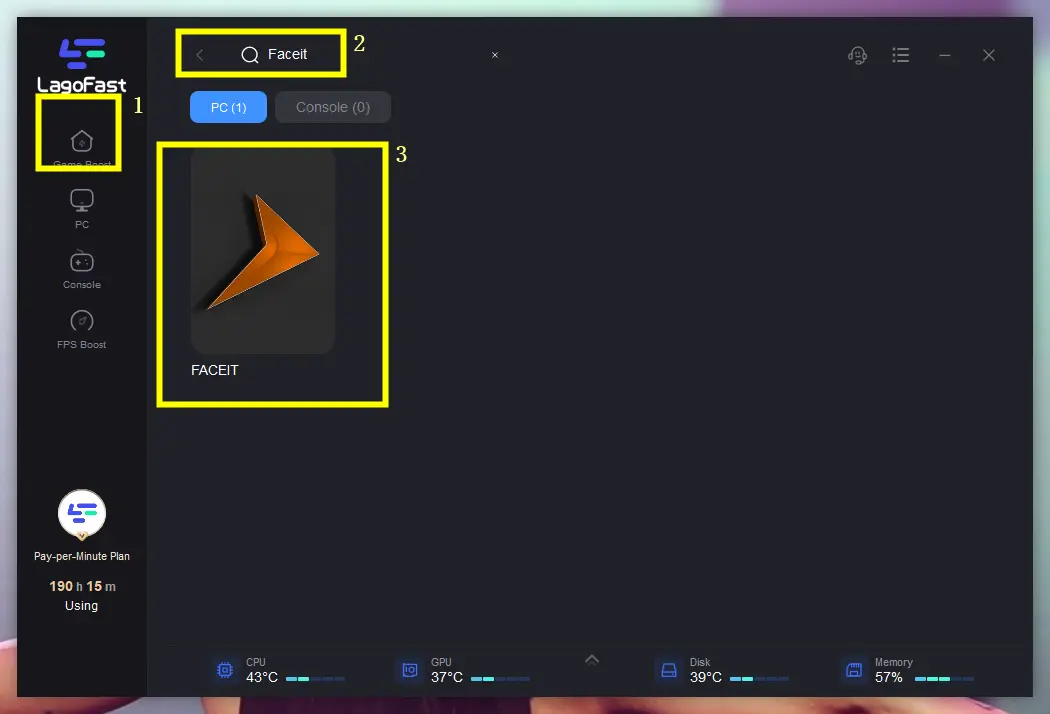
3. Select a nearby stable server (e.g., Germany or Netherlands nodes for EU FACEIT).
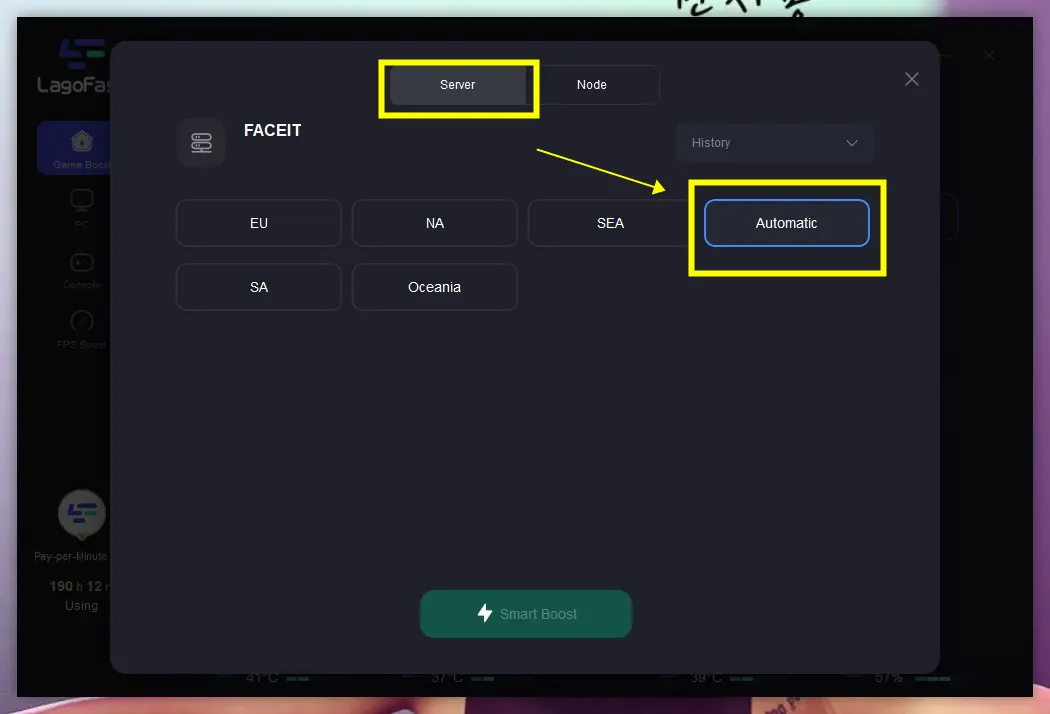
4. Enable Smart Boost to automatically reduce ping and packet loss.
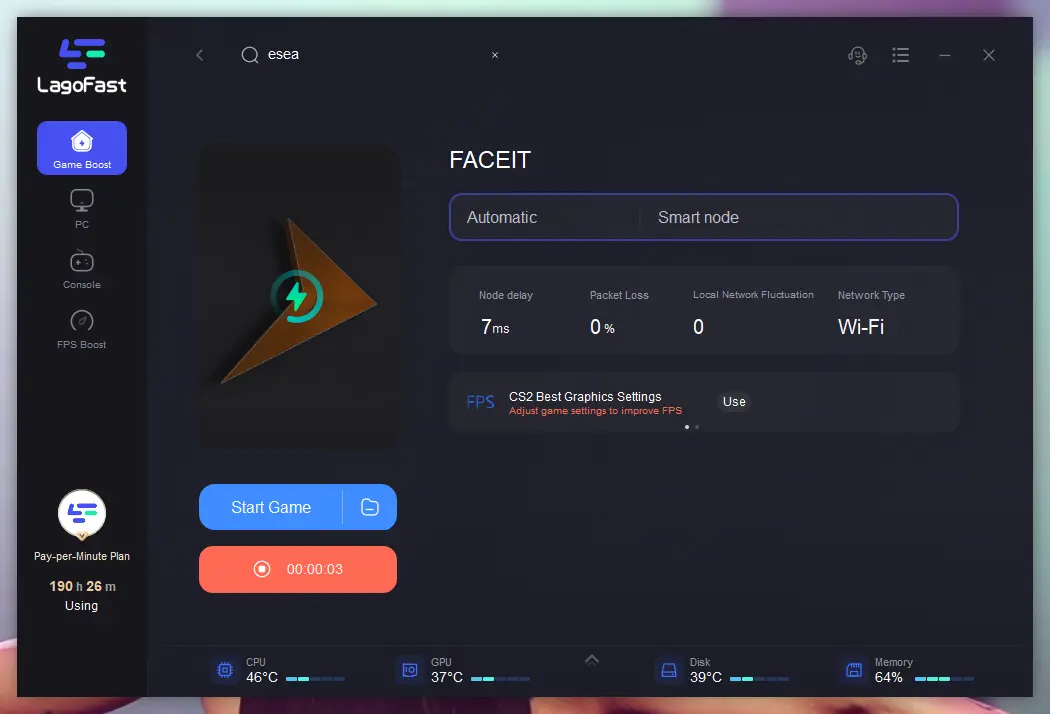
Having FACEIT not working can seriously affect your game time, especially during peak hours or tournaments. By understanding the root causes and applying these fixes, you’ll be back in the action with minimal downtime.
6. Why Some Russian Players Are Moving Away from FACEIT
Due to the highly competitive nature of FACEIT, most users are focused on ranked play. However, not all players are interested in ranking up. Some prefer casual play or “smurfing” (playing at lower skill levels). For these users, alternatives like:
- 5E Arena
- Perfect World Arena (PWA)
…are becoming more popular, especially as CS2 official matchmaking is plagued with long queue times and rampant cheating.
If you’re a Russian player looking for a more casual or relaxed environment, switching to CS2 China servers via Perfect World is a smart option.
7. How to Accelerate CS2 CN Servers Using LagoFast
To enjoy smooth gameplay on Chinese servers from outside mainland China:
Step 1: Click the Free Trial button to download and install LagoFast.
Step 2: Launch and Select CS2: Open LagoFast, search for CS2, and select it from the list.
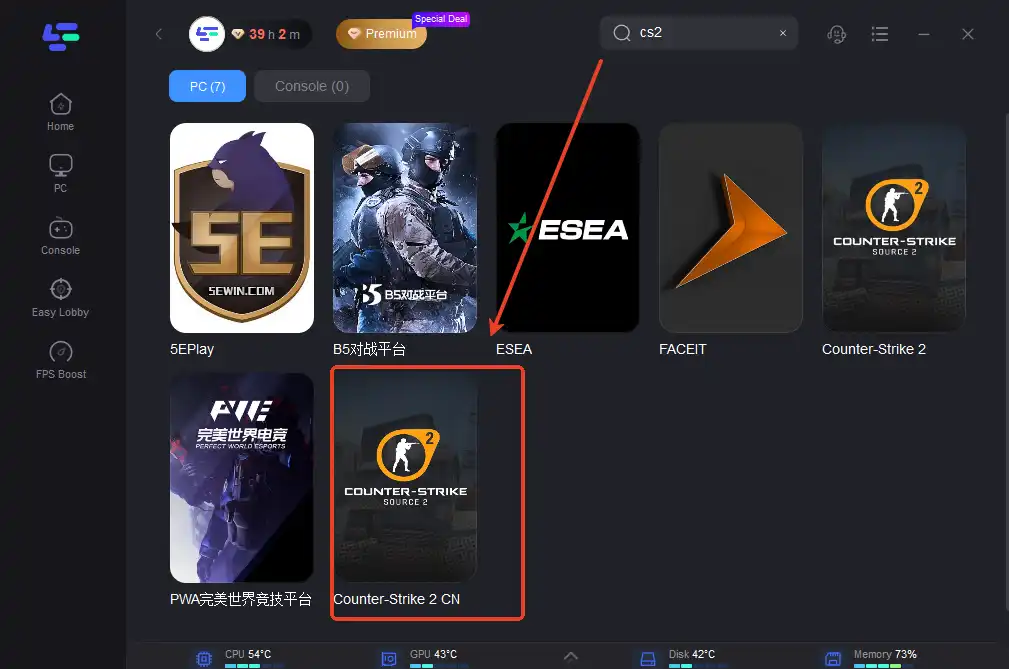
Step 3: Choose Server and Boost: Select the desired server region and click "Boost" to optimize your connection. You can choose 5E or Perfect World.
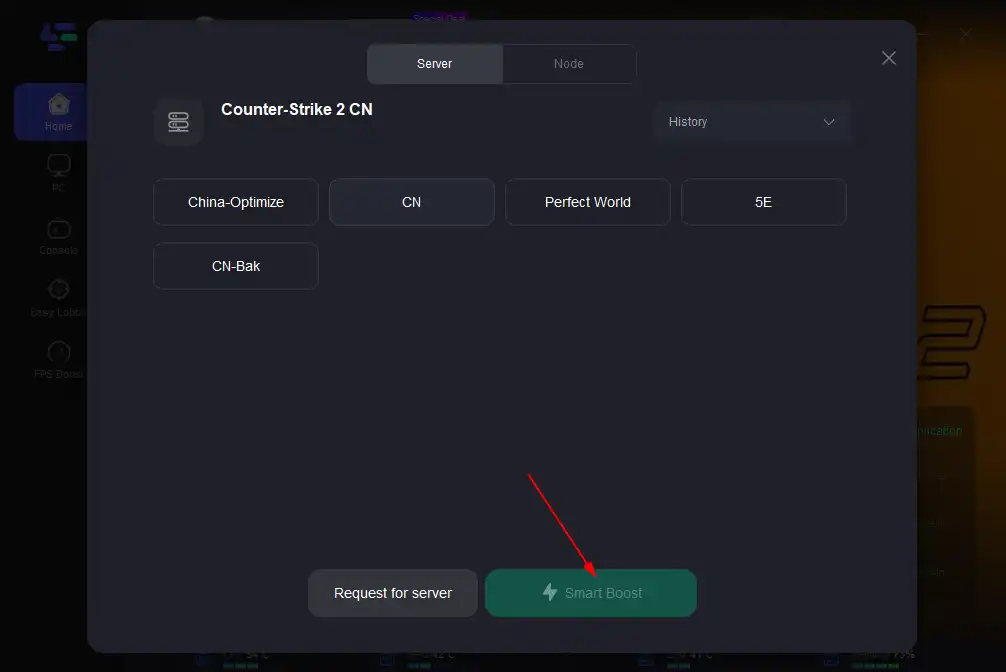
Step 4: After setting up, you can return to the game to experience a smooth network environment.
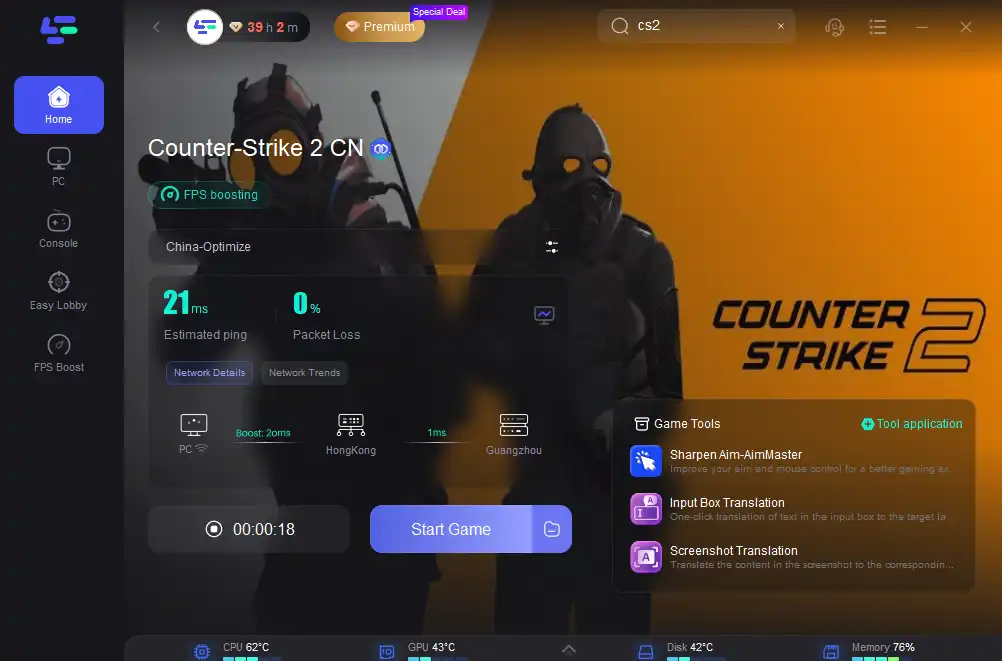
Note: You may need a verified CN account to access Perfect World servers. LagoFast only ensures a stable route—it does not bypass regional restrictions.
For competitive play, FACEIT remains the gold standard. But with recent network issues and varying player needs, having flexible tools like LagoFast ensures you can adapt and keep playing smoothly—no matter your region or playstyle.
Conclusion
When FACEIT isn’t working, it can feel like your competitive edge is slipping away—but most issues are solvable with a few quick fixes. From anti-cheat errors to match loading failures, understanding the cause is the first step toward a smoother experience. By following the troubleshooting tips above and keeping your system optimized, you can minimize disruptions and focus on what matters most: winning your next match. If problems persist, don’t hesitate to reach out to FACEIT support with detailed information for faster resolution.
Boost Your Game with LagoFast for Epic Speed
Play harder, faster. LagoFast game booster eliminates stutter and lags on PC, mobile, or Mac—win every match!
Quickly Reduce Game Lag and Ping!
Boost FPS for Smoother Gameplay!