

Embers of the Uncrowned is an MMO, which means high ping can quickly ruin the gameplay experience. If your character responds slowly, abilities trigger with noticeable delay, enemies rubberband across the screen, or the game freezes briefly during combat, the issue is usually not related to your PC's performance. In most cases, it comes down to network routing, server region distance, connection stability, or heavy load on the test servers.
Since the game is currently in testing, players may also experience server instability, a lack of nearby regional servers, and increased latency during peak login periods.
In this guide, we'll cover the most common causes of high ping, lag, and latency issues in Embers of the Uncrowned, along with proven fixes to improve your connection.

- ✅ Reduce Lag and High Ping.
- ✅ Higher FPS and better PC performance.
- ✅ Support for 8000+ games.
- ✅ Stable connection and region switching.
Why Is My Ping So High in Embers of the Uncrowned?
High ping in Embers of the Uncrowned is usually caused by one of the following factors:
- You are far away from the available test server region.
- There is no nearby regional server for your location.
- Too many players are connecting to the test server simultaneously.
- Your ISP is routing traffic through an inefficient network path.
- Your Wi-Fi connection is unstable.
- Background downloads are consuming bandwidth.
- The server is overloaded during peak hours.
- Packet loss or network jitter is occurring along the connection route.
In MMOs, even minor connection instability can feel significant because combat, movement, abilities, and enemy actions all depend on server response times.
Fix 1: Use LagoFast to Reduce High Ping
The fastest way to reduce high ping in Embers of the Uncrowned is to optimize your network route before launching the game.
LagoFast can help reduce high latency, packet loss, ping spikes, and unstable routing between your PC and the game servers. This is especially useful if you're playing from a region without a dedicated server nearby.
Use LagoFast if:
- your ping is high after joining a server;
- abilities activate with delay;
- players or monsters are rubberbanding;
- combat feels sluggish;
- you experience disconnects during busy periods;
- your friends have lower ping than you;
- the test servers are unstable in your region.
How to Use LagoFast for Embers of the Uncrowned
Open LagoFast.
Search for Embers of the Uncrowned.
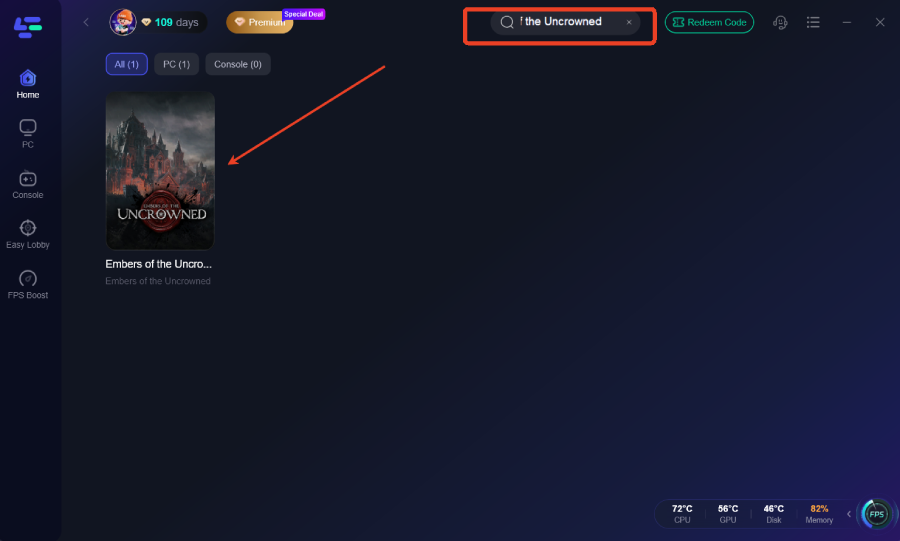
Select the game.
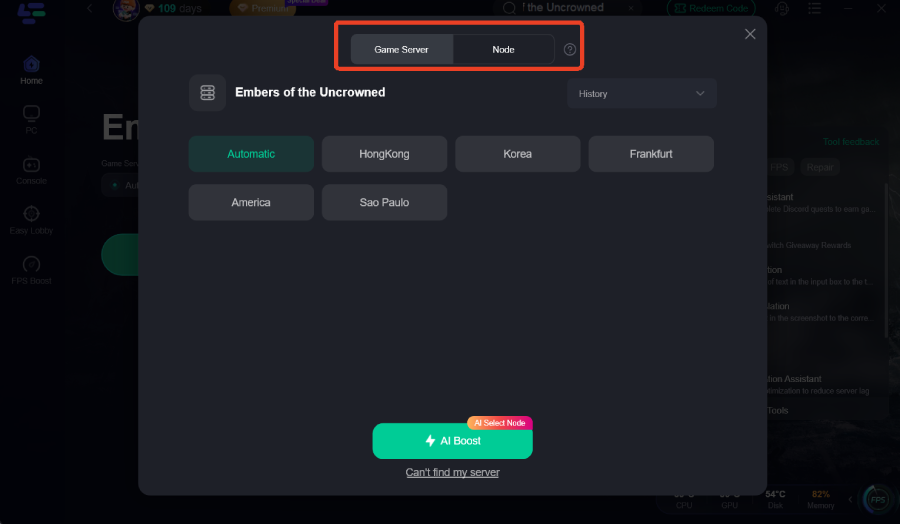
Choose the recommended route.
Click Boost.
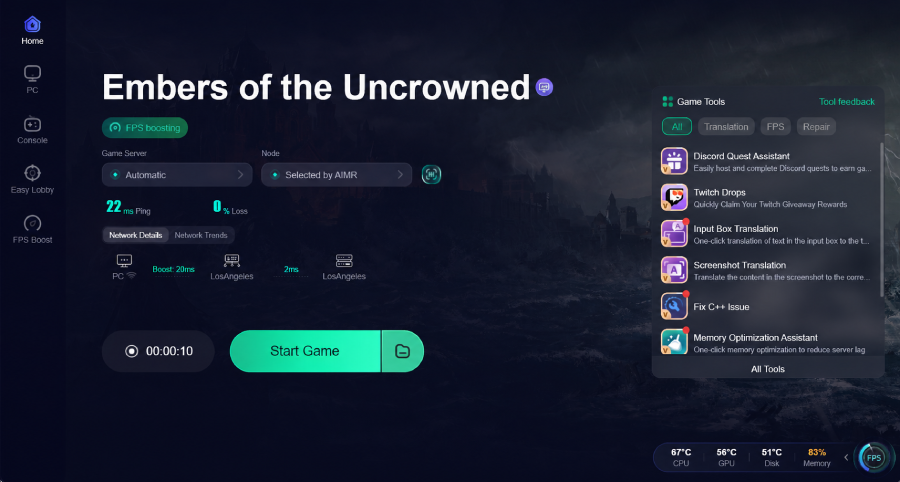
Launch the game through Steam.
Log back into the server and check your ping.
If the first route still feels unstable, try a different nearby route and compare the connection quality.
Fix 2: Avoid Peak Testing Hours
Because Embers of the Uncrowned is currently in a testing phase, server load can become extremely high right after a test begins.
High ping is most common during:
- test launch periods;
- evening peak hours;
- weekends;
- major streamer events;
- mass login waves;
- new patch releases or server reset windows.
If everyone is experiencing unusually high ping, wait 10–20 minutes and try again with LagoFast enabled.
Avoid repeatedly reconnecting every few seconds, as this may make your login session even less stable.
Fix 3: Check Whether the Problem Is Server-Side
If many players are reporting lag at the same time, the issue may be with the test server rather than your system.
The problem is likely server-side if:
- everyone in chat is complaining about lag;
- all players in your party have high ping;
- lag starts immediately after a server restart;
- the issue begins exactly when a test opens;
- other online games work normally.
In this situation, LagoFast may improve routing efficiency, but it cannot completely fix an overloaded game server. Wait for the servers to stabilize and try again later.
- ✅ Reduce Lag and High Ping.
- ✅ Higher FPS and better PC performance.
- ✅ Support for 8000+ games.
- ✅ Stable connection and region switching.
Fix 4: Use a Wired Connection Instead of Wi-Fi
For MMOs, Wi-Fi can cause ping spikes even when your average internet speed appears normal.
Whenever possible, switch to a wired Ethernet connection.
If you must use Wi-Fi:
- move closer to your router;
- use a 5 GHz Wi-Fi network;
- avoid playing with a weak signal;
- restart your router before long gaming sessions;
- pause downloads and streaming on other devices.
High ping is not always caused by slow internet speeds. Packet loss and jitter are often more damaging than limited bandwidth.
Fix 5: Close Background Downloads
Before launching Embers of the Uncrowned, close any applications using your network connection.
Check for:
- Steam downloads;
- Windows updates;
- cloud backup services;
- browser downloads;
- video streaming services;
- torrent applications;
- updates from other launchers;
- Discord screen sharing.
During MMO testing periods, even a single background download can cause ability delay or sudden ping spikes.
Fix 6: Restart Steam and Reconnect
If your ping becomes unstable after multiple failed login attempts, completely restart your session.
Follow these steps:
- Close Embers of the Uncrowned.
- Exit Steam completely.
- Wait a few seconds.
- Launch Steam again.
- Enable LagoFast Boost.
- Start the game.
- Log back into the server.
This can help if your Steam session, game login session, or connection to the test servers has become unstable.
Fix 7: Reduce Network Load During Group Content
If high ping mainly occurs during parties, raids, or heavily populated areas, the issue may be related to increased server synchronization load.
Try the following:
- avoid crowded areas during peak hours;
- test the game while playing solo;
- move to a less populated zone;
- restart the game before group content;
- enable LagoFast before entering dungeons or raids;
- avoid switching routes or server regions mid-session.
If your ping is normal in town but rises sharply during combat, the game server may be under heavy load.
Fix 8: Don't Confuse FPS Drops with High Ping
High ping and low FPS feel very different in-game.
| Issue | What It Feels Like |
|---|---|
| High Ping | Ability delay, rubberbanding, enemies teleporting |
| FPS Drops | Stuttering visuals, choppy camera movement, low frame rates |
| Server Lag | Everyone freezes or responds with noticeable delay |
| Packet Loss | Sudden lag spikes, disconnects, inconsistent movement |
If your FPS is stable but abilities trigger late, focus on fixing your connection first.
If the visuals themselves are stuttering, lower your graphics settings or check your system performance.
Conclusion
High ping in Embers of the Uncrowned is most commonly caused by overloaded test servers, the lack of nearby regional servers, unstable routing, or ISP-related network path issues.
Start with LagoFast because it directly helps improve route stability and reduce latency. Then determine whether the problem affects only you or everyone on the server.
If the issue only affects you, focus on optimizing your network route and local connection.
If everyone is experiencing lag, the test server is likely overloaded, and the best solution is to wait for it to stabilize.
Boost Your Game with LagoFast for Epic Speed
Play harder, faster. LagoFast game booster eliminates stutter and lags on PC, mobile, or Mac—win every match!
Quickly Reduce Game Lag and Ping!
Boost FPS for Smoother Gameplay!