

VAMPIR Taiwan is a dark fantasy MMORPG built around large-scale PvP battles, guild wars, and competitive progression — the kind of game where getting in early can make a real difference. With the official Taiwan release approaching, more players are searching for clear details on how to download and play VAMPIR Taiwan smoothly. Below, you’ll find the confirmed release timing, official download methods, and practical tips to help you start smoothly on day one.

- ✅ Reduce Lag and High Ping.
- ✅ Boost FPS at the Same Time.
- ✅ Support 2000+ Popular Online Games.
- ✅ Change Server all over the World!
- ✅ Boost Game Loading Speed.
Part 1: VAMPIR Taiwan Release Date & Gameplay Details
Part 2: How to Download and Play VAMPIR Taiwan
Part 3: Enhance Your Gaming Experience with LagoFast
Part 1: VAMPIR Taiwan Release Date & Gameplay Details
The confirmed VAMPIR Taiwan release date is March 11, 2026.
On this date, the Taiwan-exclusive servers and international servers will officially open for players in Taiwan, Hong Kong, and Macau.
For players who plan to compete seriously, this date matters more than it seems. In PvP-focused MMORPGs like VAMPIR, the first few days often shape long-term server balance — early guild formation, boss clears, and resource control can create advantages that are hard to catch up with later.
Part 2: How to Download and Play VAMPIR Taiwan
If you’re ready to jump into VAMPIR Taiwan, here’s how to download and get started on PC or mobile.
For PC
- Visit the official VAMPIR Taiwan website.
- Download the official PC launcher.
- Install the client and complete all updates.
- Log in with your Netmarble account.
For Mobile (Android / iOS)
- Open the Google Play Store or Apple App Store.
- Search for "VAMPIR."
- Confirm the publisher is Netmarble.
- Download and install the game.
- Log in or register a Netmarble account.
How to Use LagoFast to Download VAMPIR Taiwan in Any Country
Although VAMPIR Taiwan officially launches for players in Taiwan, Hong Kong, and Macau — with international servers opening at the same time — some regions may still run into issues, such as the game not appearing in the app store or being unavailable for direct download. In this case, LagoFast can help. It includes a built-in download tool that makes it easier to access the VAMPIR Taiwan version without switching store regions or relying on third-party APK sites.
For PC Players:
Step 1: Click the Free Trial button to download and install LagoFast.
Step 2: Launch LagoFast, type "VAMPIR Taiwan" into the search bar, and select the game.
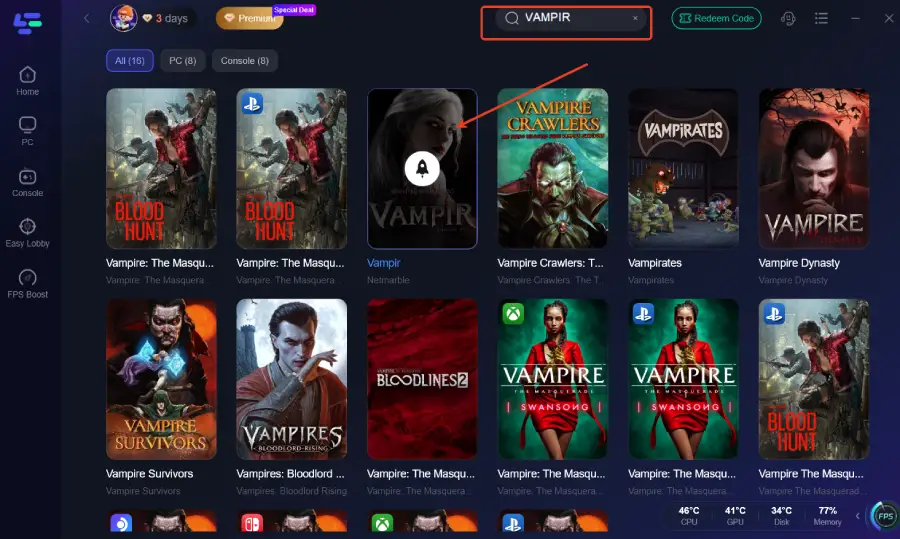
Step 3: Click the "Game Download" button in the bottom-right corner.
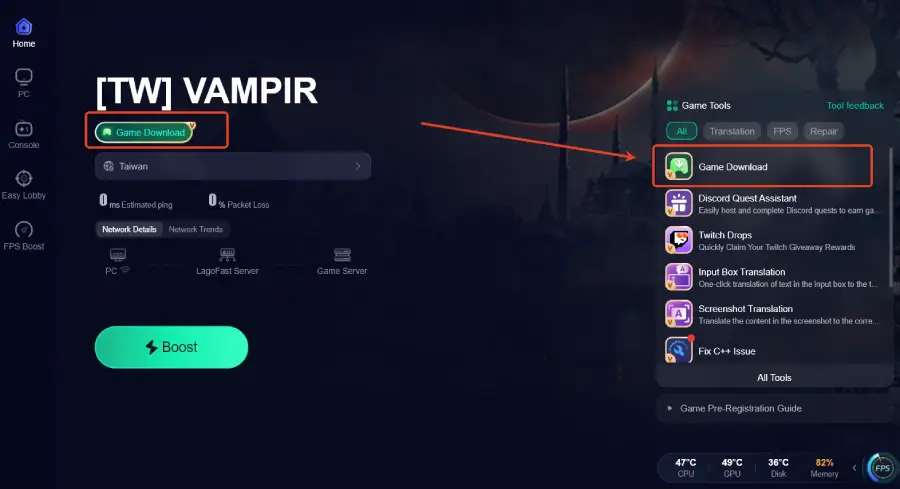
For Mobile Players:
Step 1: Visit LagoFast’s official website to download LagoFast Mobile and install it.

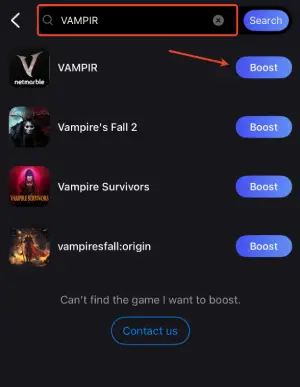
Step 2: Open LagoFast Mobile, search for "VAMPIR " and tap the download button next to the search result.

Step 3: After downloading, tap “Install” to safely and quickly install VAMPIR Taiwan.

Part 3: Enhance Your Gaming Experience with LagoFast
Even after you download and enter VAMPIR Taiwan, issues like high ping, packet loss, or unstable connections can affect your gameplay—especially if you’re connecting from outside Taiwan. In an MMORPG where timing and responsiveness matter, even small delays can impact your overall experience. LagoFast is a game performance platform designed to improve the gaming experience. Using LagoFast Game Booster can help reduce ping, minimize packet loss, stabilize your network, and optimize routing for smoother gameplay. It also includes practical tools like a repair tool to fix common connection issues, helping you stay connected and play more smoothly from day one.
Tutorial to Use LagoFast to Get the Best VAMPIR Taiwan Experience on PC:
Step 1: Click the Free Trial button to download and install LagoFast.
Step 2: After installation, search "VAMPIR" in the search bar and select the game.
Step 3: Choose your preferred server node and click "Smart Boost" to start optimizing.
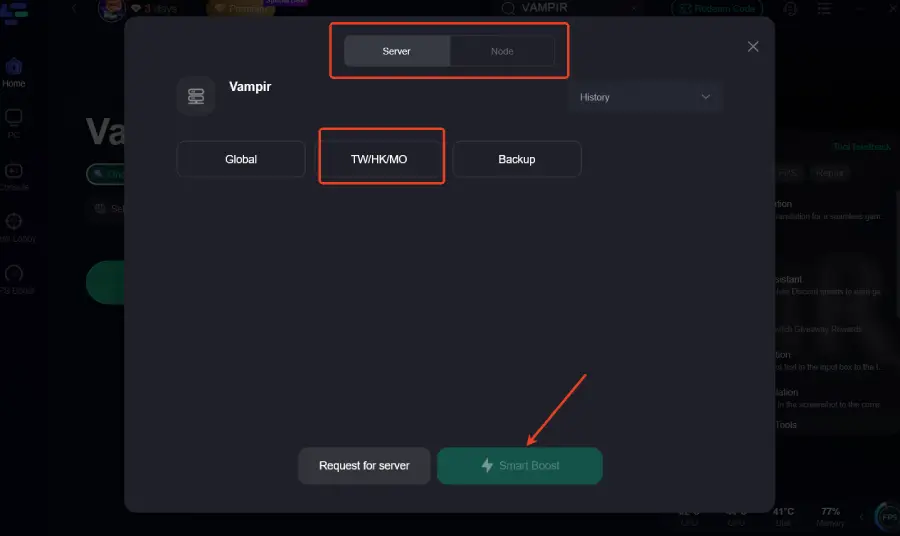
Step 4: Launch your game and enjoy smooth, optimized gameplay with lower ping and no stutter.
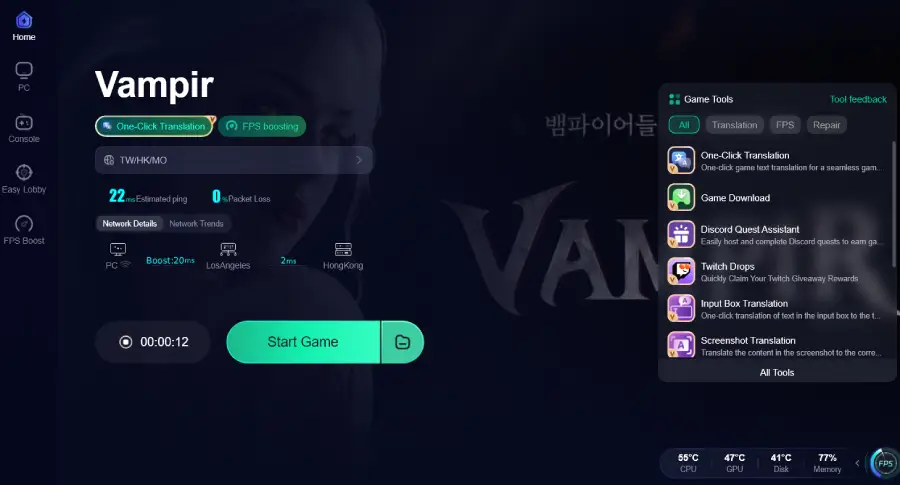
Tutorial to Use LagoFast to Get the Best VAMPIR Taiwan Experience on Mobile:
Step 1: Open LagoFast Mobile, search for "VAMPIR," and select it.
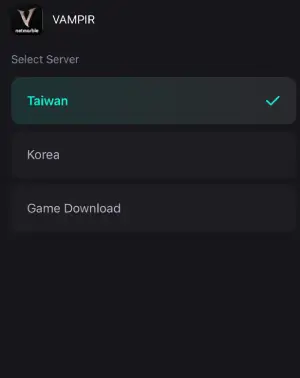
Step 2: Pick the server that suits you best.
Step 3: Tap Boost, and LagoFast will display real-time ping and packet loss stats.

Conclusion
With VAMPIR Taiwan launching on March 11, 2026, preparation is key if you want a smooth start. Download the official client on PC or mobile, complete your account setup early, and be ready before servers open. If you’re accessing the game from another region or want to avoid connection issues, using a tool like LagoFast can help make the experience more stable. Get everything ready in advance so launch day is focused on playing, not troubleshooting.

Boost Your Game with LagoFast for Epic Speed
Play harder, faster. LagoFast game booster eliminates stutter and lags on PC, mobile, or Mac—win every match!
Quickly Reduce Game Lag and Ping!
Boost FPS for Smoother Gameplay!