
The world of gaming is filled with excitement and anticipation, especially when a highly-anticipated title like Doom: The Dark Ages makes its debut on May 14, 2025. As a sequel to the beloved Doom franchise, this game is expected to push the boundaries of first-person shooter (FPS) games, offering players an immersive experience like never before.
However, amidst the excitement, players may encounter a frustrating issue: the game crashing unexpectedly on their PCs. This error can turn an eagerly awaited gaming session into a disappointing experience. Understanding the possible reasons behind these crashes and knowing how to fix them is crucial for any gamer looking to fully enjoy Doom: The Dark Ages. In this comprehensive guide, we will delve into the common causes of Doom: The Dark Ages crashing on PC and provide effective solutions to help you get back to slaying demons.

- ✅ Reduce Lag and High Ping.
- ✅ Boost FPS at the Same Time.
- ✅ Support 2000+ Popular Online Games.
- ✅ Enhance Gaming Experience.
- ✅ Provide Game Tools.
- ✅ Support Cross-Platform Gameplay.
Part 1:Introduction to Doom: The Dark Ages
Part 2: Doom: The Dark Ages Early Access Details
Part 3: Why Does Doom: The Dark Ages Crash on PC
Part 4: How to Fix Doom: The Dark Ages Crashing on PC Error
Part 5: Using LagoFast to Enhance Doom: The Dark Ages Gaming Experience
Part 1:Introduction to Doom: The Dark Ages
Developed by the legendary id Software and published by Bethesda, Doom: The Dark Ages is coming on May 14. It has promised to deliver an adrenaline-fueled journey through a dark and foreboding world filled with demons, challenges, and intense combat. Set in a medieval-inspired world overrun by demons, the game combines the fast-paced, intense combat that Doom is known for with a rich, atmospheric setting. Players take on the role of a brave warrior armed with an array of devastating weapons, from traditional swords and axes to futuristic firearms, as they battle through hordes of enemies to uncover the secrets of this dark era.
The game's visuals are stunning, with detailed environments and terrifying creature designs that immerse players in a world filled with danger and mystery. The sound design is equally impressive, with haunting melodies and bone-chilling sound effects that enhance the overall gaming experience. Coupled with a gripping storyline and multiplayer modes that promise hours of replayability, Doom: The Dark Ages is shaping up to be a must-play title for FPS enthusiasts.
Part 2: Doom: The Dark Ages Early Access Details
Faced with such an alluring game setup, can't you help but wish today were May 14th already? Understanding the eagerness of players to dive into Doom: The Dark Ages and experience the thrill of battling demons ahead of time, id Software has decided to launch Doom: The Dark Ages Early Access 48 hours early, that means on May 12, giving players the opportunity to get a head start on the action! However, the Early Access period isn't uniform across all regions; it will be rolled out in phases. Players can check the opening times for their specific regions based on the following information.
Monday, May 12, 2025
PDT (Los Angeles): 5 PM
CDT (Mexico City): 6 PM
CDT (Dallas): 7 PM
EDT (New York): 8 PM
BRT (São Paulo): 9 PM
Tuesday, May 13, 2025
BST (London): 1 AM
CEST (Paris): 2 AM
AST (Dubai): 3 AM
IST (New Delhi): 5:30 AM
CST (Beijing): 8 AM
HKT (Hong Kong): 8 AM
KST (Seoul): 9 AM
JST (Tokyo): 9 AM
AEST (Sydney): 10 AM
NZST (Auckland): 12 PM (noon)
Now that you know when Early Access for Doom: The Dark Ages is available, how can you secure your spot? The way is: Purchase the $200 Collector's Edition of Doom: The Dark Ages to gain immediate access to Early Access (note that it's currently sold out).
As a gesture of appreciation to both new and returning players, Doom: The Dark Ages will be offering Twitch Drops Rewards: the exclusive DOOM Slayer Guardian Skin. To access the rewards, players need to log in to their Bethesda.net account (or create a new one if they don't already have it) and watch at least 60 minutes of any live stream featuring Doom: The Dark Ages. If you're looking to save time on watching live streams, you can utilize LagoFast's Twitch Drops Tool to help you quickly and effortlessly claim your rewards. Here are the steps to follow:
Download and install LagoFast by clicking the "Free Trial" button.
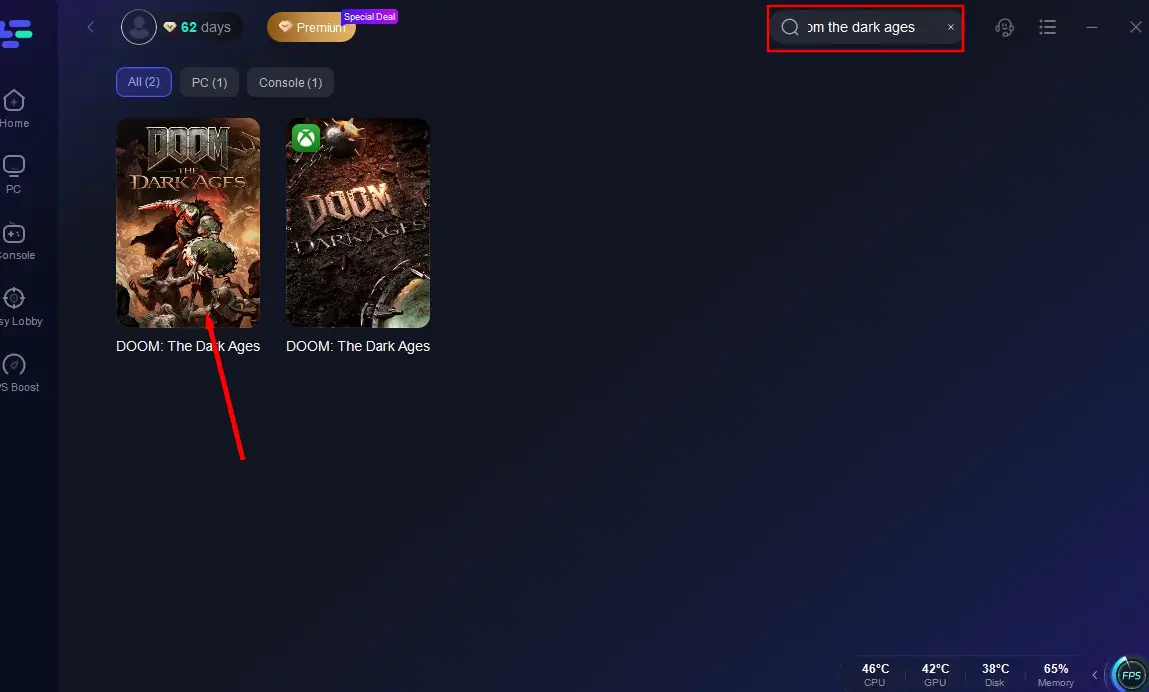
Launch LagoFast, search for Doom: The Dark Ages, and click on the result.
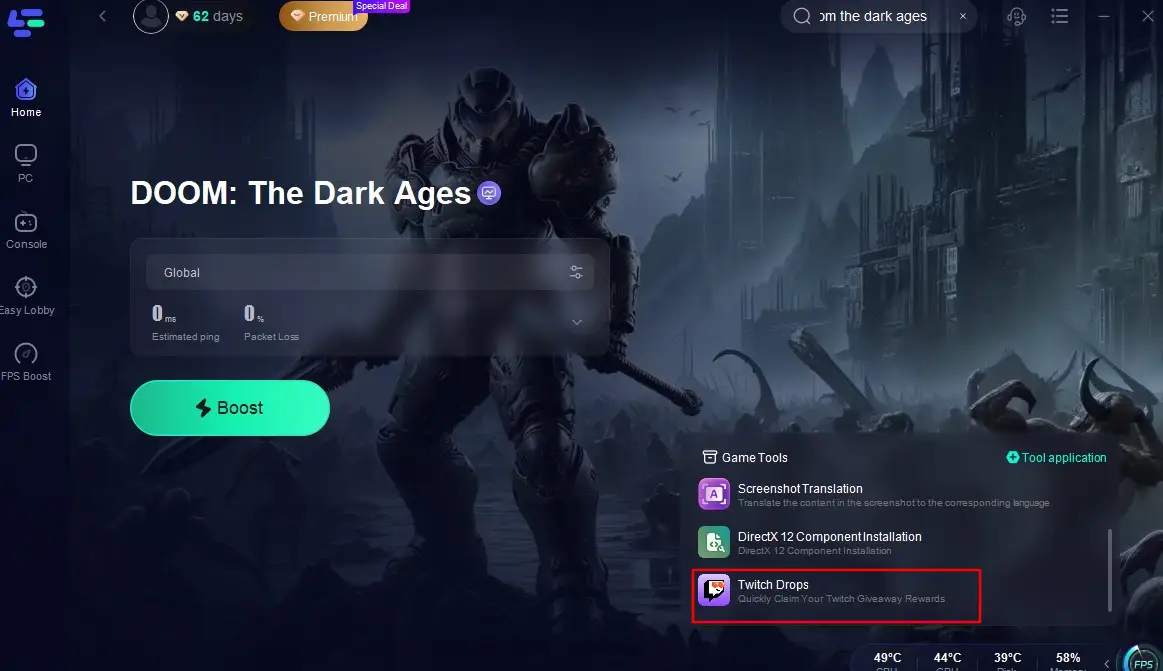
Locate and click on the "Twitch Drops" tool in the bottom right corner of the interface.
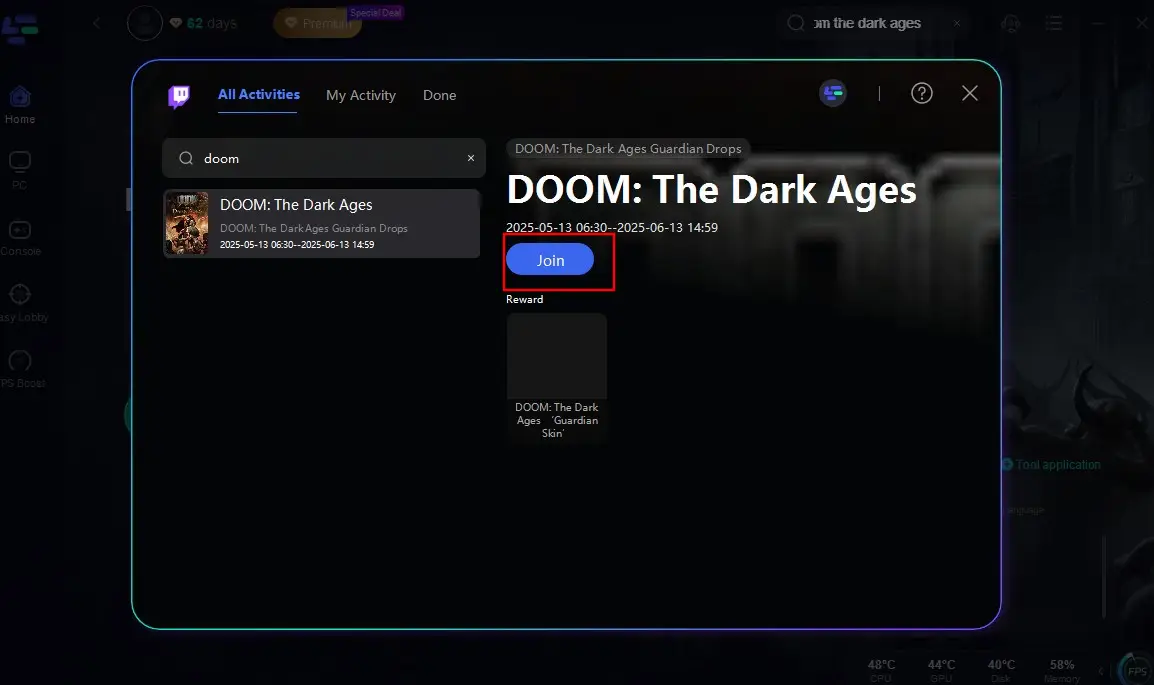
Search for "Doom: The Dark Ages" once more in the search box and click "Join." This will enable you to quickly and conveniently obtain the Twitch Drops for Doom: The Dark Ages Early Access, saving you time and effort!
Part 3: Why Does Doom: The Dark Ages Crash on PC
Despite its promise, Doom: The Dark Ages is not immune to technical issues, with crashes being one of the most commonly reported problems. Here are some of the potential reasons why Doom: The Dark Ages might be crashing:
1. Outdated Graphics Card Drivers
One of the most common culprits behind game crashes is outdated graphics card drivers. Graphics processing units (GPUs) are crucial for rendering the game's visuals, and having outdated drivers can lead to compatibility issues, resulting in crashes.
2. Faulty Game Files
Corrupted or missing game files can also cause crash errors on PC. This can happen due to interrupted downloads, incomplete installations, or disk errors. When the game tries to access these corrupted files, it may crash unexpectedly.
3. Insufficient System Requirements
Doom: The Dark Ages is a demanding game, and if your PC doesn't meet the minimum system requirements, it may struggle to run smoothly, leading to crashes. This includes having enough RAM, a capable CPU, and sufficient storage space.
4. Overheating
Overheating is another common issue that can cause crashes. When your PC's components get too hot, they may throttle down their performance or shut down completely to prevent damage. This can happen if your cooling system is inadequate or if your PC is placed in a poorly ventilated area.
5. Background Programs
Running too many background programs can consume system resources, leaving insufficient memory and CPU power for the game to run smoothly. This can lead to crashes, especially if the game is resource-intensive.
6. Antivirus Software
Sometimes, antivirus software can mistakenly flag game files as malicious and block them from running, causing crash error. This is more likely to happen if the antivirus software is overzealous or if the game's files are incorrectly identified as threats.
Part 4: How to Fix Doom: The Dark Ages Crashing on PC Error
Now that we've identified some of the potential causes, let's explore how to fix the crash error and get Doom: The Dark Ages running smoothly on your PC.
1. Update Your Graphics Card Drivers
- For Nvidia Users: Visit the Nvidia website, locate the latest driver for your GPU model, and download it. Follow the installation instructions carefully, and make sure to restart your PC after the installation is complete.
- For AMD Users: Similarly, visit the AMD website, find the latest driver for your GPU, and install it. Restart your PC to apply the changes.
2. Verify Game Files
If you're using Steam, right-click on Doom: The Dark Ages in your library, select "Properties," go to the "Local Files" tab, and click on "Verify Integrity of Game Files." This process will check for any corrupted or missing files and download replacements if necessary.
3. Check System Requirements
Ensure that your PC meets the minimum system requirements for Doom: The Dark Ages.
- OS: Windows 10 / 11.
- CPU: AMD Ryzen 7 3700X / Intel Core i7-10700K.
- GPU: 8GB VRAM; Nvidia GeForce RTX 2060 Super / AMD Radeon RX 6600.
- RAM: 16GB.
- Storage: 512GB or higher NVMe SSD (100GB available)
If your PC falls short of these requirements, consider upgrading your hardware or adjusting the game's graphics settings to reduce the load on your system.
4. Improve Cooling
- Clean your PC's fans and vents to remove dust and debris that can impede airflow.
- Consider adding additional fans or upgrading your cooling system if necessary.
- Place your PC in a well-ventilated area to ensure proper airflow.
5. Close Background Programs
- Use the Task Manager (Ctrl+Shift+Esc) to close unnecessary background programs before launching the game.
- Disable startup programs that you don't need running at boot time to free up system resources.
7. Configure Antivirus Software
- Add Doom: The Dark Ages to your antivirus software's exclusion list to prevent it from blocking the game's files.
- Temporarily disable your antivirus software while playing the game to see if it resolves the crashing issue. If it does, consider switching to a less intrusive antivirus solution.
Part 5: Using LagoFast to Enhance Doom: The Dark Ages Gameplay
After fixing the "Doom: The Dark Ages Crashing on PC Error", players can dive into the game and engage in epic battles against demons. However, high ping and lag issues often disrupt the smooth gaming experience, acting as a major obstacle. If you're seeking a one-stop solution to enhance your performance in Doom: The Dark Ages, we highly recommend LagoFast! As a professional and seasoned game accelerator.
LagoFast's Advantages
- Reduce Ping: LagoFast optimizes your in-game connection, helping to lower ping spikes and ensure a more stable gaming experience.
- Optimize Network Connection: LagoFast utilizes intelligent algorithms to find the most stable network connection for you and optimizes it in real-time.
- Improve FPS: Using LagoFast can help reduce stuttering and even frame drops, ensuring a consistent FPS for smoother gameplay.
- Real-time Optimization: With LagoFast, you don't need to exit the game mid-session to adjust settings. Enjoy optimized performance directly in real-time as you play.
- Multiple Game Tools: LagoFast provides a variety of tools tailored to your needs to enhance your gaming performance, such as DLSS Booster and Frame Generation tools.
How to Use LagoFast's DLSS Tool
Click the "Free Trial" button to get LagoFast.
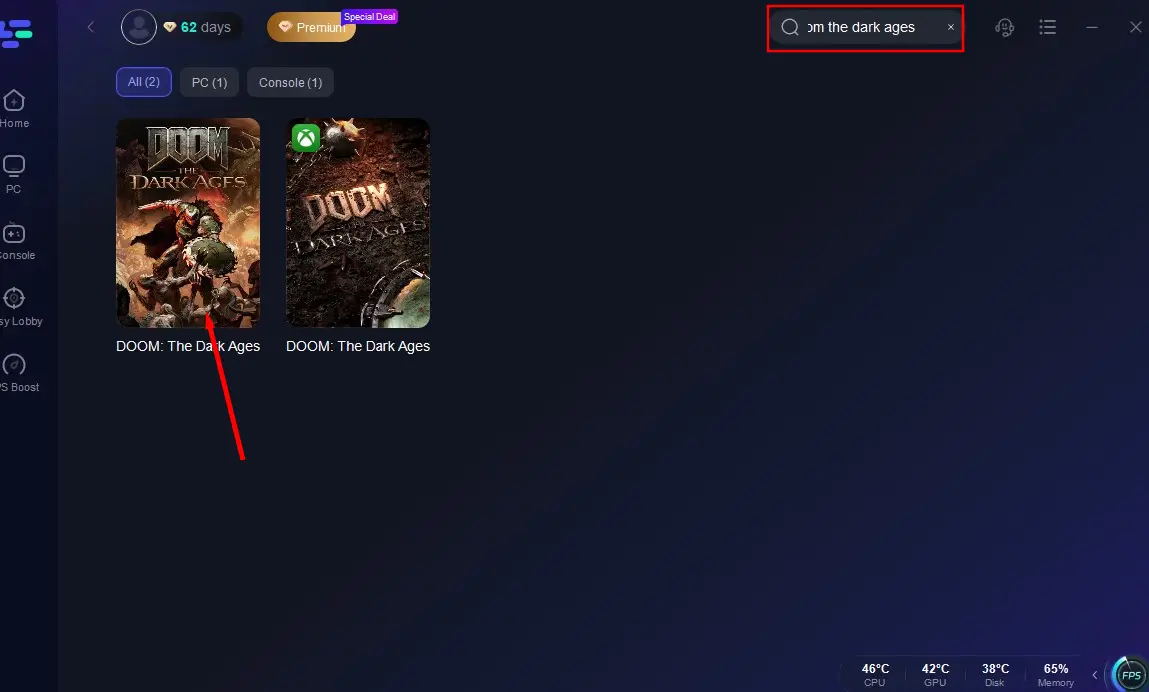
Search for "Doom: The Dark Ages" and click on it.
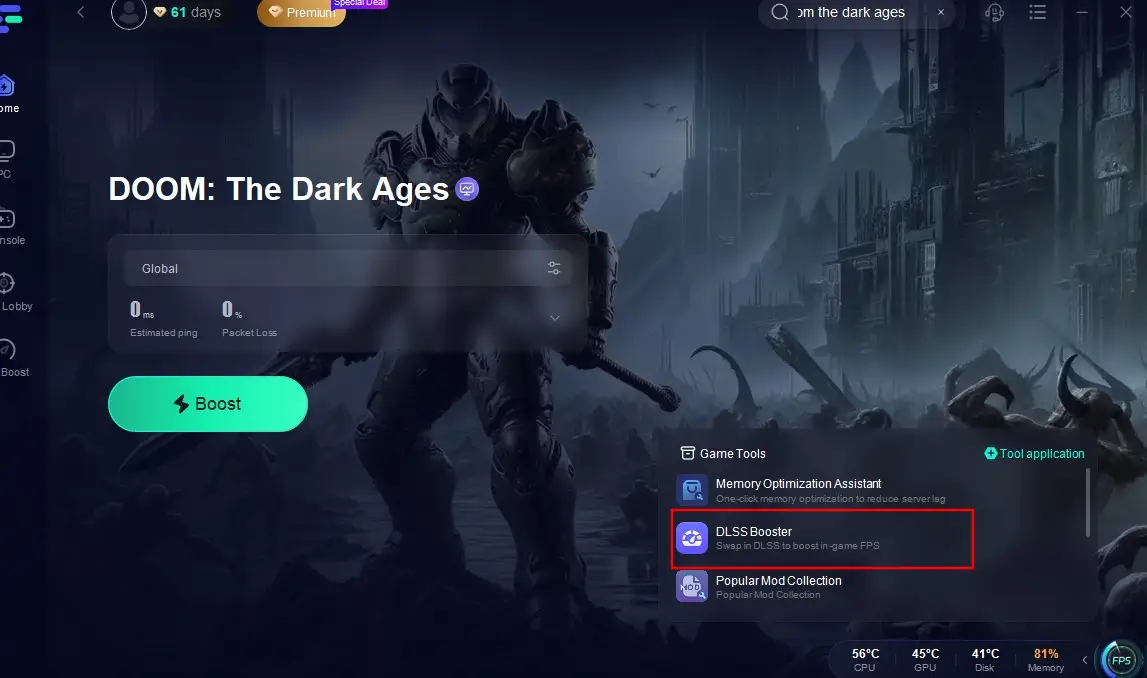
Click on the "DLSS Booster" in the game toolbar at the bottom right corner.
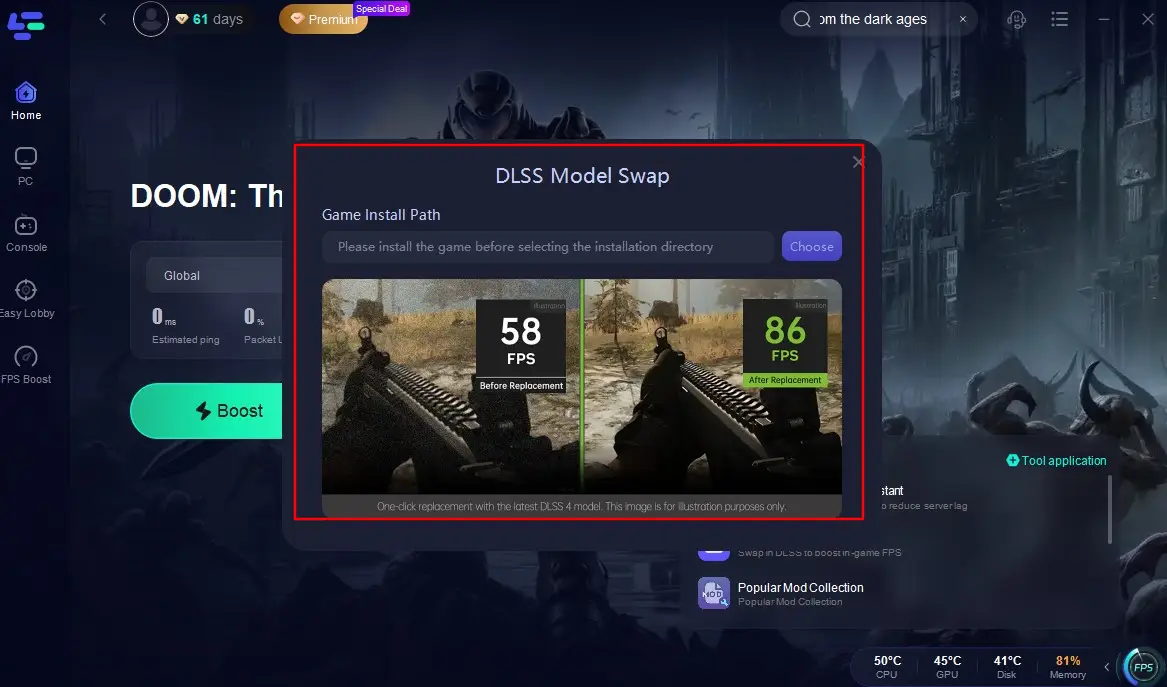
Import the game file path to intelligently optimize your game's frame rate with just one click, ensuring you never miss a subtle attack point or timing when battling demons.
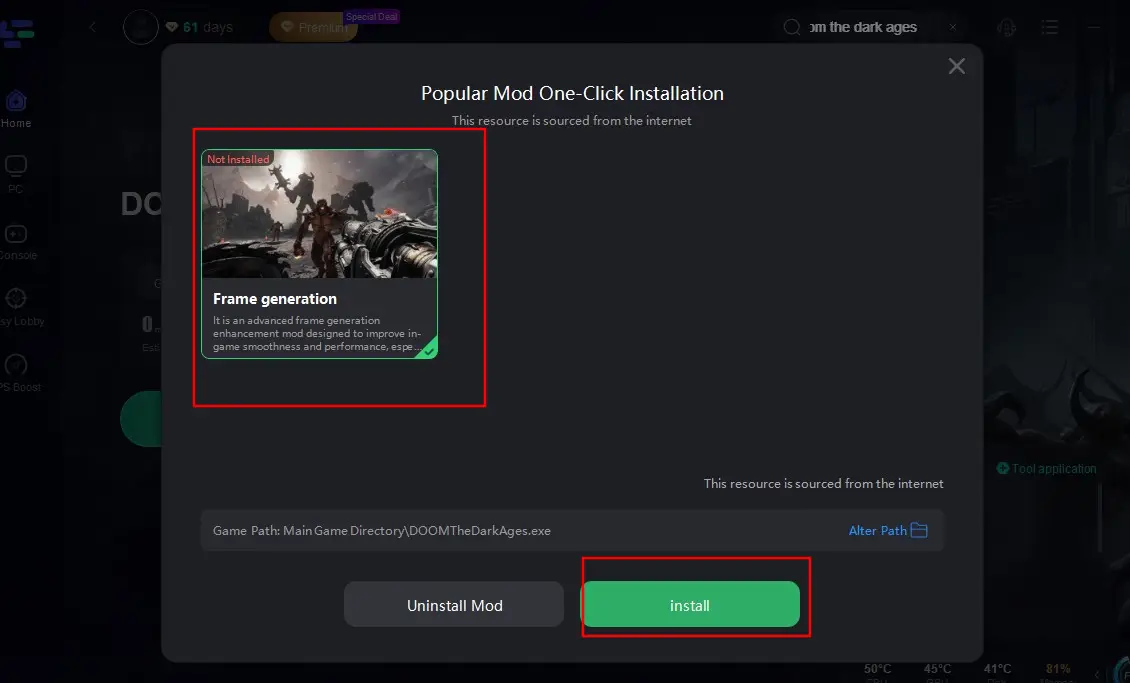
How to Use Frame Generation Tool in LagoFast
Access the Frame Generation tool by clicking on the Popular Mod Collection at the bottom right corner of the screen, then follow the prompts to complete the installation. This tool helps improve the rendering efficiency of Doom: The Dark Ages, enhancing the smoothness of in-game cutscenes.
How to Use LagoFast to Enhance Your Doom: The Dark Ages Experience on PC
Open LagoFast, search for "Doom: The Dark Ages", and click on the search result.
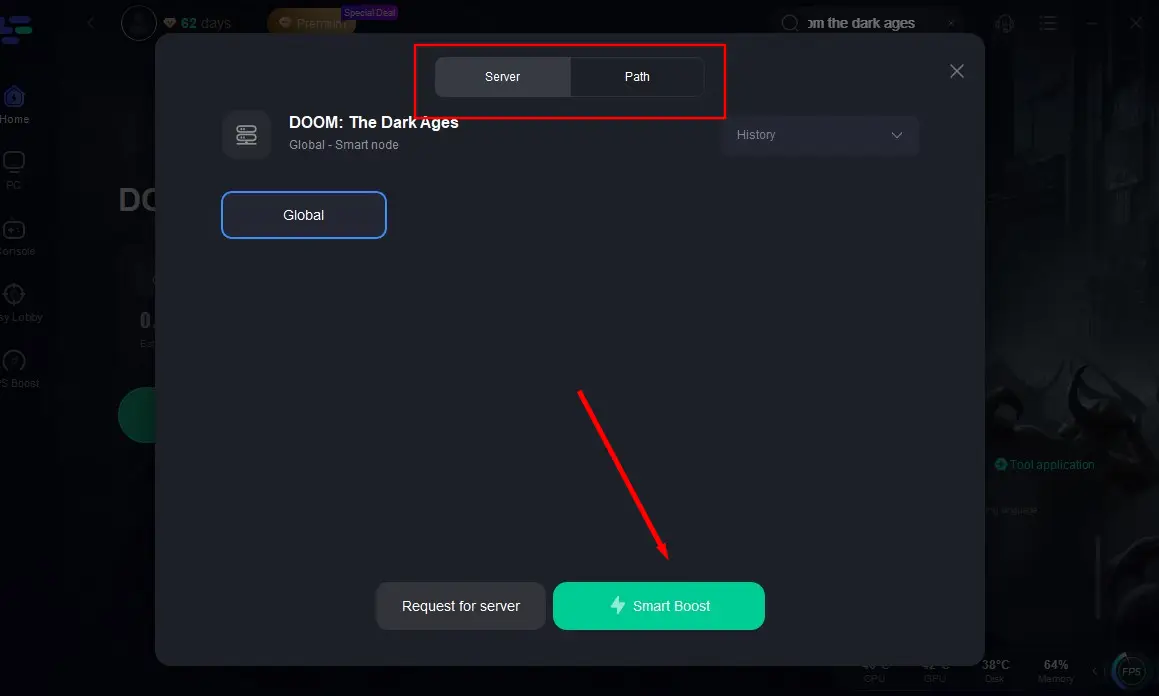
Click on "Select Server" and switch to the best server node based on your actual situation, then click on "Smart Boost".
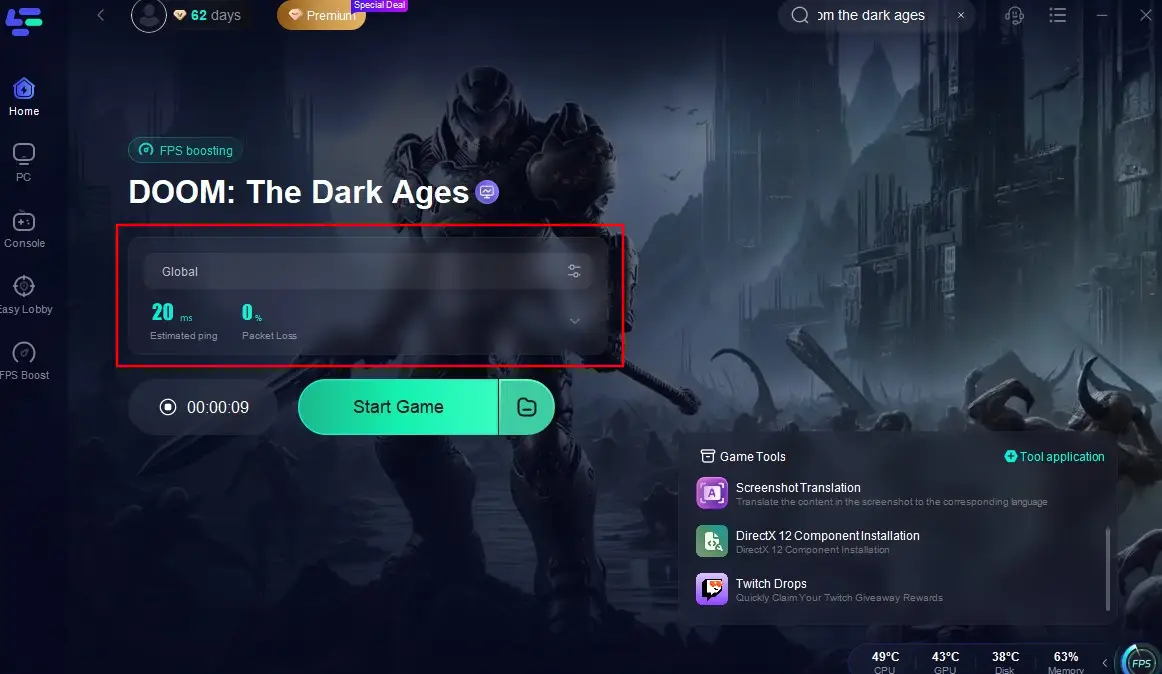
Check the real-time packet loss rate and ping for the game, and then click on the "Start Game" button to begin playing.
Conclusion
Encountering crash error on your PC while playing Doom: The Dark Ages can be a major roadblock to enjoying the game to its fullest. By understanding the common causes of these crashes and implementing the solutions outlined in this guide, you can significantly improve your chances of having a smooth and enjoyable gaming session. And at the same time, if you play Doom: The Dark Ages with the help of LagoFast, the game issues like high ping or latency will say goodbye to you forever!
So, gear up, embrace the challenge, and get ready to embark on an epic adventure in Doom: The Dark Ages!
Boost Your Game with LagoFast for Epic Speed
Play harder, faster. LagoFast game booster eliminates stutter and lags on PC, mobile, or Mac—win every match!
Quickly Reduce Game Lag and Ping!
Boost FPS for Smoother Gameplay!