

With the global launch of Delta Force Season 5, this free-to-play tactical shooter that redefines modern military FPS experiences has sparked excitement among operators worldwide! What's even more thrilling for players is that Delta Force will expand to console platforms on August 19, 2025. This article provides the most comprehensive Delta Force platform details and recommends the best ways to enhance your gameplay!
Korean Version: 델타포스 플랫폼: 작전 장비·체계 완벽 가이드

- ✅ Reduce Lag and High Ping.
- ✅ Boost FPS at the Same Time.
- ✅ Support 2000+ Popular Online Games.
- ✅ Change Server without Latency.
Part 1: Delta Force Console Version Overview
Part 2: Delta Force Platforms & System Requirements
Part 3: How to Enhance Gaming Experience in Delta Force
Part 4: Play Delta Force with LagoFast on Mobile
Part 5: Enhance Gaming Experience in Delta Force on Console
Part 1: Delta Force Console Version Overview
The Delta Force console version will officially launch globally on August 19, 2025, available on Xbox Series X|S and PlayStation 5. It supports cross-platform play and cross-progression, along with 4K resolution and 120Hz refresh rates.
Pre-orders are now open:
- PlayStation 5: https://store.playstation.com/en-us/concept/10014058/
- Xbox: https://www.xbox.com/en-US/games/store/KEYWORD/9NRMZXGKP4NM
Players who purchase the Delta Force Console Pre-Order Pack will receive:
1. Digital Content:
- 750 Delta Coins (in-game currency)
- Exclusive weapon skins:
- M249 - Immortal
- Vityaz - Aerospace
- CAR-15 - Atlantis
- 2x Premium Weapon EXP Tokens
- 5x Intermediate Weapon EXP Tokens
2. Early Access: 3-day head start to level up weapons before full release.
Part 2: Delta Force Platforms & System Requirements
With the console launch on August 19, Delta Force will be available across Mobile, PC (via Steam and Epic Games Store), and Console( PlayStation 5 and Xbox Series) platforms. Players can choose their preferred platform to join battles while syncing game progress seamlessly across different systems for the optimal experience.
For PC players aiming for the most immersive and smooth gameplay, ensure your device meets Delta Force's system requirements:
Minimum System Requirements:
- CPU: Intel Core i3-4150 / AMD FX-6300
- RAM: 12 GB RAM
- GPU: Nvidia Geforce GTX 960 / AMD R9 380 / Intel Arc A380
- DX: Version 12
- OS: Windows 10 64 bit
- STO: 50 GB available space
- NET: Broadband Internet connection
Recommended System Requirements:
- CPU: Intel Core i5-6500 / AMD Ryzen 5 1500x
- RAM: 16 GB RAM
- GPU: Nvidia Geforce GTX 1060 5G / AMD RX 5500 XT / Intel Arc A580
- DX: Version 12
- OS: Windows 10 64 bit
- STO: 50 GB available space
Part 3: Enhance Gaming Experience in Delta Force on PC
To enhance immersion and reduce lag while playing Delta Force on PC, using LagoFast is highly recommended. Follow these steps:
Install LagoFast: Click the "Free Trial" button to download and install the software.
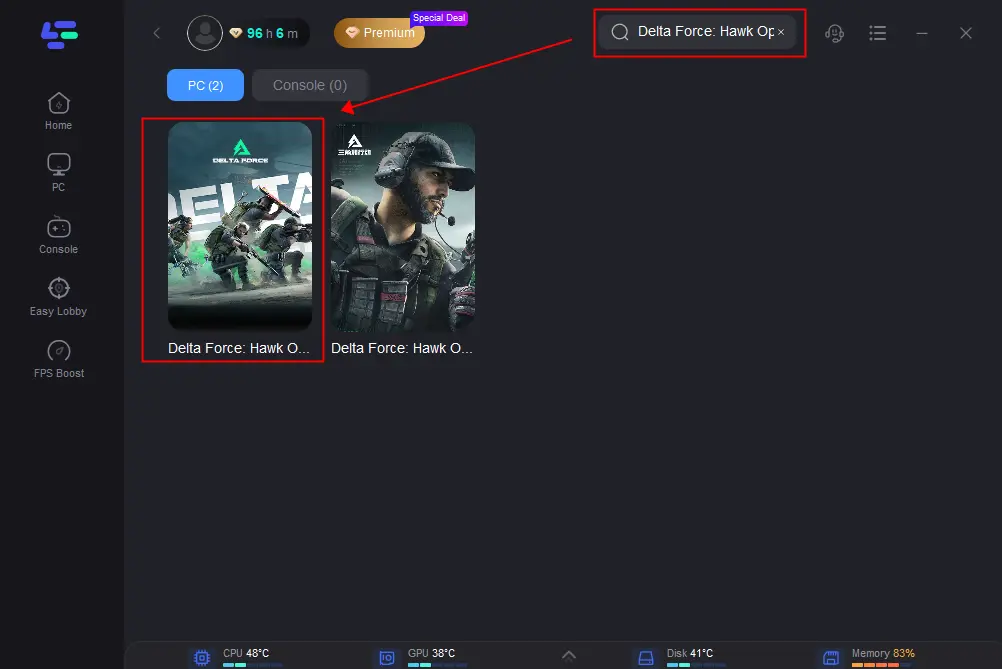
Launch and Search: Open LagoFast, type "Delta Force" in the search bar, and select the game from the results.
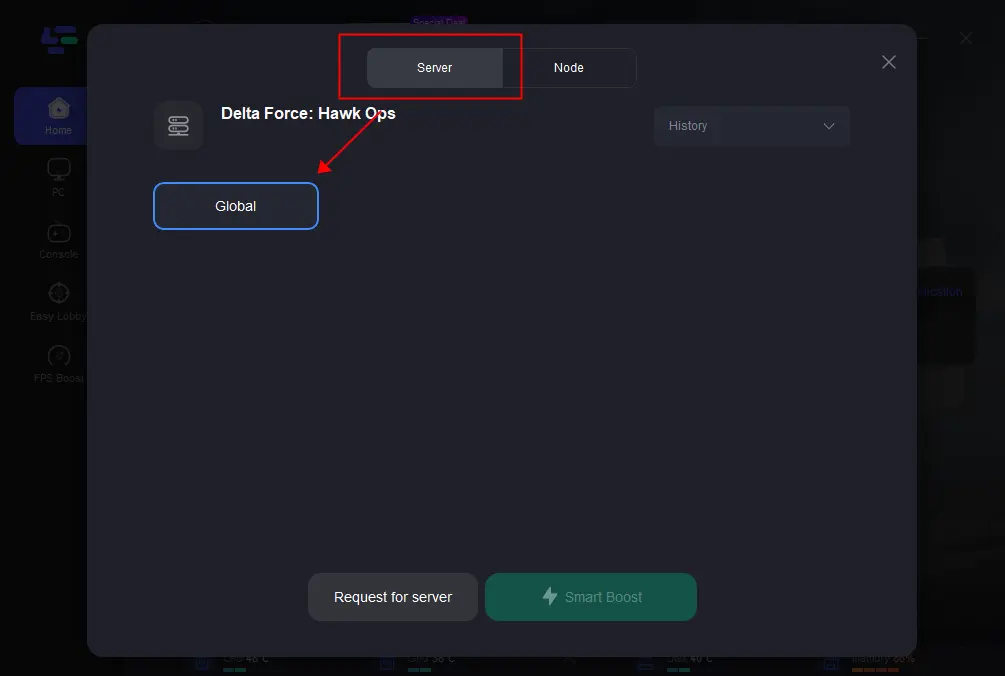
Choose Server: Select the best server based on your location and desired performance.
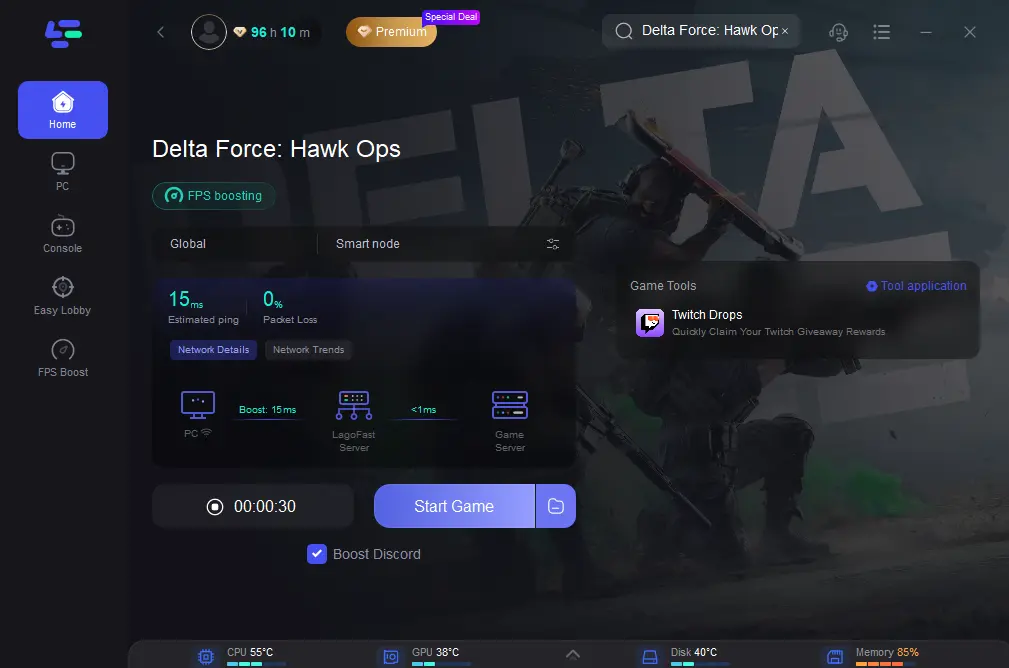
Verify Connection: Ensure packet loss rate and ping improve, then click "Start Game" to launch.
For shooting accuracy, customize your aim with LagoFast's tools:
Custom Crosshair
As a shooting-focused game, Delta Force demands precise aiming skills from players. LagoFast’s Custom Crosshair tool lets you adjust the size, color, and style of your in-game crosshair, helping you lock onto enemies faster and never miss a shooting opportunity!
Click the Custom Crosshair tool (bottom-right corner of the screen).

Adjust settings based on your shooting habits.
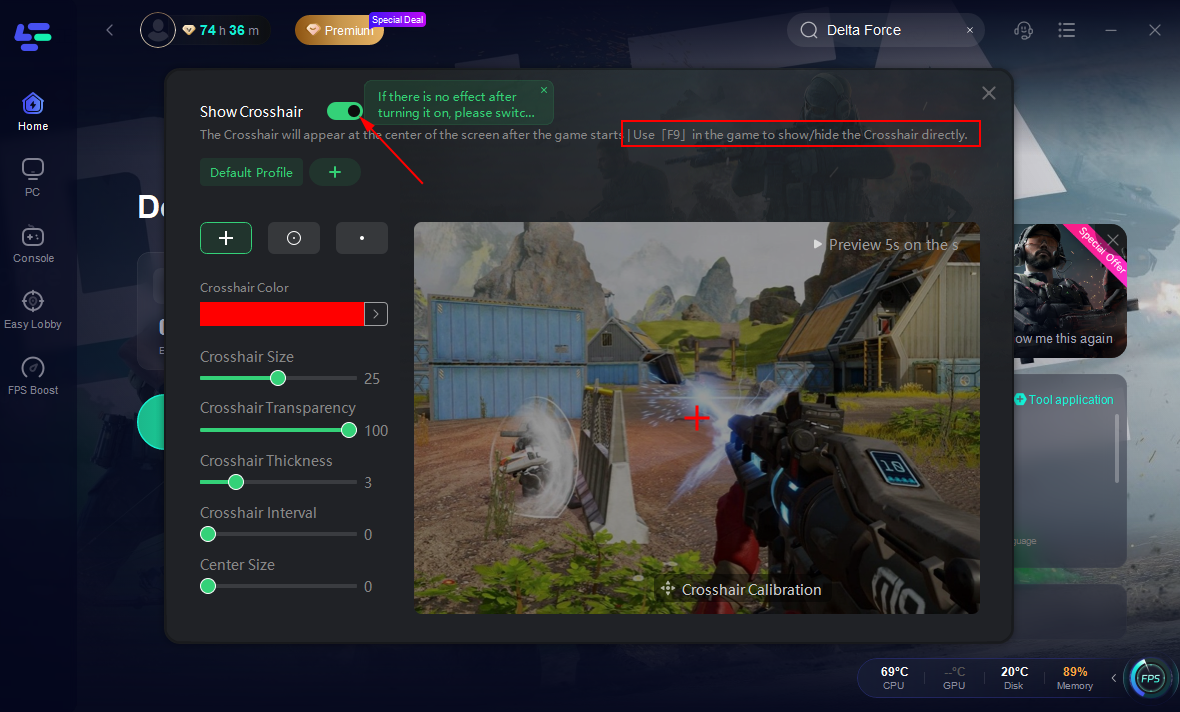
Save and use your personalized crosshair to target enemies swiftly!
Sharpen Aim (Aim-Master)
For PC players, mouse performance is crucial. LagoFast’s Sharpen Aim (Aim-Master) tool boosts mouse sensitivity, reduces input delay, and optimizes shooting controls.
Click the Sharpen Aim tool (bottom-right corner of the screen).
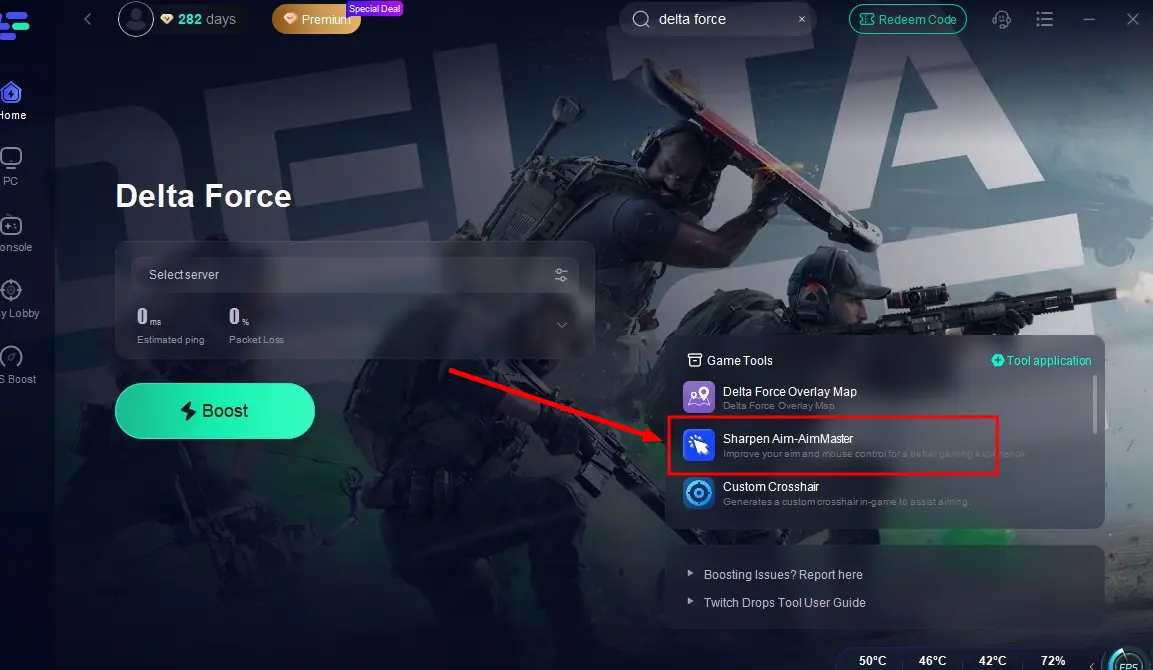
Choose one of the three preset modes that best fits your shooting style.
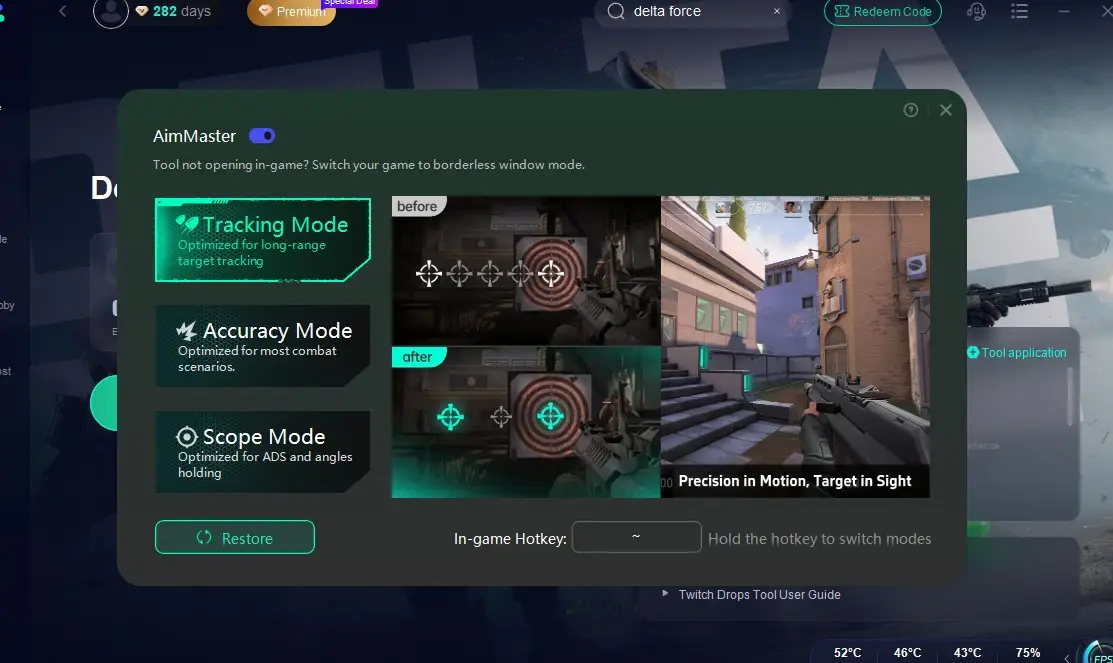
Confirm your selection and return to the game to enjoy smoother, more responsive mouse controls!
These tweaks help you stay sharp in fast-paced battles!
Part 4: Play Delta Force with LagoFast on Mobile
Players prioritizing simple controls will undoubtedly choose Delta Force on mobile platforms. LagoFast also supports mobile players by reducing in-game lag and improving connection stability.
Step 1: Search “LagoFast Mobile booster” in the App Store or Google Play., or scan the following QR codes.

Step 2: Click the “Download” button, then launch “LagoFast Mobile Booster”.
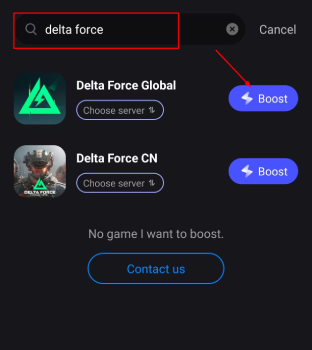
Step 3: Launch Delta Force, then search it in LagoFast Mobile Booster.
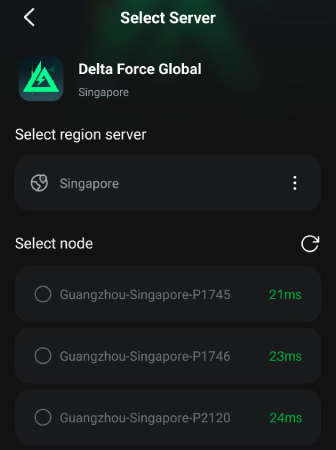
Step 4: When you find Delta Force in LagoFast Mobile Booster, click the “Boost” button.
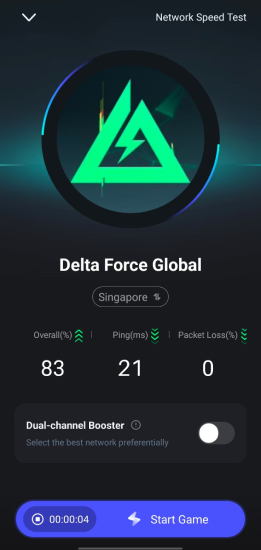
Step 5: Finally, go back to Delta Force and start playing it without any lag.
Part 5: Enhance Gaming Experience in Delta Force on Console
Once Delta Force officially launches on console platforms, players can also use LagoFast Box to enhance their gaming experience!
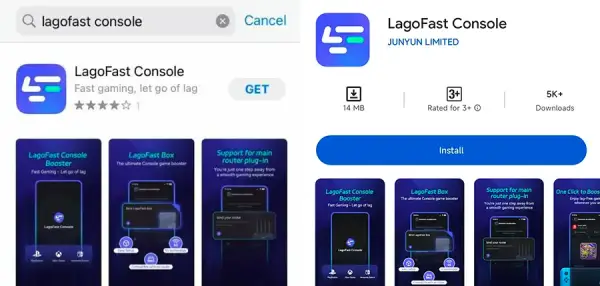
Step 1: Download the LagoFast Console App on your phone to control the LagoFast Box.
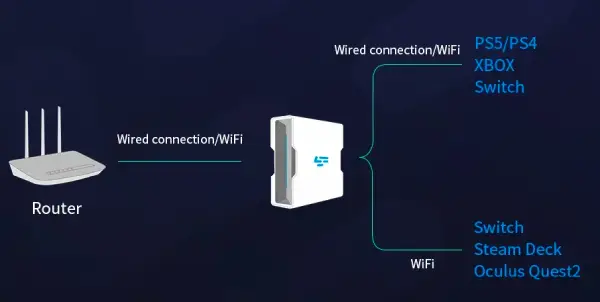
Step 2: Establish a connection between your LagoFast Box, router, and console, choosing between a wired or wireless connection.
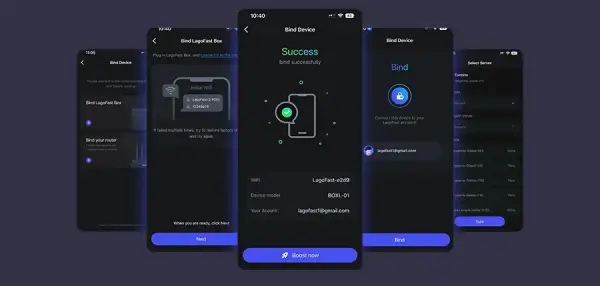
Step 3: Launch the LagoFast Console App and boost Delta Force. Once you have completed the binding process with the LagoFast Box, proceed to boost this game within the LagoFast Console App.
Conclusion
Delta Force's cross-platform strategy and Season 5 updates cement its position as a genre leader. By leveraging LagoFast for optimization and understanding platform-specific tweaks, players worldwide can enjoy lag-free battles.
Delta Force's comprehensive platform availability and outstanding cross-platform support offer players endless possibilities. Now, head to your preferred platform to download Delta Force and install LagoFast—ensuring a smooth, lag-free experience and boosting your thrilling battles!
Boost Your Game with LagoFast for Epic Speed
Play harder, faster. LagoFast game booster eliminates stutter and lags on PC, mobile, or Mac—win every match!
Quickly Reduce Game Lag and Ping!
Boost FPS for Smoother Gameplay!