
Dead by Daylight (DBD) is one of the most popular asymmetrical horror games, but like any online title, it’s not immune to server issues. Whether you’re facing endless matchmaking queues, getting disconnected mid-game, or seeing error messages like “Cannot connect to servers,” you’re probably wondering what’s happening. This article will walk you through the current Dead by Daylight server status, why the servers might not be working, and how RKN blocks may be involved.

- ✅ Reduce Lag and High Ping.
- ✅ Boost FPS at the Same Time.
- ✅ Support 2000+ Popular Online Games.
- ✅ Stable Server Connections.
- ✅ End Crashing & Black Screen Issues.
1. Is Dead by Daylight Down Right Now
2. Why Are Dead by Daylight Servers Not Working
3. What Is RKN and Why Is It Blocking Dead by Daylight
4. How to Fix or Bypass Server Connection Issues
5. How to Stay Updated on Server Status
6. Bypass Lag and Regional Restrictions with LagoFast
1. Is Dead by Daylight Down Right Now
If you can’t log in or connect to matches, the first thing to check is the current Dead by Daylight server status. There are several ways to verify if the issue is on your end or if it’s a global outage:
- Official DBD Twitter/X (@DeadByBHVR): They post real-time updates during maintenance or unexpected downtime.
- Behaviour Interactive’s Support Page: Check support.deadbydaylight.com for announcements.
- Downdetector: A popular crowd-sourced site that shows spikes in reported issues by region.
- Steam Server Status: If you’re playing via Steam, sometimes the issue is related to Steam itself.
2. Why Are Dead by Daylight Servers Not Working
There are several reasons why Dead by Daylight servers might not be working:
1. Scheduled Maintenance
Behaviour Interactive occasionally takes the servers offline for updates, patches, or seasonal content. These are usually announced in advance on social media and the support website.
2. Unexpected Outages
Server crashes or DDoS attacks can cause temporary downtime. These outages may impact certain regions more than others.
3. Regional Network Blocks (RKN Issues)
One increasingly common reason for server issues—especially for players in Russia and neighboring countries—is RKN blocking, referring to the Russian Federal Service for Supervision of Communications (Roskomnadzor). If you’re seeing consistent connection problems or restricted access, it could be due to RKN-blocked servers.
3. What Is RKN and Why Is It Blocking Dead by Daylight
RKN (Roskomnadzor) is Russia’s internet regulatory authority. Occasionally, games or services—especially those that route traffic through banned IP addresses or CDN providers—may be partially or fully blocked. In DBD’s case, certain game servers may rely on services that are under RKN restrictions.
As a result, players in affected regions may experience:
- Timeouts or failed logins
- Delayed matchmaking
- Inability to update the game
- Dropped connections mid-match
These issues are not due to Behaviour Interactive but rather to how ISPs in those regions handle network traffic and content filtering.
4. How to Fix or Bypass Server Connection Issues
While you can’t control Behaviour’s servers or RKN decisions, there are several steps you can take to regain access:
- Use a VPN: A reputable gaming VPN, like LagoFast, can route your traffic through an unrestricted location, bypassing blocked IPs and improving ping stability.
- Change DNS Settings: Switching to a public DNS (like Google 8.8.8.8 or Cloudflare 1.1.1.1) may help with routing issues.
- Check for Local ISP Issues: Sometimes the block is temporary or related to your ISP’s filtering. Rebooting your modem or contacting your provider can sometimes resolve it.
- Use Game Boosters like LagoFast: Tools like LagoFast offer optimized game routing and acceleration, potentially bypassing blocked paths and reducing latency.
5. How to Stay Updated on Server Status
To avoid guessing next time DBD isn’t working, here are a few tips:
- Enable notifications from @DeadByBHVR on Twitter/X
- Bookmark Downdetector and Behaviour’s support site
- Join the official Dead by Daylight Discord or Reddit for real-time community feedback
6. Bypass Lag and Regional Restrictions with LagoFast
If you’re facing high ping, lag spikes, or even region-based connection issues in your favorite online games, LagoFast offers a simple, effective solution. This lightweight game booster helps you stabilize your connection, reduce latency, and even bypass regional locks that may prevent access to certain game servers.
Key Benefits of LagoFast
- Bypasses region-based restrictions like RKN blocks
- Reduces ping and smooths gameplay
- Automatically selects the best routing path
- Real-time stats on ping, jitter, and packet loss
- Supports hundreds of popular online games
How to Use LagoFast
Using LagoFast takes just a few minutes:
Download LagoFast and start your free trial.
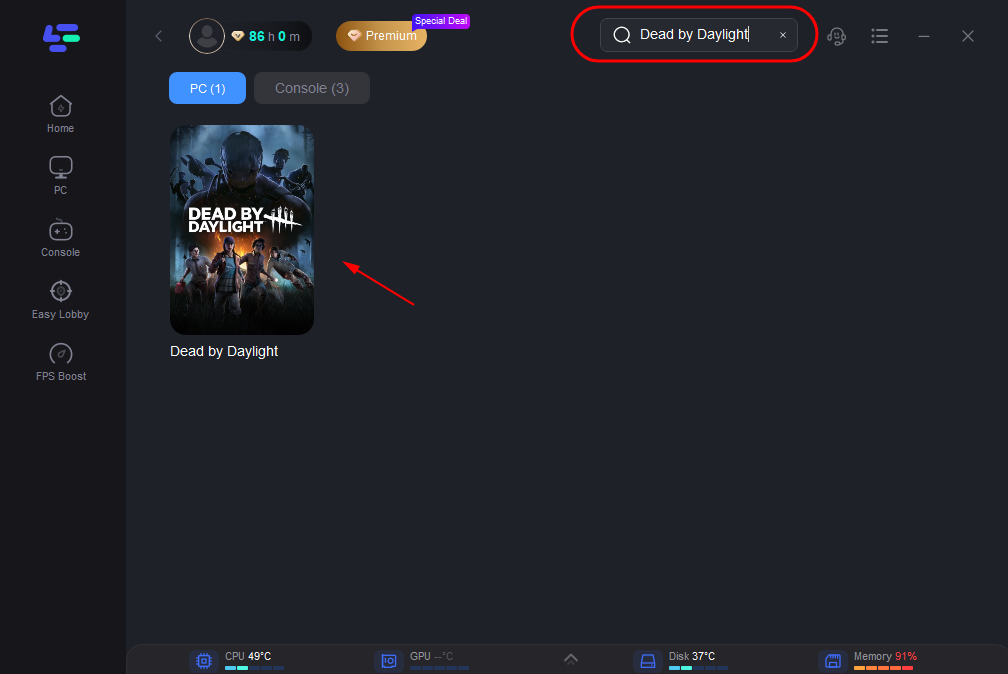
Search for your game in the dashboard.
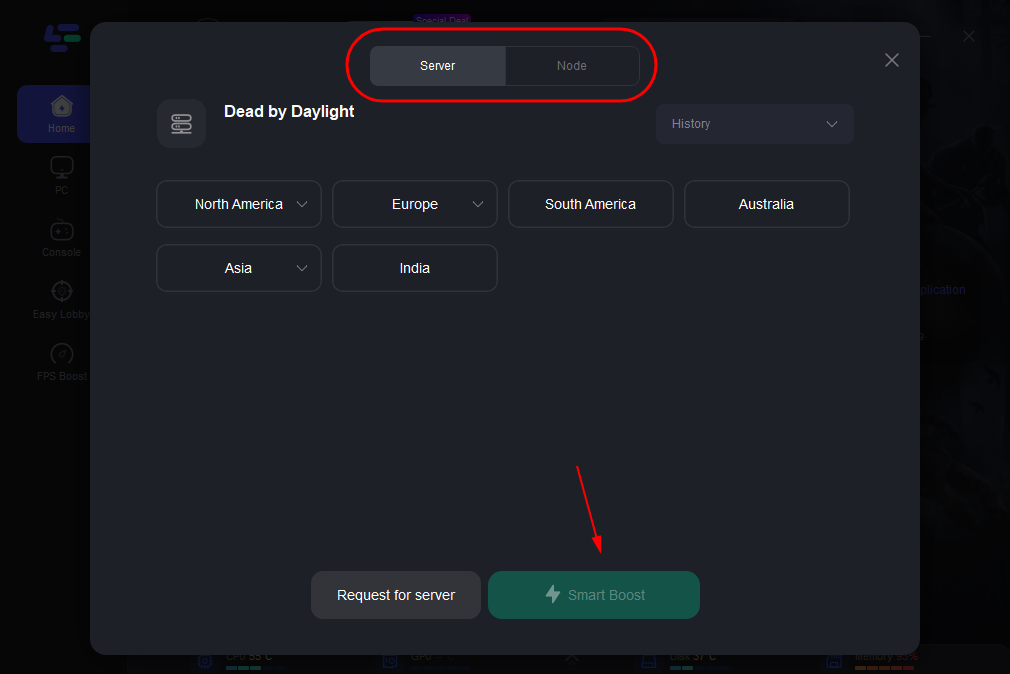
Select the most stable server and choose a nearby or unrestricted node.
Click “Smart Boost” to activate real-time acceleration and monitor your ping, packet loss, and network route.
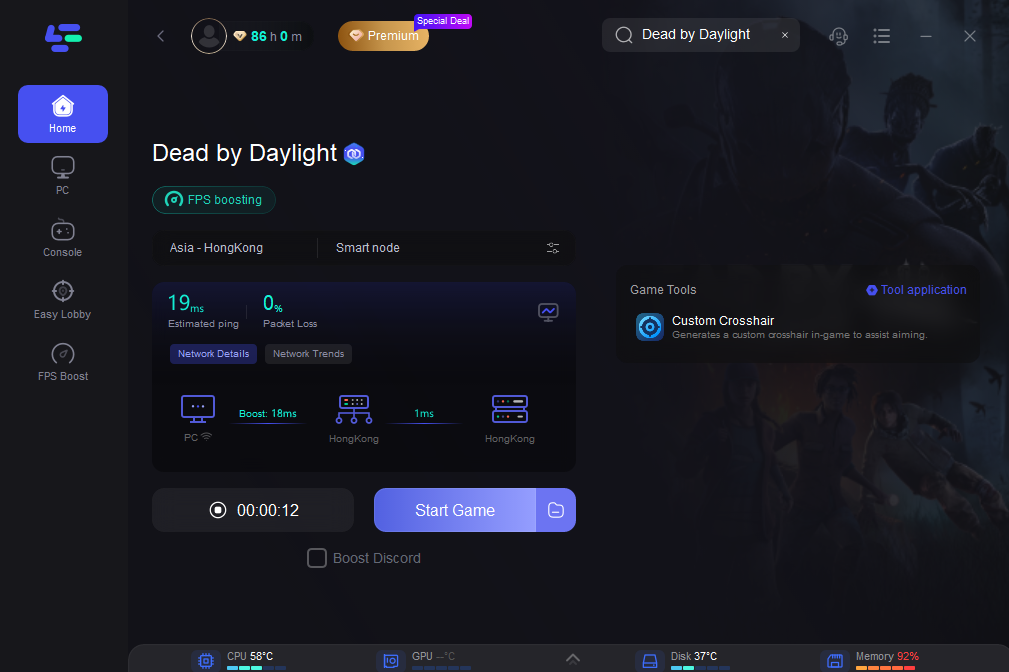
Whether you’re trying to connect to blocked servers, reduce competitive lag, or just enjoy a smoother online experience, LagoFast gives you the edge with just one click. It’s built specifically for gamers who need reliability and speed without the hassle of complex configurations. If your game is restricted due to regional blocks—like RKN in Russia—or you’re suffering from unstable ping during ranked matches, LagoFast intelligently reroutes your traffic through optimized global nodes to restore access and stabilize gameplay.
Conclusion
If you’re dealing with Dead by Daylight server issues, especially in regions affected by RKN blocks, you’re not alone. Server downtime, regional restrictions, and network instability can all cause disruptions, but understanding the root of the problem—and knowing how to respond—can get you back into the Fog faster. Keep an eye on server status updates, try out a VPN or network optimization tool if necessary, and stay informed through official channels to ensure a smoother gameplay experience.

Boost Your Game with LagoFast for Epic Speed
Play harder, faster. LagoFast game booster eliminates stutter and lags on PC, mobile, or Mac—win every match!
Quickly Reduce Game Lag and Ping!
Boost FPS for Smoother Gameplay!