
If you’ve ever tried to join a server in CS:GO or Counter‑Strike 2 and seen “Steam Validation Rejected”, “steam rejected your connection to server”, or “connection rejected by game CSGO”, you’re not alone. Many players are hitting these messages in 2026 and it can be confusing to figure out Why does it say Steam validation rejected? and How to fix Steam connection error CS‑related problems. This comprehensive guide breaks down the causes and fixes so you can get back in the game.

- ✅ Reduce Lag and High Ping.
- ✅ Boost FPS at the Same Time.
- ✅ Add CSGO to Steam Library.
- ✅ Change Server Without Latency.
- ✅ End All Connection crash Issues.
- ✅ Multiplatform: PC, Mobile, Console.
Part 1: Understanding Steam Validation Rejected Errors in CS:GO and CS2
Part 2: Common Causes of Steam Validation Rejected in CS:GO and CS2
Part 3: How to Fix Steam Validation Rejected in CS:GO and CS2
Part 4: Additional Fixes for Steam Validation Rejected Errors
Part 1: Understanding Steam Validation Rejected Errors in CS:GO and CS2
Before we dive into the actual Steam validation rejected csgo problem, it is important to first distinguish it from two other errors that players often confuse with it. These errors look similar but happen at different stages of the Steam and CS2 connection process, and they usually have different causes.
Understanding which issue you are encountering will help you apply the correct fix instead of troubleshooting the wrong problem.
1. Steam rejected your connection to the server (CS2 offline)
What it means:
Your Steam client failed to connect to the Steam network, so the game cannot communicate with Steam services.
When it happens:
This usually occurs early in the launch or matchmaking process, before the game starts authenticating with servers.
Common causes:
Steam client running in offline mode, temporary Steam service outages, or local network problems preventing Steam from connecting.
In this situation, the problem is typically at the Steam client level rather than the game server.
2. CS2 unable to establish connection with the game server
What it means:
Your Steam account is connected normally, but the CS2 client cannot establish a network connection with the game server.
When it happens:
This occurs during the server connection stage, after Steam authentication but before the player actually joins the match.
Common causes:
Router NAT restrictions, firewall rules blocking the game, unstable ISP routing, or the server itself being unavailable.
In this case, the issue is mainly related to network connectivity between the player and the server.
3. CS2 STEAM Validation Rejected / Steam validation rejected csgo
Now let’s look at the issue this guide focuses on.
What it means:
The game server cannot verify your Steam authentication token, so it rejects your connection attempt.
This typically happens after the Steam client has successfully connected to Steam services but during the authentication phase when joining a server.
When the Steam verification fails, the server immediately denies access and displays the error message CS2 STEAM Validation Rejected or Steam validation rejected csgo.
If you are encountering this message, the problem is usually related to Steam authentication mismatches, incorrect game registration, or server configuration issues.
In the next section, we will explore the most common causes behind Steam validation rejected csgo errors and explain why they occur.
Part 2: Common Causes of Steam Validation Rejected in CS:GO and CS2
There are three major underlying reasons why you might see the Steam Validation Rejected message or related errors.
1. Servers Using the Wrong Steam AppID
After Valve split CS:GO Legacy from Counter‑Strike 2, they also changed the AppID that the game uses. Many community servers still run old configs with outdated AppIDs, so Steam authentication simply doesn’t match up anymore — leading to Steam validation rejected cs go legacy errors.
What players see:
- Steam Validation Rejected immediately when joining a community server.
- The game launches normally but won’t connect.
- This often isn’t your PC’s problem — the server needs updating.
2. CS:GO/CS2 Isn’t Properly Registered with Steam
If CS:GO or CS2 wasn’t installed or registered properly (for example, manually installed, launched outside Steam, or using old builds), Steam can’t authenticate your install. That leads to failures at the validation step.
This is especially common when:
- Launching games outside of Steam library.
- Using community builds or standalone game versions.
- Installing legacy builds separately from Steam.
3. Connecting to Outdated or Legacy Community Servers
Many community servers have not updated their configs for the new CS:GO Legacy vs CS2 divide. If the server still uses old CS:GO settings, it will reject modern clients — CS:GO Legacy servers being rejected from Steam becomes a real problem.
Symptoms:
- Works when joining via Steam’s official server browser.
- Doesn’t work when connecting via manual IP.
- Fails only on specific servers while others work fine.
Part 3: Add CS:GO to Steam with LagoFast to Fix Steam Validation Rejected
One of the most common search queries is CSGO STEAM Validation Rejected Fix, so here are proven steps to clear that up.
Many players have successfully resolved the Steam validation rejected CSGO launcher issue by ensuring CS:GO is correctly registered in Steam, and one of the quickest ways to fix it is by using LagoFast Game Booster.
Here’s a step‑by‑step method using LagoFast tool to add CS:GO to Steam:
Click the "Free Trial" button below to download and install LagoFast for free.
Open LagoFast game booster and search for CS:GO.
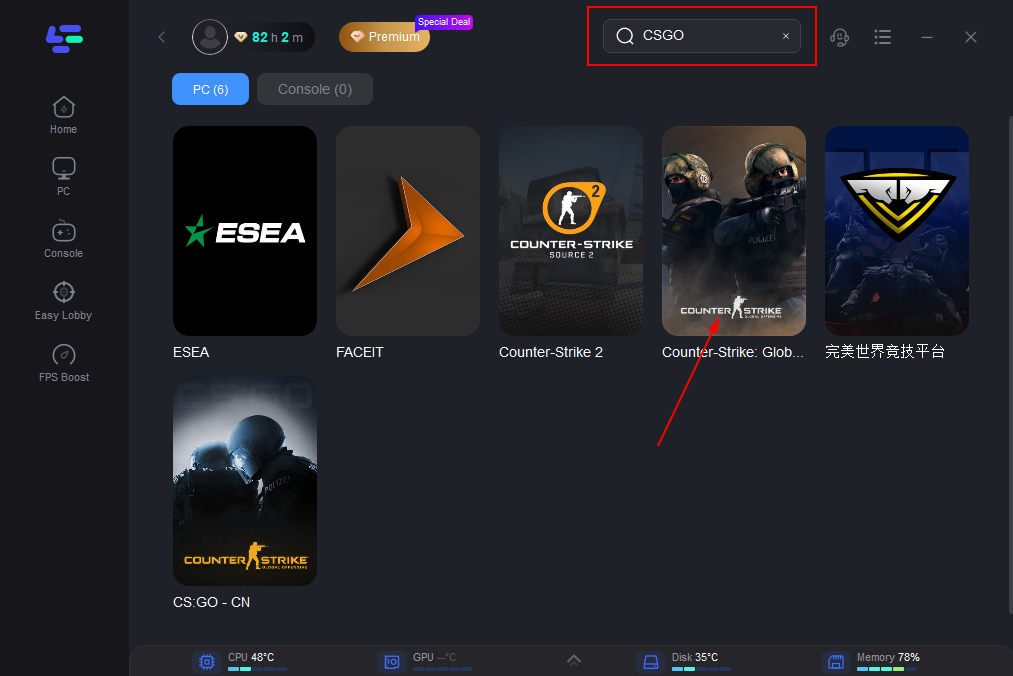
Click “Add CS:GO to Steam Library”.
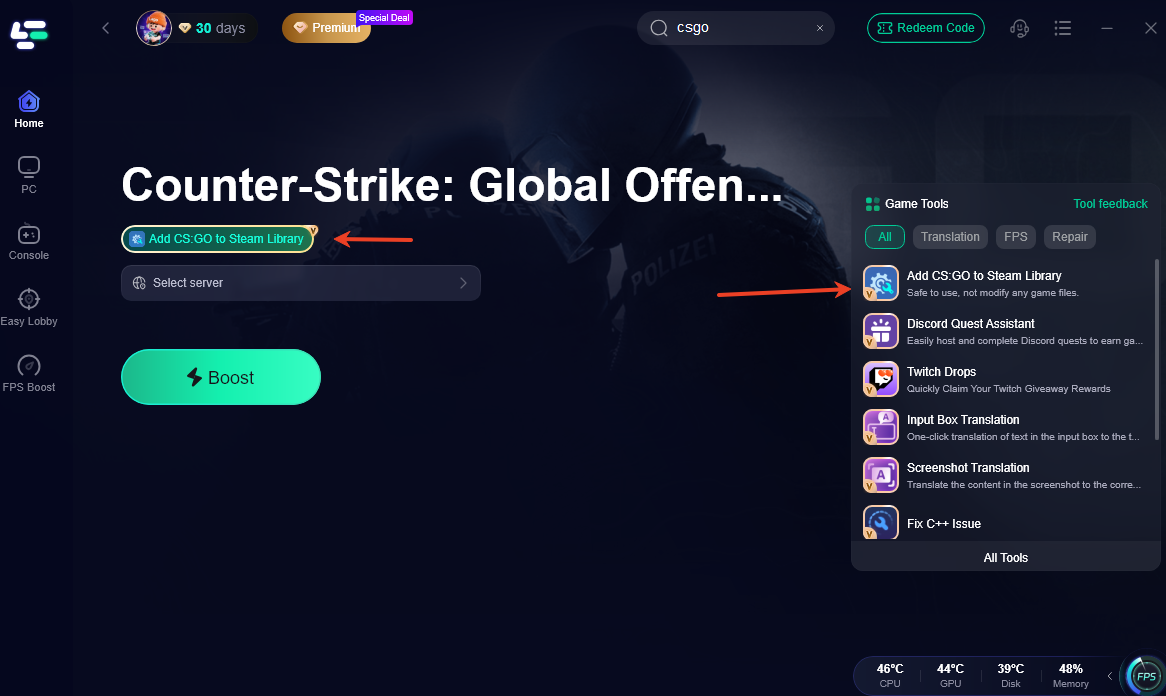
Let the tool safely register the game in Steam (it won’t alter game files).
Relaunch CS:GO and try to connect to a server.
This restores proper Steam authentication and often fixes the validation rejection. It is especially useful if your installation was manual or incomplete.
Part 4: Additional Fixes for Steam Validation Rejected Errors
If you’re still seeing Steam Validation Rejected, try these steps next.
1. Use the Steam Server Browser Instead of IP
Instead of manually connecting via IP commands in console:
- Open Steam
- Click View → Game Servers
- Filter by CS:GO
- Join a server from that list
Servers listed here are more likely to support the current client build and avoid CS:GO Legacy error: STEAM validation rejected.
2. Don’t Hack Your AppID Files
You might see advice telling you to edit files like steam_appid.txt or steam.inf. This is dangerous — tweaking app IDs can create mismatches between client and server and make matters worse. Unless you are running your own server, avoid changing these files.
3. Clear Steam Cache & Reconnect Steam
If the root issue is Steam connection itself:
- Exit Steam completely
- Run
steam://flushconfig - Restart Steam
- Log back in
This often helps Steam validation loops and How to Fix Steam Validation Loop cases.
4. Check Your Internet and Firewall
Some validation errors fall under How to fix connection rejected by game CSGO, especially if the client can’t reach the game server:
- Restart your router
- Allow Steam & CS:GO through your firewall
- Avoid VPNs or proxies that block Steam ports
Network issues can break authentication handshakes or make Steam appear offline.
5. Reinstall or Verify Game Files
If the game wasn’t verified or has corrupted files, Steam may fail base checks:
- Right‑click CS:GO or CS2 in Steam Library
- Click Properties → Installed Files → Verify integrity of game files
This fixes corrupted installs and is part of How to fix Steam connection error CS fixes.
Conclusion
Seeing steam validation rejected csgo or CS:GO Legacy error: STEAM validation rejected can be frustrating, but most cases come down to:
- Steam authentication mismatches
- Outdated server or AppID setups
- Game install/register issues
Work through this guide step by step, and you’ll usually find the fix — from adding CS:GO correctly to your Steam library to choosing the right servers. With the changes Valve made to CS:GO and CS2 in recent years, keeping everything updated and authenticated through Steam is now more important than ever.
Good luck and happy fragging!

Boost Your Game with LagoFast for Epic Speed
Play harder, faster. LagoFast game booster eliminates stutter and lags on PC, mobile, or Mac—win every match!
Quickly Reduce Game Lag and Ping!
Boost FPS for Smoother Gameplay!