
If you encounter the CS2 matchmaking failed error, it means the game could not successfully connect you to a matchmaking server. This issue can occur for several reasons, including server outages, unstable internet connections, Steam authentication problems, or corrupted game files.
Because Counter-Strike 2 is an online multiplayer game released in 2023 on PC via Steam, it relies entirely on matchmaking systems. Even minor disruptions can trigger issues such as CS2 matchmaking failed unknown network error or CS2 matchmaking failed - failed to reach any official servers CS2. The good news is that most players can resolve this problem quickly with the right troubleshooting steps.

- ✅ Reduce Lag and High Ping.
- ✅ Boost FPS at the Same Time.
- ✅ Add CSGO to Steam Library.
- ✅ Change Server Without Latency.
- ✅ End All Connection crash Issues.
- ✅ Multiplatform: PC, Mobile, Console.
Part 1: What Does CS2 Matchmaking Failed Error Mean in Counter-Strike 2
Part 2: Why is CS2 matchmaking unavailable – common causes explained
Part 3: Check CS2 server status before fixing matchmaking issues
Part 4: Basic fixes for CS2 matchmaking failed error on PC
Part 5: Advanced fixes – how to fix CS2 matchmaking failed completely
Part 6: How to fix Counter Strike 2 matchmaking failed on PC with network optimization
Part 1: What Does CS2 Matchmaking Failed Error Mean in Counter-Strike 2
Understanding matchmaking errors in CS2
The CS2 matchmaking failed error appears when the game cannot establish a connection with official matchmaking servers.
Common messages include:
- Matchmaking failed
- Failed to connect to matchmaking servers
- Unable to join matchmaking queue
- CS2 Matchmaking Failed (official servers unreachable)
These messages indicate that your game client is unable to communicate with Valve’s matchmaking system.
Why players keep seeing matchmaking error messages
Many users ask why does it keep saying matchmaking error. This usually happens when connection attempts repeatedly fail due to unstable routing, authentication issues, or server-side problems.
Part 2: Why is CS2 matchmaking unavailable – common causes explained
Server-side issues and overload
One of the most frequent answers to why is CS2 matchmaking unavailable is server instability. This often occurs during:
- Major updates or patches
- Steam maintenance periods
- Peak player activity hours
Network instability and packet loss
Unstable internet connections can lead to:
- Packet loss
- High latency
- Interrupted matchmaking handshake
This often results in CS2 matchmaking failed unknown network error.
Steam authentication problems
If Steam cannot verify your session properly, matchmaking will fail. This is a common backend issue that prevents access to official servers.
VPN and proxy interference
VPN usage can reroute traffic inefficiently, leading to:
- Authentication failures
- Increased latency
- Server connection rejection
This is a major cause of CS2 matchmaking failed - failed to reach any official servers CS2.
Corrupted or missing game files
Broken files can disrupt communication between the client and servers, preventing matchmaking entirely.
Part 3: Check CS2 server status before fixing matchmaking issues
Why server status matters first
Before applying fixes, always verify whether the issue is global. If servers are down, no local fix will work.
When to wait instead of troubleshooting
If many players report CS2 Matchmaking Failed (official servers unreachable) at the same time, the best solution is simply to wait until servers stabilize.
Part 4: Basic fixes for CS2 matchmaking failed error on PC
Restart Steam and game client properly
Key step: restarting clears temporary authentication errors.
Steps:
- Close Counter-Strike 2 completely
- Exit Steam
- Restart your PC
- Launch Steam and reopen the game
Restart your internet connection
Key step: resetting your network can fix routing issues.
Steps:
- Turn off modem and router
- Wait 2–3 minutes
- Restart devices and reconnect
This helps resolve temporary network conflicts causing matchmaking failures.
Part 5: Advanced fixes – how to fix CS2 matchmaking failed completely
Verify game files integrity in Steam
Key step: fix corrupted files.
Steps:
- Open Steam Library
- Right-click Counter-Strike 2
- Select Properties
- Go to Installed Files
- Click Verify integrity
Disable VPN and network filters
Key step: remove interference.
Actions:
- Turn off VPN
- Disable proxy services
- Restart Steam
This can resolve CS2 matchmaking failed unknown network error instantly.
Check firewall and security settings
Key step: allow required programs.
Ensure these are not blocked:
- Steam client
- Counter-Strike 2 executable
- Steam Client Service
Security tools often mistakenly block matchmaking traffic.
Clear Steam download cache
Key step: reset Steam connection data.
Steps:
- Open Steam Settings
- Go to Downloads
- Click Clear Download Cache
- Log back in
Part 6: How to fix Counter Strike 2 matchmaking failed on PC with network optimization
When the CS2 matchmaking failed error appears, the problem is often related to unstable routing, packet loss, or high latency between your network and the matchmaking servers. Even if your internet seems normal, inefficient routing paths can interrupt the matchmaking handshake and prevent the game from connecting to servers. Tools like LagoFast help optimize the connection path before launching the game, improving stability and reducing network interruptions.
Benefits of using LagoFast
- Reduces sudden latency spikes during matchmaking and gameplay
- Minimizes packet loss that can interrupt server communication
- Stabilizes connection to matchmaking servers
- Improves success rate when entering matchmaking queues
- Provides real-time monitoring of ping, packet loss, and connection quality
Quick Steps to Use LagoFast
Click the "Free Trial" button below to download and install LagoFast for free.
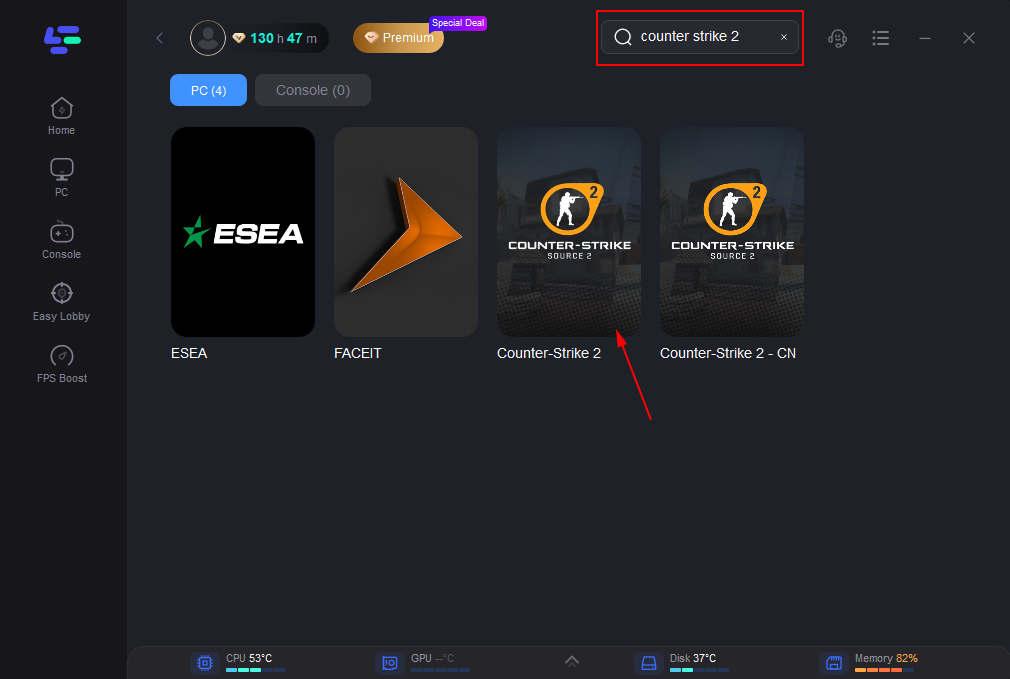
Use the search bar in LagoFast to find Counter-Strike 2.
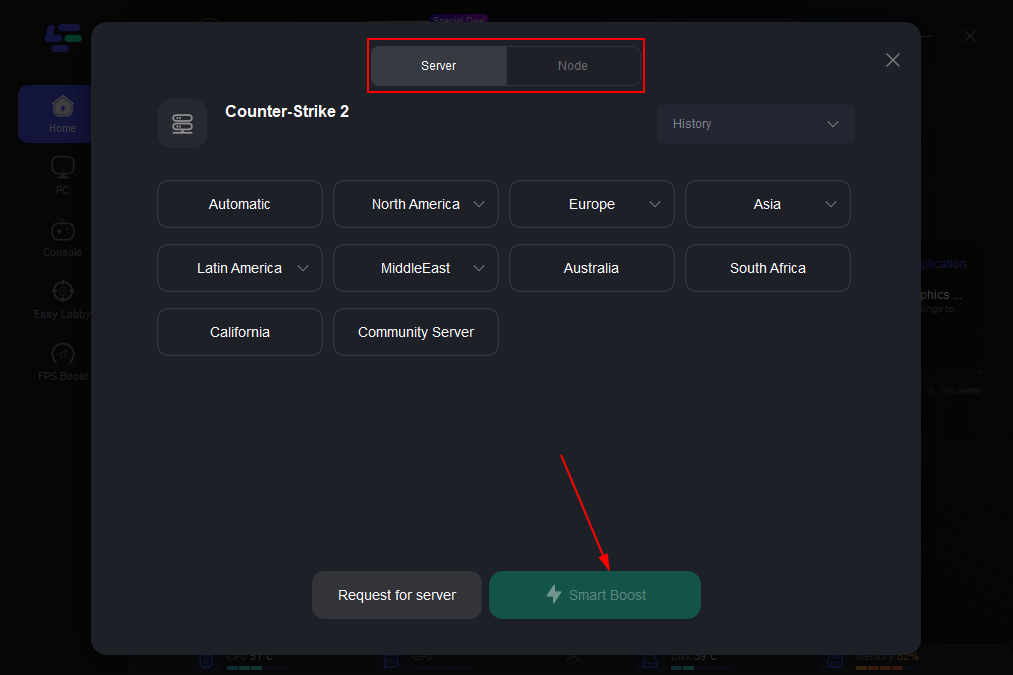
Click on “Server” to change to a better server that ensures smooth gameplay, then click on “Smart Boost”.
Check the specific game ping, packet loss, and multiple path connection on the right side. Finally, click the “Start Game” to play the game.
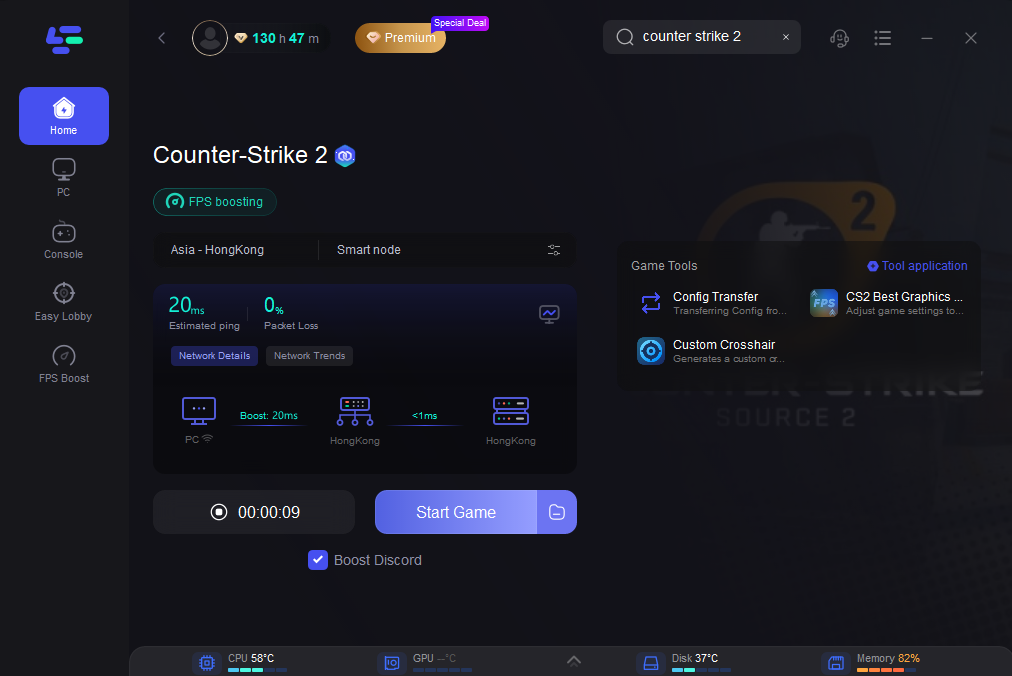
Once enabled, the tool automatically reroutes your traffic through optimized nodes, which can help avoid unstable network paths that often cause matchmaking errors.
Although LagoFast cannot fix official server outages, it can significantly improve local connection stability. By optimizing your network route before launching Counter-Strike 2, you can reduce matchmaking failures and enjoy a smoother online gaming experience.
Conclusion
The CS2 matchmaking failed error usually occurs when your game cannot connect to official servers due to network instability, server issues, or Steam authentication problems. Whether you're dealing with why does it keep saying matchmaking error or CS2 matchmaking failed - failed to reach any official servers CS2, most problems can be resolved through structured troubleshooting.
Boost Your Game with LagoFast for Epic Speed
Play harder, faster. LagoFast game booster eliminates stutter and lags on PC, mobile, or Mac—win every match!
Quickly Reduce Game Lag and Ping!
Boost FPS for Smoother Gameplay!