
Quick Answer
The final CONTROL Resonant System Requirements list Windows 10 or 11 64-bit, 16 GB RAM, and 120 GB of SSD space. Minimum hardware targets 1080p at 30 FPS with an i5-8500 or Ryzen 5 3500 and GTX 1070, RX 5600 XT, or Arc A580. Recommended hardware targets 1440p at 60 FPS with an i7-10700 or Ryzen 7 3700X and RTX 3060 Ti, RX 6700 XT, or Arc B580.

- ✅ Reduce Lag and High Ping.
- ✅ Boost FPS at the Same Time.
- ✅ Support 8000+ Popular Online Games.
- ✅ Stable Server Connection
Part 1: CONTROL Resonant PC System Requirements at a Glance
Part 2: CONTROL Resonant Minimum and Recommended Requirements
Part 3: What Performance Can Your PC Expect?
Part 4: CONTROL Resonant Best PC Settings for FPS
Part 5: How to Optimize CONTROL Resonant Performance With LagoFast Game Booster
Part 6: Ray Tracing, Path Tracing, and Hardware Planning
Part 7: CONTROL Resonant System Requirements FAQ
Part 1: CONTROL Resonant PC System Requirements at a Glance
CONTROL Resonant is a third-person action RPG built around a large Manhattan setting, supernatural effects, and heavy lighting work. The official listing requires an SSD for both hardware tiers because open-world streaming can cause traversal stutter on a slow hard drive.
|
Requirement |
Minimum target |
Recommended target |
|
Operating system |
Windows 10/11 64-bit |
Windows 10/11 64-bit |
|
Processor |
Intel Core i5-8500 / Ryzen 5 3500 |
Intel Core i7-10700 / Ryzen 7 3700X |
|
Memory |
16 GB RAM |
16 GB RAM |
|
Graphics |
GTX 1070 / RX 5600 XT / Arc A580 |
RTX 3060 Ti / RX 6700 XT / Arc B580 |
|
Storage |
120 GB SSD |
120 GB SSD |
|
Baseline target |
1080p, 30 FPS, Low |
1440p, 60 FPS, Medium |
Some early articles list 100 GB and an RTX 3070. The final Steam listing uses 120 GB and RTX 3060 Ti / RX 6700 XT / Arc B580 for the standard recommended tier.
Part 2: CONTROL Resonant Minimum and Recommended Requirements
Treat the published tiers as performance targets, not only a launch checklist. The minimum tier is not designed for high presets, ray tracing, or locked 60 FPS.
CONTROL Resonant Minimum Requirements
The CONTROL Resonant Minimum Requirements target 1080p at 30 FPS with the Low preset, Quality upscaling, and ray tracing disabled. A GTX 1070, RX 5600 XT, or Arc A580 with at least 6 GB of VRAM is the entry point.
An i5-8500 or Ryzen 5 3500 may expose CPU limits in crowded scenes and streaming. If GPU usage is low while frame time spikes, reducing resolution will not solve the problem.
CONTROL Resonant Recommended Requirements
The CONTROL Resonant Recommended Requirements target 1440p at 60 FPS with the Medium preset, Balanced upscaling, and ray tracing off. The RTX 3060 Ti and RX 6700 XT are sensible baseline cards for this tier, while the Arc B580 is also listed.
Sixteen gigabytes of RAM meets the published target. Close background applications and keep extra SSD space available for Windows and shader caches.
Part 3: What Performance Can Your PC Expect?
The most useful performance information is the target table, not a single GPU ranking. CONTROL Resonant has separate expectations for standard rendering, ray tracing, and path tracing.
|
Target |
Upscaler |
Preset |
Ray tracing |
Suggested hardware |
|
1080p, 30 FPS |
Quality |
Low |
Off |
GTX 1070 / RX 5600 XT / Arc A580 |
|
1440p, 60 FPS |
Balanced |
Medium |
Off |
RTX 3060 Ti / RX 6700 XT / Arc B580 |
|
4K, 60 FPS |
Performance |
High |
Off |
RTX 3080 / RX 6800 XT |
|
1080p, 30 FPS |
Quality |
Low |
Low |
RTX 2060 Super / RX 6600 / Arc A580 |
|
1440p, 60 FPS |
Balanced |
Medium |
Medium |
RTX 4070 Ti / RX 9070 |
|
4K, 60 FPS |
Performance |
High |
High |
RTX 5080 |
These are launch targets, not a promise for every area. Combat, volumetric effects, and traversal can create frame-time spikes. Stable frame pacing usually feels better than a higher but fluctuating FPS counter.
Part 4: CONTROL Resonant Best PC Settings for FPS
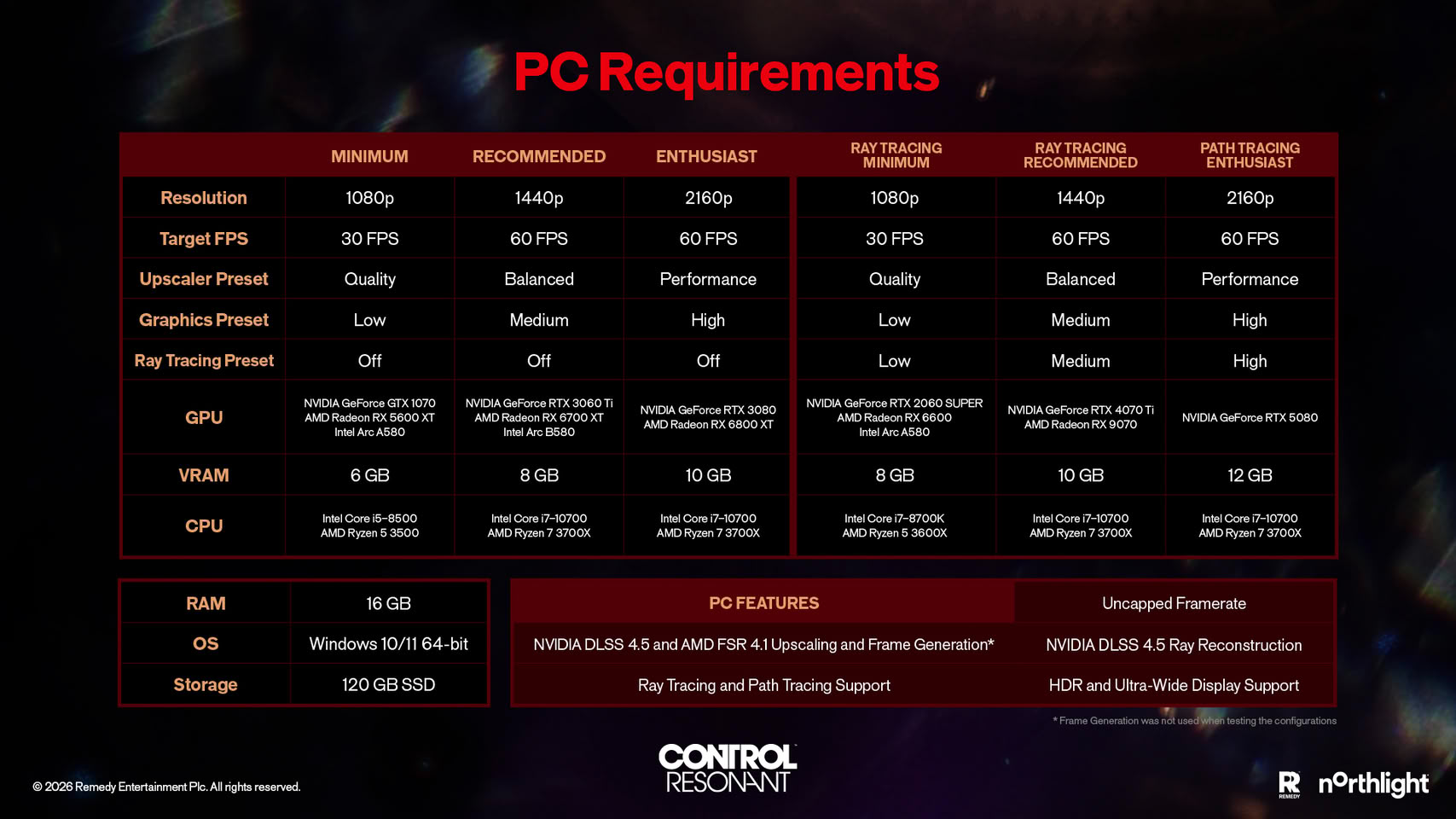
The CONTROL Resonant Best PC Settings for FPS depend on resolution and GPU headroom. Start from the published target, then change one setting at a time.
Recommended starting profiles
- Entry-level PC: 1080p, Low preset, DLSS or another upscaler on Quality, ray tracing Off, 30 FPS cap.
- Mainstream RTX PC: 1440p, Medium preset, Balanced upscaling, ray tracing Off, 60 FPS cap.
- High-end PC: 4K, High preset, Performance upscaling, ray tracing Off unless the GPU has clear headroom.
- Ray-tracing build: 1440p, Medium preset, Balanced upscaling, RT Medium, then test reflections and lighting separately.
- Path-tracing build: 4K, High preset, Performance upscaling, RT High, and a stable base frame rate before frame generation.
Settings to lower first
- Volumetric lighting and fog.
- Reflections and ray-traced effects.
- Shadow quality and contact shadows.
- Foliage, crowd, or world-detail distance.
- Resolution scaling mode before texture quality.
Keep textures higher when VRAM allows it. If stutter appears while entering areas, check SSD activity and shader compilation before lowering every setting.
Part 5: How to Optimize CONTROL Resonant Performance With LagoFast Game Booster
CONTROL Resonant is primarily single-player, so LagoFast is most useful for launcher downloads, patches, cloud synchronization, remote streaming, and other network-heavy services.
Step-by-step tutorial for optimizing CONTROL Resonant with LagoFast
Step 1. Click the Free Trial button to download and install LagoFast Free Trial.
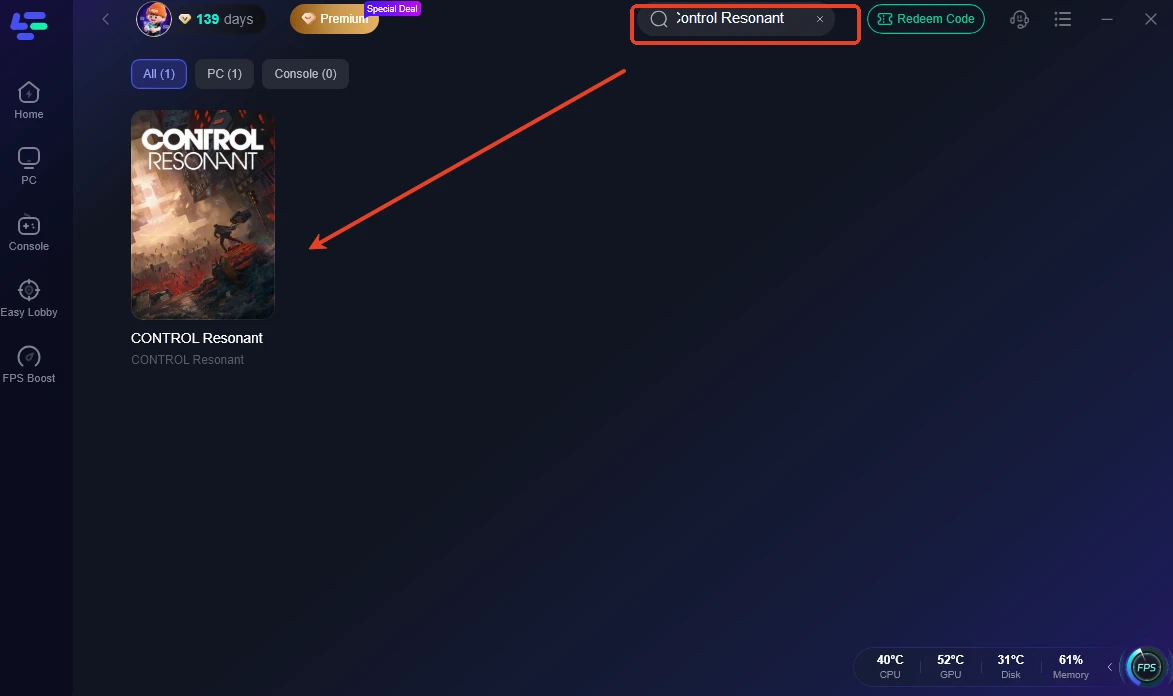
Step 2. Search for CONTROL Resonant. Select the correct PC game profile rather than a profile for the original CONTROL.
Step 3. Choose a recommended network route. Start with the route suggested for your region and compare stability if downloads or connected services slow down.
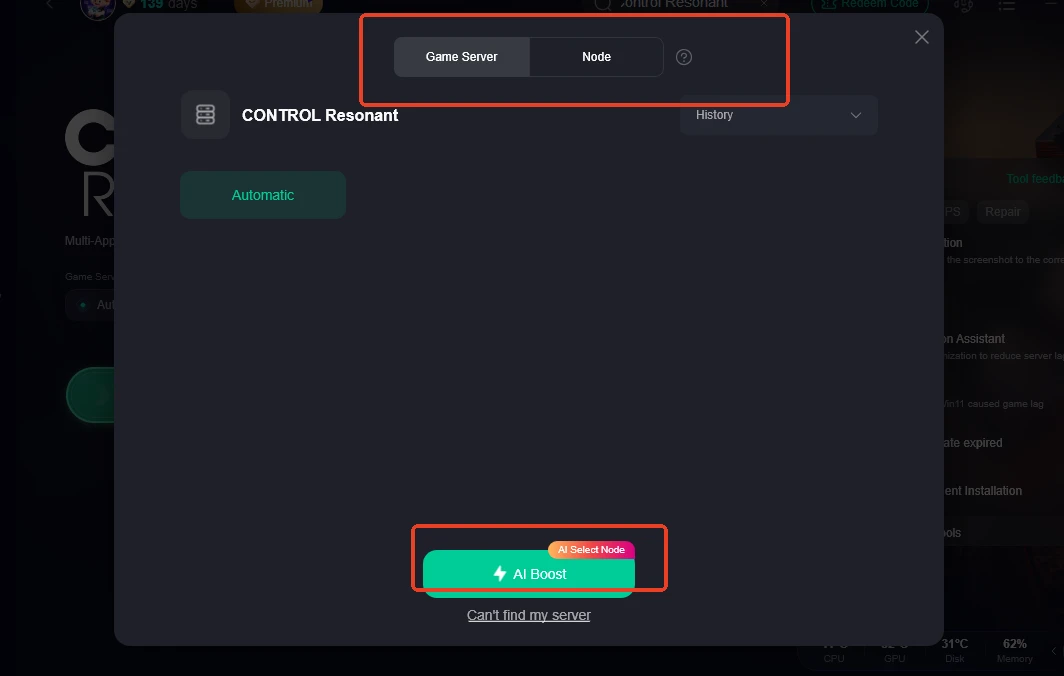
Step 4. Activate Smart Boost. Pause cloud backups, large downloads, streaming, and other traffic that can create bufferbloat during testing.
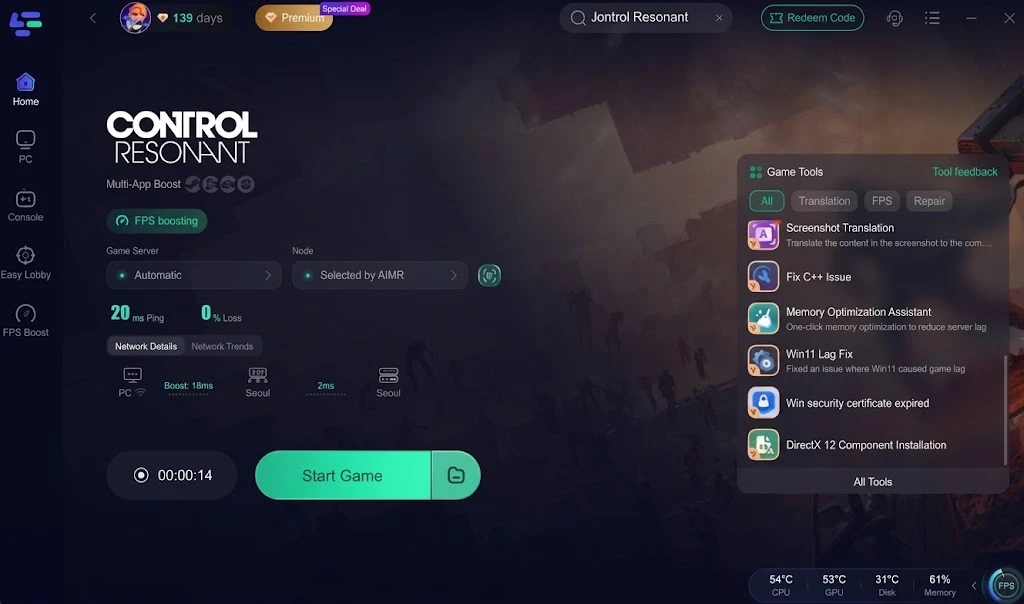
Step 5. Launch the game and monitor the session. Compare patch speed, connection stability, stutter frequency, and frame-time behavior. If the issue occurs offline with stable GPU usage, return to graphics, storage, or driver troubleshooting.
Part 6: Ray Tracing, Path Tracing, and Hardware Planning
CONTROL Resonant launches with DLSS 4.5 Dynamic Multi Frame Generation, DLSS Super Resolution, DLSS Ray Reconstruction, and path tracing. These options increase GPU workload beyond the standard minimum target.
How to plan for ray tracing
An RTX 2060 Super, RX 6600, or Arc A580 is listed for 1080p ray tracing at 30 FPS with Low settings and Quality upscaling. For 1440p and 60 FPS with Medium ray tracing, the listed target rises to an RTX 4070 Ti or RX 9070.
Path tracing is a different performance class. The published 4K enthusiast target uses an RTX 5080, High settings, Performance upscaling, and High ray tracing. Players with weaker cards should disable path tracing first rather than sacrificing resolution and frame pacing.
Avoid a common settings mistake
Do not enable ray tracing, path tracing, frame generation, and maximum resolution at the same time before establishing a stable baseline. Test standard rendering first. Then add ray tracing, record the frame-time change, and only afterward evaluate frame generation.
Part 7: CONTROL Resonant System Requirements FAQ
What are the CONTROL Resonant Minimum Requirements?
The minimum tier requires Windows 10 or 11 64-bit, an i5-8500 or Ryzen 5 3500, 16 GB RAM, a GTX 1070, RX 5600 XT, or Arc A580, and 120 GB of SSD storage. The target is 1080p at 30 FPS on Low settings.
What are the CONTROL Resonant Recommended Requirements?
The recommended tier requires an i7-10700 or Ryzen 7 3700X, 16 GB RAM, and an RTX 3060 Ti, RX 6700 XT, or Arc B580. The target is 1440p at 60 FPS on Medium settings with Balanced upscaling.
Does CONTROL Resonant require an SSD?
Yes. The official PC listing marks an SSD as required and lists 120 GB of available space. An SSD should also reduce asset-streaming delays compared with a mechanical hard drive.
Can a GTX 1070 run CONTROL Resonant?
It is listed as the minimum GPU for 1080p, 30 FPS, Low settings, Quality upscaling, and ray tracing off. Do not expect the minimum tier to deliver a consistent 60 FPS at high settings.
What are the best settings for 60 FPS?
Start at 1440p, Medium, Balanced upscaling, and ray tracing off on recommended hardware. Lower volumetrics, reflections, shadows, and foliage before textures.
Does CONTROL Resonant support ray tracing?
Yes. Published targets include Low and Medium ray tracing plus a High path-tracing tier. GPU requirements rise sharply with these effects.
Key takeaway
The final requirements call for 16 GB RAM, a 120 GB SSD, and at least a GTX 1070-class GPU for 1080p. The recommended 1440p target uses an RTX 3060 Ti-class card; ray tracing and path tracing need much stronger hardware. Start with stable raster settings and tune effects methodically.

Boost Your Game with LagoFast for Epic Speed
Play harder, faster. LagoFast game booster eliminates stutter and lags on PC, mobile, or Mac—win every match!
Quickly Reduce Game Lag and Ping!
Boost FPS for Smoother Gameplay!