
Quick Answer
Officially, DLSS 5 is available for RTX 50 Series GPUs and GeForce NOW’s supported cloud hardware. Experimental community patches have made it run on RTX 40 and RTX 30 cards, while RTX 20 testing is still unofficial and highly hardware-dependent. Compatibility does not guarantee playable FPS, low latency, stable image quality, or anti-cheat safety.

- ✅ Reduce Lag and High Ping.
- ✅ Boost FPS at the Same Time.
- ✅ Support 8000+ Popular Online Games.
- ✅ Stable Server Connection
Part 1: Can RTX 20, 30 and 40 Series Use DLSS 5?
Part 2: Official DLSS 5 Support vs Community Patches
Part 3: RTX 40 and RTX 4090 Performance Expectations
Part 4: RTX 30 and RTX 20 Series FPS Reality
Part 5: How to Configure DLSS 5 With LagoFast Game Booster
Part 6: Safe Testing, Settings and Troubleshooting
Part 1: Can RTX 20, 30 and 40 Series Use DLSS 5?
For official NVIDIA support, RTX 50 Series is the safe answer. Modified builds have expanded experimental testing to older generations.
|
GPU generation |
Current status |
Practical interpretation |
|
RTX 50 Series |
Official launch support |
Intended hardware for DLSS 5 |
|
RTX 40 Series |
Experimental patched support |
Can run in some tests, but not officially guaranteed |
|
RTX 30 Series |
Experimental patched support |
Runs in demonstrations with major performance penalties |
|
RTX 20 Series |
Early experimental testing |
Compatibility and performance remain especially uncertain |
DLSS 5 is not simply a new upscaling preset. Its 3D-guided neural-rendering model processes the game’s frame data to add lighting and material detail. That workload is different from using older DLSS Super Resolution, and the same Tensor Core label across RTX generations does not mean identical support.
Part 2: Official DLSS 5 Support vs Community Patches
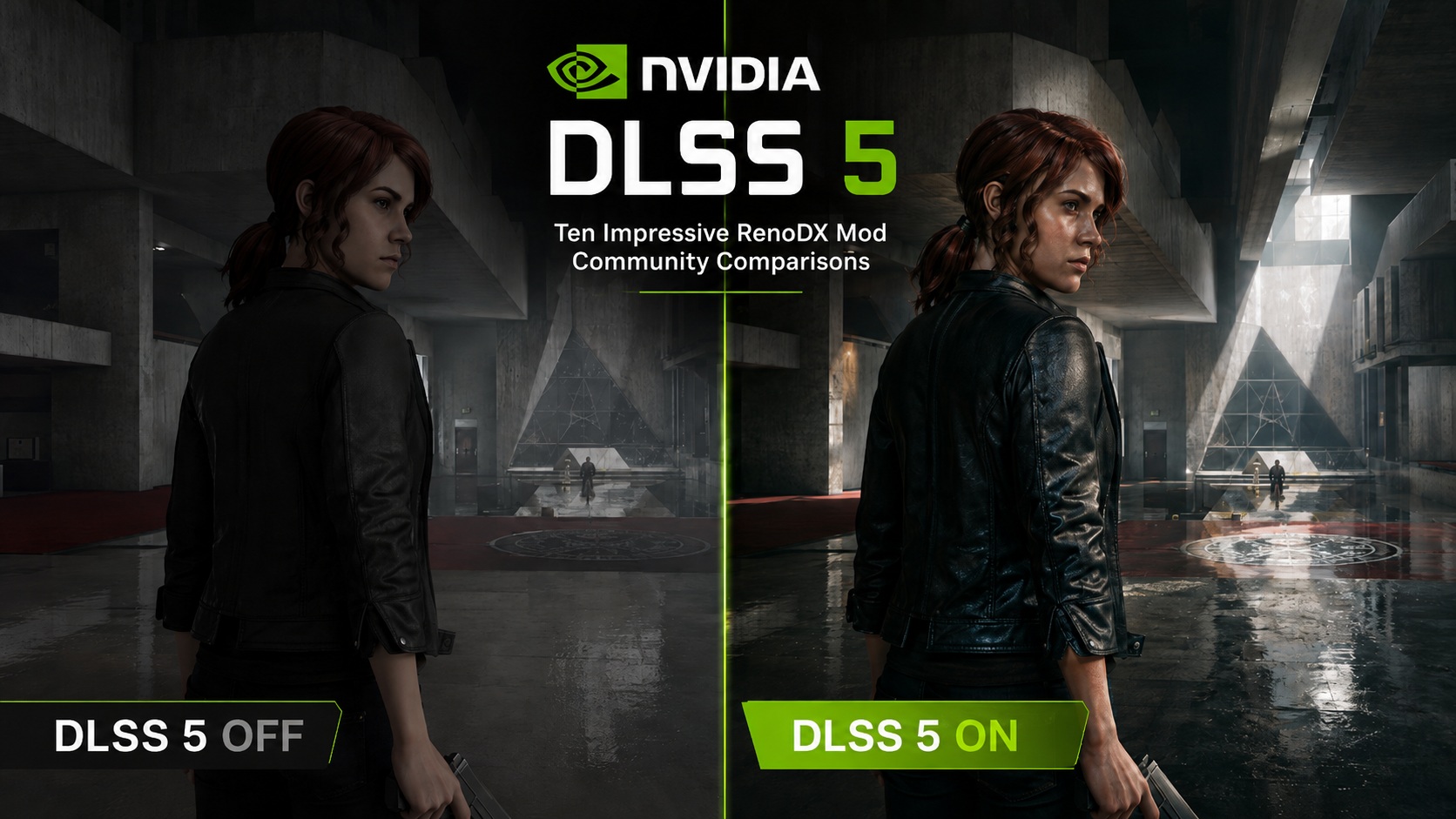
NVIDIA’s official DLSS 5 rollout began with RTX 50 Series hardware, using fifth-generation Tensor Cores and Blackwell-focused binaries. The first public implementation appeared in NBA 2K27, where the feature is exposed as a developer-integrated graphics option rather than a generic driver switch.
Community developers then modified leaked or pre-release files and patched architecture-specific instructions. This explains why online posts can show DLSS 5 working on older cards even while NVIDIA’s official compatibility list remains narrower.
Why the distinction matters
- Official support normally includes a tested driver path, game integration, and a defined support boundary.
- A community patch may depend on a particular DLL, ReShade layer, mod loader, or game version.
- A successful boot proves only that the code executed; it does not prove good frame pacing or visual stability.
- Online games may reject modified files or trigger anti-cheat warnings.
- Future updates can overwrite files or make a workaround stop working.
Treat benchmark videos as experiments, not purchase advice. Measure frame time, input latency, image quality, and stability after enabling it.
Part 3: RTX 40 and RTX 4090 Performance Expectations
The RTX 40 generation is the most credible older target for experimental DLSS 5 because Ada Lovelace can handle the model’s FP8-oriented workload more naturally than Ampere. Community patches have been demonstrated on cards such as the RTX 4080, and the RTX 4090 has also appeared in performance testing.
That still does not make dlss 5 rtx 40 series support official. Early reports show a meaningful rendering cost. One RTX 40 test reported roughly a 30 percent performance hit, while another RTX 4090 result dropped from about 130 FPS to roughly 82 FPS in a modified test scenario. Results differ by game and graphics preset, so these figures are directional rather than a universal benchmark.
RTX 4090 and RTX 4080 testing checklist
- Record native or regular-DLSS FPS before changing files.
- Measure average FPS, one-percent lows, render latency, and frametime spikes.
- Compare the same scene, resolution, ray-tracing preset, and camera movement.
- Check for shimmering, noisy materials, ghosting, or unstable facial detail.
- Restore the original files if latency rises more than image quality improves.
Part 4: RTX 30 and RTX 20 Series FPS Reality
The answer to “can rtx 30 use dlss 5” is technically yes in some community demonstrations, but the practical answer is often no for normal gameplay. RTX 30 cards lack the same native FP8 path expected by the leaked model, so patched execution can create extreme render latency.
Reported tests include an RTX 3080 falling from around 130 FPS to about 4 FPS in one game, an RTX 3070 laptop dropping below 1 FPS, and an RTX 3090 reaching roughly 30 FPS in a different title. Other tests on RTX 3050 and RTX 3060 Ti hardware hovered near single-digit performance. These results show execution, not a polished product experience.
The RTX 20 generation faces an even less certain path. Community work is exploring whether Turing cards can run modified builds, but model compatibility, driver behavior, VRAM pressure, and frame latency vary widely. A card that displays a rendered frame may still be unusable for real-time play.
For dlss 5 rtx 30 series and dlss 5 rtx 20 series testing, use an offline game first, not a ranked or anti-cheat title.
Part 5: How to Configure DLSS 5 With LagoFast Game Booster
Instead of manually finding DLL files, replacing game files, and trying to remember how to restore them, LagoFast’s DLSS 5 configuration tool can check local Steam games, validate whether a title can use the configuration, and apply or revert the setup from one interface.
Step-by-step tutorial for testing DLSS 5 compatibility
Step 1. Click the Free Trial button to download and install LagoFast Free Trial.
Step 2. Select a detected Steam game or add its folder manually. LagoFast can identify installed Steam titles, while manual directory selection helps with games stored outside the default library.
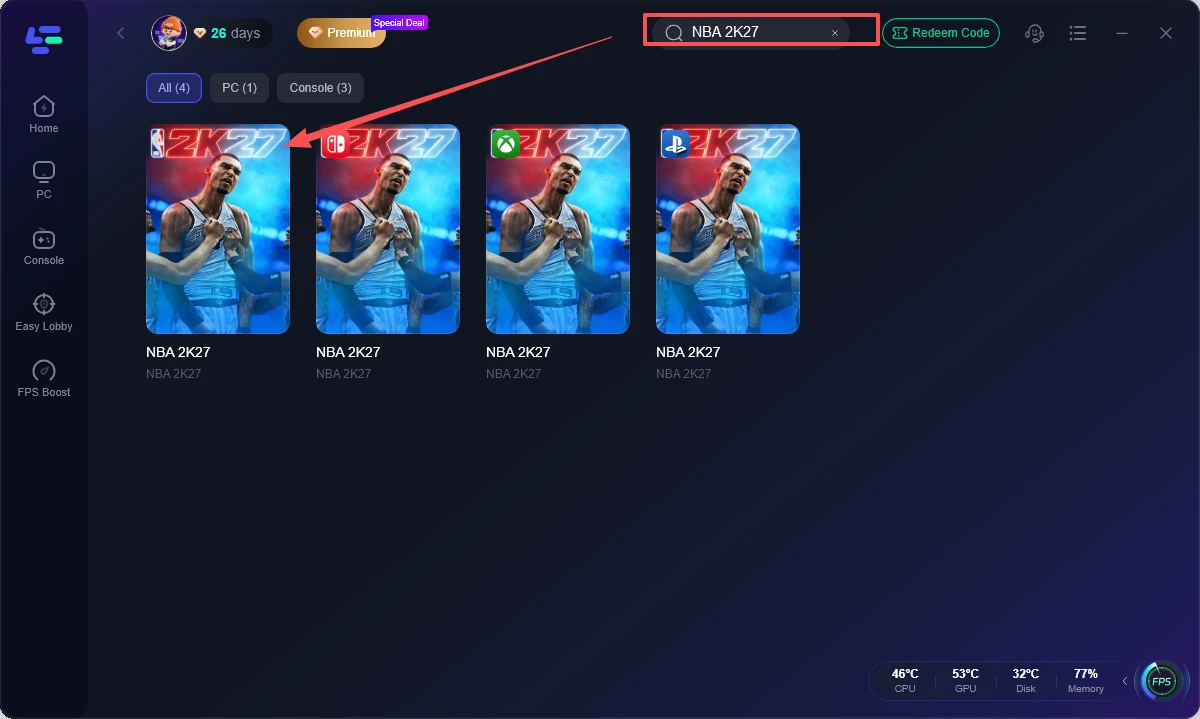
Step 3. Run the compatibility check. Let the tool verify whether the selected game and local installation can accept the DLSS 5 configuration. Do not assume every game is suitable simply because it uses DLSS.
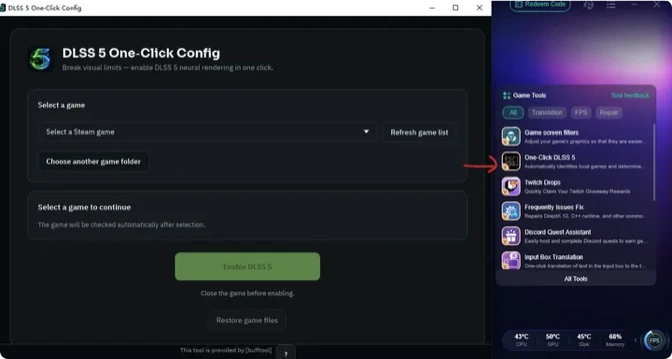
Step 4. Read the warning and confirm the change. The tool explains possible anti-cheat conflicts, FPS drops, stutter, visual defects, and hardware-load concerns before applying the files. Proceed only after reviewing the notice.
Step 5. Apply or restore the configuration. LagoFast can place the required files in the game directory so the game starts with the neural-rendering mode, and it provides a one-click restore option if the result is poor or an update breaks compatibility.
LagoFast does not turn an RTX 30 or RTX 20 card into officially supported hardware or guarantee playable FPS; its value is controlled file management and reversibility.
Part 6: Safe Testing, Settings and Troubleshooting
DLSS 5 is a visual-quality experiment, not a guaranteed FPS booster. The final image still depends on the input frame, render resolution, and graphics preset.
Use this testing order
- Update the GPU driver and restart the PC.
- Back up the game folder or use LagoFast’s restore option.
- Disable overlays and background recording during the first benchmark.
- Test an offline scene for ten minutes before trying online content.
- Watch GPU temperature, power draw, frametime, and input response.
- Remove the configuration if the game crashes, stutters, or shows severe artifacting.
Do not confuse network lag with neural-rendering latency. A stable ping does not fix a GPU-bound frame-time problem, and a DLSS 5 patch does not repair packet loss. If your game is online, LagoFast’s network optimization can be tested separately from the DLSS configuration so you know which change affected the result.
Part 7: FAQs
Can RTX 40 use DLSS 5 officially?
Official availability centers on RTX 50 hardware. RTX 40 cards can run experimental patched builds in some games, but that is not the same as official NVIDIA support.
Can RTX 4090 use DLSS 5?
The RTX 4090 has appeared in community tests using modified files. Expect game-specific behavior, possible FPS loss, added latency, and no official support guarantee.
Can RTX 4080 use DLSS 5?
Patched demonstrations have run on an RTX 4080. Treat the result as experimental and measure frame time and image quality instead of relying on a successful launch.
RTX 20 support remains experimental and uncertain. Community testing does not establish stable, official compatibility across Turing models.
Does DLSS 5 always increase FPS?
No. The neural-rendering stage can add substantial GPU workload. On older cards, FPS may drop sharply even if the image looks more realistic.
Is it safe to use a DLSS 5 patch in every game?
Can RTX 30 use DLSS 5?
Some RTX 30 cards can execute patched builds, but reported performance often falls to single digits or becomes extremely latency-heavy. The RTX 3090 may perform better than lower-tier Ampere cards, but it is still unofficial.
Can RTX 20 use DLSS 5?
No. Anti-cheat systems, game updates, file integrity checks, and unsupported DLL changes can cause errors or account-related risk. Test offline first and keep an easy restore path.
Key takeaway
RTX 50 Series is the official DLSS 5 platform, while RTX 40 compatibility is experimental and RTX 30 or RTX 20 results are far less practical. Before chasing a higher-quality image, measure FPS, frametime, latency, and stability. LagoFast Game Booster can simplify compatibility checks, automatic file configuration, warnings, and one-click restoration, giving older RTX owners a more controlled way to test the technology.

Boost Your Game with LagoFast for Epic Speed
Play harder, faster. LagoFast game booster eliminates stutter and lags on PC, mobile, or Mac—win every match!
Quickly Reduce Game Lag and Ping!
Boost FPS for Smoother Gameplay!