
If Call of Duty: Black Ops 7 refuses to launch—whether it's stuck on a black screen, crashes immediately, or simply doesn't load—this guide is your lifeline. We'll walk you through common causes, proven fixes, and how to optimize stability using LagoFast Game Booster.
Ukrainian version: Як виправити Call of Duty Black Ops 7 не запускається, не відкривається

- ✅ Reduce Lag and High Ping.
- ✅ Boost FPS at the Same Time.
- ✅ Ensure Stable Server Connection.
- ✅ Change Server without Latency.
- ✅ Fix Crashing and Stuck Errors.
- ✅ 0% Packet Loss Rate
- ✅ Boost Game Downloading Speed.
Part 1. Introduction to Launch Issues in Call of Duty: Black Ops 7
Part 2. Why Call of Duty: Black Ops 7 Won't Start or Load
Part 3. Troubleshooting Call of Duty: Black Ops 7 Not Launching
Part 4. Using LagoFast Game Booster to Enhance Launch Stability
Part 1. Introduction to Launch Issues in Call of Duty: Black Ops 7
Launch issues are unfortunately common in modern AAA games like Black Ops 7. Problems span from software conflicts and anti-cheat interruptions to corrupted game files or faulty hardware setups. Players across similar titles frequently report game launches failing with no error—just a return to desktop.
You May Like: How to Fix Call of Duty: Black Ops 7 Slow Download Speed - 100% Work
Part 2. Why Call of Duty: Black Ops 7 Won't Start or Load
Anti-Cheat or Remapping Software Conflicts
Tools like ReWASD, Logitech G Hub, iCUE, or device services have caused launch blocks—even after game uninstallation. The anti-cheat flags them and prohibits the game from running.
Background Software Conflicts
Apps like Riot Vanguard, overlays, or telemetry tools have been reported to interfere. On Reddit, users noted disabling all non-Microsoft services resolved launch issues.
Corrupted Game Files or Install Path Mismatches
Missing files or mismatched drive paths can prevent proper launch. Verifying file integrity often helps.
Antivirus or Firewall Overwatch
The game may be blocked from launching due to overzealous security settings. Ensuring Call of Duty is whitelisted helps.
Outdated Drivers, Software, or OS
Launch failures can stem from outdated graphics drivers, missing Visual C++ packages, or unsupported DirectX versions.
You May Like: Black Ops 7 Zombies – Full Overview, Maps, and Everything You Should Know
Part 3. Troubleshooting Call of Duty: Black Ops 7 Not Launching
Step 1: Disable Conflicting Software
Remove or fully uninstall software such as ReWASD, Logitech G Hub, or iCUE. If already uninstalled, use built-in uninstallers to remove residual files.
Disable all non-Microsoft services using msconfig and reboot.
Step 2: Repair Launchers & Verify Game Files
Battle.net / Steam / Xbox App: Use file verification or repair tools.
Step 3: Update Drivers & Windows
Install latest GPU drivers.
Ensure Windows is fully up-to-date.
Step 4: Exempt Game from Antivirus / Firewall
Add the game folder to antivirus exception lists.
Step 5: Clean Installation
Uninstall the game, delete leftover config files, then reinstall to a stable directory.
Step 6: Check Install Path & Missing Files
Verify installation drive. Mismatched drives caused failures in prior COD titles.
Watch the bootstrapper log for missing files and manually copy them into path if needed.
Step 7: Disable Overlays & Try Safe Mode Launch
Turn off Steam, OBS, and overlay apps.
Launch through Battle.net and choose Safe Mode if available.
Step 8: Verify Visual C++ & Adjust Config
Reinstall both x86 and x64 Visual C++ Redistributables.
Consider adding -dx11 or -d3d11 as launch option if DX12 issues arise.
Hot Related: How to Fix Call of Duty: Black Ops 7 Slow Download Speed - 100% Work
Part 4. Using LagoFast Game Booster to Enhance Launch Stability
LagoFast won’t directly fix corrupted files or software conflicts, but it can stabilize your connection and optimize performance—helpful if launch hangs or network timeouts occur.
Benefits:
- Smoother Overlay Load: Faster network connections help reduce launcher timeouts.
- Lower Latency: Minimizes launch hangs caused by poor Auth servers or CDN delays.
- Stability: Creates a reliable connection path for the game handshake, especially useful for Game Pass or Battle.net connection workflows.
How to Use LagoFast on PC
Step 1: Click the Free Trial button to download and install LagoFast.
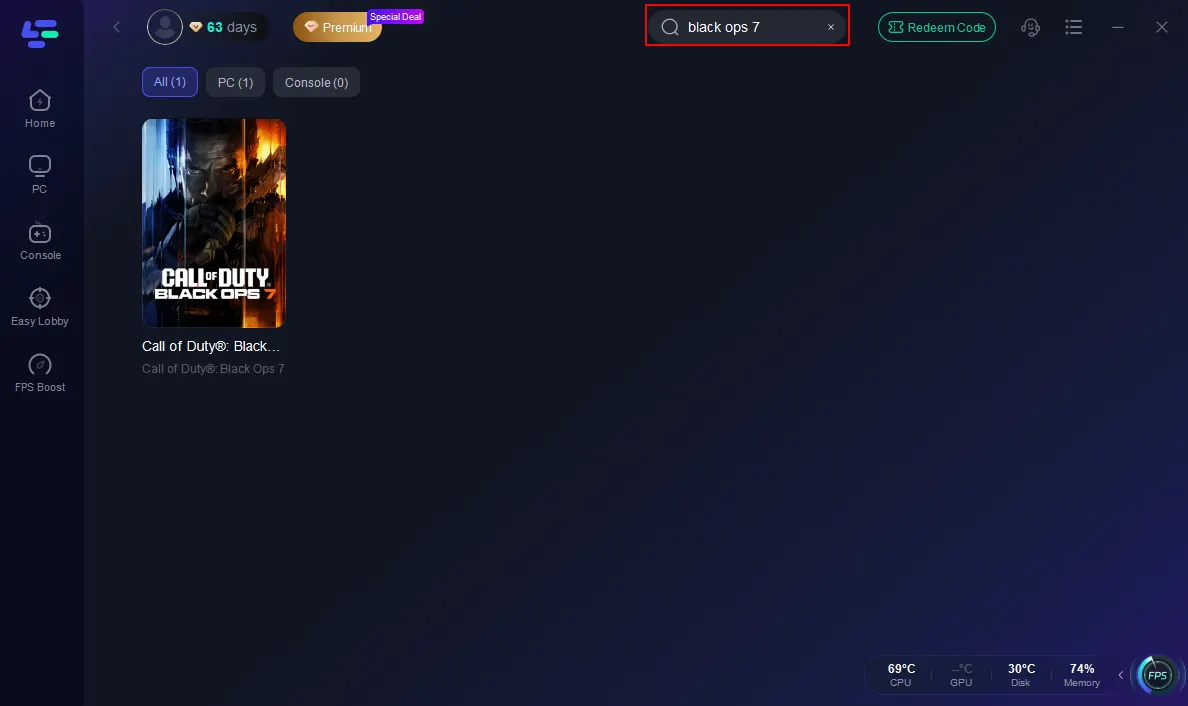
Step 2: Open LagoFast, then click the PC button on the left and search Black Ops 7 in the search bar, and click it after it appears.
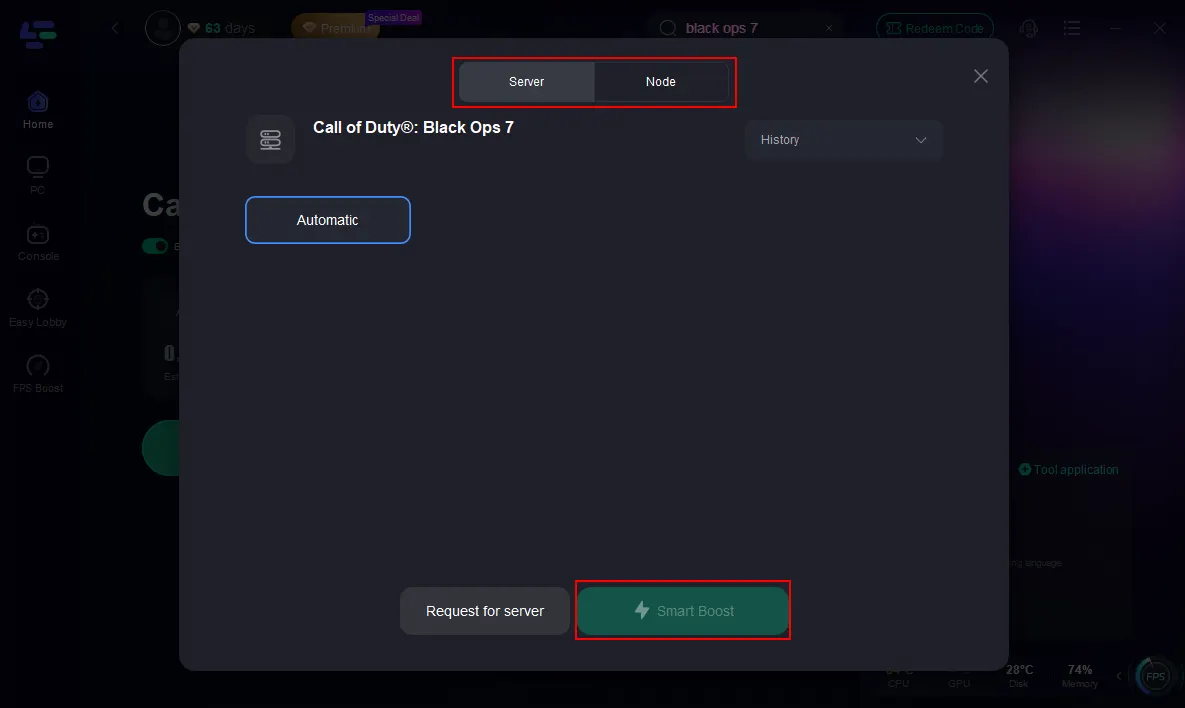
Step 3: Click on “Server” to change to a better server that ensures the Black Ops 7 gaming experience, then click on “Smart Boost”.
Step 4: Launch game and enjoy an enhanced gaming experience with reduced lag and improved stability.
How to Use LagoFast Box for Consoles
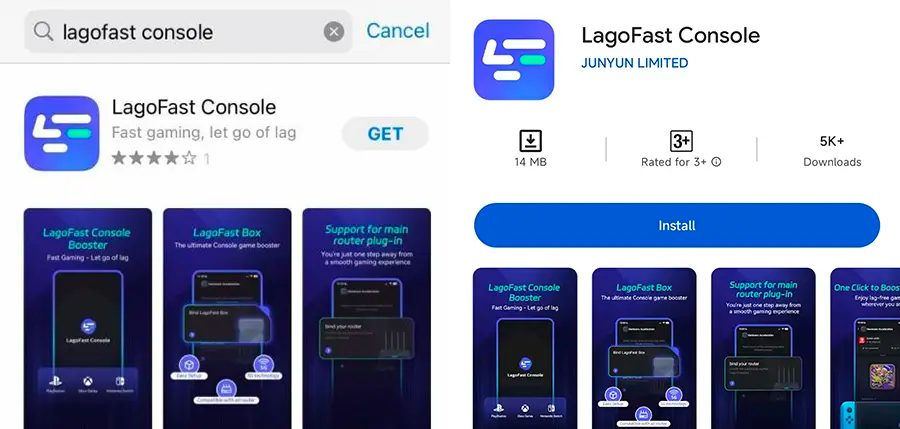
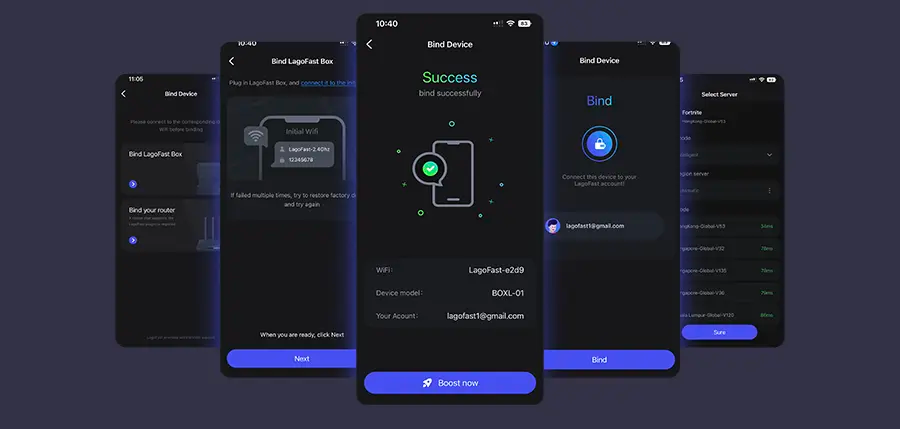
Step 1: Download the LagoFast Console App on your phone to control the LagoFast Box.
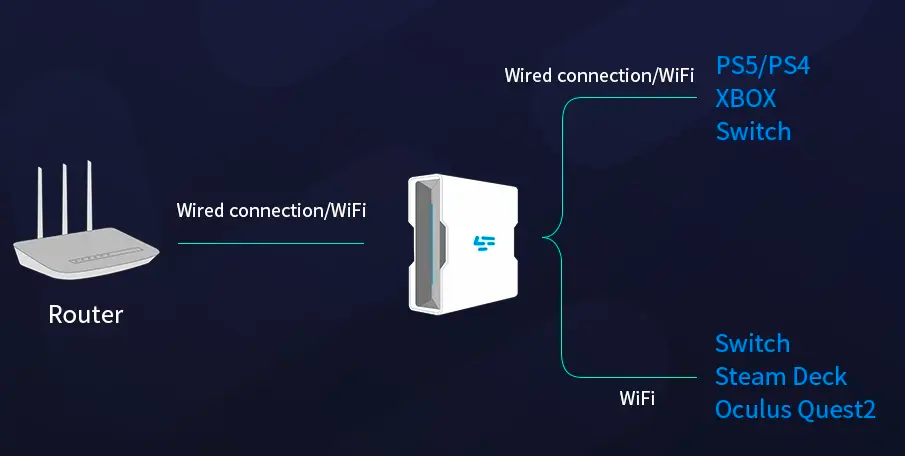
Step 2: Establish a connection between your LagoFast Box, router, and console, choosing between a wired or wireless connection.
Step 3: Launch the LagoFast Console App and boost Black Ops 7. Once you have completed the binding process with the LagoFast Box, proceed to boost this game within the LagoFast Console App.
Related Article: Call of Duty: Black Ops 7 Pre-Order Guide — Editions, Bonuses, and Game Pass Access
Part 5. FAQs
Q: Why does no error appear when CoD doesn’t start?
Often caused by software conflicts or anti-cheat blocking silent processes, not errors visible to the user.
Q: Does reinstalling always fix it?
Not always. If underlying conflicting software or file paths are still problematic, the issue may persist. Use clean installs and path checks.
Q: Should I disable all services?
Only non-Microsoft services. This clean boot helps isolate the culprit.
Q: Is Wi-Fi relevant here?
More for in-game performance; launch issues are rarely caused by network, unless the game can’t authenticate or download required assets.
Q: Does LagoFast help with launch issues?
Not directly—but it primes your network, helping reduce problems during login, DLC checks, and updates.
Conclusion
If Call of Duty: Black Ops 7 won’t start, it’s usually due to anti-cheat conflicts, background services, or outdated drivers. Follow the steps—from disabling conflicting apps, repairing the launcher, verifying file integrity, and reinstalling—to isolate troublemakers. For consoles or PCs, using LagoFast Game Booster or LagoFast Box can further stabilize connections, reduce latency, and enhance overall launch and gameplay experience.

Boost Your Game with LagoFast for Epic Speed
Play harder, faster. LagoFast game booster eliminates stutter and lags on PC, mobile, or Mac—win every match!
Quickly Reduce Game Lag and Ping!
Boost FPS for Smoother Gameplay!