

On October 9, 2025, at 8:00 AM (UTC+8), the highly anticipated anime-style MMORPG Blue Protocol: Star Resonance officially launched worldwide, marking its full release across PC and mobile platforms. As players from around the globe began exploring the vast world of Magna, familiar online challenges such as lag and connection instability surfaced once again. Many users have reported high latency, slow loading speeds, and occasional disconnects in community forums. This article will analyze the main causes of lag in Blue Protocol: Star Resonance and share practical solutions to help players achieve a smoother and more stable gameplay experience.

- ✅ Reduce Lag and High Ping.
- ✅ Boost FPS at the Same Time.
- ✅ Support 2000+ Popular Online Games.
- ✅ Fix Connection Issues.
Part 1: Blue Protocol: Star Resonance Overview
Part 2: Why Lag Occurs in Blue Protocol: Star Resonance
Part 3: How to Fix Lag in Blue Protocol: Star Resonance
Part 4: How to Check Lag in Blue Protocol: Star Resonance
Part 1: Blue Protocol: Star Resonance Overview
Blue Protocol: Star Resonance is a free-to-play, cross-platform MMORPG developed by Shanghai Bokura Network Technology and published by A PLUS JAPAN. Set in the fantasy open world of Magna, players embark on adventures as "Resonators," wielding unique star-powered abilities. Including highlights below:
- Open-world exploration across diverse landscapes.
- Dynamic combat with customizable skill trees.
- Cross-platform play (PC, iOS, Android).
- Deep character customization and story-driven quests.
The game initially launched its China-exclusive test on July 17, 2025, and officially rolled out globally on October 9, 2025, across PC (Steam, Epic Games) and mobile platforms (iOS, Android).
Part 2: Why Lag Occurs in Blue Protocol: Star Resonance
Lag in Blue Protocol: Star Resonance typically stems from:
1. Server Connection Route Congestion
Given that over 9.8 million players have pre-registered for Blue Protocol: Star Resonance, the massive player base will cause congestion in server connection routes during the initial server launch period. This results in lag and slow loading times when players attempt to access the game.
2. Geographical Server Distance
- Chinese servers are physically distant from players in North America, Europe, or Southeast Asia, causing high ping (>150ms).
- Network congestion during peak hours exacerbates delays.
3. Device Performance Limits
- Blue Protocol: Star Resonance has a file package size of 23GB on PC, while the mobile version requires approximately 6.9GB (Android) and 7GB (iOS) of storage space. Insufficient storage space on players' devices can restrict game loading speeds and lead to lag issues.
- Outdated hardware or low VRAM can lead to stuttering in graphically rich areas.
4. Network Configuration Issues
- ISP throttling or unstable Wi-Fi connections disrupt data packets.
- Background apps (e.g., cloud sync, updates) consume bandwidth.
Part 3: How to Fix Lag in Blue Protocol: Star Resonance
1. Best Solution - LagoFast
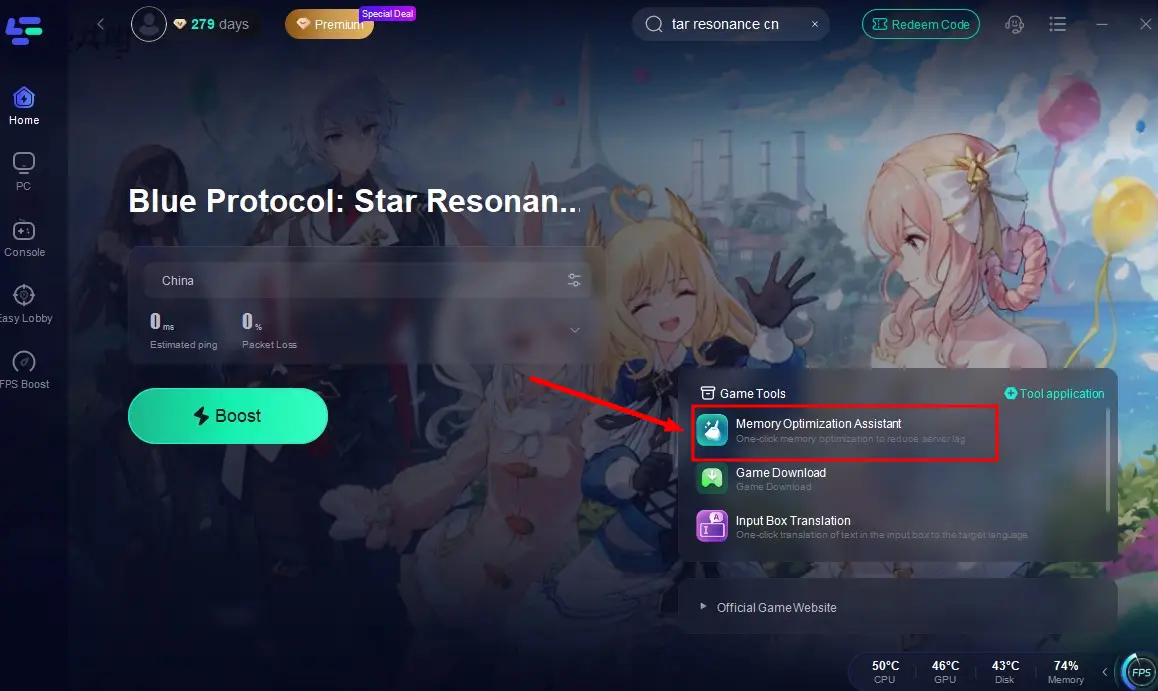
LagoFast, as an experienced game booster, has been committed to creating the most stable server connections for players over the years. Using intelligent algorithms for analysis and automatic optimization, it effectively enhances game loading speeds and operational smoothness, reducing lag to deliver the most seamless gaming experience. Additionally, its memory optimization tool helps players free up device memory with one click, creating more space for Blue Protocol: Star Resonance to run and further resolving lag issues.
How to Fix Lag in Blue Protocol: Star Resonance on PC by LagoFast:
Step 1: Click the Free Trial button to download and install LagoFast.
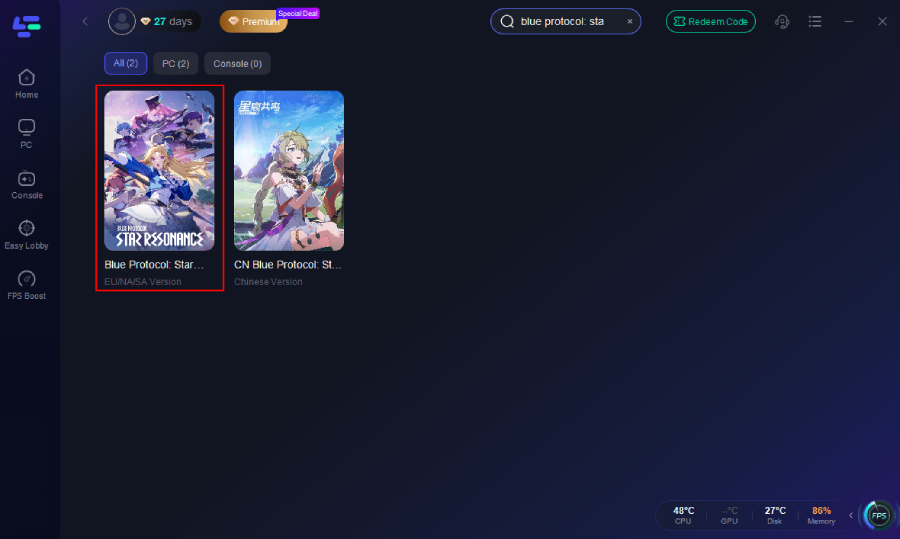
Step 2: Open LagoFast, then click the PC button on the left and search Blue Protocol: Star Resonance in the search bar, and click it after it appears.
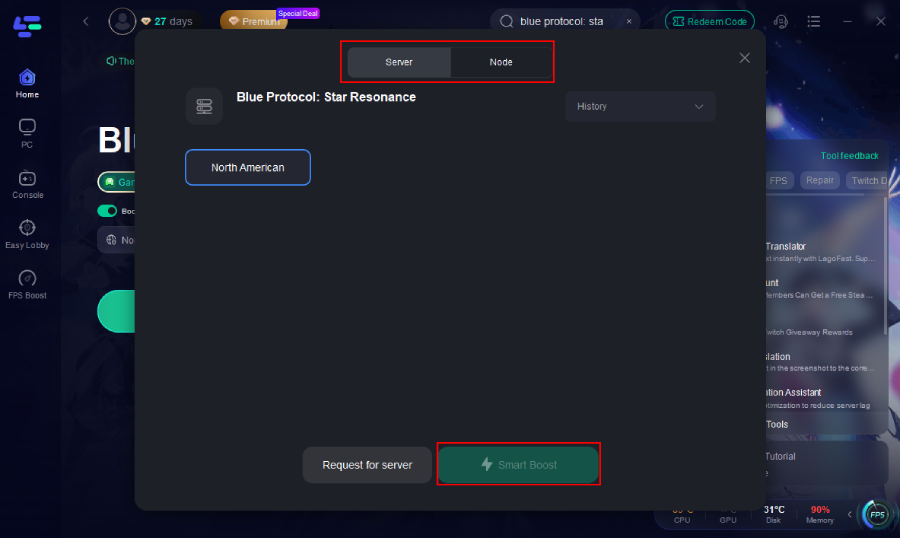
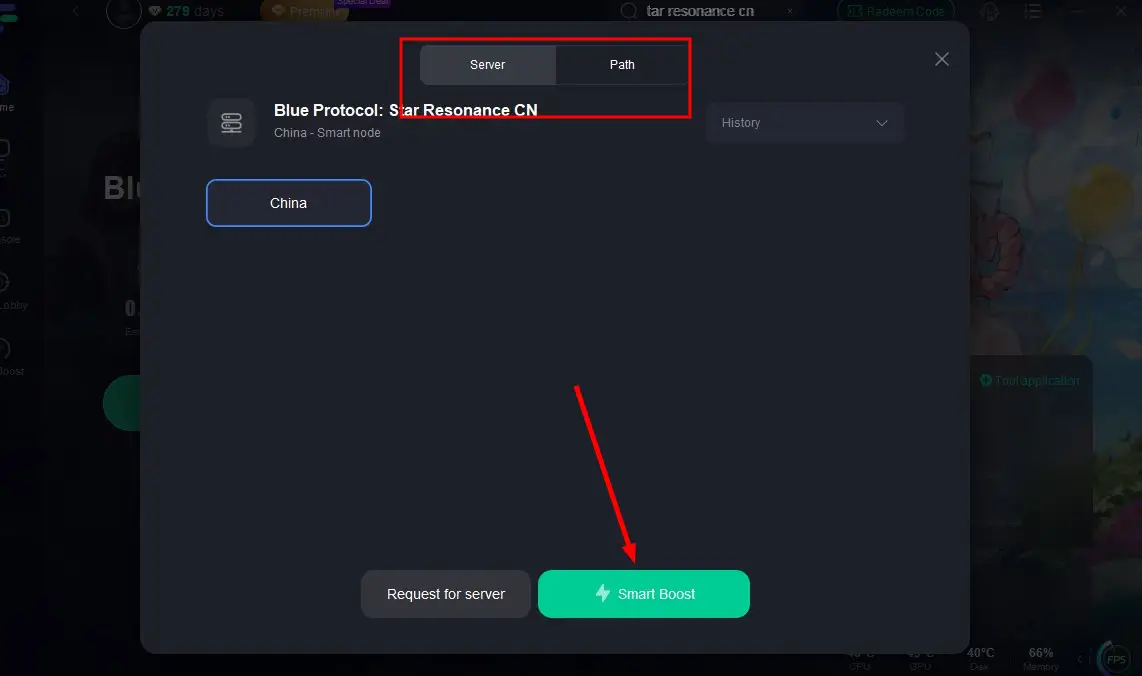
Step 3: Click on “Server” to change to a better server that ensures the Blue Protocol: Star Resonance gaming experience, then click on “Smart Boost.”
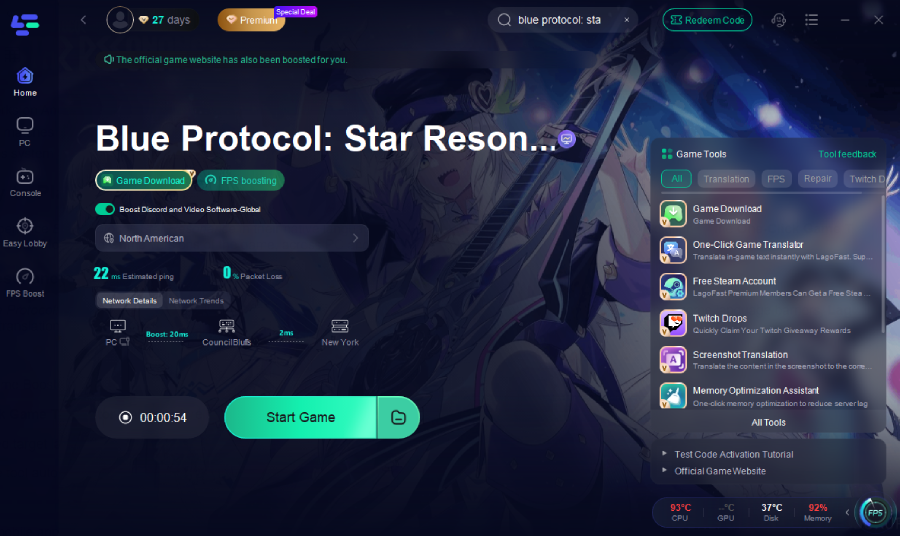
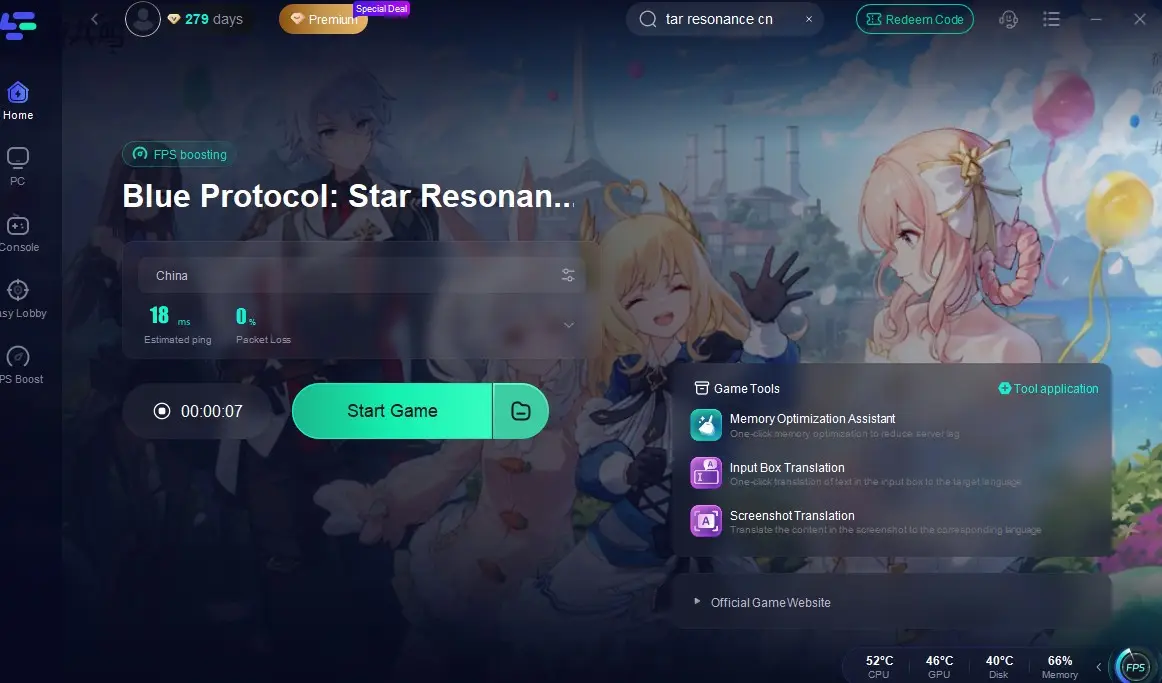
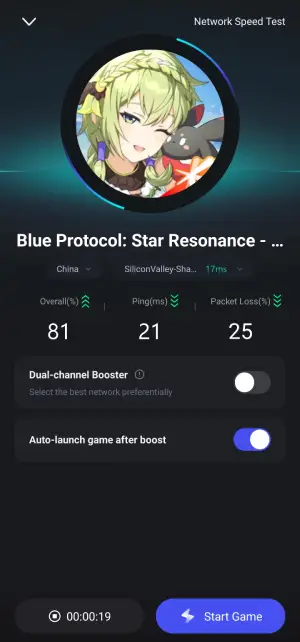
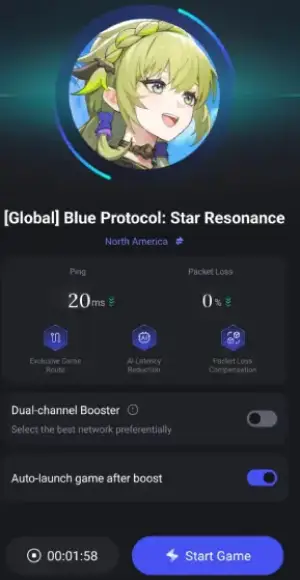
Step 4: Check the specific game ping, packet loss, and multiple path connections. Finally, click “Start Game” to play the game.
Step-by-Step Guide of Using LagoFast to Boost Blue Protocol: Star Resonance CN:
Step 1: Click the "Free Trial" button below to download and install LagoFast.
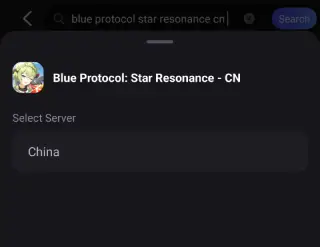
Step 2: Search for Blue Protocol: Star Resonance(currently only Chinese version) in LagoFast or find it in the game library.
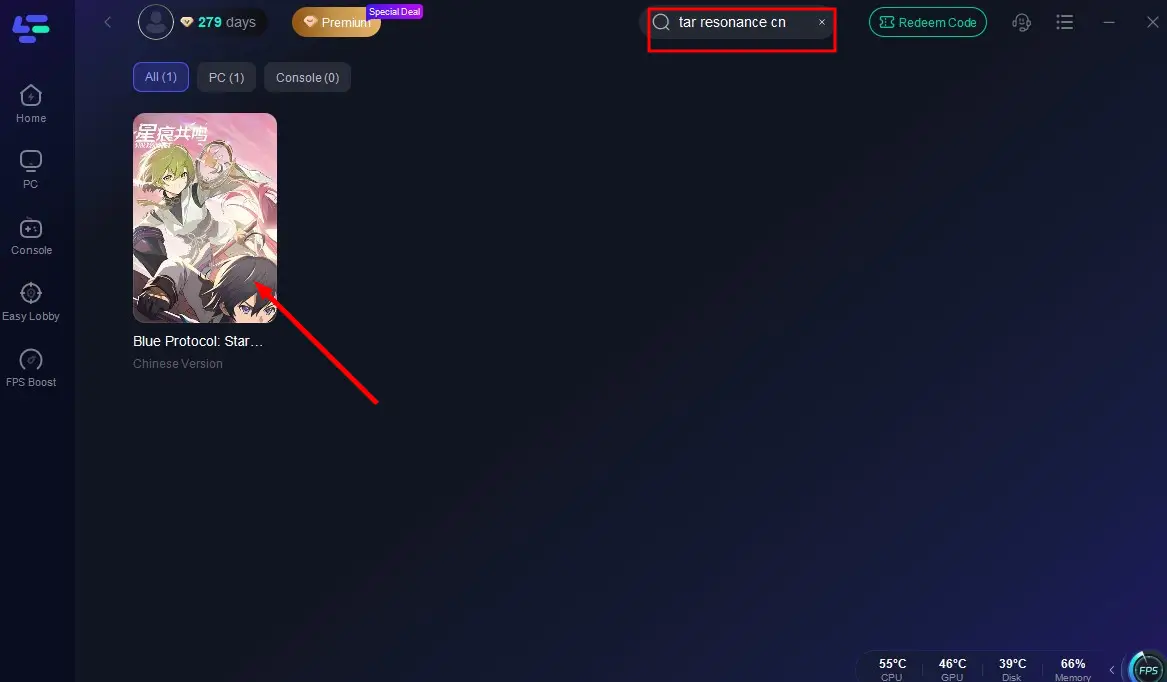
Step 3: Click "Select Server" to choose an optimal server, then click "Smart Boost" to start real-time optimization.
Step 4: After successful acceleration, click "Start Game" to enjoy lag-free gameplay.
Don’t forget: LagoFast’s memory optimization tool can further enhance smoothness!
How to Reduce Lag in Blue Protocol: Star Resonance on Mobile:
Step 1: Download LagoFast Mobile from Google Play or the App Store, or scan the QR code below.

Step 2: After installation, search for "Blue Protocol: Star Resonance" in LagoFast's search bar.
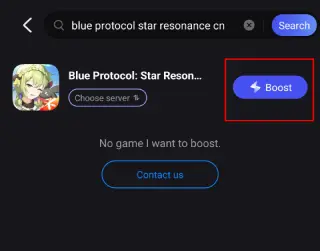
Step 3: Select a suitable server node to connect to.
Step 4: Once optimized performance is confirmed, click "Start Game" to launch the game.
Blue Protocol: Star Resonance Global PC gameplay network dashboard showing game ping, packet loss rate, and multiple path connections optimized by LagoFast.”
2. Verify System Requirements
Blue Protocol: Star Resonance demands high system specifications due to its large file size. Ensuring your device meets or exceeds the requirements below can significantly reduce lag:
PC
Minimum Requirements:
- OS: Windows 10 64-bit
- Processor: Intel Core i7-8700 / AMD Ryzen 5 3600 or equivalent
- GPU: NVIDIA GeForce GTX 1060 6GB / AMD Radeon RX 580 or equivalent
- RAM: 12GB+
- Storage: SSD with 35GB free space
Supported Requirements:
- OS: Windows 10 64-bit
- Processor: Intel Core i7-11700K / AMD Ryzen 7 5700X or equivalent
- GPU: NVIDIA GeForce RTX 2060 / AMD Radeon RX 5600 XT or equivalent
- RAM: 16GB+
- Storage: SSD with 35GB free space
Recommended Requirements:
- OS: Windows 10 64-bit
- Processor: Intel Core i7-13700K / AMD Ryzen 9 7900 or equivalent
- GPU: NVIDIA GeForce RTX 3070 / AMD Radeon RX 6750 XT or equivalent
- RAM: 32GB+
- Storage: SSD with 35GB free space
Android
Minimum Requirements:
- OS: Android 10+
- CPU: Qualcomm Snapdragon 778G / MediaTek Dimensity 1000L / HiSilicon Kirin 985 / Samsung Exynos 9825 or equivalent
Supported Requirements:
- CPU: Qualcomm Snapdragon 7+ Gen 2 / MediaTek Dimensity 8200 / HiSilicon Kirin 9000 / Samsung Exynos 2200 or equivalent
Recommended Requirements:
- CPU: Qualcomm Snapdragon 8 Gen 2 / MediaTek Dimensity 9200 or equivalent
iOS:
Minimum Requirements:
- OS: iOS 15+
- Device: iPhone 11+ / iPad with A13+ chip, 4GB+ RAM
Supported Requirements:
- Device: iPhone 12 Pro+ / iPad with A14+ chip, 6GB+ RAM
Recommended Requirements:
- Device: iPhone 14 Pro+ / iPad with A16+ chip, 6GB+ RAM
3. Optimize In-Game Settings
Lower graphics settings:
- Resolution: 1080p or lower.
- Effects/Shadows: Medium or Low.
- Render Scale: 75%.
- Disable V-Sync and Motion Blur.
4. Upgrade Hardware/Network
- For PCs: Ensure drivers (GPU, network) are updated. Use an SSD for faster loading.
- For Mobile: Close background apps and use 5GHz Wi-Fi.
- Ethernet Connection: Prefer wired connections over Wi-Fi.
5. Monitor Network
- Use tools like PingPlotter or Speedtest to check for packet loss or jitter.
- Contact your ISP if latency persists during off-peak hours.
Part 4: How to Check Lag in Blue Protocol: Star Resonance
1. Built-in Network Stats: Press Ctrl + Shift + N in-game to view real-time ping, FPS, and packet loss.
2. Manual Testing:
- Perform a trace route to the game server:
- Open Command Prompt: tracert blueprotocol-cn.lagofast.com
- Analyze hops for high Ping nodes.
Conclusion
While the China-exclusive test of Blue Protocol: Star Resonance offers a sneak peek into its immersive world, lag remains a hurdle for global players. By combining LagoFast with hardware/network optimizations, you can minimize delays and enjoy smoother gameplay.

Boost Your Game with LagoFast for Epic Speed
Play harder, faster. LagoFast game booster eliminates stutter and lags on PC, mobile, or Mac—win every match!
Quickly Reduce Game Lag and Ping!
Boost FPS for Smoother Gameplay!