
Arena Breakout: Infinite is one of the most ambitious tactical shooters of the decade, but like many new online games, it’s had its fair share of growing pains. Players often run into frustrating problems like connection drops, update freezes, RAM limitation warnings, and confusing error codes that don’t explain much. From failed downloads to anti-cheat lockouts, these issues can make it tough to enjoy the game. This guide gives you the complete guide to Arena Breakout Infinity errors and issues, what they actually mean, and how to fix them faster.

- ✅ Reduce Lag and High Ping.
- ✅ Boost FPS at the Same Time.
- ✅ Support 2000+ Online Games.
- ✅ Change Region Server Quickly.
- ✅ Multiplatform Game Support.
Part 1: Arena Breakout Infinity common issues
Part 2: Arena Breakout Infinity All Error Codes
Part 1: Arena Breakout Infinity common issues
Arena Breakout Infinity Connection Error: “Please Try Again Later”
Symptoms
- A popup says “Arena Breakout Connection Error. Please try again later.”
- The game fails to connect to matchmaking or drops back to the login screen.
- Players on EU servers report frequent regional outages.
Why It Happens
- Server outages or maintenance: Often temporary and not caused by your PC.
- ISP routing issues: Poor routes to Arena Breakout servers (especially cross-region play).
- Firewall or antivirus blocking traffic: Security software sometimes flags the launcher or anti-cheat.
Fixes
- Check server status first on Discord, Twitter/X, or Downdetector.
- Switch servers temporarily if possible.
- Restart your router and PC.
Flush DNS (Windows):
4. ipconfig /flushdns
5. Add the launcher and ACE-Client.exe (anti-cheat) to your firewall/antivirus whitelist.
6. If the error persists but friends can connect, try a gaming VPN to bypass routing issues.
Network Error on Arena Breakout Infinity
Symptoms
- Message: “Network error. Please check your network connection.”
- The game disconnects completely or freezes during raids.
- Some players reported that Wi-Fi crashes their entire internet connection.
Why It Happens
- Wi-Fi adapter driver crashes under heavy packet loads (common in Unreal Engine games).
- Router firmware bugs or QoS misconfiguration.
- Weak Wi-Fi signal or unstable ISP routing.
Fixes
1. Use a wired connection (Ethernet) – confirmed to fix total network drops.
2. Update Wi-Fi drivers in Device Manager and disable “Allow computer to turn off this device.”
3. Adjust adapter settings:
- Disable 802.11 Power Save Mode.
- Set Roaming Aggressiveness to lowest.
4. Update your router firmware; enable QoS or gaming mode.
5. Test with a USB Wi-Fi dongle to rule out hardware failure.
Arena Breakout Update Error (Stuck at 93–97%)
Symptoms
- Update progress freezes around 93–97% even though the timer counts up.
- Some users see “Need more space” warnings even with available storage.
Why It Happens
- The launcher UI is bugged; the update installs in the background while the progress bar stalls.
- Antivirus or security settings slow down file verification.
- Limited temporary storage during patching.
Fixes
1. Wait 15–30 minutes: The update often completes even if the bar is stuck.
2. Run the launcher as Administrator:
- Right-click arena_breakout_infinite_launcher.exe → Run as Administrator.
3. Free up 20–30 GB of storage to avoid temporary space errors.
4. Use startup_runner.exe in the install folder to push past 93%.
5. For future updates, use the Steam client (fewer UI bugs).
Login Error Arena Breakout
Symptoms
- “Network error” or “Failed to login” loops.
- Players in the UK, France, and South Africa on EU servers reported mass login failures while friends already in games played normally.
Why It Happens
- Server-side authentication outages or maintenance.
- Regional routing instability.
Fixes
- Check Discord announcements – if servers are down, wait for them to recover.
- Try another server region temporarily.
- Clear DNS cache and restart your PC.
- Avoid unnecessary reinstalls: This is usually not your setup’s fault.
Arena Breakout RAM Error
Symptoms
- Game refuses to launch with a warning that you don’t have enough RAM.
- Common on laptops with 8GB RAM or GPUs with only 4GB VRAM.
Why It Happens
- Minimum requirement is 12–16GB RAM and ~6GB VRAM.
- ABI is an Unreal Engine 5 game; bypassing this check isn’t viable because the game will crash or perform poorly.
Fixes
1. Upgrade laptop RAM:
- Lenovo IdeaPad Gaming 3, for example, has two RAM slots.
- Add another 8GB DDR4 SODIMM stick (cheap, ~€20).
2. Increase Windows paging file:
- Control Panel → System → Advanced → Performance → Virtual Memory → System Managed Size.
3. Close all background apps to free memory.
4. Long term: Upgrade to a PC or GPU with 8GB+ VRAM.
Arena Breakout Initialization Error
Symptoms
The game fails to start after pressing “Launch”:
- No error message.
- Or errors pointing to missing executables or anti-cheat issues.
Some players noticed their taskbar shortcut pointed to an outdated path after reinstall.
Why It Happens
- Launcher shortcut mismatch after reinstall.
- Corrupted anti-cheat (ACE) installation.
- Missing administrator privileges.
Fixes
Uninstall both game and launcher. Delete leftover folders:
1. C:\Program Files (x86)\Arena Breakout Infinite\
C:\Users\<Name>\AppData\Local\ArenaBreakoutInfinite\
2. Reinstall and use the new desktop shortcut with the shield icon (Administrator).
3. Run both launcher and ArenaBreakoutInfinite.exe as Administrator.
4. If anti-cheat is corrupted:
- Boot into Safe Mode with Networking.
- Launch ABI once to let ACE reinstall.
- Reboot normally.
5. Whitelist game and ACE in antivirus.
Part 2: Arena Breakout Infinity All Error Codes
Error 212: “Onconnectproc Unknown Error 212”
What It Means
This is one of the most widely reported Arena Breakout errors. It indicates a session authentication failure between the launcher and the game servers. It often appears:
- After your PC wakes from sleep mode.
- If your network briefly disconnects.
- When the launcher’s session token expires but doesn’t refresh.
Fix
- Log out of the launcher.
- Completely close it.
- Reopen and log back in.
- Launch the game.
Players have confirmed this fix still works in August 2025. If the error persists, restart your PC or flush your DNS cache with:
ipconfig /flushdns
Error 4_28: “Connection Failed [4_28]”
What It Means
Error 4_28 indicates a routing or CDN authentication failure at the login stage. It’s common in:
- Regions where Arena Breakout servers are partially deployed.
- Situations where your ISP’s routing to the login/CDN servers is broken.
- Times when large updates or pre-season content packs are being rolled out.
The fact that VPNs consistently fix this proves it’s not your device but your network path.
Fix
- Update the game fully: Some players saw this error vanish after a 1.6GB pre-season patch.
- Disable Private DNS/custom DNS on Android or routers.
- Switch networks: Try mobile data, another Wi-Fi, or tethering.
- Reset network settings on your phone or PC.
- Use a gaming optimize tool until your ISP/CDN route stabilizes.
If you’re still experiencing unstable connections, high ping, or frequent disconnects even after troubleshooting, consider using a gaming optimization tool like LagoFast. It can reroute your traffic through more stable servers, reduce latency, and smooth out gameplay while your ISP or CDN route stabilizes. This is especially helpful during major updates, peak hours, or if you’re playing on servers outside your region.
Follow our detailed guide to quickly set up LagoFast and enjoy your gameplay again!
Step 1: Download and install LagoFast
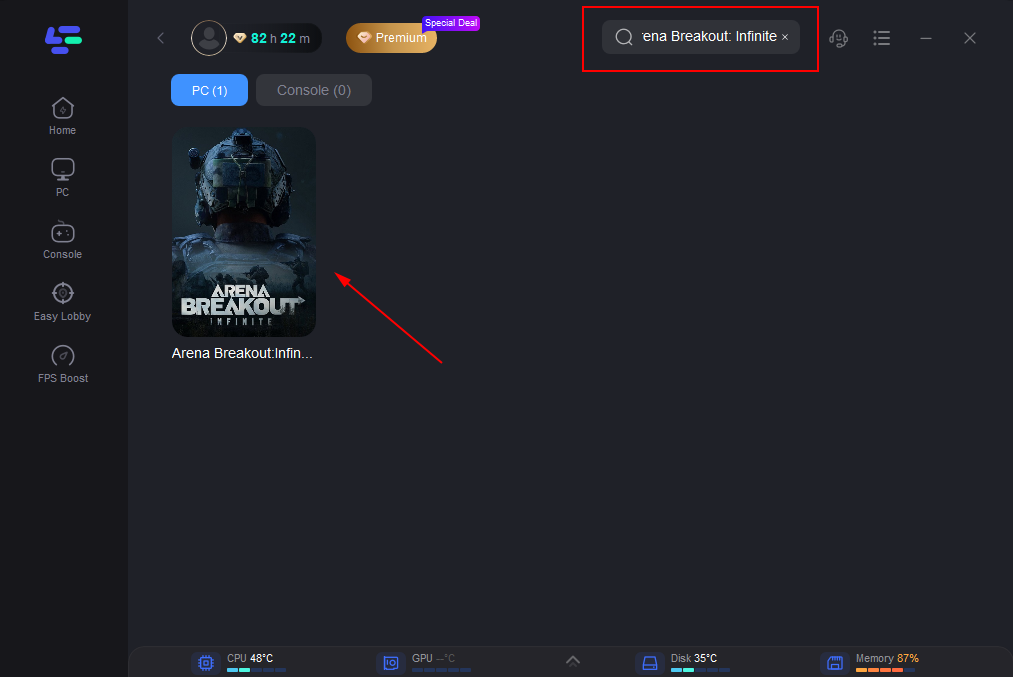
Step 2: Type “Arena Breakout: Infinite” in the search box and select the game from the list
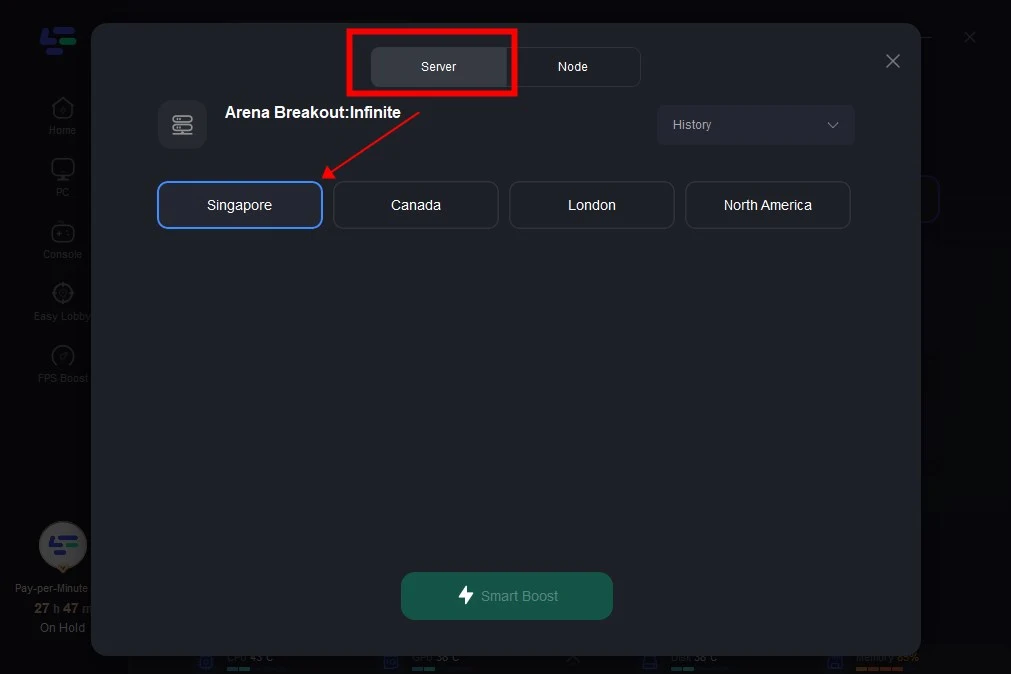
Step 3: Select the server and node that suits you
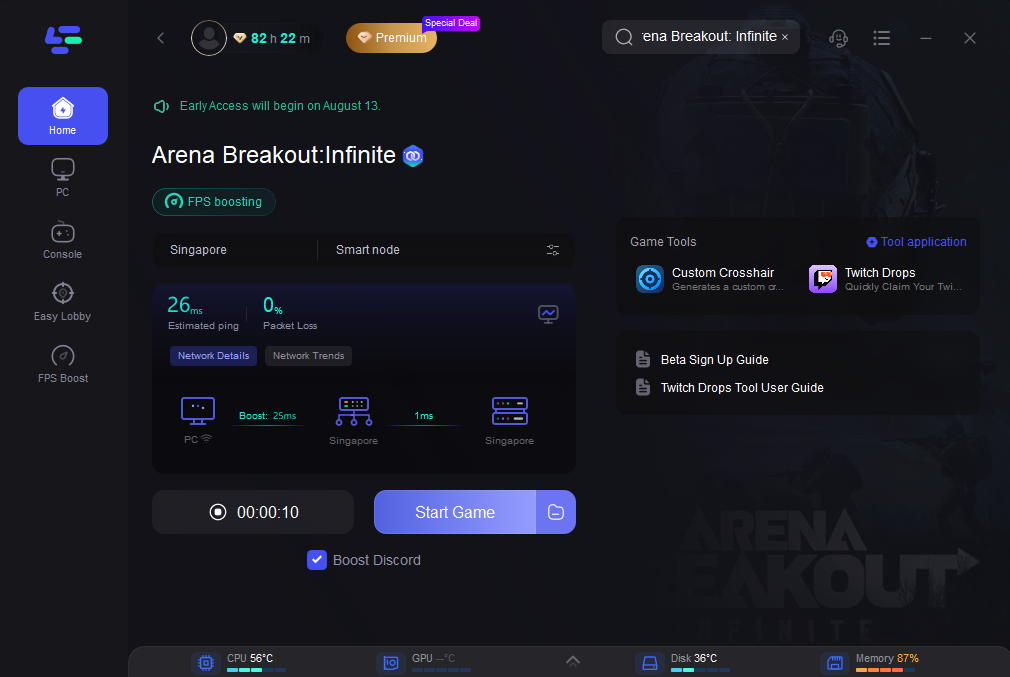
Step 4: The boost page will display data about packet loss, network status, and your ping. Launch Arena Breakout: Infinite and play without lag!
Error 7801110: Launcher Initialization Failure
What It Means
7801110 is a launcher initialization error that typically means:
- Missing or corrupted launcher configuration files.
- Conflicts with antivirus or firewall settings.
- Problems with the Tencent game launcher’s registry entries.
Fix
- Run the launcher as Administrator.
- Whitelist the launcher folder in your antivirus.
- Delete the Config folder inside your Arena Breakout install directory; it will rebuild automatically.
- If that fails, uninstall and reinstall the launcher from the official site.
Error 7801113: Launcher Update Error
What It Means
This error is closely related to 7801110 but happens when the launcher itself fails to update or verify its files.
Fix
1. Delete launcher cache:
Navigate to:
C:\Users\<Name>\AppData\Local\ArenaBreakoutLauncher\
- and clear the contents.
2. Reinstall the launcher.
3. Use a different install directory (not the default C:\Arena Breakout Infinite)
4. Temporarily disable antivirus during install.
5. Error 554696704: Anti-Cheat Service Block
What It Means
This error indicates that ACE (Arena Breakout’s anti-cheat) cannot run or hook into the game. Causes include:
- Missing ACE services.
- Corrupted ACE files after an update.
- Conflicts with third-party security software.
Fix
Open your Arena Breakout folder and delete the entire ACE folder:
1. C:\Program Files (x86)\Arena Breakout Infinite\ACE\
2. Relaunch the game; ACE will reinstall itself.
3.Restart your PC.
4. Add ACE to your firewall/antivirus whitelist.
5. Error 1400015: “Can’t Run Game”
What It Means
Another anti-cheat-related issue, this error is a launch failure triggered by ACE corruption or missing dependencies.
Fix
Same as Error 554696704:
- Delete the ACE folder, relaunch, and let the game reinstall anti-cheat.
- Reboot and retry.
Error 154140716: Game Integrity Check Failure
What It Means
This error means game file integrity validation failed. It usually happens after partial updates or manual folder moves.
Fix
- In the launcher, click Repair (if available).
- If the repair fails, delete and reinstall the game.
- Avoid moving the install folder manually; use the launcher’s built-in tools.
Error 1400006: Anti-Cheat Initialization Timeout
What It Means
ACE cannot start or register in time. This happens when:
- ACE is blocked by security software.
- The Windows service fails to initialize due to missing permissions.
Fix
- Run the launcher as Administrator.
- Ensure Windows is updated (anti-cheat requires latest certificates).
- Reinstall ACE manually by deleting its folder and relaunching.
Error 7812023: “Failed to Download Patch Files”
What It Means
This error appears when the launcher fails to create patch directories or download temporary update files.
Fix
1. Run the launcher as Administrator.
2. Change the installation path:
- Uninstall and reinstall to a folder like C:\Games\Arena Breakout Infinite.
3. Disable antivirus and check for disk space.
4. Clear temporary launcher cache in:
C:\Users\<Name>\AppData\Local\ArenaBreakoutLauncher\
Error 7812031: “Insufficient Disk Space or Permissions”
What It Means
Similar to 7812023, but this one specifically flags insufficient permissions or folder write access.
Fix
- Cancel the current download and restart installation.
- Pick a custom install directory away from C:\.
- Right-click the launcher and run as Administrator.
- Check folder permissions under Properties → Security and ensure your account has Full Control.
Conclusion
Arena Breakout: Infinite is packed with potential, but its errors and bugs can be frustrating. This guide gives you quick, clear solutions to the most common Arena Breakout Infinity issues in 2025 so you can get back to playing with minimal downtime.
Boost Your Game with LagoFast for Epic Speed
Play harder, faster. LagoFast game booster eliminates stutter and lags on PC, mobile, or Mac—win every match!
Quickly Reduce Game Lag and Ping!
Boost FPS for Smoother Gameplay!