

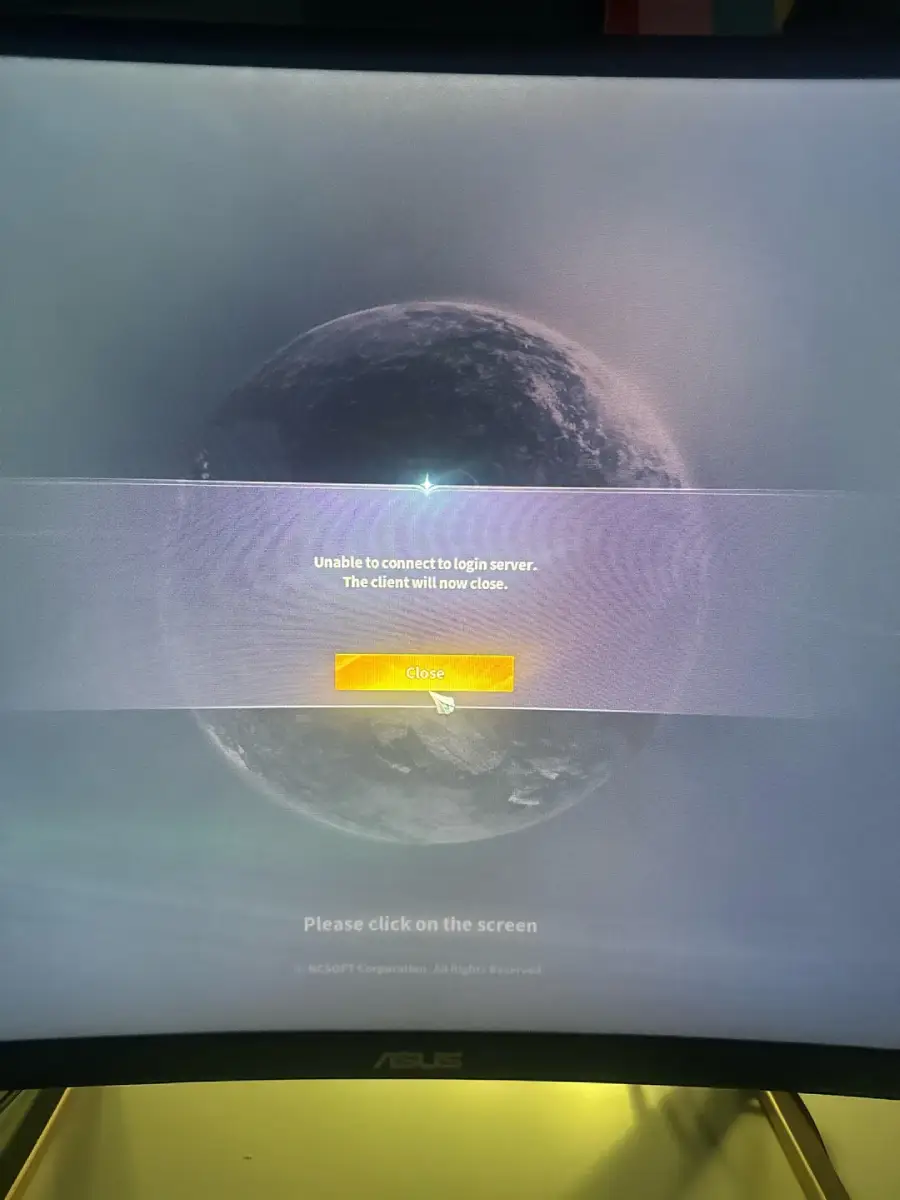
Trying to launch AION 2 but stuck with an "Unable to Connect to Login Server" error? You are not alone. Some players have reported suddenly losing access after the game previously worked normally.
One Reddit player shared:
"Been on a few hours today, now just get this message, for the last 1h tryna log in, i give up. What does this even mean?!"
This issue usually happens during login, causing the client to close, preventing access to the server list, or showing AION 2 login server error messages. It is often related to network instability, regional restrictions, or PURPLE launcher issues, especially for overseas players.This guide covers the causes and fixes for AION 2 cannot connect to login server errors.
Part 1: Common Causes of Login Server Connection Issues
Part 2: Steps to Fix Aion 2 Unable to Connect to Login Server
Part 3: Enhance Your Login Experience with LagoFast Game Booster
Part 1: Common Causes of Login Server Connection Issues Aion 2
When dealing with Aion 2 login problems, several factors typically contribute to the connection failures. Identifying the specific cause affecting your access is the first step toward implementing an effective solution.
Network Instability
Long-distance connections to AION 2 servers in Taiwan or Korea can cause high ping, packet loss, and poor routing. These issues may lead to slow loading, authentication failures, or disconnects during login.
Regional Restrictions
Some overseas players may encounter AION 2 TW login server errors due to regional access restrictions or IP blocks. This can happen even if the game previously worked normally.
PURPLE Launcher Problems
Incorrect account regions, outdated PURPLE versions, corrupted cache files, or firewall interference can prevent AION 2 from reaching the login server or server list.
System Configuration Issues
Missing Visual C++ or DirectX components, antivirus blocking, firewall rules, or background software conflicts may also interrupt the login process.
Part 2: Steps to Fix Aion 2 Unable to Connect to Login Server
Thankfully, most login connection issues in Aion 2 can be resolved through methodical troubleshooting. These proven techniques address the most common causes and have helped numerous players restore their access to the game.
1. Check AION 2 Server Status
Before troubleshooting, check whether AION 2 servers are running normally. If many players receive AION 2 login server error or AION 2 login server unavailable messages at the same time, the issue may be server-related.
Check official updates or community reports first. If servers are working, continue with the fixes below.
2. Fix AION 2 Client Closes After Unable to Connect to Login Server
Some players find that AION 2 shows the logo, fails to connect, and then closes automatically. This issue is often related to PURPLE connection problems, corrupted files, or blocked game services.
Try these fixes:
- Restart PURPLE and clear its cache.
- Repair AION 2 game files.
- Check firewall or antivirus settings.
- Close background programs that may interfere.
If the issue continues, optimizing your network connection may help stabilize the login process.
3. Optimize the Network Connection
Overseas players may experience login failures because of long-distance routing, high ping, or packet loss. A gaming accelerator such as LagoFast can optimize the route to AION 2 Taiwan or Korea servers.
Select AION 2 in LagoFast, choose a Taiwan or Korea node, start acceleration, and then launch PURPLE.
4. Check the Account Region
Make sure your PURPLE account region matches the AION 2 client and server region. An incorrect region setting may prevent authentication or access to the server list.
5. Repair PURPLE and Game Files
Exit PURPLE completely, clear its cache, and restart the launcher. You can also use the repair function to check game files.
If the problem continues, reinstall the latest version of PURPLE from the official website.
6. Check System and Security Settings
Update Microsoft Visual C++ components, DirectX, Windows, and graphics drivers. Add PURPLE and AION 2 to your firewall and antivirus allowlists, and close conflicting background applications.
7. Try Another Connection Method
Use a wired connection instead of Wi-Fi, restart your router, or switch to a more stable network. You can also try public DNS services such as Google DNS:
- Preferred DNS: 8.8.8.8
- Alternate DNS: 8.8.4.4
Related Article: Aion 2 Global Release Date >
Part 3: Enhance Your Login Experience with LagoFast Game Booster
For players seeking a comprehensive solution that addresses both connection quality and technical issues, LagoFast Game Booster offers specialized tools designed specifically for Aion 2 login problems. This all-in-one approach can significantly improve your chances of successful authentication while enhancing overall gameplay stability.
Fixing Aion 2 PURPLE Fatal Error: The fatal error crash that occurs when launching Aion 2 through the Purple launcher is particularly frustrating, as it typically happens after the login process and just as the game begins to load. This "UE Aion 2 Game Has Crashed" error often relates to connection instability during the critical handoff between the Purple platform and the game client.
LagoFast addresses this specific issue with a targeted solution. After installing and launching LagoFast, search for Aion 2 in the application's game list.
Step 1: Begin by clicking the Free Trial button to download and install the LagoFast Free Trial.
Step 2: Search for Aion2: Open LagoFast and use the search bar to find Aion2.
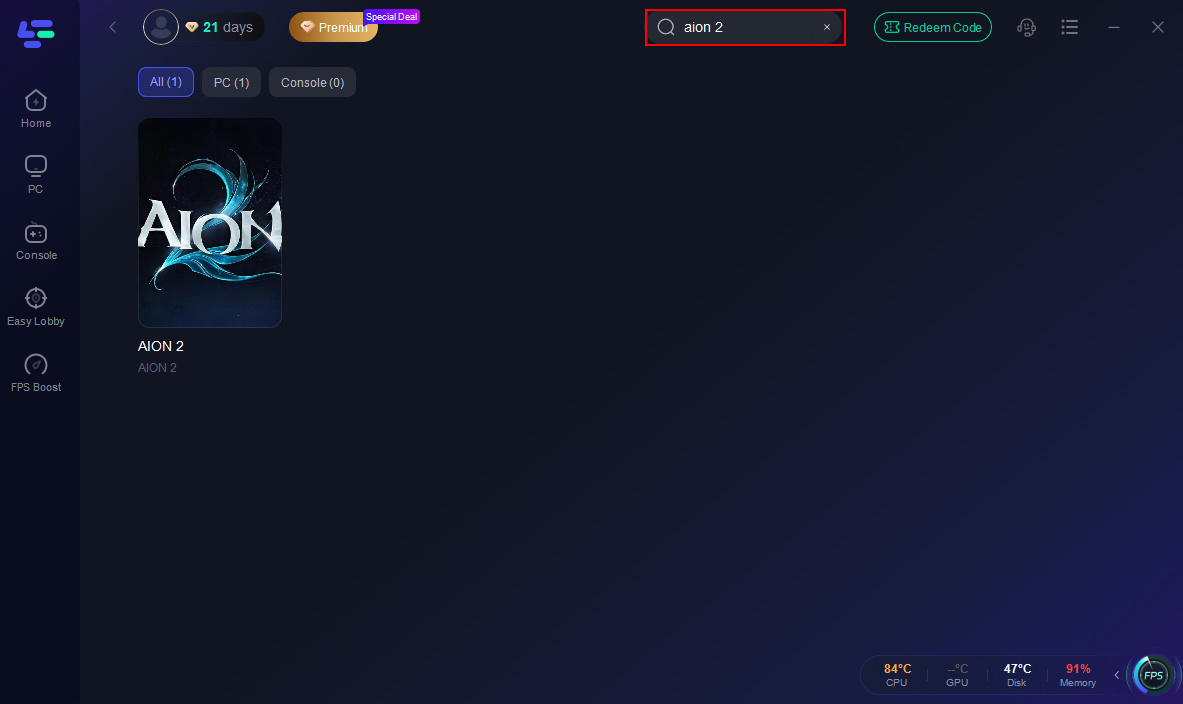
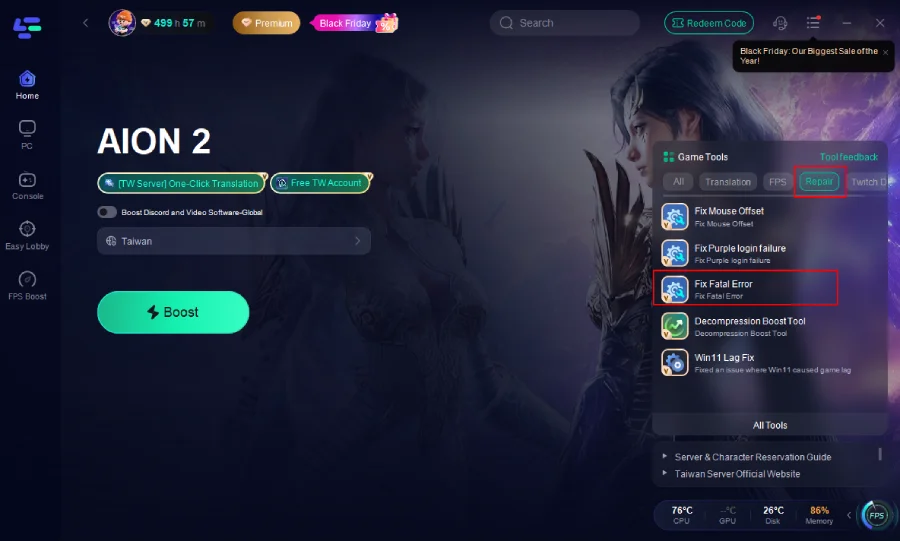
Step 3: Instead of using the standard acceleration feature, locate and click the "Fix Fatal Error" tool specifically designed for this Purple launcher crash.
Step 4: Within this tool, select the "One-Click Fix" option, which automatically applies the necessary adjustments to prevent the fatal error.
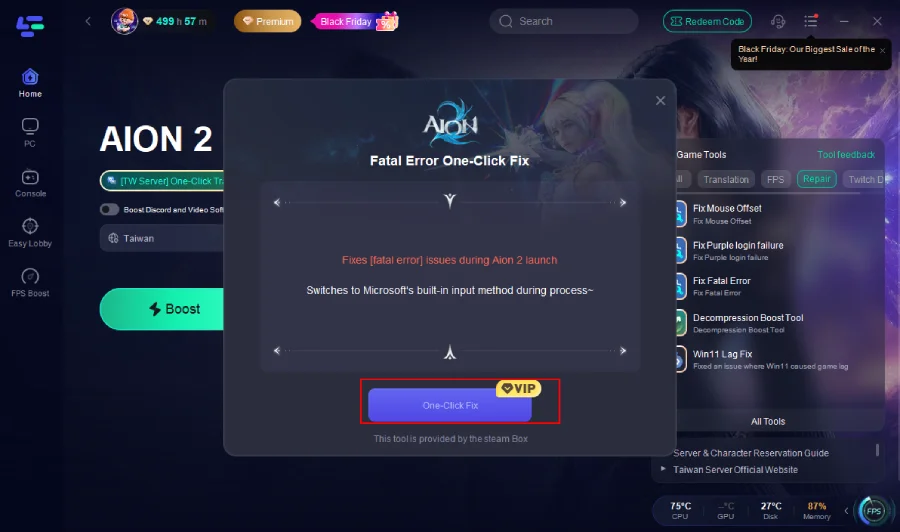
This process works by optimizing the network pathway during the transition between the launcher and game, ensuring stable communication that prevents the crash trigger.
Part 4: FAQs
Why can't I connect to AION 2 login servers from the US or Europe?
Aion 2 implements regional restrictions on its Taiwan and Korean servers, limiting access primarily to players within these regions . While the game initially allowed international connections, recent enforcement of these restrictions has blocked many overseas players. Using gaming acceleration services that offer optimized routing through Taiwan or Korea typically resolves this issue by bypassing these regional blocks .
Do I need a Taiwan IP address to play Aion 2?
Current player reports indicate that a Taiwan IP address is now necessary for accessing the Taiwan servers, unlike the initial launch period when international connections were possible .
Will using an accelerator significantly improve my connection?
Yes, quality gaming accelerators can dramatically improve connection stability and reduce latency by optimizing your route to the game servers . These services use dedicated lines and multiple connection paths to minimize packet loss and ping spikes, which is particularly important for bandwidth-intensive activities like MMORPG gameplay .
What should I do if my Purple launcher shows the wrong region?
If your Purple launcher displays an incorrect region, you'll need to create a new account with the proper regional setting . During registration, carefully select Taiwan or Korea as your region when prompted, as this determines which game clients and servers you can access .
How can I distinguish between server issues and my connection problems?
Server-side issues typically affect large numbers of players simultaneously and are often announced on official channels . If other players in your region report similar login problems at the same time, the issue is likely server-related. Conversely, if friends can login while you cannot, the problem is probably on your end. During peak hours, server load may also cause login delays or failures .
What do specific error codes like 0xE0000015 mean?
Error code 0xE0000015 typically indicates a security module conflict or process issue . Resolve this by opening Task Manager, ending all Aion2.exe and NCGuard.exe processes, then restarting your computer and launching the game through Purple again . Other common errors include network-related codes that typically respond well to accelerator solutions .
Why does AION 2 say login server unavailable?
The "AION 2 login server unavailable" message usually appears when the client cannot communicate with the authentication server. Check server status first, then troubleshoot your network, PURPLE launcher, and account settings.
Conclusion
Connecting to AION 2 from overseas regions can be challenging due to routing issues, regional restrictions, and PURPLE launcher errors. By optimizing your network, checking account region settings, updating PURPLE, and repairing game files, you can resolve most login problems and improve your chances of entering Atreia successfully.

- ✅Less ping and crashes.
- ✅ Higher FPS and better PC performance.
- ✅ Support for 8000+ games.
- ✅ Stable connection and region switching.
Boost Your Game with LagoFast for Epic Speed
Play harder, faster. LagoFast game booster eliminates stutter and lags on PC, mobile, or Mac—win every match!
Quickly Reduce Game Lag and Ping!
Boost FPS for Smoother Gameplay!