
You're excited to dive into Aion 2, but instead of entering its fantasy world, you're stuck staring at an endless loading screen or frozen black display. This frustrating issue can occur during login, map transitions, or just before character control. The good news: you're not alone, and there are effective solutions available.
This comprehensive guide will help you understand the root causes of loading failures, show you how to use LagoFast Game Booster for improved stability, provide other proven fixes, and offer preventative tips to avoid future issues.

- ✅Less ping and crashes.
- ✅ Higher FPS and better PC performance.
- ✅ Support for 2000+ games.
- ✅ Stable connection and region switching.
Part 1: Understanding the Aion 2 Stuck on Loading Issue
Part 2: Fix Stuck on Loading Issue with Game Booster - LagoFast
Part 3: Other Solutions to Fix Aion 2 Stuck on Loading
Part 4: How to Prevent Future Aion 2 Loading Issues
Part 1: Understanding the Aion 2 Stuck on Loading Issue
Before you start troubleshooting, it’s important to understand why Aion 2 may refuse to load properly. Several factors can contribute to this problem:
Unstable Internet Connection
Many loading issues are caused by network instability. If your ping spikes, your connection jitters, or packets are lost, the game may not be able to load the required assets, causing it to hang on the loading screen.
Server Overload
During peak times, patch days, or major in-game events, Aion 2’s servers may be overloaded. When too many players are trying to connect, the server’s response can slow down or time out, resulting in failed handshakes or stalled loading.
Corrupted Game Files
If parts of the game client are damaged or missing — whether due to a bad download, failed installation, or file corruption — the game may not be able to load certain assets, causing stalls or crashes during load.
Hardware Performance Limitations
Even if your PC meets the game's minimum requirements, large scenes, detailed character models, or heavy environment assets can overwhelm slower CPUs, limited memory, or slow storage drives — extending loading times or causing freezes.
Software Interference
Background programs, antivirus or firewall software, or misconfigured network settings (e.g., bad DNS, proxy) can block or slow the data flow needed during the loading process, leading to failure or very long load times.
By recognizing these causes, you’re better positioned to apply the right fix — whether it’s improving your connection, validating files, or optimizing your setup.
Part 2: Fix Stuck on Loading Issue with Game Booster - LagoFast
One of the most effective ways to address loading issues in Aion 2 is by using LagoFast Game Booster. This tool is specifically designed to optimize network paths, reduce latency, and stabilize your connection to game servers.
Why LagoFast Helps
- Smart Routing: LagoFast uses a proprietary protocol to identify and route your game traffic through the fastest, most stable network paths. This avoids congested or inefficient routes, reducing packet loss or jitter that can disrupt game asset loading.
- Optimized for Gaming Data: Instead of treating your game traffic like general web traffic, LagoFast recognizes and accelerates it, improving handshake stability with Aion 2 servers.
- Stability and Flexibility: Because server nodes are globally distributed, LagoFast can help players in regions distant from the game’s official data centers find better connectivity.
How to Use LagoFast to Fix Loading Issues
Step 1: Begin by clicking the Free Trial button to download and install the LagoFast Free Trial.
Step 2: Search for Aion2: Open LagoFast and use the search bar to find Aion2.
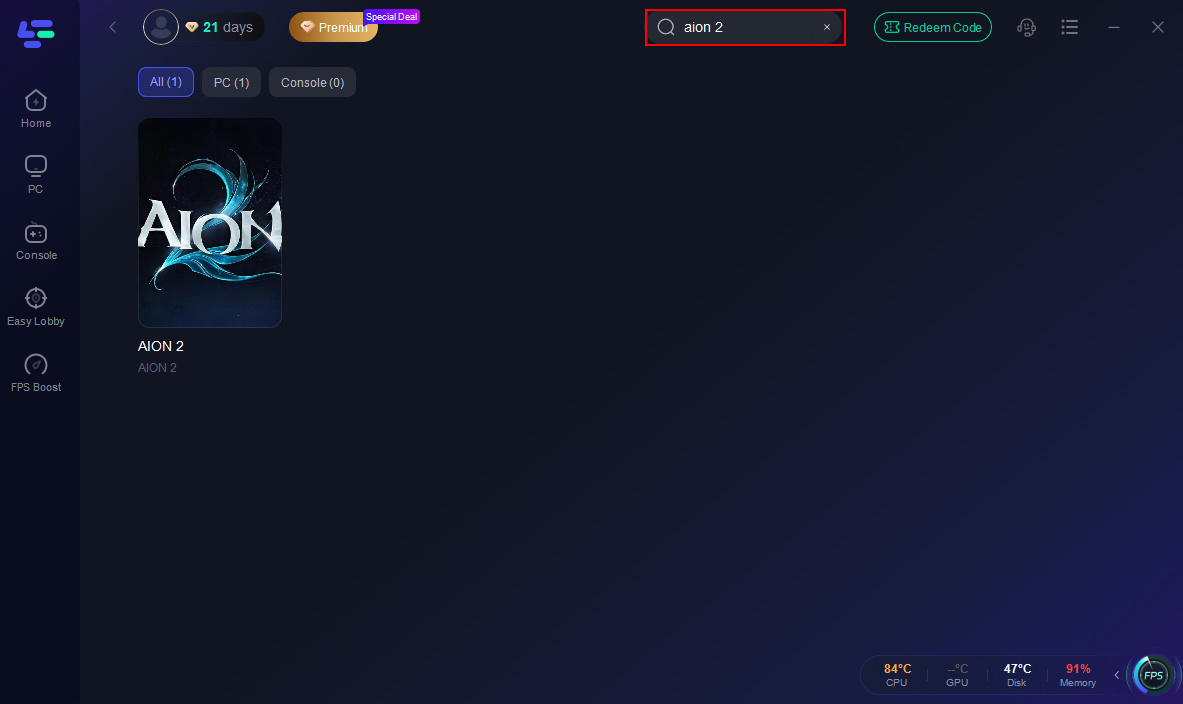
Step 3: Optimize Network Settings: LagoFast will automatically select the optimal server and settings to reduce latency and packet loss
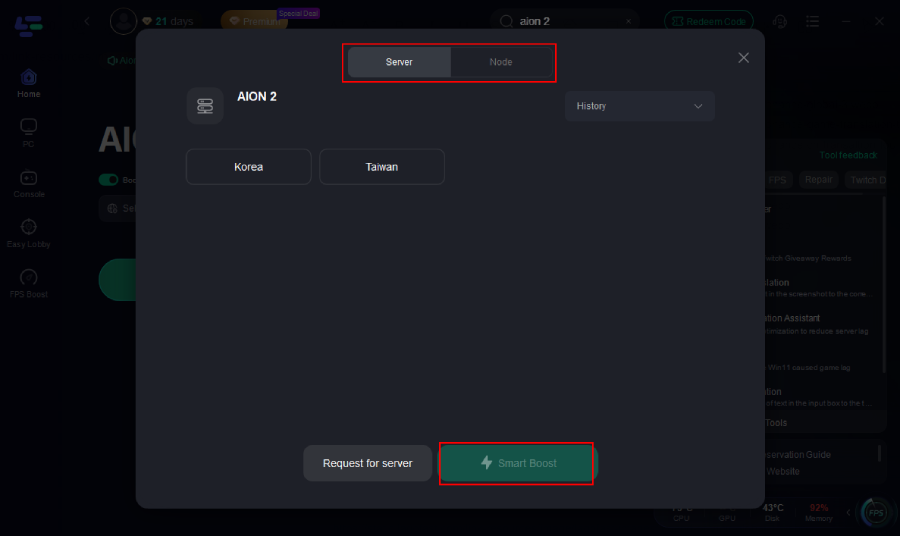
Step 4: Launch the Game: Start Aion2 through LagoFast to enjoy improved performance and stability.
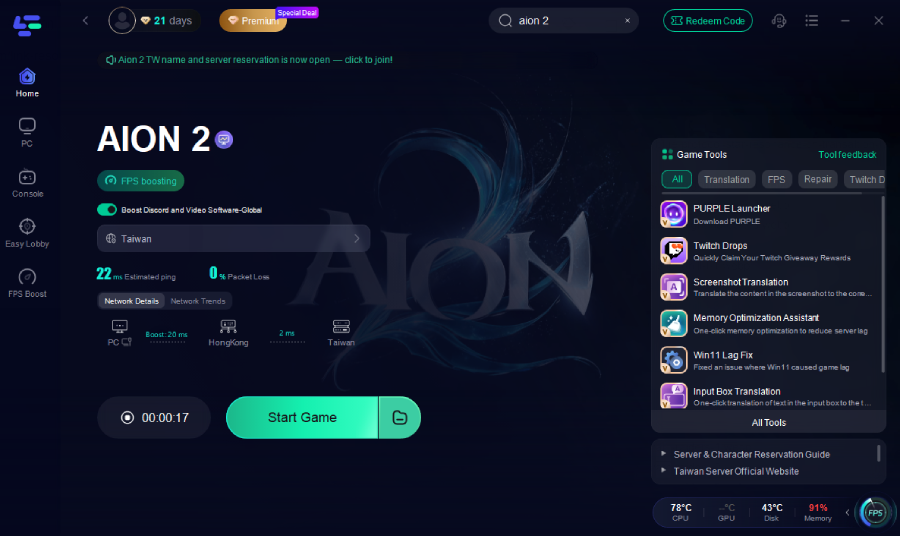
Using LagoFast in this way gives you a more reliable foundation for your connection, significantly lowering the chances that loading get stuck due to network issues.
How to use LagoFast Game Booster on Mobile
1. Visit LagoFast Mobile official website and download APK file.
2. After installation, search for "Aion 2" in LagoFast's search bar.
3. Click boost and select a suitable server node to connect to.
4. Once optimized performance is confirmed, click "Start Game" to launch the game.
Part 3: Other Solutions to Fix Aion 2 Stuck on Loading
If the booster doesn’t entirely resolve the problem, or you want to try other fixes in parallel, here are proven additional solutions:
1. Repair or Reinstall the Game Client
- Use Aion 2’s launcher to verify or repair game files. This ensures corruption or missing assets are replaced.
- If repair doesn’t work, a fresh uninstall and reinstall may help. This clears old or broken files that could block proper loading.
2. Check and Update Drivers
- Graphics Drivers: Make sure your GPU drivers (NVIDIA, AMD, or Intel) are up to date. Outdated drivers can struggle with rendering or asset streaming.
- Network Drivers: Update your network adapter’s drivers to ensure stable and efficient data transmission.
- System Software: Make sure you have the latest DirectX, Visual C++ redistributables, and any OS updates installed.
3. Close Background Applications
- Open Task Manager (Ctrl + Shift + Esc), and check for programs consuming high CPU, memory, or network.
- Close or disable apps you don’t need while gaming (e.g., browsers, streaming software, cloud backups) to free up resources.
4. Network Reset and Configuration
- Restart your Router/Modem: Power cycle your network gear to clear routing issues or cached congestion.
- Switch to Ethernet: If possible, use a wired connection instead of Wi-Fi to reduce instability and packet loss.
- Check Firewall / Antivirus: Temporarily disable or whitelist Aion 2 in your security software – sometimes these programs block necessary ports.
- Verify DNS Settings: Use reliable public DNS such as Google (8.8.8.8) or Cloudflare (1.1.1.1) to improve domain resolution.
5. Validate Server Status
- Check Aion 2’s official social channels or forums for server maintenance or overload notifications.
- If many players are reporting login or loading issues, it could be a server-side problem beyond your control.
6. Hardware Maintenance
- Make sure your PC’s storage drive is not running out of space and is healthy — slow drives or those near capacity can delay asset loading.
- Clean dust from your PC to avoid thermal throttling, which might slow down CPU and GPU performance during heavy asset streaming.
Part 4: How to Prevent Future Aion 2 Loading Issues
To reduce the likelihood of running into loading problems in the future, try to adopt the following habits:
Always Use LagoFast Before Launching
Start Aion 2 via LagoFast every session. This ensures the optimized route is active from the moment the game begins, reducing the risk of handshake or connection failures.
Keep Software Updated
Regularly update your GPU drivers, DirectX, Visual C++, and your OS. These updates often include bug fixes that can improve game stability and reduce load failures.
Maintain Your Game Files
After major patches or updates, use the client’s repair/verify feature to catch and fix corrupted files early.
Optimize Your Network
- Reboot your router periodically.
- Use QoS (Quality of Service) on your router, if available, to prioritize gaming traffic.
- Avoid large background downloads or streaming while you play.
Monitor Server Health
Keep an eye on official channels for maintenance or known issues. If the servers are under stress, waiting before logging in may spare you repeated loading failures.
Part 5: FAQs
Q1: Why does Aion 2 get stuck on the loading even on fast PCs?
Even high-end systems can fail to load if there’s network instability, corrupted game files, or server issues. Hardware alone isn't always the bottleneck.
Q2: Will repairing the game client always fix loading issues?
Not always, but it’s one of the most reliable fixes for corrupted or missing files. Combined with network and system tweaks, it dramatically increases your chances of success.
Q3: My game loads OK sometimes, but other times it freezes mid-load — what’s going on?
This is often a symptom of intermittent network instability, packet loss, or server congestion. Boosting your connection with a tool like LagoFast helps maintain a consistent route and reduces those interruptions.
Q4: Should I always use a wired connection for Aion 2?
A wired Ethernet connection is generally more stable and reliable than Wi-Fi, making it the preferred choice for avoiding load issues and lag.
Conclusion
Getting stuck on the loading in Aion 2 can be deeply frustrating, but in most cases, the root causes lie in network instability, file corruption, or resource constraints, not just bad luck. By using LagoFast Game Booster, repairing or reinstalling the game, optimizing your system and connection, and adopting better maintenance habits, you can minimize or even eliminate these loading issues. With a stable connection and a clean, optimized system, you’ll be free to explore the rich world of Aion 2 without the frustration of endless loading — ready to jump into battle, quest, and discovery without the delays.
Boost Your Game with LagoFast for Epic Speed
Play harder, faster. LagoFast game booster eliminates stutter and lags on PC, mobile, or Mac—win every match!
Quickly Reduce Game Lag and Ping!
Boost FPS for Smoother Gameplay!