
Granblue Fantasy: Relink has captivated Skyfarers with its stunning visuals, engaging combat, and a compelling narrative. However, for many players, the thrill of tackling the challenging "Endless Ragnarok" update, grinding for Gold Dahlia medals, or simply joining a Quick Quest with friends is often marred by persistent and frustrating network errors. The dreaded "A connection error has occurred. Returning to town in offline mode" message, or an infinite "Stuck on connecting" loop, can quickly turn an exciting gaming session into a test of patience.
This guide delves into the root causes of these Granblue Fantasy Relink Endless Ragnarok connection issues, offering a comprehensive suite of solutions, from community-tested fixes to advanced network optimization, to get you back into the action and enjoying the skies of Zegagrande without interruption.

- ✅ Reduce Lag and High Ping.
✅ Boost FPS at the Same Time.
✅ Support 8000+ Popular Online Games.
✅ Change Server without Latency.
✅ Boost Game Loading Speed.
Part 1. Why You Are Stuck on Connecting in Granblue Fantasy Relink Endless Ragnarok
Part 2. Common Granblue Fantasy Relink Endless Ragnarok Connection Errors
Part 3. How to Fix Connection Error Every time I Matchmake
Part 4. Advanced Troubleshooting for Network Error in Online Queueing
Part 5. How to Enhance Your Game Experience with LagoFast Game Booster
Part 1. Why You Are Stuck on Connecting in Granblue Fantasy Relink Endless Ragnarok
The core of Granblue Fantasy: Relink's online multiplayer experience, particularly for matchmaking, appears to rely heavily on a Peer-to-Peer (P2P) architecture. While P2P can offer direct connections and potentially lower latency in ideal scenarios, it is also highly susceptible to various network impediments. Unlike dedicated server-client models, P2P connections are significantly more sensitive to individual player network configurations, including NAT types, router settings, and, crucially, Internet Service Provider (ISP) routing.
When you initiate matchmaking for content like Endless Ragnarok, your game client attempts to establish a direct connection with other players' clients. If any point along this chain—be it your NAT type, your ISP's routing path, or even a firewall setting—impedes this connection, the matchmaking process can fail, leading to the game being stuck on connecting or throwing a network error. Furthermore, regional locking for matchmaking, often tied to your platform's download region, can exacerbate the problem. If your local region has a low player count, the game might struggle to find suitable peers, resulting in prolonged "Connecting" states or "ghost" queues that eventually time out.
Part 2. Common Granblue Fantasy Relink Endless Ragnarok Connection Errors
Understanding the specific error you are encountering is the first step toward a solution. Skyfarers frequently report several distinct variations of network instability, especially when attempting to access the high-level raids in the Endless Ragnarok update.
- "A connection error has occurred. Returning to town in offline mode." This is the most common and disruptive error. It typically occurs just as a match is about to start or shortly after entering a quest. It indicates a total loss of synchronization between your client and the host or other peers.
- "Network error when online queueing." This error often pops up during the initial matchmaking phase. It suggests that the game's matchmaking service is unable to even begin the process of pairing you with other players, often due to regional restrictions or local network blocks.
- The Infinite "Connecting" Loop: You might notice the "Connecting" text at the bottom right of your screen spinning indefinitely. This usually happens when the game has found a potential match but is failing to establish the P2P handshake required to finalize the session.
Part 3. How to Fix Connection Error Every time I Matchmake
If you find yourself unable to complete a single matchmaking cycle without an error, several community-tested methods have proven effective for both PC and console players.
Matchmaking Region Settings: In the game's network settings, you can set your matchmaking region to "Any." While this expands the pool of potential players, it can sometimes increase the likelihood of high-latency connections. Conversely, if you are in a low-population region, setting it to a specific high-traffic region (like Japan or North America) might be necessary to find a match at all.
Steam Download Region (PC): For PC players, Granblue Fantasy: Relink's matchmaking is often tied to your Steam download region. If you are stuck on connecting, try changing your Steam download region to "Japan - Tokyo" or "US - Los Angeles." These regions have massive player bases, making it much easier for the P2P system to find stable peers.
DNS Optimization: Your ISP's default DNS servers can sometimes have poor routing to gaming networks. Switching to a public DNS can bypass these bottlenecks.
|
Provider |
Primary DNS |
Secondary DNS |
|
Google Public DNS |
8.8.8.8 |
8.8.4.4 |
|
Cloudflare DNS |
1.1.1.1 |
1.0.0.1 |
Part 4. Advanced Troubleshooting for Network Error in Online Queueing
When basic fixes aren't enough, you may need to look deeper into your hardware and ISP configuration.
Mobile Hotspot Test: This is a classic "black magic" fix in the community. If you can't connect via your home Wi-Fi or Ethernet, try using your phone's mobile hotspot. If the game works perfectly on a hotspot, it confirms that the issue lies with your ISP's routing or your router's internal firewall/NAT settings.
NAT Type and UPnP: Ensure your NAT type is "Open" (Type 1 or 2). A "Strict" NAT (Type 3) is the death knell for P2P games like Relink. Enabling UPnP (Universal Plug and Play) in your router settings can help the game automatically open the ports it needs for matchmaking.
Administrator Privileges (PC): Sometimes, Windows' built-in security prevents the game from establishing the necessary network sockets. Right-click the game's executable and select "Run as Administrator" to ensure it has full access to your network hardware.
Part 5. How to Enhance Your Game Experience with LagoFast Game Booster
While manual fixes can help, they are often temporary or require constant adjustment. LagoFast (LagoFast Game Booster - Get No Lag and Lower Ping) Game Booster offers a professional, automated solution to the Granblue Fantasy Relink Endless Ragnarok connection issues. Unlike a standard VPN, LagoFast is designed specifically for gamers, utilizing a global network of dedicated routes to optimize P2P connections and bypass ISP congestion.
LagoFast's multipath technology is particularly effective for Relink. It establishes multiple simultaneous connections to the matchmaking pool, ensuring that if one path drops, another is ready to take over. This drastically reduces the chances of seeing the "Returning to town" error.
How to Use LagoFast Game Booster
Step 1: Click the Free Trial button to download and install LagoFast Free Trial.
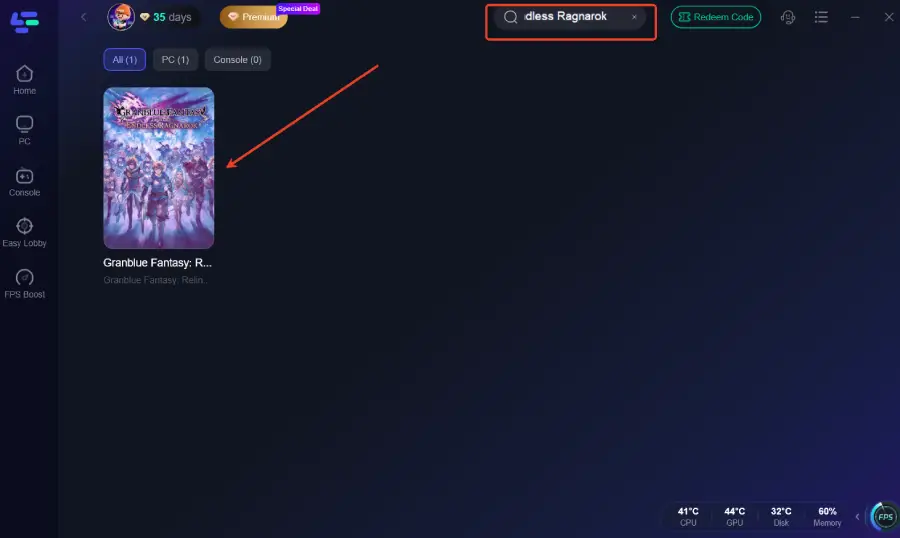
Step 2: Search for the Game: Open LagoFast and type "Granblue Fantasy: Relink - Endless Ragnarok" in the search bar.
Step 3: Select Your Region: Choose the region where you want to play. If you're looking for the fastest matchmaking in Endless Ragnarok, selecting "Japan" or "North America" is highly recommended.
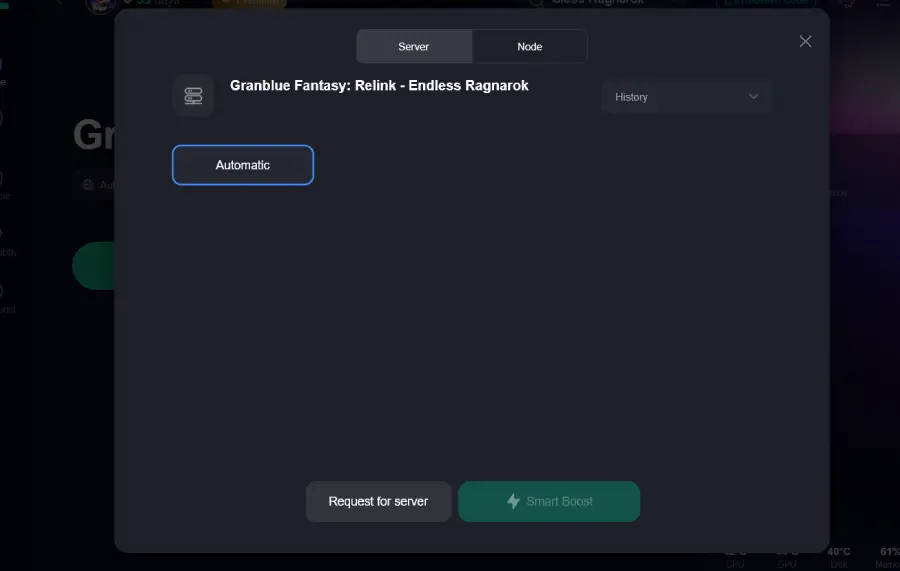
Step 4: One-Click Boost: Click the "Boost" button. LagoFast will automatically optimize your routing and stabilize your connection.
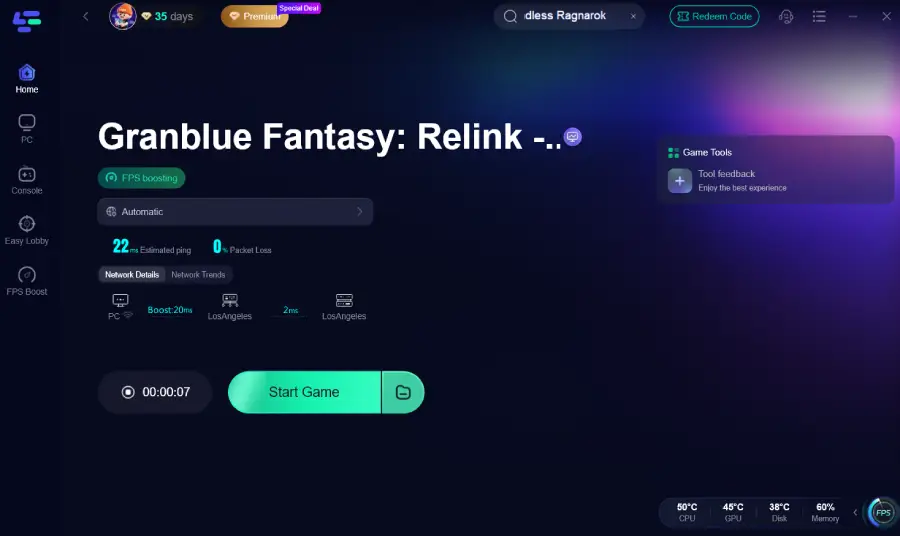
Step 5: Launch the Game: With the boost active, launch the game and head to Siero's Knickknack Shack to start your online session. You should notice a much faster "Connecting" phase and fewer matchmaking errors.
Part 6. FAQs
Q: Why does matchmaking work in the demo but not the full game?
A: The demo often uses a more limited or different matchmaking pool. The full game, especially with the Endless Ragnarok update, has more complex data requirements and a larger, more fragmented player base across different regions.
Q: Will changing my region affect my save data?
A: No. Your save data is stored locally or in the cloud (Steam/PSN). Changing your matchmaking or download region only affects who you play with, not your progress or items.
Conclusion
The "Endless Ragnarok" update represents the pinnacle of Granblue Fantasy: Relink's endgame, but you can't conquer it if you can't stay connected. Whether it's the P2P architecture's sensitivity or regional routing issues, being stuck on connecting is a hurdle every Skyfarer wants to clear. By optimizing your DNS, adjusting your matchmaking regions, and utilizing the professional-grade optimization of LagoFast Game Booster, you can ensure that your focus remains on the battle, not the loading screen. Don't let network errors ground your Grandcypher—optimize your connection today and reclaim the skies.
Boost Your Game with LagoFast for Epic Speed
Play harder, faster. LagoFast game booster eliminates stutter and lags on PC, mobile, or Mac—win every match!
Quickly Reduce Game Lag and Ping!
Boost FPS for Smoother Gameplay!