Best FC 26 Lag Reducer & FPS Booster
FC 26 delivers a more realistic and responsive football experience, but many players still encounter lag, stuttering, or FPS drops during online matches. These performance issues can be caused by network instability, server load, or hardware limitations, especially in high-intensity gameplay.
Using network optimization tools or applying simple manual tweaks can help improve connection stability, reduce lag spikes, and deliver a smoother overall gameplay experience.

- ✅ Reduce Lag and High Ping.
- ✅ Boost FPS at the Same Time.
- ✅ Fix Packet Loss on PC and Console.
- ✅ Change Server without Latency.
- ✅ End Stuck & Crashing Issues.
FC 26 Overview

FC 26 is EA Sports’ newest football simulation, featuring upgraded visuals, more realistic player movement, and improved match responsiveness. From kick-off to full time, gameplay feels smoother and more immersive than previous titles.
However, these improvements also increase system and network demands. During online matches or peak hours, some players may experience FPS drops, stuttering, or lag spikes depending on hardware and server conditions.
That’s why even solid setups may still experience lag, stuttering, or FPS drops in some online matches.
FC 26 Release Date & Download Info
FC 26 officially launched worldwide on September 26, 2025, with early access available from September 19, 2025 for Ultimate Edition and EA Play members.
The game is available across major platforms, including PlayStation, Xbox, PC, Nintendo Switch, Steam, EA App, mobile devices, and other supported cloud services.
Players can download FC 26 through official platform stores depending on their device:
- EA App / Steam for PC
- PlayStation Store for PlayStation users
- Xbox Store for Xbox players
- Nintendo eShop for Switch users
- Google Play Store / App Store for mobile users
After purchase, the game will appear in your library once your EA account is properly linked with your platform account.
Even after FC 26 download, some players may still experience instability during peak hours, such as
- server congestion
- matchmaking delays
- post-launch performance updates
So if the game doesn’t feel perfectly stable at launch, it’s often related to server load rather than installation issues.
Why Is FC 26 So Laggy?
If FC 26 starts feeling slow, delayed, or stuttering mid-match, it usually isn’t just one single problem. Most of the time, it’s a combination of network stability, server load, and your own system performance.
Here’s what’s actually going on:
1. Unstable Network Routing
Even if your internet speed looks fine, the route your data takes to FC 26 servers might not be efficient. Longer or unstable routing paths can lead to higher ping, delayed inputs, and sudden lag spikes during online matches.
2. Server Load During Peak Hours
FC 26 online servers may become congested during peak hours, especially after updates or new content releases.
When servers are overloaded, players may experience inconsistent responsiveness, even with a stable internet connection.
3. Hardware or System Bottlenecks
FC 26 is more demanding than previous titles. High graphics settings, background applications, or outdated drivers can lead to FPS drops and stuttering during fast-paced matches.
Best Way to Fix FC 26 Lag
LagoFast is a game-focused network optimization tool designed to improve overall gameplay stability in FC 26. By optimizing your internet connection and reducing ping, it helps create a smoother and more responsive online experience, especially in competitive matches where even small delays matter.
It works by improving routing efficiency and stabilizing your connection, which can directly reduce common issues like lag spikes and disconnects during gameplay.
Key features include:
- Ping Reduction & Route Optimization: Improves connection paths to FC 26 servers for lower and more stable ping
- Packet Loss Fix: Helps reduce data loss that causes stuttering, teleporting, or delayed actions
- Stable Connection Support: Keeps your network more consistent during online matches
- FPS Boost: Frees up system resources to help improve and stabilize in-game FPS
- Game Crash Fix: Repairs common game environment issues such as DirectX 12 errors, C++ runtime issues, and other stability problems with one-click repair
- Memory Optimization Assistant: One-click memory cleanup to reduce system load and improve performance during heavy gameplay
- Heavy Gameplay Optimization: Optimizes system performance under high-load gaming situations to reduce lag and instability
Overall, it focuses on both network and system-side optimization, which may help improve stability and responsiveness during online play.
How to Use LagoFast to Boost FC 26
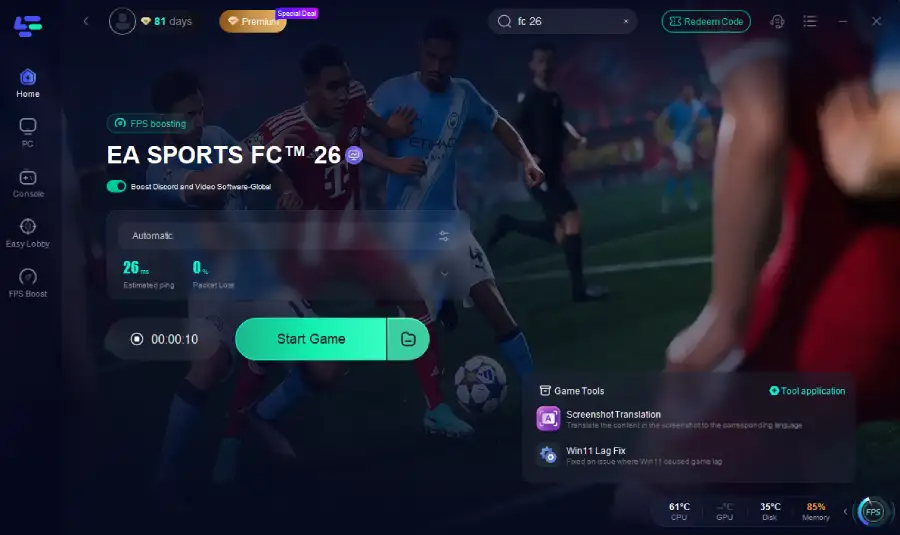
Step 1: Click the Free Trial button to download and install LagoFast.
Step 2: After installation, search "FC 26" in the search bar and select the game.
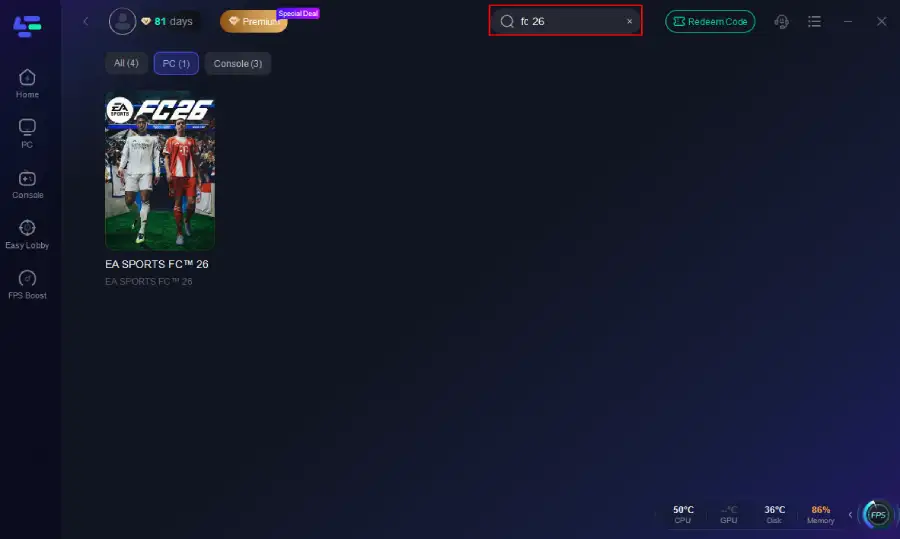
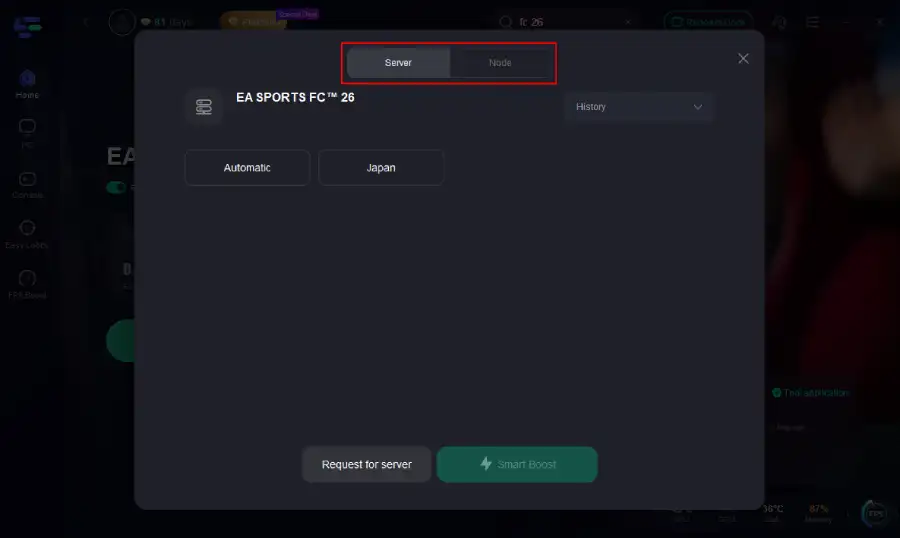
Step 3: Choose your preferred server node and click "Smart Boost" to start optimizing.
Step 4: Launch your game and enjoy smooth, optimized gameplay with lower ping and no stutter.
Other Ways to Fix FC 26 Lag
If you don’t want to use any tools, there are still a few practical ways to improve FC 26 performance. These won’t fix server-side issues, but they can noticeably reduce stuttering, FPS drops, and local lag spikes.
Lower in-game settings
FC 26 can be demanding on both GPU and CPU, especially in high-detail matches. Try lowering settings like shadows, crowd density, and motion effects. This reduces system load and helps keep FPS more stable during gameplay.
Use a wired connection
Wi-Fi is convenient, but it’s not always stable during peak usage or heavy network traffic. Switching to an Ethernet cable gives you a more consistent connection, which can reduce random lag spikes and improve overall match stability.
Close background applications
Apps running in the background—such as browsers, streaming platforms, or game overlays—can quietly consume bandwidth and system resources. Closing them before launching FC 26 helps free up performance for the game.
Update your drivers
Outdated GPU or network drivers can lead to stuttering, FPS drops, or compatibility issues. Keeping drivers updated ensures your hardware is properly optimized for the latest game version and patches.
Final Thoughts
FC 26 delivers more realistic gameplay than previous titles but also requires more stable hardware and network performance. If you are experiencing lag, FPS drops, or stuttering, the issue is usually caused by a combination of system load and network instability rather than a single factor. With the right optimizations, gameplay can feel significantly smoother and more stable in both online and offline modes.