
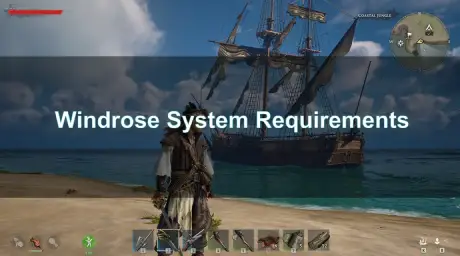
Windrose, the highly anticipated pirate adventure, is quickly gaining traction among PC gamers for its immersive open world and challenging Souls-like combat. However, before you embark on your swashbuckling journey, it is crucial to understand the game's system requirements. This guide will provide a comprehensive breakdown of the minimum and recommended specifications, help you assess your PC's readiness, and offer practical solutions to optimize your gaming experience, including leveraging the power of LagoFast Game Booster. The game, built on Unreal Engine 5, demands modern hardware, with an NVIDIA RTX 3080 or AMD Radeon RX 6800 XT and 32GB of RAM being the recommended baseline for optimal performance.

- ✅ Reduce Lag and High Ping.
✅ Boost FPS at the Same Time.
✅ Support 8000+ Popular Online Games.
✅ Change Server without Latency.
✅ Boost Game Loading Speed.
Part 2. Windrose Minimum Requirements
Part 3. Windrose Recommended Requirements
Part 4. Can Your PC Run Windrose?
Part 5. Why Windrose Requires High-End Hardware
Part 6. How to Fix Windrose Lag & FPS Drops
Part 7. How to Enhance Your Game Experience with LagoFast Game Booster
Part 8. Bonus Tips: Windrose Low-End PC Settings
Part 1. Quick Answer
To quickly determine if your system is ready for Windrose, refer to the table below:
|
Component |
Minimum Requirements |
Recommended Requirements |
|
OS |
Windows 10 (64-bit) |
Windows 11 or later (64-bit) |
|
Processor |
Intel® Core™ i7-8700K / AMD® Ryzen™ 7 2700X |
Intel® Core™ i7-10700 / AMD® Ryzen™ 7 5800X |
|
Memory |
16 GB RAM |
32 GB RAM |
|
Graphics |
NVIDIA® GTX™ 1080 Ti / AMD® Radeon™ RX 6800 |
NVIDIA® RTX™ 3080 / AMD® Radeon™ RX 6800 XT |
|
DirectX |
Version 12 |
Version 12 |
|
Network |
Broadband Internet connection |
Broadband Internet connection |
|
Storage |
30 GB available space (SSD recommended for optimal performance) |
30 GB available space (SSD highly recommended) |
Part 2. Windrose Minimum Requirements
To achieve a playable experience in Windrose, your PC should meet or exceed the following minimum specifications. These requirements are designed to allow the game to run, albeit potentially with lower graphical settings and frame rates. Players should anticipate needing at least an NVIDIA GTX 1080 Ti or AMD Radeon RX 6800 graphics card, coupled with 16GB of RAM, to navigate the game's world without significant performance bottlenecks.
- OS: Windows 10 (64-bit)
- Processor: Intel® Core™ i7-8700K / AMD® Ryzen™ 7 2700X
- Memory: 16 GB RAM
- Graphics: NVIDIA® GTX™ 1080 Ti / AMD® Radeon™ RX 6800
- DirectX: Version 12
- Network: Broadband Internet connection
- Storage: 30 GB available space
Part 3. Windrose Recommended Requirements
For those seeking the best visual fidelity and smoother frame rates, especially at higher resolutions like 1440p and with Epic graphical settings, the recommended specifications for Windrose are considerably more demanding. An NVIDIA RTX 3080 or AMD Radeon RX 6800 XT, alongside a robust 32GB of RAM, is essential to fully appreciate the game's stunning Unreal Engine 5 visuals and dynamic gameplay. Meeting these specifications will ensure a more fluid and immersive pirate adventure.
- OS: Windows 11 or later (64-bit)
- Processor: Intel® Core™ i7-10700 / AMD® Ryzen™ 7 5800X
- Memory: 32 GB RAM
- Graphics: NVIDIA® RTX™ 3080 / AMD® Radeon™ RX 6800 XT
- DirectX: Version 12
- Network: Broadband Internet connection
- Storage: 30 GB available space
Part 4. Can Your PC Run Windrose?
Determining if your current PC can handle Windrose involves a direct comparison of your hardware against the game's system requirements. Given that Windrose is built on Unreal Engine 5, it is inherently more demanding than many titles, particularly concerning GPU and RAM. Pay close attention to your graphics card's VRAM, as 12GB or more is highly recommended for optimal performance, especially at higher resolutions and settings. If your system falls short of the minimum, you may experience significant lag and low frame rates, impacting your overall enjoyment. For a quick assessment, compare your system's key components with the detailed specifications provided above.
Part 5. Why Windrose Requires High-End Hardware
Windrose's substantial hardware demands stem primarily from its utilization of Unreal Engine 5 (UE5) and its ambitious open-world design. UE5 features such as Nanite for highly detailed geometric assets and Lumen for dynamic global illumination and reflections significantly enhance visual realism but are computationally intensive. These technologies allow for incredibly detailed environments and realistic lighting, which contribute to the game's immersive atmosphere but also necessitate powerful GPUs and ample RAM. Furthermore, the game's expansive open world and the precision required for its Souls-like combat mechanics demand consistent performance to ensure a responsive and engaging player experience.
Part 6. How to Fix Windrose Lag & FPS Drops
Experiencing lag or significant FPS drops in Windrose can detract from the immersive pirate experience. Addressing these issues often involves a combination of software optimization and ensuring network stability. Beyond adjusting in-game settings, which will be discussed in more detail, it is crucial to keep your graphics drivers updated to the latest version, as these often include performance enhancements for new titles. Additionally, closing unnecessary background applications can free up valuable system resources. For network-related performance issues, especially in a game that might feature co-op or multiplayer elements, a dedicated game booster like LagoFast can make a substantial difference by optimizing your connection and reducing ping.
Part 7. How to Enhance Your Game Experience with LagoFast Game Booster
LagoFast(LagoFast Game Booster - Get No Lag and Lower Ping) Game Booster is an invaluable tool for any Windrose player looking to minimize lag, reduce ping, and stabilize FPS, thereby significantly enhancing their overall gaming experience. By optimizing network routes and prioritizing game traffic, LagoFast ensures a smoother and more responsive connection, which is critical for a demanding online-capable title like Windrose. Follow these detailed steps to integrate LagoFast into your Windrose gameplay:
How to Use LagoFast Game Booster
Step 1: Click the Free Trial button to download and install LagoFast Free Trial.
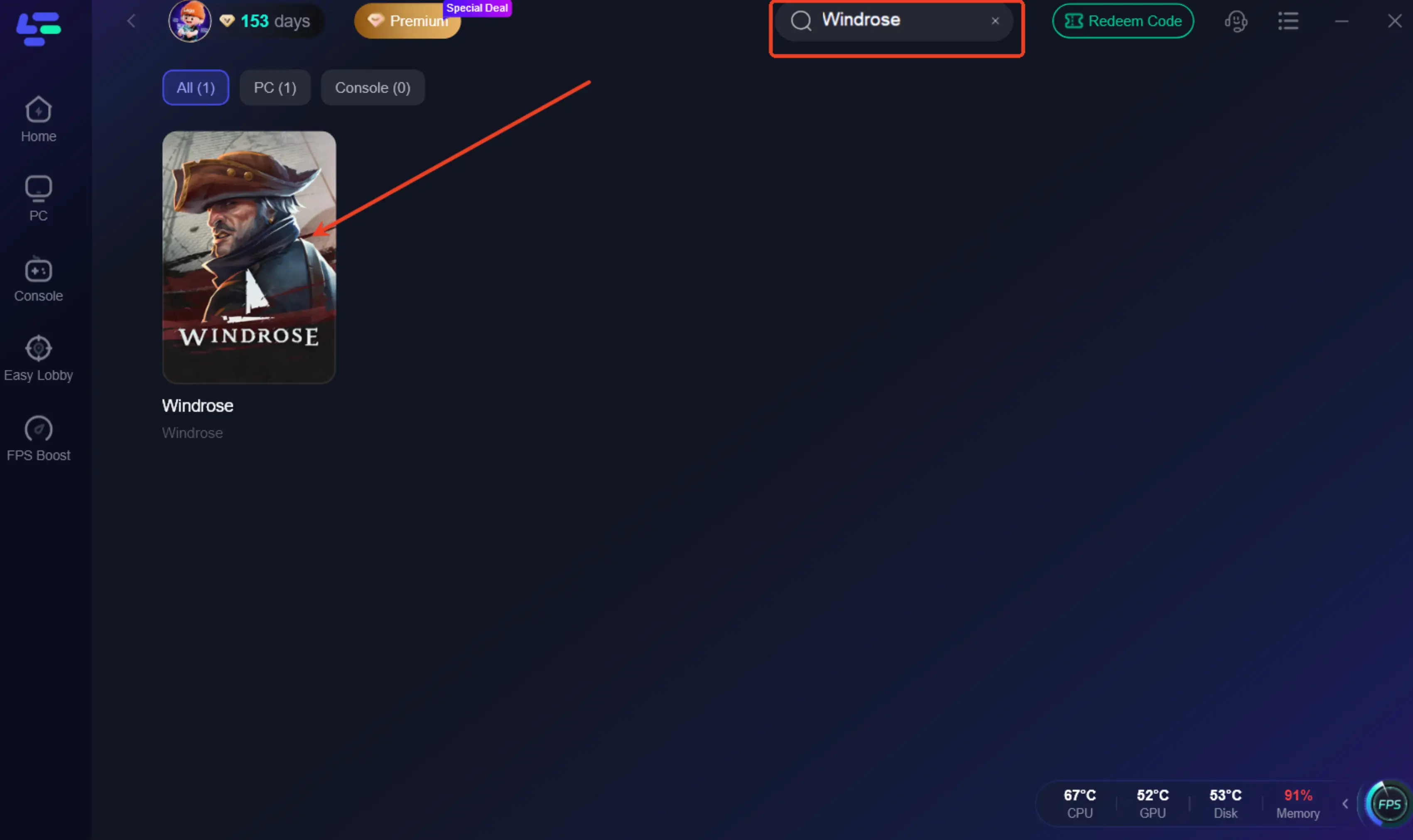
Step 2: Open the LagoFast application. In the search bar, type "Windrose" and select the game from the search results.
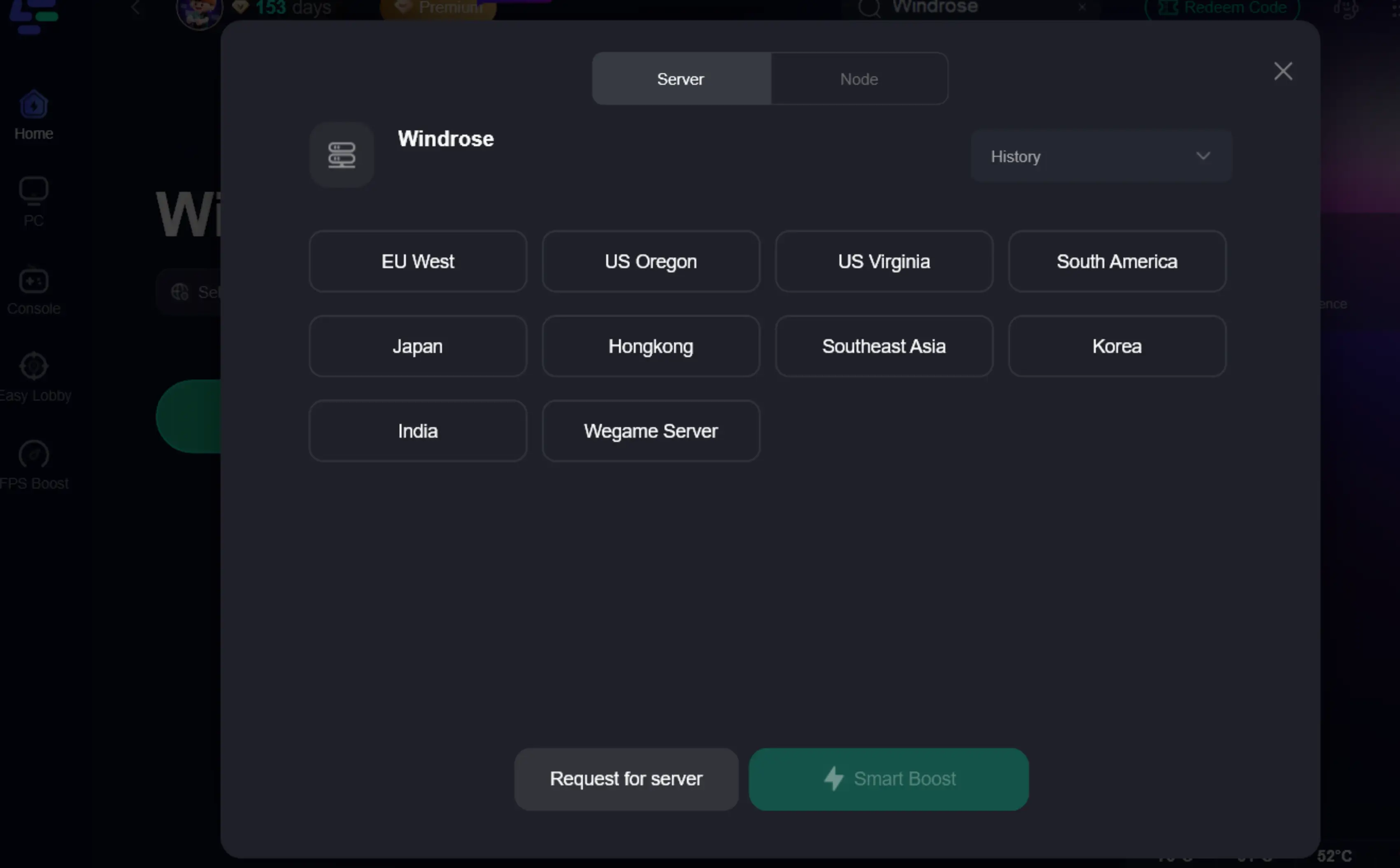
Step 3: After selecting Windrose, LagoFast will present you with various server and node options. Choose the server location closest to you or the game server you are playing on for the best connection. LagoFast's intelligent routing will often suggest the optimal node automatically.
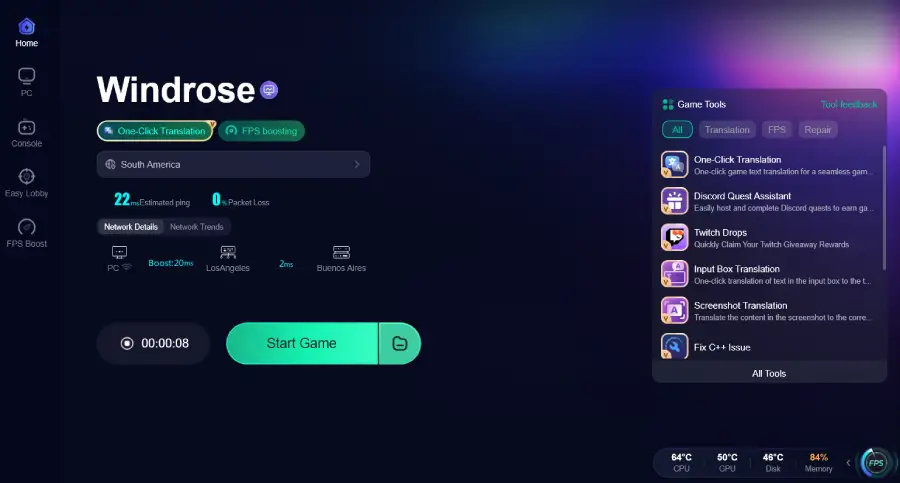
Step 4: Once you have selected your preferred server and node, click the "Boost" button. LagoFast will then optimize your network connection. After the boost is active, you can launch Windrose directly through LagoFast or from your game library. You should immediately notice improved ping and more stable FPS.
Part 8. Bonus Tips: Windrose Low-End PC Settings
Even if your PC barely meets the minimum requirements, you can still improve your Windrose experience by carefully tweaking in-game settings. The key is to reduce the load on your GPU and CPU by scaling back graphically intensive features. Start by utilizing the game's "Auto Set Quality" option, which provides a good baseline based on your hardware. From there, focus on these specific adjustments:
- Resolution Scale: This is often the most impactful setting. Lowering the resolution scale (e.g., to 70-80%) can significantly boost FPS at the cost of some visual clarity. Experiment to find a balance you are comfortable with.
- Shadow Quality: Shadows are notoriously demanding. Set this to "Low" or "Medium" to gain substantial performance.
- Foliage Quality/Density: Dense vegetation can be a major FPS killer in open-world games. Reduce this setting to alleviate the load.
- Post-Processing Effects: Effects like motion blur, depth of field, and bloom, while visually appealing, can be resource-intensive. Consider disabling or lowering these.
- View Distance: While important for immersion, reducing view distance slightly can help, especially in busy areas.
- Anti-Aliasing: While essential for smooth edges, try lower-tier anti-aliasing options or even disabling it if desperate for frames.
Part 9. FAQs
Does Multiplayer Affect Performance?
Yes, multiplayer can significantly affect performance in Windrose. When playing with other players, your system needs to process more data, including other player models, their actions, and network synchronization. This can lead to increased CPU usage and network latency, potentially causing FPS drops and lag, especially if your internet connection is unstable or the game server is far away. Using a game booster like LagoFast can help mitigate these issues by optimizing your network connection.
Can I run Windrose with 16GB RAM?
Yes, you can run Windrose with 16GB of RAM, as it is listed as the minimum requirement. However, for a smoother experience, especially if you run other applications in the background or aim for higher graphical settings, 32GB of RAM (the recommended specification) would provide a noticeable improvement. With 16GB, you might experience occasional stuttering or longer loading times, particularly in memory-intensive areas of the game.
Does Windrose need an SSD?
While Windrose only lists 30GB of available space as a requirement, an SSD (Solid State Drive) is highly recommended for optimal performance. Installing the game on an SSD will drastically reduce loading times, improve texture streaming, and minimize in-game stuttering, leading to a much smoother and more enjoyable experience compared to a traditional HDD (Hard Disk Drive). Given the game's open-world nature and UE5's asset streaming capabilities, an SSD is almost a necessity for a seamless experience.
Is Windrose a demanding game?
Yes, Windrose is a demanding game, primarily due to its utilization of Unreal Engine 5 and its detailed open-world environment. The recommended specifications, including an RTX 3080 and 32GB of RAM, clearly indicate that it requires modern, high-end hardware to run at its best. Players with systems at or near the minimum requirements should expect to make significant compromises in graphical settings to achieve playable frame rates.
How to fix connection errors in Windrose?
Connection errors in Windrose can be frustrating. Here are some steps to troubleshoot:
1.Check your internet connection: Ensure your internet is stable and functioning correctly.
2.Restart your router/modem: A simple restart can often resolve temporary network issues.
3.Verify game files: Use your game launcher (Steam, Epic Games) to verify the integrity of Windrose's game files.
4.Disable VPN/Firewall temporarily: Sometimes, VPNs or overly aggressive firewall settings can interfere with game connections. Try disabling them temporarily to see if it resolves the issue.
5.Use a game booster: Tools like LagoFast can often resolve connection issues by optimizing your network route to the game servers, reducing packet loss and ping.
Conclusion
Navigating the treacherous waters of Windrose requires not only skill but also a PC capable of handling its demanding system requirements. We've explored the minimum and recommended specifications, delved into why this Unreal Engine 5 title pushes hardware limits, and provided strategies to combat lag and FPS drops. For the ultimate smooth and responsive pirate adventure, optimizing your system and network is paramount. To ensure you experience Windrose at its best, with minimal latency and stable frame rates, we highly recommend downloading and utilizing LagoFast Game Booster. Set sail for an unparalleled gaming journey today!

Boost Your Game with LagoFast for Epic Speed
Play harder, faster. LagoFast game booster eliminates stutter and lags on PC, mobile, or Mac—win every match!
Quickly Reduce Game Lag and Ping!
Boost FPS for Smoother Gameplay!