

Vindictus: Defying Fate is an action-focused RPG built around precise timing and fast reactions, where combat relies heavily on instant server response. When the connection is stable, dodges feel responsive and skill chains flow naturally. But for many players, the game quickly starts to feel delayed—dodges register late, skills activate slowly, and hits land when they shouldn’t. While this is often blamed on poor optimization or hardware, most Vindictus: Defying Fate lag and high ping issues are actually caused by network latency and unstable connections, not performance limits. This guide breaks down why these issues happen and what you can do to reduce lag, lower ping, and stabilize your connection.

- ✅ Reduce Lag and High Ping.
✅ Boost FPS at the Same Time.
✅ Support 2000+ Popular Online Games.
✅ Change Server without Latency.
✅ Boost Game Loading Speed.
Part 1: Why Is Vindictus: Defying Fate Lag and Having High Ping?
Part 2: How to Fix Vindictus: Defying Fate Lag and High Ping?
Part 1: Why Is Vindictus: Defying Fate Lag and Having High Ping?
Lag in Vindictus: Defying Fate usually appears as delayed inputs, brief freezes during combat, rubberbanding, or inconsistent hit detection. While these issues can look random, they are usually caused by a small number of connection-related factors rather than game performance itself.
1. Weak or Unstable Network Signal
An unstable network connection is one of the most common reasons for Vindictus: Defying Fate lag and high ping. When the signal fluctuates, data packets are delayed or dropped before reaching the server.
This often happens when:
- Playing on Wi-Fi with interference from other devices
- The signal strength between your device and router is weak
- The connection quality changes throughout the session
Unstable signals increase latency variation, which directly affects how quickly the game responds to your inputs.
2. Server Distance and Routing Issues
Vindictus: Defying Fate uses server-side validation for combat actions, which means physical distance matters. The farther your data has to travel, the higher the ping becomes.
In addition to distance, inefficient routing can worsen the problem:
- ISPs may route traffic through unnecessary nodes
- Data may take indirect paths before reaching the server
- Congested routing nodes can add extra delay
Even with fast internet speeds, poor routing can cause consistently high latency.
3. Background Programs Using Network Resources
Background applications can quietly consume bandwidth and disrupt connection stability. This is especially noticeable in real-time games like Vindictus: Defying Fate.
Common examples include
- Download managers
- Cloud sync services
- Streaming platforms running in the background
These programs increase latency and can trigger lag spikes during combat.
4. System and Network Hardware Limitations
In some cases, lag and packet loss are caused by system-level or hardware limitations rather than the internet connection itself.
These include:
- Outdated network drivers
- Overloaded or aging routers
- System processes competing for network resources
When the system cannot process network traffic efficiently, delays and packet loss become more frequent.
Part 2: How to Fix Vindictus: Defying Fate Lag and High Ping?
Most lag and high ping issues in Vindictus: Defying Fate can be improved without changing hardware or internet plans. Follow the steps below in order to stabilize your connection and reduce latency.
Use LagoFast—The Best Vindictus: Defying Fate Lag and Ping Reducer
If you want a straightforward way to fix Vindictus: Defying Fate lag and high ping, LagoFast is a top choice. LagoFast is a professional game booster designed to optimize the connection between your device and the game servers. It helps reduce ping, minimize packet loss, stabilize network connections, and optimize routing paths, which directly improves combat responsiveness. LagoFast also offers practical features like FPS optimization and a Game Server Switch Tool, allowing players to select better server routes and maintain a smoother overall gameplay experience.
Tutorial To Use LagoFast To Fix Vindictus: Defying Fate Lag and High Ping:
Step 1: Click the Free Trial button to download and install Lagofast.
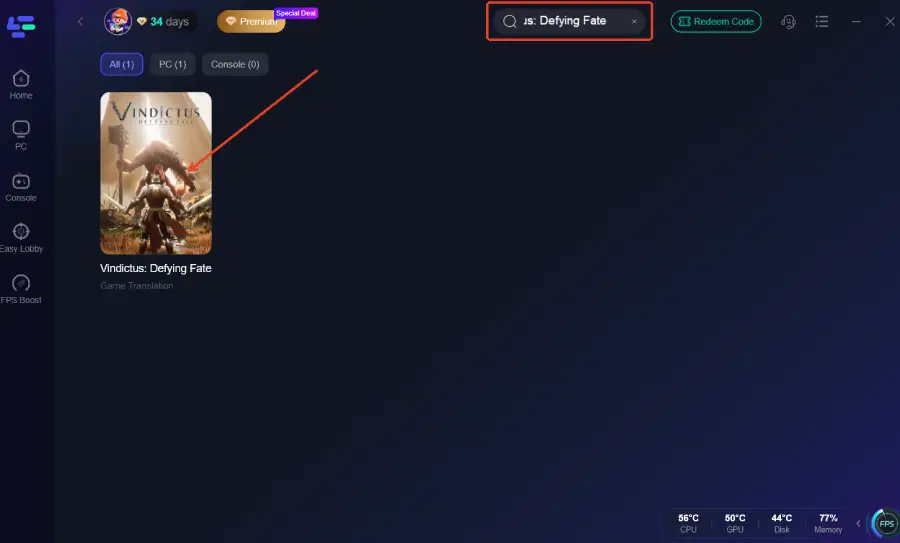
Step 2: After installation, search "Vindictus: Defying Fate" in the search bar and select the game.
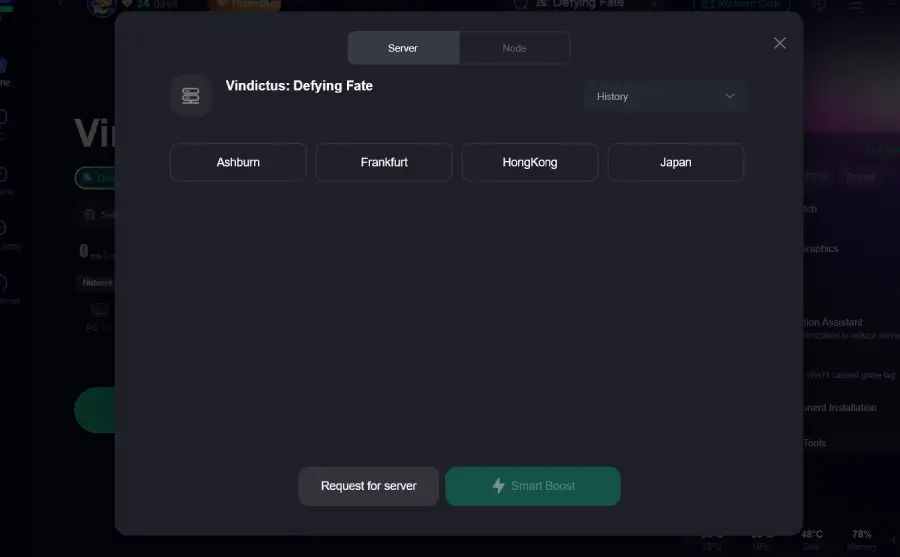
Step 3: Choose your preferred server node and click "Smart Boost" to start optimizing.
Step 4: Launch your game and enjoy smooth, optimized gameplay with lower ping and no stutter.

Improve Network Signal Stability
Unstable network signals are a common cause of lag spikes and packet loss, especially during combat.
Steps:
- Use a wired Ethernet connection whenever possible
- If using Wi-Fi, stay close to the router and avoid physical obstructions
- Reduce interference from other wireless devices
A stable signal ensures that game data is delivered consistently, which is critical for real-time combat.
Reduce Background Network Usage
Even small background network activity can disrupt latency-sensitive games.
Steps:
- Close download tools and torrent clients
- Pause cloud backup or synchronization services
- Avoid video streaming or large file transfers while playing
Limiting background usage helps prevent sudden lag spikes and keeps latency stable.
Avoid Peak Network Hours
Network congestion can significantly increase latency during certain times of day.
Steps:
- Observe when lag or high ping occurs most often
- Avoid playing during peak hours, such as evenings or weekends
- Play during off-peak hours when possible
This is especially useful if your connection feels fine at some times but unstable at others.
Check System and Network Limitations
System-level issues can contribute to packet loss and unstable latency.
Steps:
- Restart your router regularly to clear cached issues
- Update router firmware if available
- Ensure your network drivers are up to date
These checks help your system handle network traffic more efficiently.
Conclusion
Lag and high ping in Vindictus: Defying Fate are rarely caused by hardware issues alone. In most cases, unstable connections, long server routes, and background network usage are what break combat timing and responsiveness. By improving network stability, reducing unnecessary traffic, and optimizing your connection route, you can significantly lower latency and make combat feel consistent again. Applying these fixes step by step helps ensure that dodges, skills, and counters register when they should—making the game play the way it was meant to.
Boost Your Game with LagoFast for Epic Speed
Play harder, faster. LagoFast game booster eliminates stutter and lags on PC, mobile, or Mac—win every match!
Quickly Reduce Game Lag and Ping!
Boost FPS for Smoother Gameplay!