
If you’re dealing with Valorant not launching on your PC, you’re not alone. Many players encounter this frustrating issue, especially after updates or driver changes. This guide will walk you through all the proven fixes to get Valorant running smoothly again.

- Common Causes of Valorant Not Launching
- Quick Fixes for Valorant Not Launching
- Advanced Solutions for Persistent Launch Issues
- Bonus Tip: Use LagoFast to Fix Network-Related Launch Crashes
- FAQs
1. Common Causes of Valorant Not Launching
Before jumping into solutions, it’s useful to understand why Valorant won’t start. The most common culprits include:
- Corrupted game files
- Outdated graphics drivers
- Conflicts with background software
- Vanguard anti-cheat issues
- Missing Windows updates
- Improper game installation or permissions
2. Quick Fixes for Valorant Not Launching
1. Restart Your PC and Riot Client
A simple reboot can clear out temporary glitches. Close all Riot processes in Task Manager and restart your system before relaunching Valorant.
2. Run Valorant as Administrator
Right-click on the Valorant shortcut or executable file and choose “Run as administrator”. This grants necessary permissions that may be blocked by default.
3. Check for Windows Updates
Make sure your system is up to date:
- Go to Settings > Windows Update
- Click Check for updates
- Install any available updates and restart your PC
4. Update Your Graphics Drivers
Outdated or corrupted drivers are a common reason why Valorant won’t open. Use one of the following tools to update:
- NVIDIA GeForce Experience
- AMD Radeon Software
- Or go directly to the manufacturer’s website
3. Advanced Solutions for Persistent Launch Issues
5. Restart the Vanguard Anti-Cheat
Sometimes, the Riot Vanguard service fails to initialize properly.
Steps:
- Press Win + R, type services.msc, and press Enter
- Locate vgc, right-click it, and select Restart
- If it’s not running, right-click > Start
If that fails, try uninstalling Vanguard:
- Go to Control Panel > Programs > Uninstall a program
- Find and uninstall Riot Vanguard
- Launch Valorant again to reinstall it automatically
6. Reinstall Valorant
If none of the above work, a clean reinstall might solve deep-rooted issues:
Uninstall Valorant and Riot Vanguard via Control Panel
Delete leftover files in:
- C:\Riot Games
- C:\ProgramData\Riot Games
Download the latest installer from the official Valorant website
4. Bonus Tip: Use LagoFast to Fix Network-Related Launch Crashes
If Valorant refuses to launch or crashes due to unstable network conditions, LagoFast can help. This lightweight game booster optimizes your connection, reduces packet loss, and stabilizes ping—all of which can prevent launch errors tied to poor connectivity or delayed server responses.
How to Use LagoFast for a Smooth Start
Step 1: Download and install LagoFast from the link below.
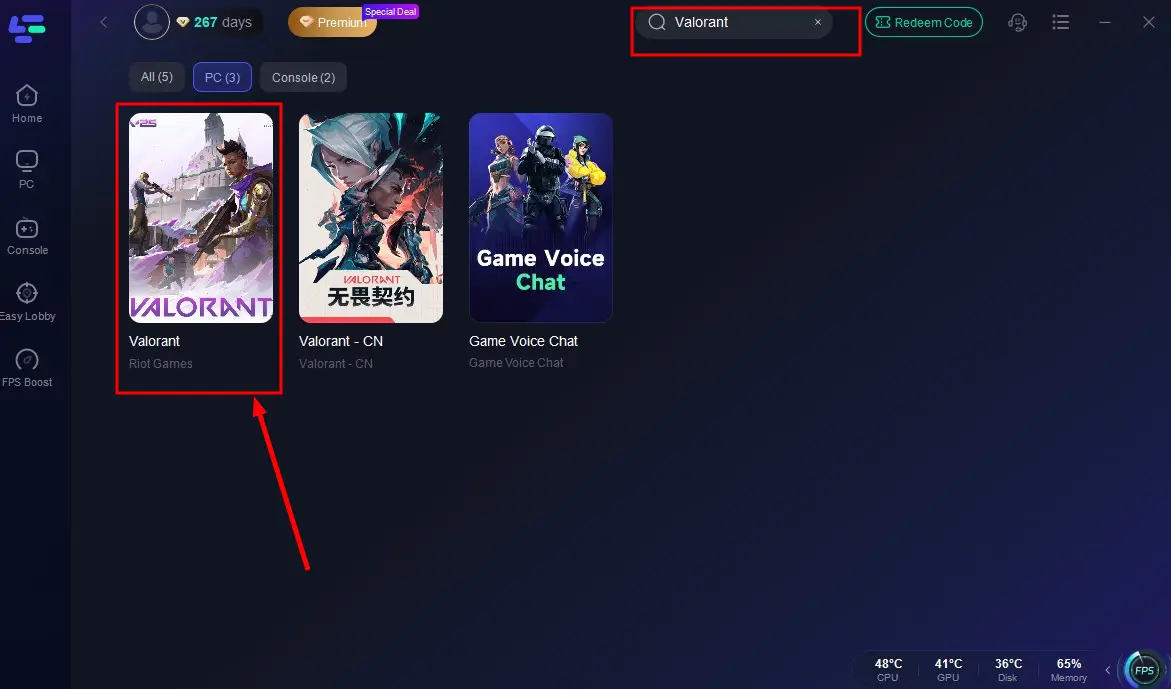
Step 2: Open the LagoFast application and look for Valorant.
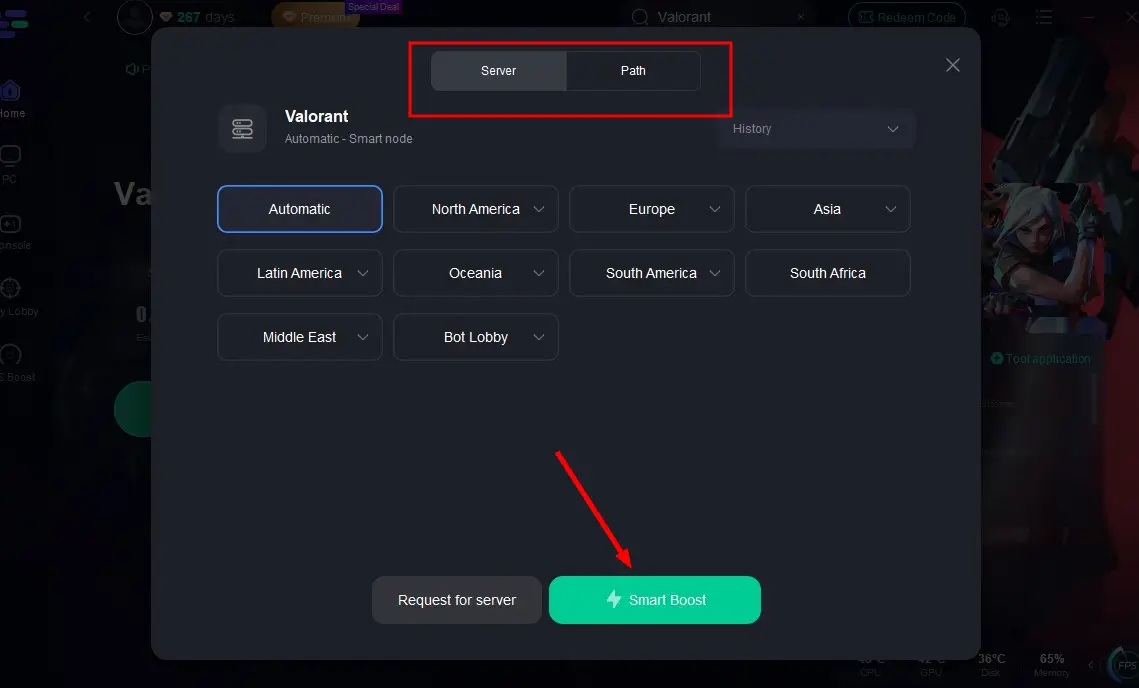
Step 3: Select the desired server from the list.
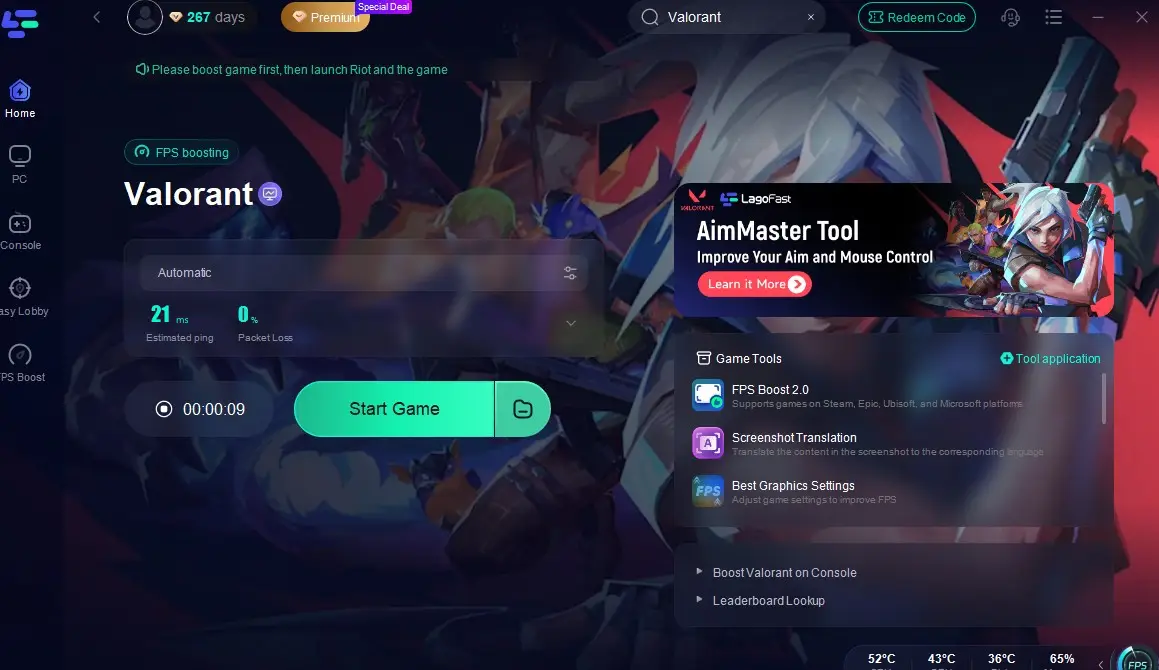
Step 4: Click on game boost and check for packet loss value and launch the game.
Why Use LagoFast?
- Lower ping and real-time latency monitoring
- Avoids connection timeouts during game startup
- Boosts launch speed and reduces crashes tied to network issues
- Smart routing for a more stable game session
With just a few clicks, you can eliminate one of the major causes behind Valorant not launching—network instability. Many players experience issues like infinite loading screens, crashes at startup, or failure to connect to Riot servers, often due to inconsistent routing or high packet loss. LagoFast tackles these problems head-on by offering smart node selection and real-time ping optimization, ensuring your connection is game-ready before you even hit “Play.” Whether you’re stuck at launch or want to avoid future headaches, LagoFast gives you a fast, stable way back into the action—no tech skills required.
5. FAQs
Why does Valorant close immediately after launching?
This can be caused by corrupted files, background apps like antivirus software, or problems with Riot Vanguard.
Can third-party overlays cause Valorant not to start?
Yes. Disable overlays from Discord, NVIDIA GeForce Experience, or other apps before launching the game.
Does Valorant require TPM 2.0 and Secure Boot?
As of recent updates, Windows 11 users must have TPM 2.0 and Secure Boot enabled to run Valorant. You can enable these features via your BIOS settings.
Conclusion
Valorant not launching is a common issue with multiple causes — but thankfully, also multiple reliable solutions. From restarting Vanguard to reinstalling the game or using a game booster like LagoFast, this guide should help you get back to clutching rounds in no time. Don’t let launch issues hold you back — try these steps today and dive back into the action.

Boost Your Game with LagoFast for Epic Speed
Play harder, faster. LagoFast game booster eliminates stutter and lags on PC, mobile, or Mac—win every match!
Quickly Reduce Game Lag and Ping!
Boost FPS for Smoother Gameplay!