
The frustration of hitting "Play" only to be met with a connection error is a feeling every tactical shooter fan dreads. Recently, a significant number of players have reported that they simply cannot enter the game, specifically seeing that Valorant can't connect to the server in Middle East locations. Whether you are trying to climb the ranks from the UAE or casual gaming in Qatar, the sudden absence of reliable local nodes has left the community searching for answers. This guide explores the current situation and provides a definitive solution to get you back into the server.

- ✅ Reduce Lag and High Ping.
✅ Boost FPS at the Same Time.
✅ Support 2000+ Online Games
✅ Change Server Without Latency.
✅ Multiplatform: PC, Console, Mobile.
✅ End Connection & Crashing Issues
Part 1: Valorant Can't Connect to Server in the Middle East - Players' Feedback
Part 2: Valorant Can't Connect to Server in the Middle East: How to Fix It
Part 1: Valorant Can't Connect to Server in the Middle East - Players' Feedback
The gaming community has been vocal about the recent disruptions. On platforms like Reddit, threads are filled with players asking, "Why can't I connect to Valorant servers?" or "Is it just me, or are Dubai and Bahrain servers not showing up?" Many users have shared screenshots of empty server selection lists where the 40ms nodes used to be. One Reddit user noted, "I logged in today, and my ping to everything is 150+. It feels like the local servers just vanished."
This isn't an isolated incident or a simple bug. Currently, local servers for several major video games, including Valorant, Fortnite, Rocket League, and EA FC, are temporarily shut down in Bahrain and the UAE. Infrastructure instability in the region has forced these outages, leaving players with no choice but to be routed to distant European or Asian hubs. While Riot Games works on a fix, the community is stuck waiting for official announcements regarding when the Middle East infrastructure will return to full capacity.
Part 2: Valorant Can't Connect to Server in the Middle East: How to Fix It
The Ultimate Solution: LagoFast Game Booster
When local servers are offline, your data has to travel much further, leading to the dreaded "Unable to Connect" prompt or unplayable lag. LagoFast stands out as the premier tool for overcoming these regional hurdles. It isn't just a basic utility; it is a sophisticated gaming network optimizer designed to find the shortest possible path to active game servers. Players use LagoFast to switch regions and access other servers, achieving low latency gameplay on European or North American servers even when the Middle East nodes are completely unavailable.
Key Features of LagoFast:
- Global Server Network: Access over 2,000+ nodes worldwide to bypass regional outages.
- Real-Time Path Optimization: Automatically switches to the fastest route to avoid network congestion.
- One-Click Region Change: Easily swap your game's connection to EU or NA without complicated settings.
- FPS & Lag Reduction: Specifically built to stabilize frame rates and eliminate packet loss.
- Game Crash Fix Tool: Includes dedicated features to prevent the game from closing during connection spikes.
While the following methods might provide temporary relief, they generally lack the specialized routing technology found in LagoFast. Most of these solutions do not address the root cause of high ping when connecting to distant continents.
Tutorial to Use LagoFast to Fix Valorant Connection Issue:
Step 1: Click the Free Trial button to download and install LagoFast.
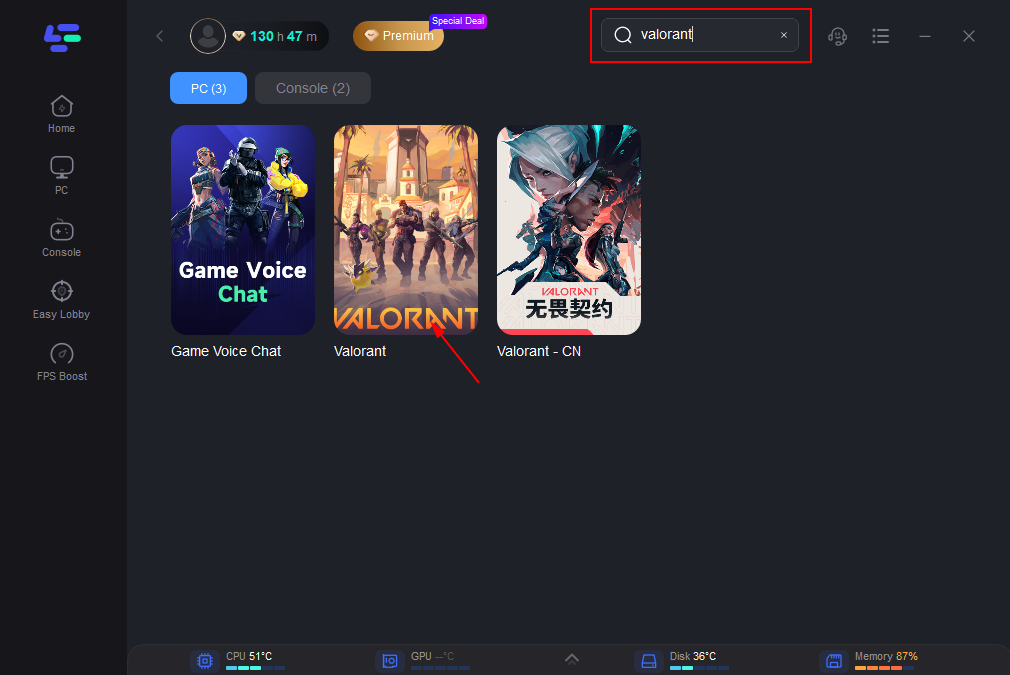
Step 2: Open LagoFast, then click the PC button on the left and search for Valorant in the search bar and click it after it appears.
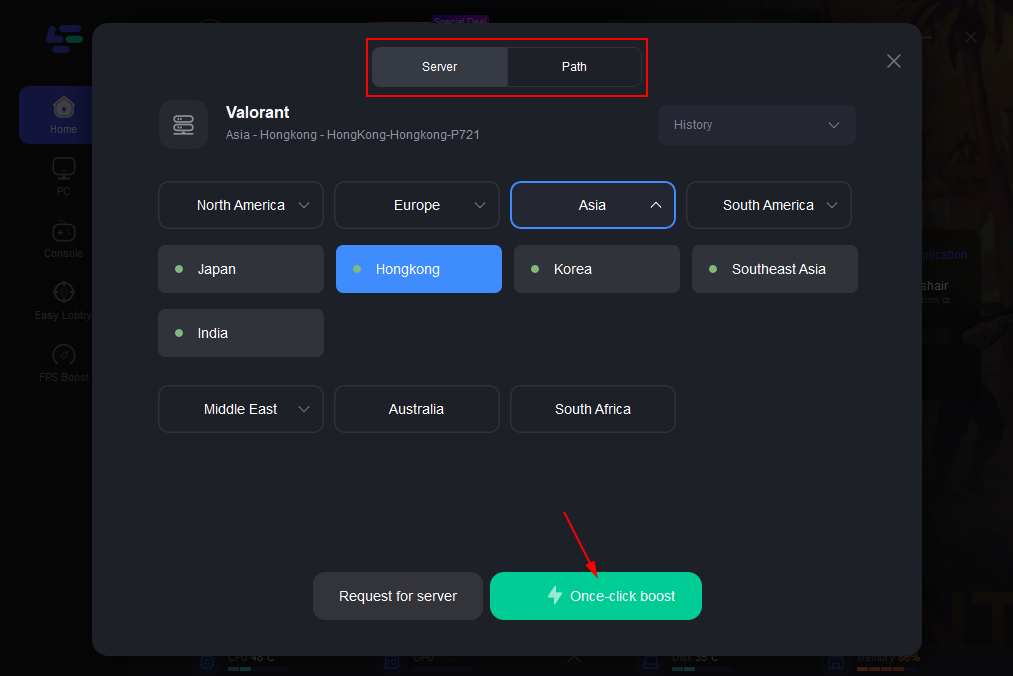
Step 3: Click “Server” to switch to a better server, such as EU or NA, which can improve the gaming experience. Then click “Smart Boost” to resolve the connection issue.
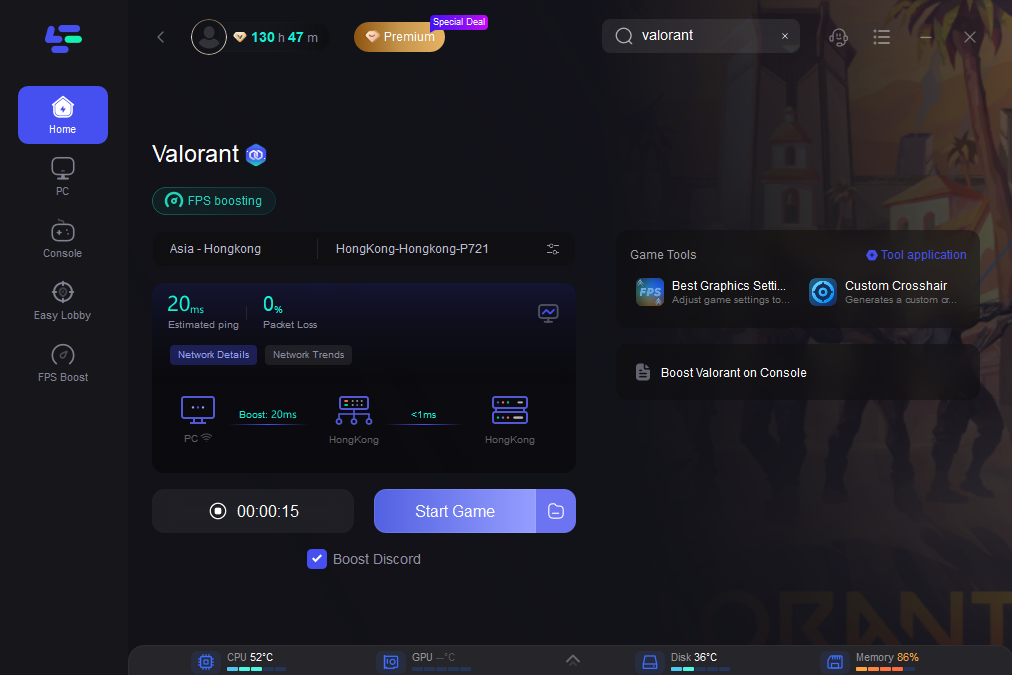
Step 4: Check the specific game ping, packet loss, and multiple path connections on the right side. Finally, click the “Start Game” to play the game.
Solution 2: Flush Your DNS Cache
Clearing old network data can sometimes refresh your connection to the Riot client, though it won't fix a server-side outage.
Step 1: Press the Windows Key and type "cmd."
Step 2: Right-click Command Prompt and select "Run as Administrator."
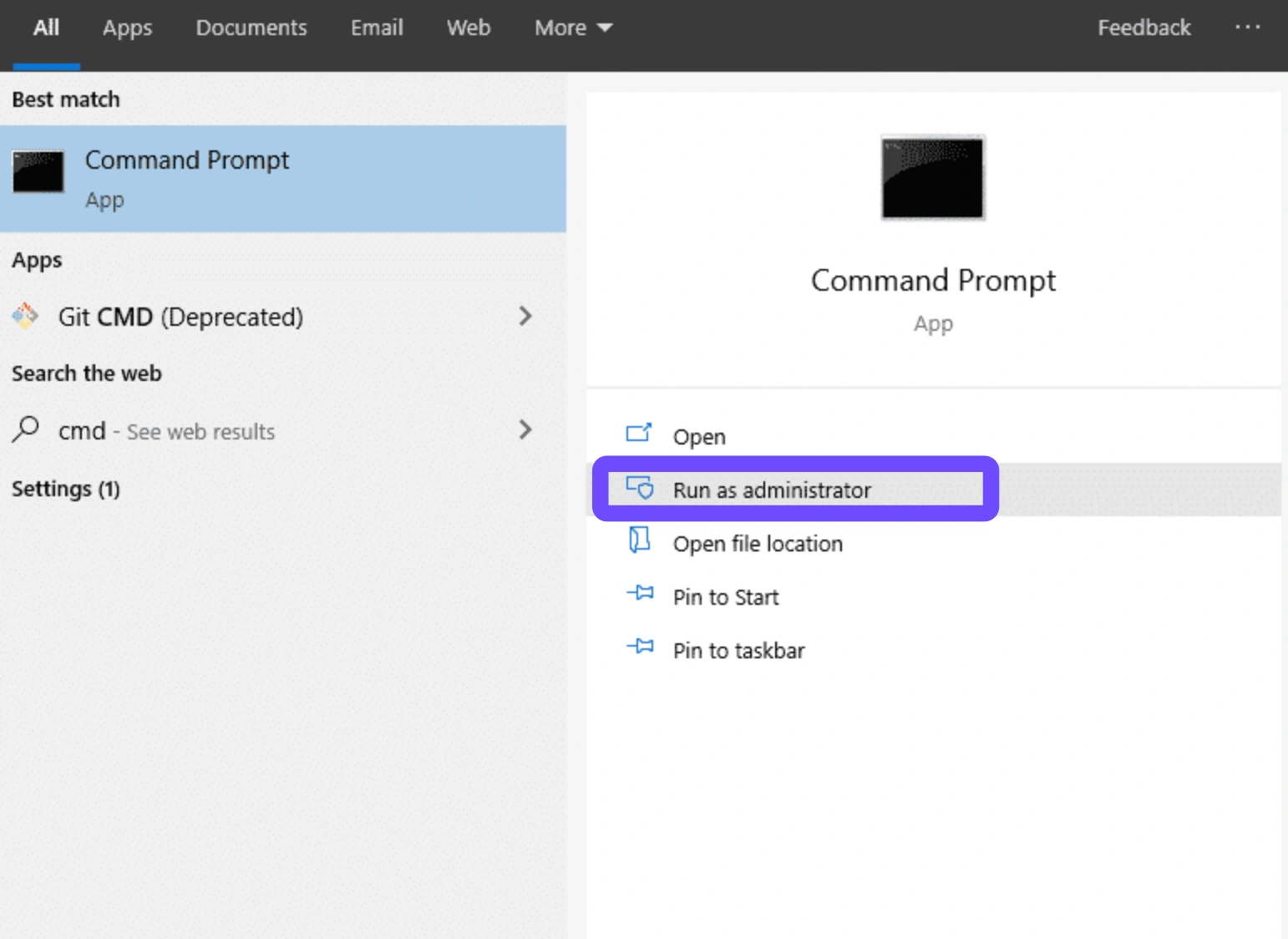
Step 3: Type ipconfig /flushdns and hit Enter.
Step 4: Restart your Riot Client.
Step 5: Attempt to log into Valorant.
Solution 3: Reset Your Network Hardware
Power cycling your router can clear temporary interference from your ISP's side.
Step 1: Unplug your router and modem from the power source.
Step 2: Wait for at least 30 seconds.
Step 3: Plug the modem back in first, followed by the router.
Step 4: Wait for all lights to stabilize.
Step 5: Restart your PC and launch the game.
Solution 4: Update Network Drivers
Outdated drivers can cause "Session Errors" and disconnections during high-traffic periods.
Step 1: Right-click the Start button and select Device Manager.
Step 2: Expand "Network adapters."
Step 3: Right-click your Ethernet or Wi-Fi controller.
Step 4: Select "Update driver" and choose "Search automatically for drivers."

Step 5: Restart your computer.
Solution 5: Change to a Wired Connection
Switching from Wi-Fi to Ethernet provides a more stable signal, which is vital when playing on distant servers.
Step 1: Locate a Cat6 or Cat7 Ethernet cable.
Step 2: Connect one end to your router and the other to your PC.
Step 3: Disable Wi-Fi in your Windows "Network & Internet" settings.
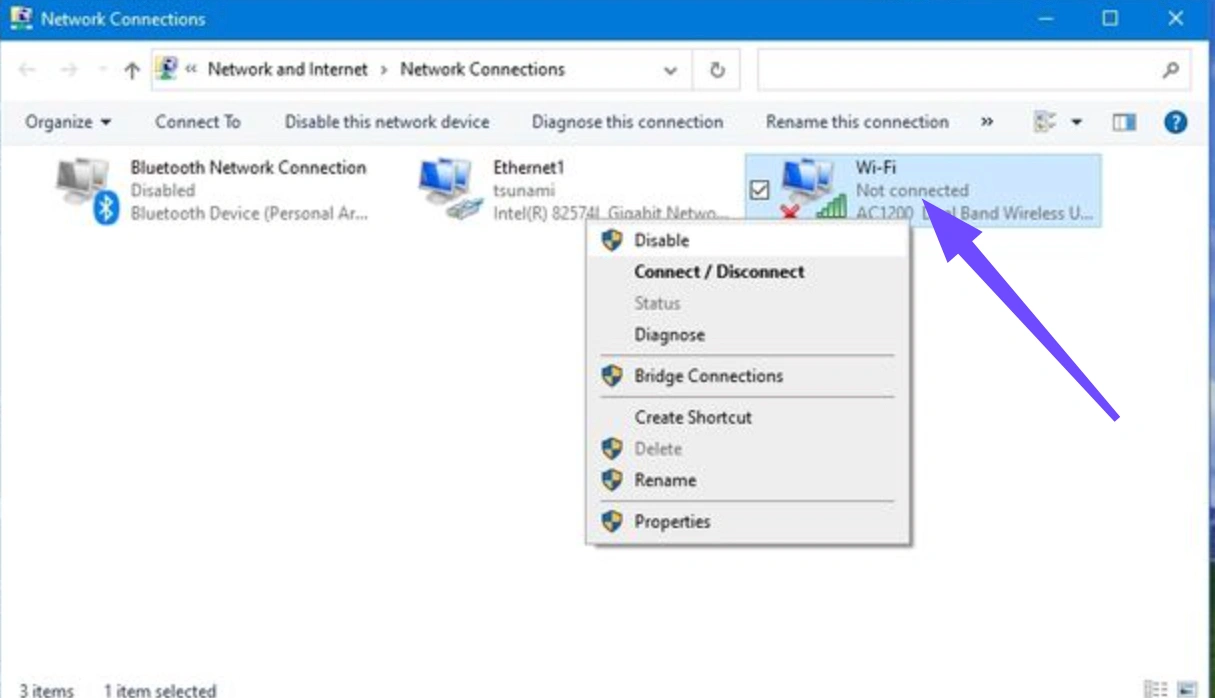
Step 4: Verify that your connection is "Wired."
Step 5: Launch Valorant to test stability.
Solution 6: Adjust In-Game Network Buffering
Valorant has internal settings to help handle unstable connections, though it may make the game feel "heavy."
Step 1: Open Valorant and go to the "Settings" menu.
Step 2: Navigate to the "Video" tab and then "Stats."
Step 3: Find "Network Buffering."
Step 4: Set it to "Moderate" or "Maximum."
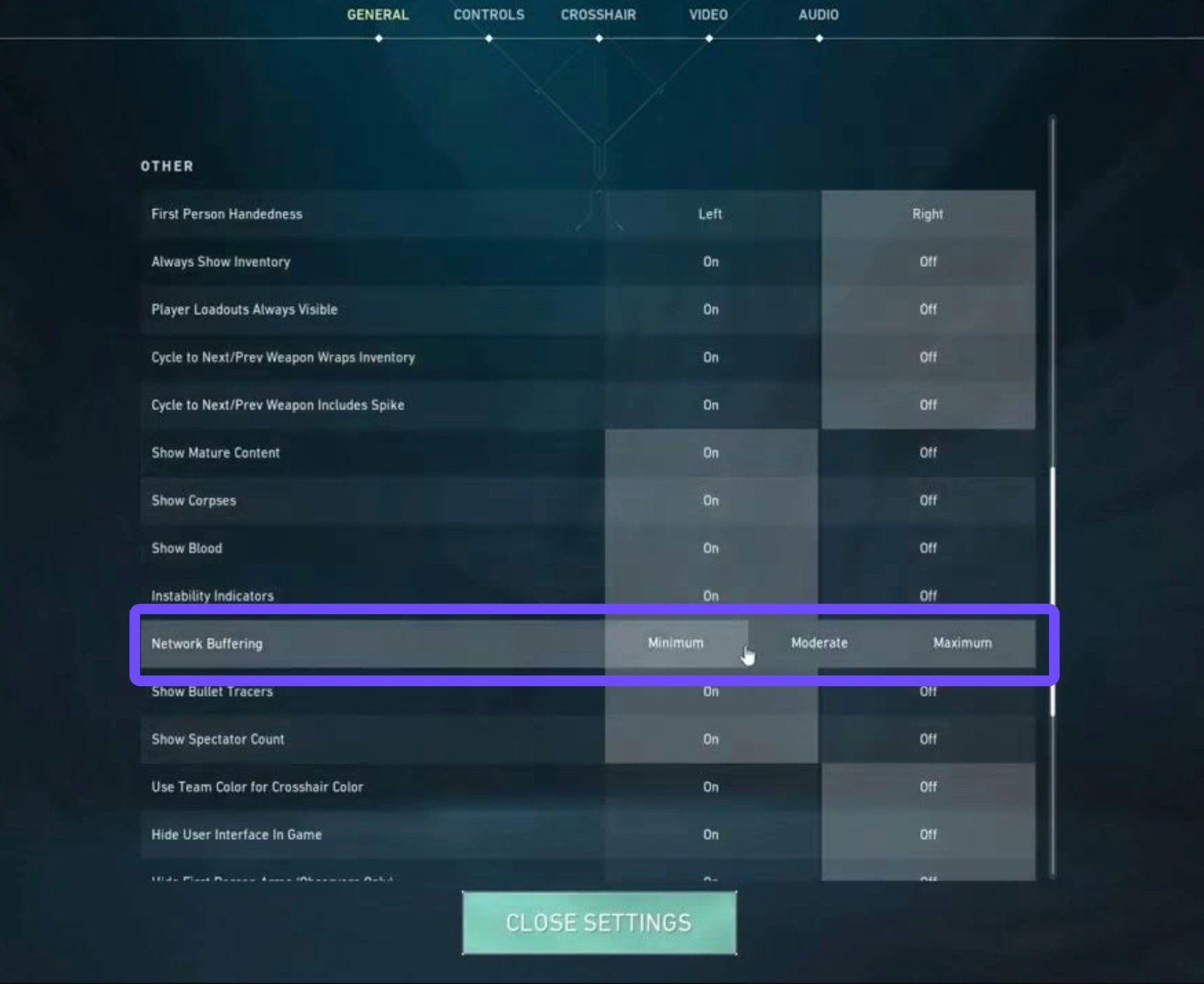
Step 5: Save settings and enter a practice range to test.
Conclusion
The current situation with Valorant Middle East servers is a waiting game. With the AWS infrastructure in the UAE and Bahrain facing physical repair challenges, players should not expect a "magic fix" from Riot Games overnight. While waiting for official updates, your best bet is to adapt. Don't let your rank decay or your skills get rusty. By using a professional game booster like LagoFast, you can bypass the local instability and continue your climb on European or Asian servers with a stable, low-latency connection.

Boost Your Game with LagoFast for Epic Speed
Play harder, faster. LagoFast game booster eliminates stutter and lags on PC, mobile, or Mac—win every match!
Quickly Reduce Game Lag and Ping!
Boost FPS for Smoother Gameplay!