

Many players exploring The Seven Deadly Sins Origin have encountered technical problems such as The Seven Deadly Sins Origin crashing, startup failures, or endless loading screens. Since the game is built on Unreal Engine 5 and released across multiple platforms including PC, PlayStation 5, and mobile devices, stability issues can occur for different reasons depending on the device and system configuration.
This guide explains the most common crash scenarios players report, including The Seven Deadly Sins Origin Game crash on startup, The Seven Deadly Sins Origin black screen, The Seven Deadly Sins Origin Stuck on loading screen, and The Seven Deadly Sins Origin Fatal error messages.

- ✅ Reduce Lag and High Ping.
✅ Boost FPS at the Same Time.
✅ Support 2000+ Popular Online Games.
✅ Change Server without Latency.
✅ Boost Game Loading Speed.
Part 1. Why The Seven Deadly Sins Origin Keeps Crashing
Part 2. How to Fix The Seven Deadly Sins Origin Crashing on PC
Part 3. How to Fix The Seven Deadly Sins Origin Crashing on Mobile
Part 4. How to Enhance Your Game Experience with LagoFast Game Booster
Part 1. Why The Seven Deadly Sins Origin Keeps Crashing
Before applying fixes, it helps to understand why The Seven Deadly Sins Origin crashing happens in the first place. Modern open-world RPGs rely heavily on CPU, GPU, and network communication, and even minor configuration issues can cause instability.
Common causes include:
1. Unreal Engine Rendering Conflicts
Because the game uses Unreal Engine 5, rendering errors or GPU driver issues may trigger The Seven Deadly Sins Origin Unreal Engine crash messages during gameplay or startup.
2. Corrupted Game Files
Interrupted downloads or failed updates may cause The Seven Deadly Sins Origin Game crash on startup, preventing the client from loading required assets.
3. Hardware or Driver Compatibility
Outdated GPU drivers are a frequent cause of crashes and freezing in modern games, especially those built on Unreal Engine.
4. Background Software Conflicts
Overlays and background programs can consume system resources and cause instability in Unreal Engine titles.
5. Network Initialization Errors
Some crashes happen during login or loading screens when the game fails to communicate with the server.
Identifying the type of crash you experience makes troubleshooting much easier.
Part 2. How to Fix The Seven Deadly Sins Origin Crashing on PC
PC players are most likely to experience The Seven Deadly Sins Origin Game crash on startup or The Seven Deadly Sins Origin black screen on launch due to software conflicts or driver issues.
Below are the most effective fixes.
1. Update Your GPU Drivers
Outdated drivers are one of the leading causes of The Seven Deadly Sins Origin crashing.
Steps:
- Visit the official NVIDIA, AMD, or Intel driver page.
- Download the latest GPU driver.
- Install and restart your PC.
Driver updates often include compatibility improvements for Unreal Engine games.
2. Verify Game Files
Corrupted files often cause The Seven Deadly Sins Origin not launching or The Seven Deadly Sins Origin Fatal error.
On Steam:
- Open Steam Library
- Right-click the game
- Select Properties
- Go to Installed Files
- Click Verify Integrity of Game Files
Steam will replace damaged files automatically.
3. Disable Overlays and Background Applications
Programs like Discord overlay, Steam overlay, or monitoring tools can trigger The Seven Deadly Sins Origin Unreal Engine crash.
Close or disable:
- Discord overlay
- NVIDIA GeForce Experience overlay
- Xbox Game Bar
- MSI Afterburner overlays
Background applications sometimes conflict with game rendering systems.
4. Run the Game as Administrator
Permission conflicts may cause The Seven Deadly Sins Origin black screen on launch.
Steps:
- Right-click the game executable.
- Select Run as Administrator.
- Launch the game again.
5. Lower Graphics Settings
If crashes occur during gameplay rather than startup, try lowering settings such as:
- Shadow quality
- Ray tracing
- Texture resolution
Open-world environments in the game require significant GPU resources.
6. Reinstall the Game
If the issue persists, uninstall and reinstall the game completely.
A clean installation often fixes The Seven Deadly Sins Origin Stuck on loading screen problems caused by incomplete updates.
Part 3. How to Fix The Seven Deadly Sins Origin Crashing on Mobile
Mobile devices encounter different crash triggers compared with PCs.
If you see The Seven Deadly Sins Origin crashing on Android or iOS, try these solutions.
1. Restart the Device
Temporary memory conflicts may cause The Seven Deadly Sins Origin black screen or app crashes.
Steps:
- Close the game completely.
- Restart your phone.
- Launch the game again.
2. Clear Game Cache
Cached data sometimes becomes corrupted.
Android steps:
- Open Settings
- Tap Apps
- Select The Seven Deadly Sins Origin
- Tap Storage
- Select Clear Cache
3. Update the Game and Operating System
An outdated client may trigger The Seven Deadly Sins Origin Fatal error.
Check:
- App Store or Google Play updates
- System software updates
Compatibility patches often fix crash bugs after release.
4. Free Up Device Storage
Low storage can cause The Seven Deadly Sins Origin Stuck on loading screen issues.
Open-world games require space for cached textures and asset streaming.
Aim for at least 5–10 GB of free storage.
5. Avoid Background Apps
Mobile devices with many background apps may experience The Seven Deadly Sins Origin Game crash on startup due to memory shortages.
Close unnecessary apps before launching the game.
Part 4. How to Enhance Your Game Experience with LagoFast Game Booster
While crashes are often caused by system issues, unstable network connections can also cause freezing or loading screen problems.
LagoFast (LagoFast Game Booster—Get No Lag and Lower Ping) Game Booster helps stabilize network routes between players and game servers.
Benefits of LagoFast
- Reduces packet loss
- Stabilizes latency during gameplay
- Optimizes server routing
- Improves login and loading stability
These improvements can reduce cases where The Seven Deadly Sins Origin Stuck on loading screen occurs during server communication.
How to Use LagoFast Game Booster on PC
Step 1: Click the Free Trial button to download and install LagoFast Free Trial.
Step 2: Open the application and select The Seven Deadly Sins Origin from the list of supported games.

Step 3: Choose the recommended route based on your location.
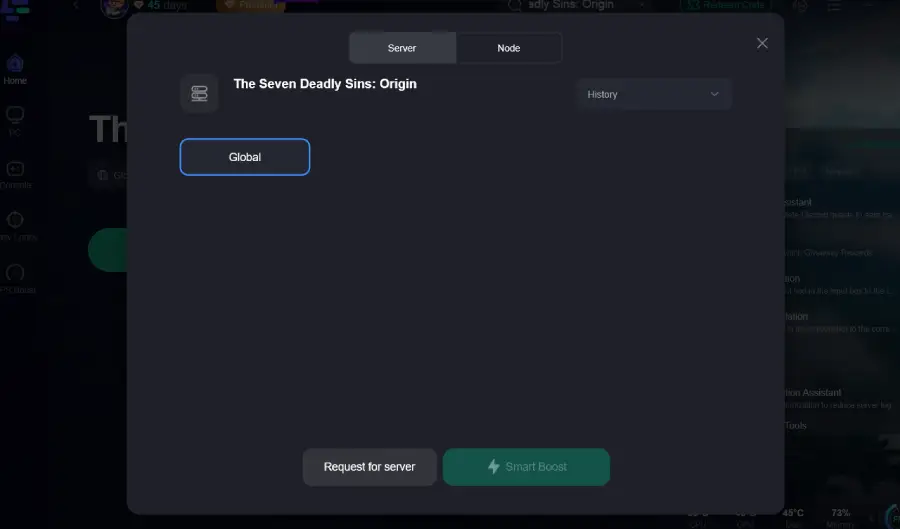
Step 4: Click the Boost button to enable optimized routing.
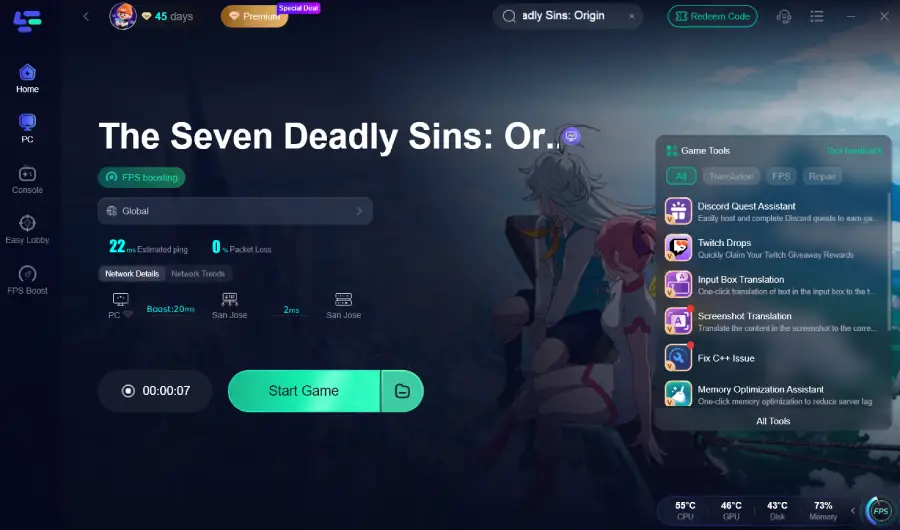
This setup helps maintain smoother sessions, especially during launch periods when server traffic is high.
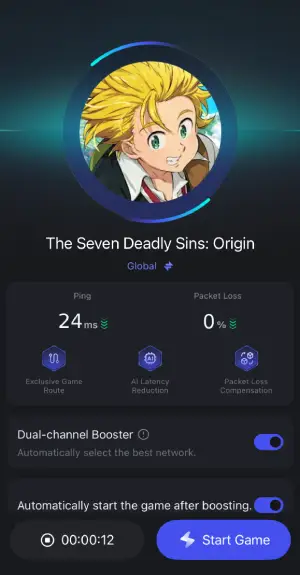
How to use LagoFast Game Booster on Mobile
Step 1: Download LagoFast Mobile Booster

Step 2: Type The Seven Deadly Sins Origin in the game list.
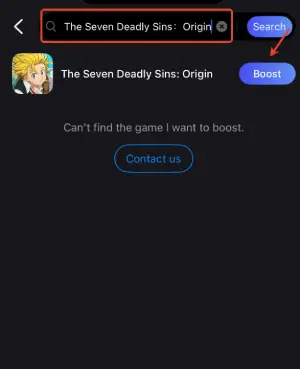
Step 3: Choose the Server you like, then click the Boost button.
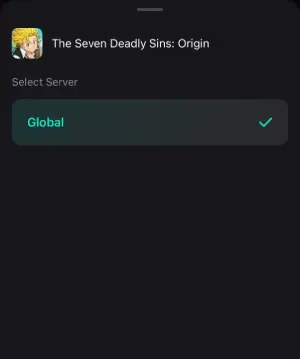
Step 4: After completing the above network optimization settings, the FPS drops issue will be easily resolved.
Part 5. FAQs
1. Why does The Seven Deadly Sins Origin keep crashing?
The Seven Deadly Sins Origin crashing usually happens because of outdated drivers, corrupted files, Unreal Engine conflicts, or insufficient system resources.
2. How do I fix The Seven Deadly Sins Origin black screen on launch?
Try these solutions:
- Update GPU drivers
- Verify game files
- Disable overlays
- Run the game as administrator
These steps fix most The Seven Deadly Sins Origin black screen on launch cases.
3. What causes The Seven Deadly Sins Origin Fatal error?
The Seven Deadly Sins Origin Fatal error usually appears when the game engine encounters a critical rendering or memory issue, often related to GPU drivers or corrupted files.
4. Why is The Seven Deadly Sins Origin stuck on loading screen?
The Seven Deadly Sins Origin Stuck on loading screen issue may occur due to server communication delays, slow storage, or incomplete downloads.
5. Is The Seven Deadly Sins Origin available on PC and mobile?
Yes. The game launches on PC (Steam), PlayStation 5, and mobile devices with cross-platform availability planned for multiple regions.
Conclusion
Experiencing The Seven Deadly Sins Origin crashing can interrupt exploration of Britannia’s open world and cooperative battles. Problems such as The Seven Deadly Sins Origin not launching, black screen on launch, Unreal Engine crash, and fatal errors usually stem from driver conflicts, corrupted files, system limitations, or unstable network communication.
By applying the solutions in this guide—updating drivers, verifying files, adjusting system settings, and managing background applications—most crash problems can be resolved on both PC and mobile platforms. Network optimization tools like LagoFast Game Booster can also help maintain smoother connections during login, updates, and online gameplay sessions.
With the right troubleshooting approach, players can return to exploring the fractured world of Britannia and enjoy the full experience that The Seven Deadly Sins Origin aims to deliver.

Boost Your Game with LagoFast for Epic Speed
Play harder, faster. LagoFast game booster eliminates stutter and lags on PC, mobile, or Mac—win every match!
Quickly Reduce Game Lag and Ping!
Boost FPS for Smoother Gameplay!