If you’re running into problems in The Seven Deadly Sins: Origin, you’re not alone. Most player-reported issues fall into three major categories: crashes and fatal errors (especially on PC), login or loading problems, and server/network instability.
The fastest way to fix your issue is to correctly identify which category it belongs to. A Fatal Error on PC requires a completely different approach compared to a login timeout or a stuck loading screen.
This guide focuses on real issues reported across PC, PS5, iOS, and Android—including error codes like 30005, 30021225-0, 20019101-2, 30035403-0, 20010025-2, as well as Fatal Error, LowLevelFatalError, EXCEPTION_ACCESS_VIOLATION, white screen login bugs, and infinite loading screens.

Best Game Booster!
- ✅ Reduce Lag and High Ping.
✅ Boost FPS at the Same Time.
✅ Support 2000+ Popular Online Games.
✅ Change Server without Latency.
✅ Boost Game Loading Speed.
Free Trial
Part 1: The Seven Deadly Sins: Origin Error Codes Explained
Part 2: Common Causes of Crashes and Errors
Part 3: PC Crash Fix Guide (Step-by-Step)
Part 4: Fixes for PS5, iOS, and Android
Part 5: How to Tell If It’s a Server Issue
Part 6: Network Fixes and Optimization Tools
Part 7: When to Contact Support
Part 8: FAQ – The Seven Deadly Sins: Origin Errors
Part 1: The Seven Deadly Sins: Origin Error Codes Explained
Common Error Codes (30005, 30021225-0, 20019101-2, 30035403-0, 20010025-2)
These error codes are widely reported but rarely come with clear in-game explanations. Based on community data:
- If they appear during login or launch → usually server overload, firewall conflicts, launcher issues, or routing instability
- If they happen after updates → likely not purely a local issue
- If they only occur on one network → points to connection routing problems
In short: treat these primarily as connection/service access errors, not file corruption.
Fatal Error / “An Unreal Process Has Crashed UE-SevenDeadlySins”
This is one of the most common PC issues and is tied to Unreal Engine crashes, not server downtime.
LowLevelFatalError
A variation of Unreal Engine crashes, often occurring very early during startup, before gameplay even begins.
Unhandled EXCEPTION_ACCESS_VIOLATION
This indicates improper memory access. In practical terms, it should be treated the same way as other UE crash errors.
Infinite Loading Screen
This sits between local and server-side issues:
- Could be shader or asset problems (PC)
- Could also be server instability during launch periods
White Screen on Login
Players report seeing a blank white window after pressing “Start Game.” This is typically:
- A login process failure
- A web/account popup issue
- Or a temporary service-side bug
Part 2: Common Causes of Crashes and Errors
On PC
Most crashes are linked to:
- Corrupted shader downloads
- Missing Microsoft Visual C++ libraries
- Overlay conflicts
- DirectX 12 driver issues
- Systems with less than 16 GB RAM
One guide summarizes it clearly:
“90% of UE5 crashes come from shaders, C++ libraries, or overlays.”
Minimum PC requirements include:
- Windows 10 64-bit
- Intel i5-2500K / AMD FX-8350
- 16 GB RAM
- GTX 1060 6GB
Network and Login Issues
Typical causes include:
- Firewall conflicts
- Launcher issues
- High latency or unstable internet
- Weak Wi-Fi or mobile data
- Network congestion
- Peak-time server overload
Part 3: The Seven Deadly Sins: Origin PC Crash Fix (Step-by-Step)
Follow these in order—don’t apply everything at once.
1) Verify Game Files
Use this for:
- Fatal Error
- Infinite loading
- White/black screen
- Post-patch crashes
This fixes corrupted assets and shader issues.
2) Update GPU Drivers
Outdated drivers are a major cause of crashes, especially with DirectX 12.
3) Reinstall Microsoft Visual C++ Redistributable
This is one of the most critical fixes for UE crashes.
4) Disable Overlays
Turn off overlays in:
- Discord
- Steam
- NVIDIA software
Overlay conflicts are a top cause of crashes before login.
5) Run as Administrator
Useful for:
- Launch issues
- Login failures
- Permission-related errors
6) Allow Through Firewall/Antivirus
Essential if:
- Game launches but can’t connect
- Repeated login errors occur
7) Clear Shader Cache
Helps with:
- Early crashes
- Loading freezes after patches
8) Install on SSD
SSD improves:
- Loading times
- Asset streaming
- Stability
9) Check System Requirements
Systems with less than 16 GB RAM may experience unavoidable crashes.
Part 4: Fixes for PS5, iOS, and Android
PS5 Fix Guide
- Restart console
- Update game
- Update system software
- Re-login account
- Switch network
- Avoid peak hours
- Reinstall only after syncing account
A known bug related to purchases (fixed March 22, 2026) affected certain bundles—so ensure your issue isn’t already patched.
Mobile Fix Guide (iOS & Android)
- Restart device
- Update app
- Switch between Wi-Fi and mobile data
- Close background apps
- Re-login account
- Lower graphics settings
- Limit FPS to 30–45
Most mobile issues are network-related rather than app-related.
Part 5: How to Tell If It’s a Server Issue
It’s likely server-side if:
- The issue started after a patch
- Many players report the same problem
- Login consistently fails
- Changing network/device doesn’t help
- It happens during maintenance
Launch periods have shown heavy instability, especially during peak hours.
Quick Check
- Official Twitter/X
- Discord announcements
- Community reports
If everyone is affected, reinstalling won’t help.
Part 6: When LagoFast Can Actually Help in The Seven Deadly Sins: Origin
If your issue clearly looks network-related rather than a crash, then a tool like LagoFast can be useful—but only in specific situations.
It makes sense to consider it if you’re experiencing:
- Login timeout errors
- Packet loss
- Ping spikes or unstable latency
- Matchmaking failing during heavy launch periods
- The game works on one network but not another
- Cross-region or unstable routing issues
In these cases, connection optimization and routing tools can genuinely improve stability.
However, it’s important to understand the limitation:
it will NOT fix Fatal Error, LowLevelFatalError, corrupted game files, outdated drivers, or missing C++ libraries.
Simple Setup Guide
Step 1: Click the Free Trial button to download and install LagoFast Free Trial.
Free Trial
Step 2: Open the application and select The Seven Deadly Sins Origin from the list of supported games.

Step 3: Choose the recommended route based on your location.
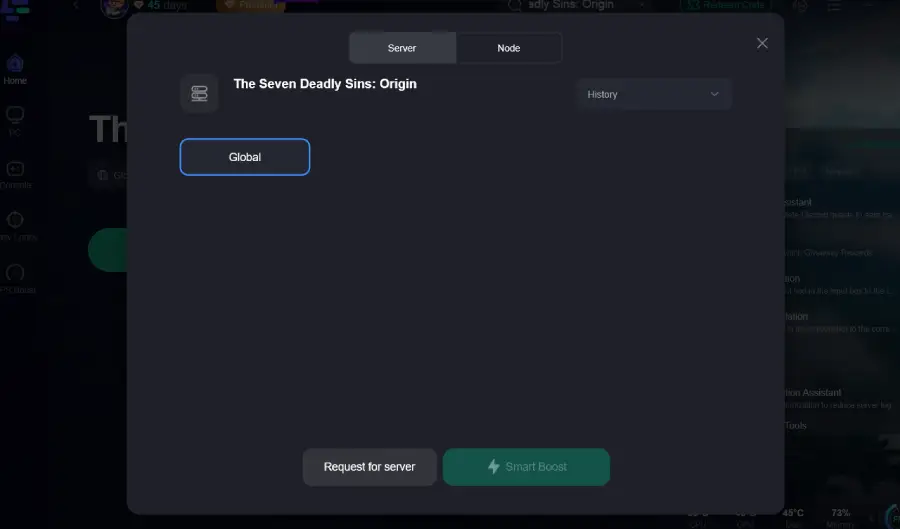
Step 4: Click the Boost button to enable optimized routing.
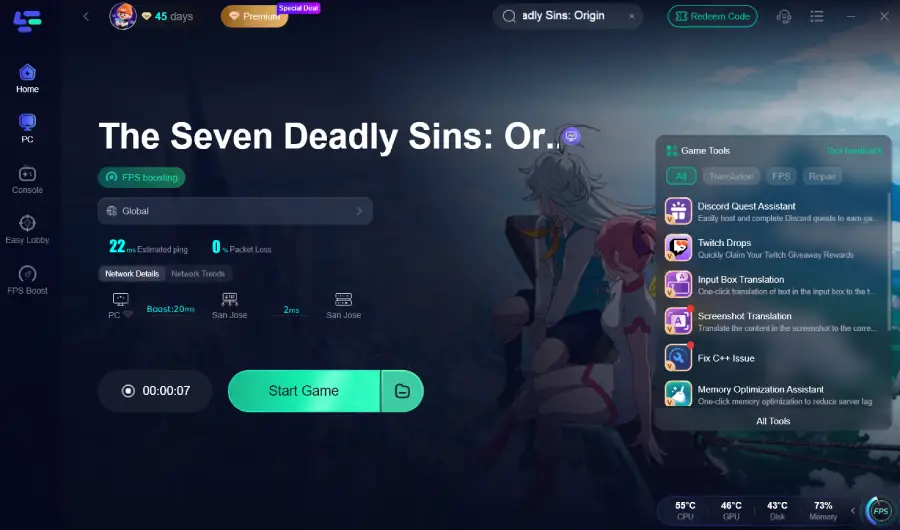
If your problem involves random ping spikes, repeated timeouts, or unstable routing during peak hours, this is one of the few cases where a network optimization tool is actually worth trying.
Part 7: When to Contact Support
If you’ve already checked server status and gone through the appropriate troubleshooting steps for your platform, it’s time to stop guessing and submit a clear support ticket.
To help support resolve your issue faster, include the following details:
- Platform: PC, PS5, iOS, or Android
- Account region
- Exact error code or full error message
- Screenshot or video of the issue
- Crash logs (for PC players)
- PC specifications (if applicable)
- Network type: Wi-Fi, Ethernet, or mobile data
- Troubleshooting steps you’ve already tried
- Whether the issue started after a patch or maintenance
The last point is especially important. If your issue began immediately after the March 22 maintenance or any recent update, support teams are much more likely to match it to a known issue and provide a faster resolution.
Part 8: FAQ – The Seven Deadly Sins: Origin Errors
What does error code 30005 mean?
It’s typically a connection or service access issue, often tied to server load or network instability.
How to fix “An Unreal Process Has Crashed”?
Follow the PC crash fixes:
- Verify files
- Update GPU drivers
- Install Visual C++
- Disable overlays
- Clear shader cache
Why is the game stuck on loading?
Usually caused by:
- Shader/asset issues
- Server instability
Are the servers down?
Check official channels. If many players are affected, it’s likely server-side.
What should I send to support?
Include platform, error code, logs, specs, and timing (especially after patches).
Conclusion
The key to fixing issues in The Seven Deadly Sins: Origin is not treating all errors the same.
A UE crash, a login failure, and a server timeout may feel equally frustrating—but each requires a completely different solution path.
Start with server status, identify the type of issue, apply targeted fixes, and only escalate when necessary.