

Many players testing or preparing for The Seven Deadly Sins Origin have encountered network problems such as The Seven Deadly Sins Origin cannot connect to server, login failures, or sudden connection timeout errors. These issues can appear during launch periods, after updates, or when network routing between the player and the game server becomes unstable.
This guide explains the most common causes of The Seven Deadly Sins Origin server error messages and provides practical solutions for PC and mobile players.

- ✅ Reduce Lag and High Ping.
✅ Boost FPS at the Same Time.
✅ Support 2000+ Popular Online Games.
✅ Change Server without Latency.
✅ Boost Game Loading Speed.
Part 1. Why The Seven Deadly Sins Origin Connection Issues Happen
Part 2. How to Fix The Seven Deadly Sins Origin Cannot Connect to Server on PC
Part 3. How to Fix The Seven Deadly Sins Origin Server Error on Mobile
Part 4. Network Optimization Tips to Avoid Connection Timeout
Part 5. How to Enhance Your Game Experience with LagoFast Game Booster
Part 1. Why The Seven Deadly Sins Origin Connection Issues Happen
Before applying fixes, it helps to understand why The Seven Deadly Sins Origin connection timeout or login errors occur. Online games rely on stable communication between the client and the server, and several factors can interrupt that process.
1. Server Overload or Maintenance
During launch windows or large updates, developers may perform maintenance or experience unexpected traffic spikes. When servers are overloaded, players may see The Seven Deadly Sins Origin cannot connect to server messages until capacity stabilizes.
2. Network Instability
Weak Wi-Fi signals, packet loss, or ISP routing issues can cause frequent disconnections. Network problems are one of the most common causes of server connectivity failures.
3. Outdated Game Client
If your game version does not match the server version after a patch, the client may fail to authenticate with the server.
4. Firewall or Security Software
Firewalls and antivirus programs sometimes block online games mistakenly, preventing the client from communicating with the server.
5. Corrupted Game Files
Incomplete downloads or interrupted updates can corrupt game files, which may trigger The Seven Deadly Sins Origin server error during startup.
Understanding these factors helps narrow down the right solution quickly.
Part 2. How to Fix The Seven Deadly Sins Origin Cannot Connect to Server on PC
PC players usually experience The Seven Deadly Sins Origin cannot connect to server errors due to launcher problems, firewall conflicts, or unstable network routing. Here are several solutions worth trying.
1. Check Server Status First
Before troubleshooting your own system, verify that the game servers are online. Developers sometimes take servers offline during maintenance or updates.
2. Restart the Game and Launcher
Simple restarts often resolve temporary network authentication failures.
Steps:
- Exit the game completely.
- Close Steam or the launcher.
- Relaunch the platform and log in again.
Many multiplayer games reconnect successfully after a restart because the client establishes a fresh server session.
3. Verify Game Files
Corrupted files can cause The Seven Deadly Sins Origin server error.
On Steam:
- Open your game library.
- Right-click the game.
- Select Properties → Installed Files → Verify Integrity of Game Files.
This process scans for damaged files and replaces them automatically.
4. Allow the Game Through Firewall
Security software may block the connection.
Steps:
- Open Windows Defender Firewall.
- Click Allow an app through firewall.
- Add the game executable and launcher.
Firewall interference is a well-known cause of connection failures in online games.
5. Reset Network Settings
If the The Seven Deadly Sins Origin connection timeout persists, resetting the Windows network stack can help.
Open Command Prompt as administrator and run:
netsh winsock reset
ipconfig /flushdns
ipconfig /release
ipconfig /renew
These commands refresh DNS and network configuration.
6. Use Wired Internet Instead of Wi-Fi
Ethernet connections provide a more stable route to the server and reduce packet loss during gameplay.
Part 3. How to Fix The Seven Deadly Sins Origin Server Error on Mobile
Mobile players sometimes experience The Seven Deadly Sins Origin connection timeout due to mobile network switching, background apps, or device settings.
1. Switch Between Wi-Fi and Mobile Data
Connection problems sometimes occur on one network but not another.
Try the following:
- Disable Wi-Fi and switch to mobile data
- Or switch from data to Wi-Fi
Some players report that certain networks block gaming traffic or create unstable routes.
2. Restart the Game and Device
Restarting clears background processes and reconnects the device to network services.
Steps:
- Close the game completely.
- Restart the phone or tablet.
- Launch the game again.
3. Clear App Cache
Temporary data can interfere with server communication.
On Android:
- Open Settings → Apps → The Seven Deadly Sins Origin
- Tap Storage
- Select Clear Cache
4. Update the Game
If the client is outdated, the game may show The Seven Deadly Sins Origin cannot connect to server until the update is installed.
Check Google Play or the App Store for updates.
5. Disable VPN or Proxy
Some VPN routes create unstable paths to game servers. If the connection timeout occurs while using a VPN, turn it off and reconnect.
Part 4. Network Optimization Tips to Avoid Connection Timeout
Even if the server is working normally, network routing can still cause The Seven Deadly Sins Origin connection timeout errors.
Here are practical improvements that experienced PC gamers often use:
1. Restart Your Router
Restarting the router refreshes DNS allocation and clears connection tables, which often fixes unstable routes.
2. Change DNS Servers
Using faster DNS providers may reduce connection delays.
Popular options include:
- Google DNS: 8.8.8.8 / 8.8.4.4
- Cloudflare DNS: 1.1.1.1 / 1.0.0.1
3. Reduce Network Traffic
Pause downloads, streaming services, or other devices using the same network during gameplay.
Online games require consistent packet delivery, and heavy bandwidth usage can cause The Seven Deadly Sins Origin server error or login timeouts.
Part 5. How to Enhance Your Game Experience with LagoFast Game Booster
Network routing between players and servers can vary significantly depending on region and ISP. Tools such as LagoFast (LagoFast Game Booster—Get No Lag and Lower Ping) help stabilize the connection by optimizing data routes.
- Lag Reduction: Minimizes latency and ping issues, ensuring smoother gameplay.
- FPS Boost: Optimizes system performance to maintain consistent frame rates.
- Server Selection: Allows connection to optimal servers for reduced lag.
How to Use LagoFast Game Booster on PC
Step 1: Click the Free Trial button to download and install LagoFast Free Trial.
Step 2: Open the application and select The Seven Deadly Sins Origin from the list of supported games.

Step 3: Choose the recommended route based on your location.
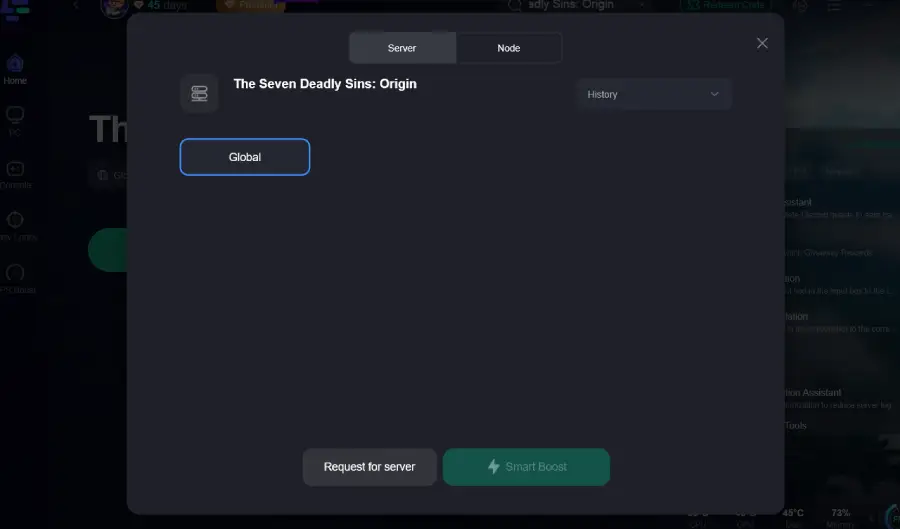
Step 4: Click the Boost button to enable optimized routing.
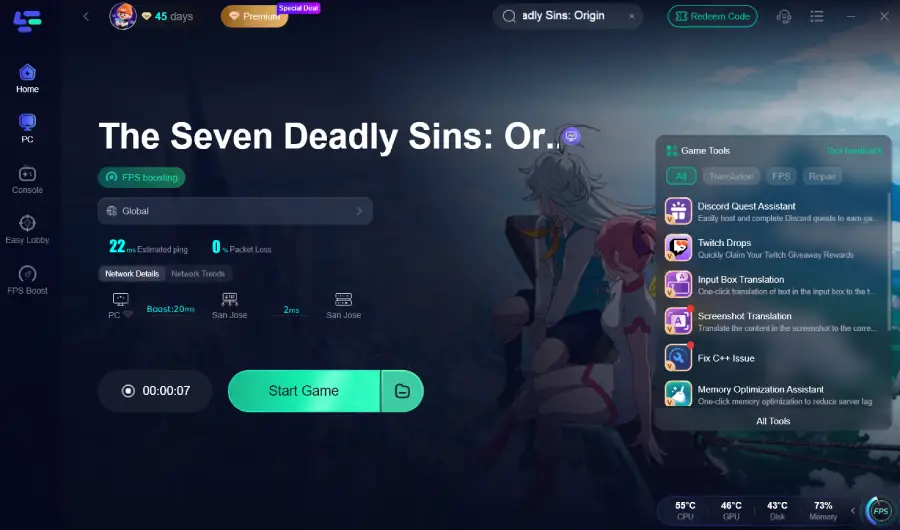
This setup can help stabilize gameplay, particularly during launch periods when server traffic is high.
How to use LagoFast Game Booster on Mobile
Step 1: Download LagoFast Mobile Booster

Step 2: Search The Seven Deadly Sins Origin and click the result.
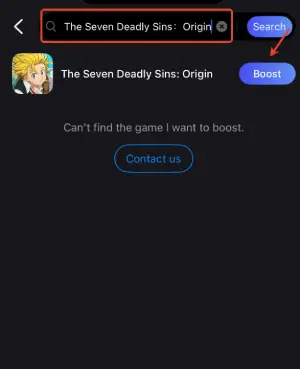
Step 3: Choose the Server you like, then click the Boost button.
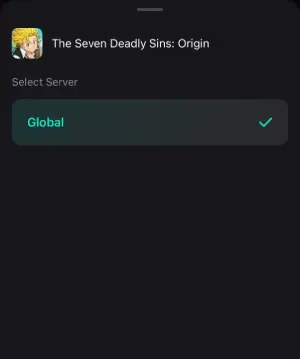
Step 4: After completing the above network optimization settings, the FPS drops issue will be easily resolved.
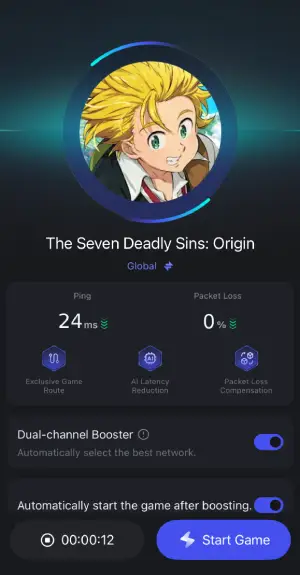
By integrating LagoFast into your gaming setup, you can achieve a more responsive and enjoyable The Seven Deadly Sins Origin Mobile experience.
Part 6. FAQs
1. Why does The Seven Deadly Sins Origin say cannot connect to server?
The The Seven Deadly Sins Origin cannot connect to server message usually appears when servers are under maintenance, the client version is outdated, or the player’s network connection is unstable.
2. What causes The Seven Deadly Sins Origin connection timeout?
A The Seven Deadly Sins Origin connection timeout typically occurs when the game client cannot reach the server within a certain time window. This may be caused by slow networks, DNS problems, or router issues.
3. Can server overload cause The Seven Deadly Sins Origin server error?
Yes. During major updates or launch events, servers can become overloaded, preventing new players from connecting until traffic stabilizes.
4. Is the game available on PC and mobile?
Yes. The Seven Deadly Sins Origin supports both PC and mobile platforms, which is why connection troubleshooting differs depending on the device.
Conclusion
Experiencing The Seven Deadly Sins Origin connection issues can be frustrating, especially when you are trying to explore the open world of Britannia with friends. Problems such as The Seven Deadly Sins Origin cannot connect to server, server error, or connection timeout often result from server overload, unstable networks, outdated clients, or firewall restrictions.
By applying the PC and mobile troubleshooting steps in this guide—checking server status, verifying files, adjusting network settings, and improving routing—you can significantly reduce the chances of encountering these errors. Network optimization tools like LagoFast Game Booster can also help maintain a stable connection during high-traffic periods, allowing players to focus on exploration, combat, and progression rather than connection problems.

Boost Your Game with LagoFast for Epic Speed
Play harder, faster. LagoFast game booster eliminates stutter and lags on PC, mobile, or Mac—win every match!
Quickly Reduce Game Lag and Ping!
Boost FPS for Smoother Gameplay!