
To prepare for the launch, note that the Blood of Dawnwalker release time is set for September 3, 2026, across PC, PS5, and Xbox Series X|S. The Blood of Dawnwalker preload is expected to go live roughly 48 hours before launch, allowing you to download the game files in advance. A core feature of this dark fantasy RPG is the Blood of Dawnwalker 30-day system, a unique 30-day mechanic where the protagonist, Coen, must save his family within a limited timeframe.

- ✅ Reduce Lag and High Ping.
✅ Solve Low Game FPS.
✅ Support 8000+ Popular Online Games.
✅ Change Server without Latency.
✅ Boost Game Loading Speed.
Part 1: The Blood of Dawnwalker Release Time and Global Launch
Part 2: Preload Schedule and Download Size for The Blood of Dawnwalker
Part 3: The Blood of Dawnwalker 30-Day System: How the Time Mechanic Works
Part 4: The Blood of Dawnwalker Editions: Standard vs. Eclipse Edition
Part 5: The Blood of Dawnwalker System Requirements
Part 6: Optimize The Blood of Dawnwalker Gaming Experience with LagoFast
Part 7: Why Stability and Ping Matter for The Blood of Dawnwalker
Part 8: Frequently Asked Questions on The Blood of Dawnwalker
Part 1: The Blood of Dawnwalker Release Time and Global Launch
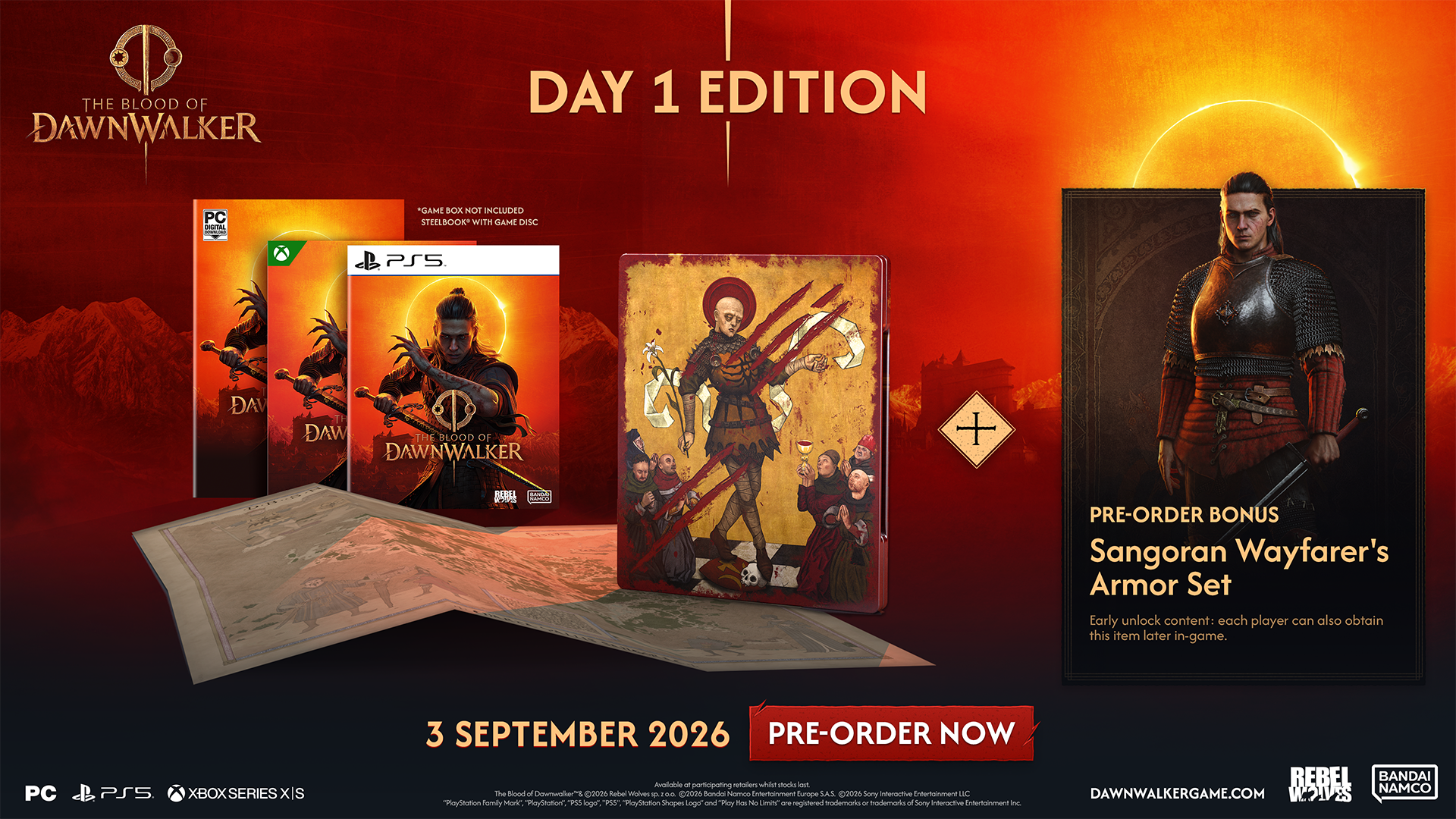
Anticipation for Rebel Wolves' debut title is reaching its peak as we approach the official The Blood of Dawnwalker release time. Developed by former leads of The Witcher 3, this open-world dark fantasy action RPG is scheduled for a global release on September 3, 2026. However, due to time zone differences, some regions might see the game appear on digital storefronts like Steam as early as late September 2.
|
Region |
Local Release Time (Estimated) |
|
Los Angeles (PDT) |
September 2, 9:00 PM |
|
New York (EDT) |
September 3, 12:00 AM |
|
London (BST) |
September 3, 5:00 AM |
|
Berlin (CEST) |
September 3, 6:00 AM |
|
Tokyo (JST) |
September 3, 1:00 PM |
|
Sydney (AEST) |
September 3, 2:00 PM |
For PC players on Steam and the Microsoft Store, the exact Blood of Dawnwalker release time often aligns with a global simultaneous rollout. Console players on PlayStation 5 and Xbox Series X|S may experience a localized midnight launch depending on their specific storefront region. It is always wise to check your platform's library for the exact countdown timer to ensure you are ready the moment the servers go live.
Part 2: Preload Schedule and Download Size for The Blood of Dawnwalker
To avoid the frustration of slow launch-day downloads, taking advantage of the Blood of Dawnwalker preload is essential. Preloading allows you to download the bulk of the game data before the official release, so you only need a small day-one patch to start playing immediately.
- Preload Start Date: Most platforms, including Steam and Xbox, typically open preloads 48 to 72 hours before the release date. Expect preloads to become available around August 31 or September 1, 2026.
- Estimated Download Size: While the final size is yet to be confirmed, early reports suggest a download requirement of approximately 80 GB to 100 GB. Ensure you have sufficient space on your NVMe SSD, as an SSD is highly recommended for the game's seamless open-world streaming.
- Platform Specifics: Xbox users can often start preloads earlier through the Xbox mobile app, even before purchasing the game. PlayStation users with a digital pre-order will see the download start automatically if "Auto-Download" is enabled in their system settings.
By completing the Blood of Dawnwalker preload early, you bypass the server congestion that often plagues major RPG launches, ensuring your journey into 14th-century Europe begins without delay.
Part 3: The Blood of Dawnwalker 30-Day System: How the Time Mechanic Works
The most talked-about feature in the community is the Blood of Dawnwalker 30-day system. Unlike traditional open-world games where the main quest can wait indefinitely while you pick herbs, this game introduces a sense of urgency through its 30 day mechanic. You play as Coen, a man who is human by day and a vampire by night, tasked with saving his family within a strict one-month window.
The Narrative Sandbox
Rebel Wolves describes this system as a "Narrative Sandbox." Instead of a literal ticking clock that punishes exploration, the blood of Dawnwalker 30-day system uses time as a form of currency. Major quest actions, traveling long distances, or resting to recover health and mana will consume "time segments." This forces you to make meaningful choices about how to spend your days and nights.
Day and Night Cycles
The gameplay changes significantly depending on the time. During the day, Coen's human form is better suited for social interaction, trading, and navigating human settlements. At night, his vampire nature takes over, granting enhanced combat abilities and stealth but making him a target for hunters and supernatural threats. Balancing these two states is the core of the 30-day mechanic.
Exploration vs. The Clock
While the 30-day limit exists, the developers have clarified that exploration does not necessarily drain your time in a way that makes the game feel like a stressful race. Instead, the the blood of dawnwalker 30 day system ensures that the world reacts to your presence and the passage of time. If you ignore a village under threat for too many days, the outcome of that sub-plot will change permanently.
Part 4: The Blood of Dawnwalker Editions: Standard vs. Eclipse Edition
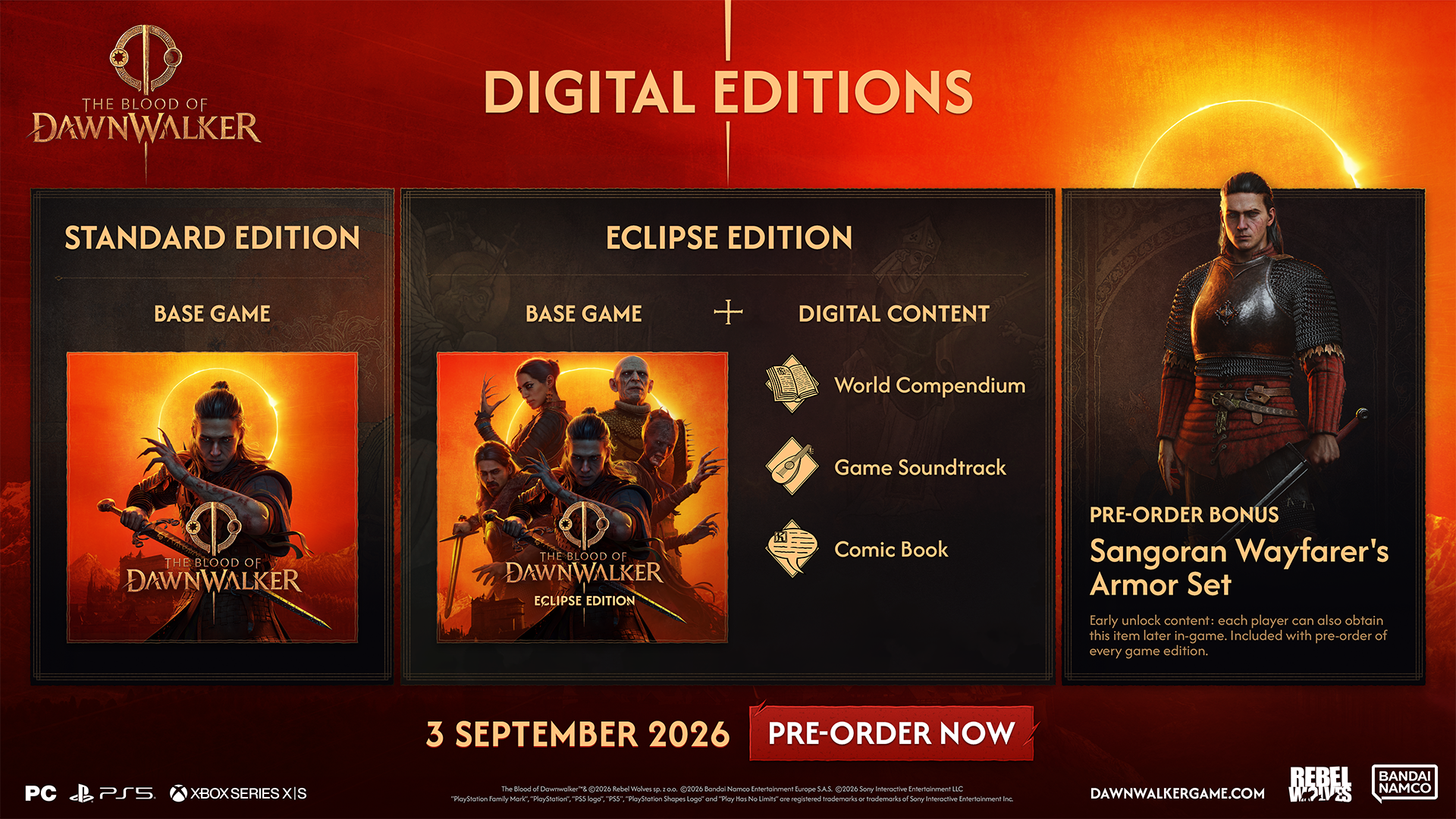
Choosing between the different Blood of Dawnwalker editions depends on how much you want to immerse yourself in the game's lore and production. Bandai Namco has revealed two primary digital versions for the launch.
|
Feature |
Standard Edition |
Eclipse Edition |
|
Base Game |
Yes |
Yes |
|
Digital World Compendium |
No |
Yes |
|
Digital Original Soundtrack |
No |
Yes |
|
Digital Comic Book |
No |
Yes |
|
Pre-order Bonus (Cosmetic) |
Yes |
Yes |
The Blood of Dawnwalker Eclipse Edition is designed for fans who appreciate the creative process behind the game. The Digital World Compendium provides deep insights into the 14th-century setting, the vampire lore, and the character backstories that you might miss during a standard playthrough. The soundtrack, composed by industry veterans, captures the dark, gothic atmosphere of the game perfectly. For those looking for the complete experience, the Eclipse Edition offers significant value beyond the base game.
Part 5: The Blood of Dawnwalker System Requirements
The Blood of Dawnwalker is designed for modern hardware, and the PC requirements reflect a typical current-generation AAA action RPG. While full optimization details may still vary closer to launch, the current specifications provide a clear expectation of performance targets.
System Requirements
Minimum:
- OS: Windows 10
- Processor: Intel Core i7-8700K / AMD Ryzen 7 3700X
- Memory: 16 GB RAM
- Graphics: NVIDIA RTX 3050 / GTX 1070 / AMD RX Vega 56 / Intel Arc A580
- DirectX: Version 12
- Storage: 60 GB available space
Recommended:
- OS: Windows 10
- Processor: Intel Core i5-13600 / AMD Ryzen 9 7900X
- Memory: 16 GB RAM
- Graphics: NVIDIA RTX 5060 / AMD RX 6800 XT
- DirectX: Version 12
- Storage: 60 GB available space
Overall, the game is expected to run best on modern mid-to-high end PCs, especially in large-scale exploration and combat-heavy encounters.
Part 6: Optimize The Blood of Dawnwalker Gaming Experience with LagoFast
Even with a strong PC setup, games like The Blood of Dawnwalker can still run into network-related issues such as high ping, lag spikes, packet loss, or unstable connections—especially during peak hours or crowded servers.
That’s where LagoFast comes in. It’s a game network optimization tool designed to lower ping, reduce packet loss, optimize routing, and stabilize your connection for smoother and more consistent gameplay. It also includes a Frequently Issues Fix feature, along with other useful tools that help resolve common game environment problems, ultimately improving overall in-game stability and experience.
How to Use LagoFast for The Blood of Dawnwalker:
Step 1: Click the Free Trial button to download and install LagoFast.
Step 2: After installation, search "The Blood of Dawnwalker" in the search bar and select the game.
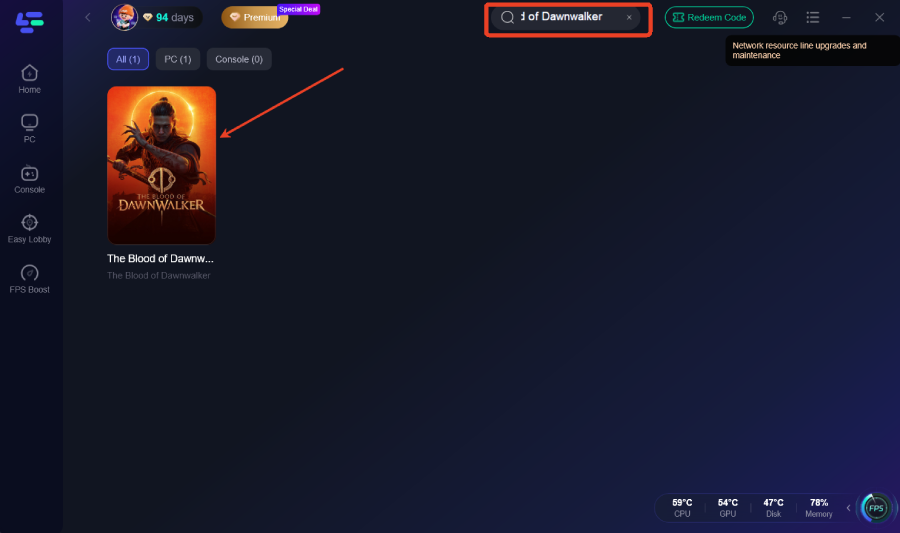
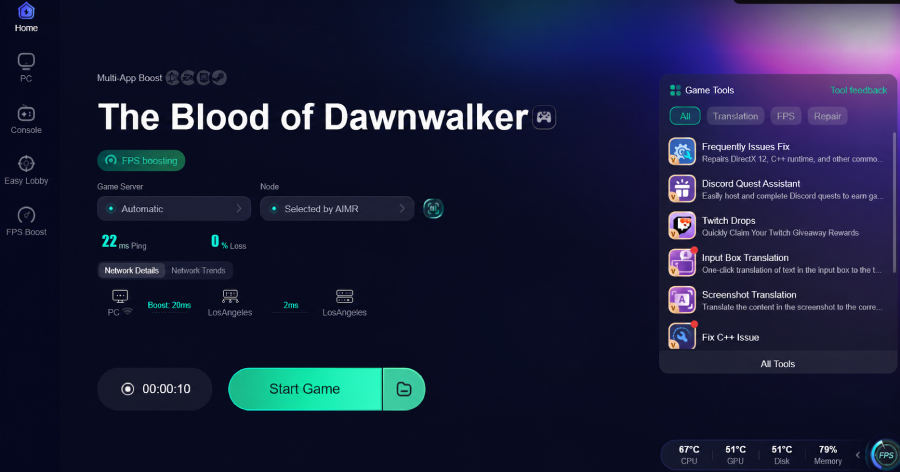
Step 3: Choose your preferred server node and click "Smart Boost" to start optimizing.
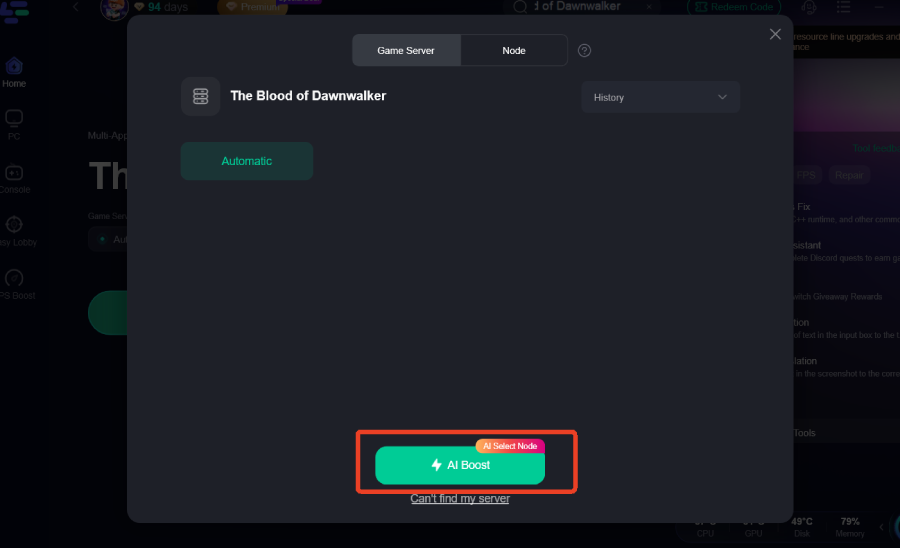
Step 4: Launch your game and enjoy smooth, optimized gameplay with lower ping and no stutter.
Part 7: Why Stability and Ping Matter for The Blood of Dawnwalker
Even though the game is primarily a single-player experience, modern RPGs are more connected than ever. A stable connection ensures that your achievements, cloud saves, and potential online features (like community-driven world events) function correctly. High ping or jitter can cause "micro-stutters" that disrupt the flow of combat, especially when you are switching between Coen's human and vampire forms.

By using an optimizer, you ensure that your hardware and your network are working in perfect harmony. This is particularly important for players who want to record their gameplay or stream their journey through the the blood of dawnwalker 30 day system. Stability allows you to focus on the narrative choices and the intense action, rather than worrying about whether your PC can handle the next big boss fight.
Part 8: Frequently Asked Questions on The Blood of Dawnwalker
Q: Can I play past the 30-day limit in The Blood of Dawnwalker?
A: The Blood of Dawnwalker 30 day system is tied to the main narrative. While you can explore extensively, the main story will reach its conclusion at the end of the 30 days. However, the developers have hinted at a "Free Roam" or "New Game Plus" mode that might offer more flexibility after your first completion.
Q: Is there a physical version of the Eclipse Edition?
A: Most of the Blood of Dawnwalker editions are digital, but certain retailers may offer a "Collector's Edition" that includes physical versions of the world compendium and a statue. Check with your local game store for availability.
Q: How does the day/night cycle affect the 30-day mechanic?
A: Each day is split into specific segments. You must decide whether to use those segments for travel, combat, or resting. Resting is necessary to heal but will advance the clock, making
it a strategic choice within the 30 day mechanic.
Q: Does preloading the game include the day-one patch?
A: Usually, the Blood of Dawnwalker preload includes the base game files. A small update or "day-one patch" is often released a few hours before launch to provide final optimizations and bug fixes.
Q: Is LagoFast safe to use with Steam and other launchers?
A: Yes, LagoFast is a legitimate performance optimizer that works alongside your game launchers. It does not modify game files in a way that would violate terms of service, making it a safe choice for enhancing your The Blood of Dawnwalker release time experience.
Key Takeaway
Mastering The Blood of Dawnwalker requires a balance of strategic time management within the 30-day system and technical preparation for the September 3 launch. By choosing the right edition, preloading the game early, and using LagoFast Game Booster to stabilize your PC's performance, you can ensure that Coen's journey to save his family is as smooth and immersive as possible.
Boost Your Game with LagoFast for Epic Speed
Play harder, faster. LagoFast game booster eliminates stutter and lags on PC, mobile, or Mac—win every match!
Quickly Reduce Game Lag and Ping!
Boost FPS for Smoother Gameplay!