
Quick Answer:
To fix the TFT Set 18 “Requires Patching to Complete” error, you must force the Riot Client to verify your game files. The most effective method is to open the Riot Client, navigate to the PBE settings, and click the Repair button. This will trigger a download (typically around 5GB to 34GB depending on your local metadata) that updates your client to the new Unreal Engine build required for Set 18. If the error persists, you may need to delete the PBE Metadata folder in your game directory to clear outdated Set 17 version information.
The transition to TFT Set 18 is one of the most significant technical updates in the game's history due to the migration to the Unreal Engine. This shift has caused widespread patching issues on the Public Beta Environment (PBE), where players are met with the frustrating message: "These players do not have a game version, and require patching to complete." Whether you are stuck seeing Set 17 assets or trapped in an infinite repair loop, resolving these version mismatches is essential to entering the Convergence.

- ✅ Reduce Lag and High Ping.
- ✅ Boost FPS at the Same Time.
- ✅ No more PBE Queue Issues.
- ✅ Full Guides For Novice Players.
- ✅ Support 8000+ Online Games.
Part 1: What Does “These Players Do Not Have a Game Version” Mean in TFT Set 18?
Part 2: Common Symptoms of the TFT Set 18 Patching Error
Part 3: Why Does TFT Set 18 Say You Do Not Have a Game Version?
Part 4: Check the TFT PBE Server Status Before Troubleshooting
Part 5: How to Fix TFT Set 18 Requires Patching to Complete
Part 6: How to Use Riot Client Repair for TFT Set 18
Part 7: How to Fix TFT Set 18 PBE Still Showing Set 17
Part 8: How to Fix TFT Set 18 PBE Repair Loop
Part 9: How to Enhance Your Game Experience with LagoFast Game Booster
Part 10: TFT Set 18 Requires Patching FAQ
Part 1: What Does “These Players Do Not Have a Game Version” Mean in TFT Set 18?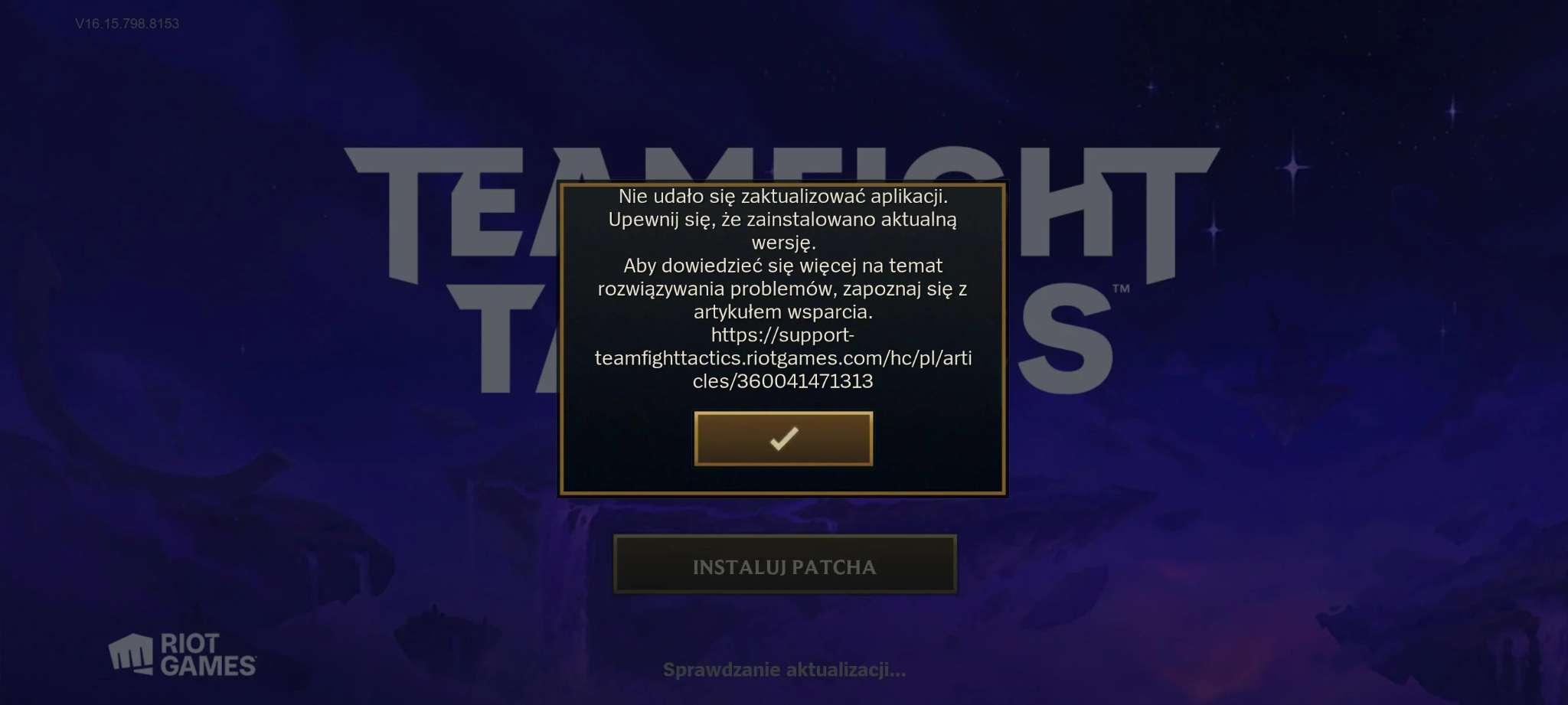
Where the Requires Patching Error Appears
This error typically triggers in the lobby when you attempt to start a match. A small red exclamation mark or a pop-up notification will state that one or more players (including yourself) lack the necessary game version. This prevents the "Find Match" button from becoming active.
Why the Error Prevents You From Starting a PBE Match
TFT Set 18 runs on a completely different engine architecture than previous sets. If your client is still holding onto Set 17 data, it cannot communicate with the Set 18 PBE servers. The server rejects your connection because your local "handshake" contains outdated version strings.
Is It a PBE Account, Server, or Client Version Problem?
In 90% of cases, this is a Client Version problem. While server outages can occasionally cause version check failures, the "Requires Patching" message specifically points to a discrepancy between what is installed on your hard drive and what the server expects.
Part 2: Common Symptoms of the TFT Set 18 Patching Error
Riot Client Does Not Start Downloading the Set 18 Patch
You open the client expecting a massive update, but the "Play" button is blue and clickable. However, once inside, the game fails to function. The client simply hasn't realized a new build is available.
PBE Still Shows Set 17 After Set 18 Goes Live
The background art, units, and traits all reflect the previous set. This is a clear sign that your local metadata is stuck, preventing the Riot Client from fetching the Unreal Engine assets.
No Update or Patch Button Appears in Riot Client
Even after restarting, there is no prompt to update. The client believes you are on the latest version, even though the server disagrees.
Repair Finishes but the Same Error Returns
You run the repair tool, it downloads a few gigabytes, and you launch the game only to see the same "No Game Version" error. This indicates that the repair did not successfully overwrite the corrupted version manifest.
Riot Client Keeps Repairing or Downloading Files Again
The dreaded "Repair Loop." The client finishes a download, verifies files, and then immediately starts the process over again, never allowing you to actually play.
Part 3: Why Does TFT Set 18 Say You Do Not Have a Game Version?
Riot Client Has Not Retrieved the Latest Set 18 Build
The Riot Client uses a caching system to speed up logins. Sometimes, this cache becomes "stale," causing the client to ignore the new Set 18 deployment on the PBE servers.
The Local PBE Version Information Is Outdated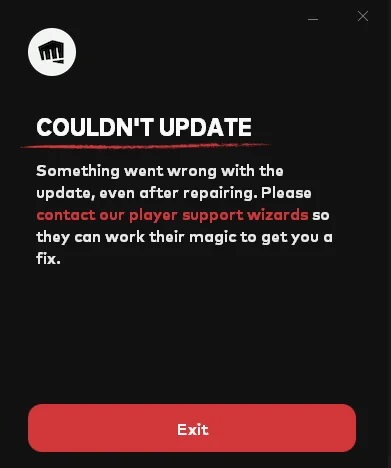
Your computer stores a small file called a "manifest" that tells the server which version you have. If this file is locked or read-only, the patcher cannot update it, leading to a permanent version mismatch.
The Set 18 Patch Was Not Completely Downloaded
Because the Set 18 update is massive (often requiring a 34GB full pull for the Unreal migration), any interruption in your internet connection can result in a "partial" patch that the server will not accept.
Riot Is Redeploying or Updating the PBE Build
During the early weeks of Set 18, Riot developers often push multiple hotfixes a day. If you are trying to patch while they are in the middle of a redeployment, the client may get confused about which version is the "current" one.
Damaged or Missing Unreal Game Files
The move to Unreal Engine means new file formats. If your previous installation had custom skins or modified files, the new patcher may fail to integrate the Unreal assets correctly.
Security Software Prevented the Patch From Being Installed
Aggressive antivirus programs sometimes flag the new Unreal Engine executables as suspicious, blocking the Riot Client from writing the new files to your disk.
The Connection to the PBE Patch Server Was Interrupted
The PBE patch servers are located in North America. If you are patching from Europe or Asia, high latency or packet loss can cause the download to "finish" prematurely without all the data.
Part 4: Check the TFT PBE Server Status Before Troubleshooting
How to Check for PBE Maintenance and Patch Deployment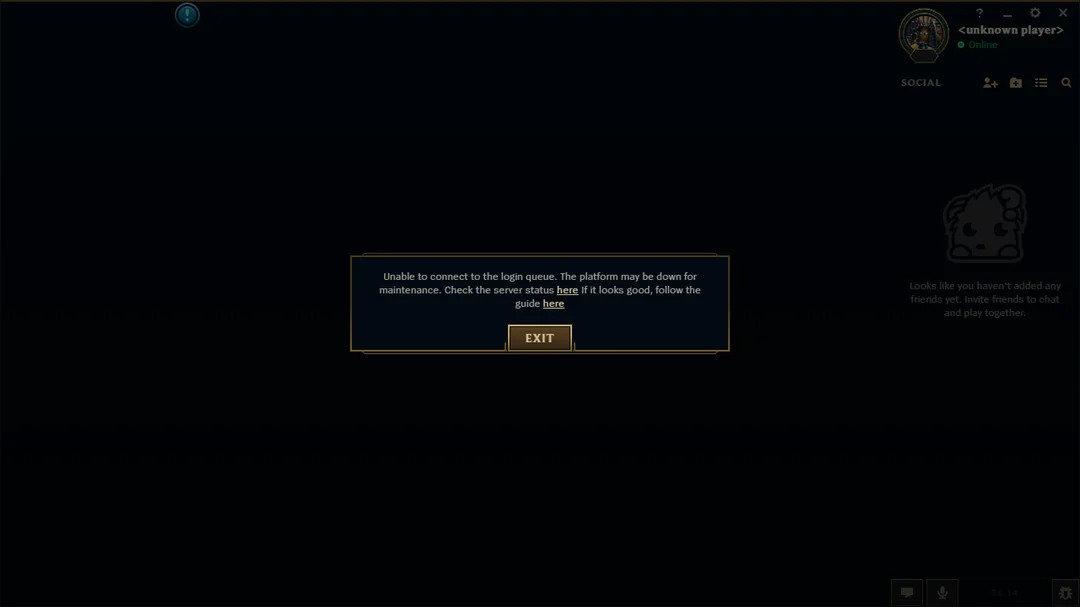
Visit the Riot Games Service Status page or follow the LeaguePBE subreddit. If Riot is currently deploying a patch, the "Requires Patching" error is universal and cannot be fixed on your end until the maintenance is over.
How to Tell a Server-Side Patch Delay From a Local Client Error
If your friends are already playing Set 18 but you are stuck on Set 17, the issue is local. If everyone on social media is complaining about the same error, the issue is server-side.
When You Should Wait Instead of Reinstalling the Game
If a new patch was just announced 5 minutes ago, wait at least 30 minutes. It takes time for the global CDN (Content Delivery Network) to propagate the files to every region.
Part 5: How to Fix TFT Set 18 Requires Patching to Complete
Fully Quit and Reopen Riot Client
Don't just click the 'X'. Go to your system tray (bottom right), right-click the Riot icon, and select Exit. This forces the client to re-authenticate and check for updates upon relaunch.
Manually Check for Updates in Riot Client
Click on your profile icon in the Riot Client and look for "Check for Updates." While often automatic, this manual trigger can sometimes jumpstart a stalled patch.
Confirm That You Selected the PBE Version
It sounds simple, but ensure the drop-down menu above the "Play" button is set to PBE and not Live. The Live server will not have Set 18 until the official release.
Restart Your PC and Riot Client Services
A full system reboot clears out any hung Riot services (like Vanguard or the Riot Client helper) that might be locking game files.
Run Riot Client as Administrator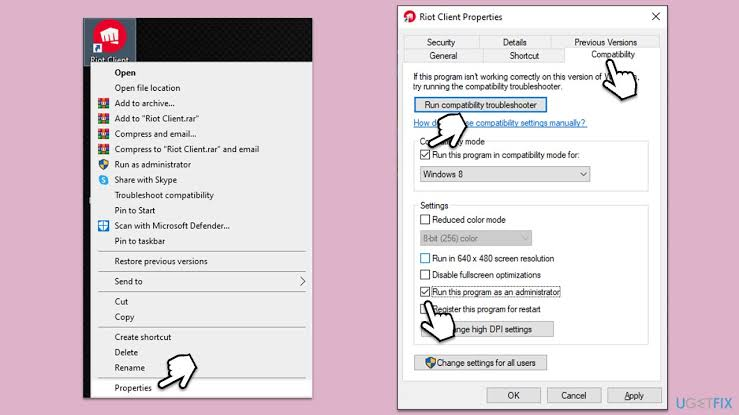
Right-click the Riot Client shortcut and select Run as Administrator. This gives the patcher the necessary permissions to overwrite old Set 17 files in the protected C:\Riot Games directory.
Use Riot Client Repair to Verify TFT Files
This is the most reliable fix. Navigate to the game settings in the Riot Client and trigger a Full Repair. This will scan every file and download anything that is missing or outdated.
Allow the Set 18 Patch to Finish Before Opening League Client
Do not try to launch the game while the progress bar is still moving. The Unreal Engine migration requires the entire package to be present before the first launch.
Check Free Disk Space for the Unreal Download
The Set 18 update is significantly larger than previous patches. Ensure you have at least 50GB of free space on your drive to accommodate the new assets and the temporary patching files.
Allow Riot Client Through Antivirus and Firewall
Add the RiotClientServices.exe and the League of Legends.exe (within the PBE folder) to your antivirus exclusion list.
Test a More Stable Connection to the PBE Patch Server
If your download keeps failing, try using a wired Ethernet connection. For players outside of NA, using a network optimizer like LagoFast can stabilize the connection to the patch server.
Part 6: How to Use Riot Client Repair for TFT Set 18
Where to Find the Repair Option in Riot Client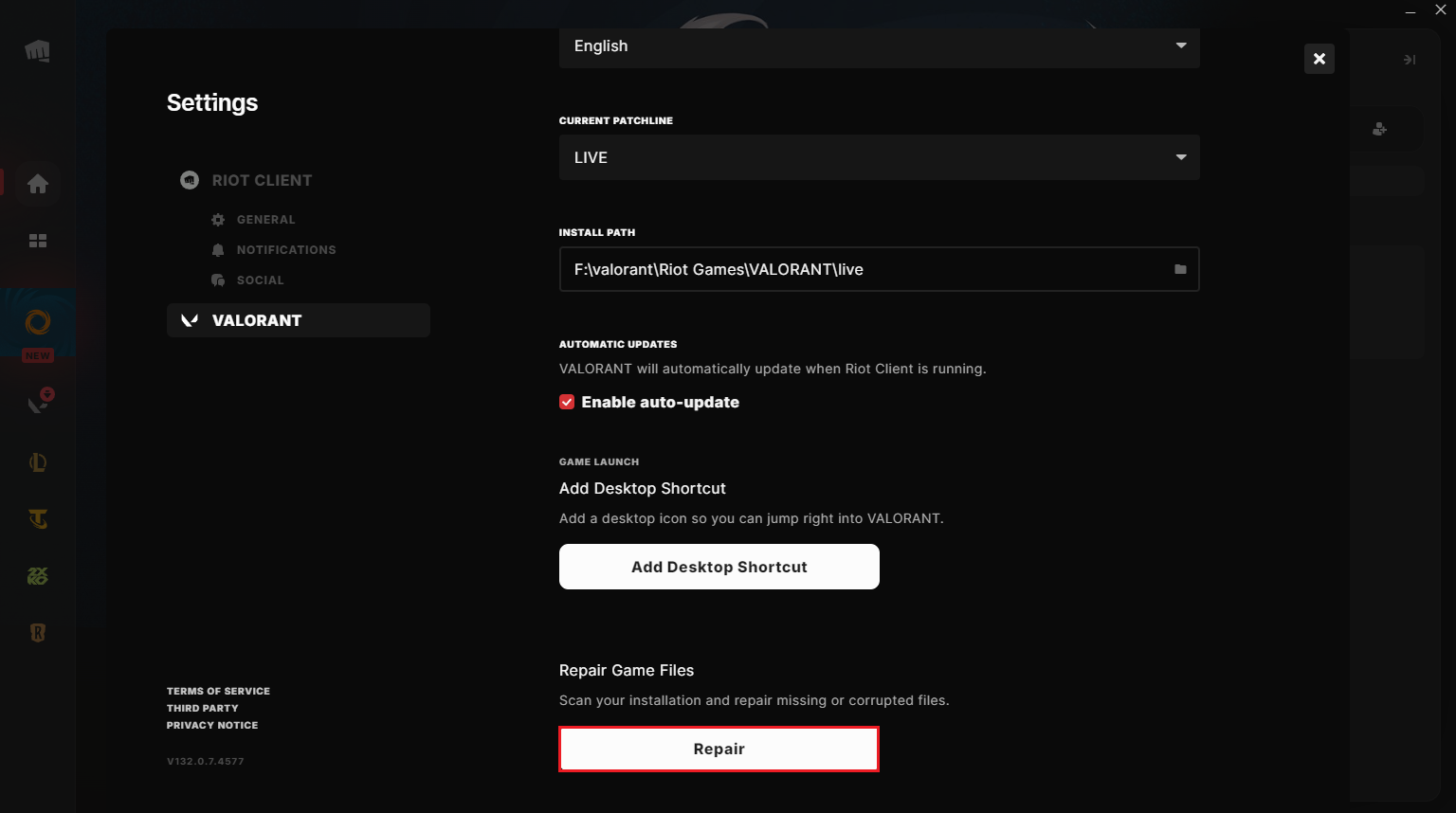
- Open the Riot Client.
- Click on the PBE tab.
- Click the Settings (gear icon) next to the Play button.
- Under the "General" tab, click Repair.
Why Repair May Download Several Gigabytes Again
Because Set 18 is a full engine swap, the "Repair" tool often realizes that almost all your local files are technically "wrong." It is normal for the tool to download between 5GB and 34GB during this process.
How to Confirm That Repair Installed the Set 18 Version
Once the repair is finished, the "Play" button will reappear. Upon launching, the loading screen should feature the Set 18 key art. If you still see Set 17, the repair failed to clear the cache.
What to Do When Repair Does Not Fix the Error
If the repair finishes but the error remains, you must manually delete the Metadata folder. Navigate to C:\Riot Games\PBE\RADS (or your custom install path) and delete the projects and metadata folders, then run the repair again.
Part 7: How to Fix TFT Set 18 PBE Still Showing Set 17
Confirm That the Set 18 Deployment Is Available
Check the official TFT Discord or Twitter. If the developers haven't pushed the build yet, your client is correctly showing Set 17.
Force Riot Client to Check for a New PBE Build
Sign out of the Riot Client entirely, then sign back in. This forces a fresh handshake with the version server.
Sign Out of the Live Client and Reopen the PBE Environment
Sometimes having the Live client open in the background can "lock" shared files. Close everything Riot-related before trying to update the PBE.
Remove Outdated Local PBE Version Information
Delete the Riot Client folder located in %appdata%\Local\Riot Games. This clears the local cache that might be telling the client you are already "up to date."
Reinstall the PBE Version When the Client Cannot Update
If all else fails, uninstall the PBE version through the Windows Control Panel and perform a fresh installation. This is often faster than fighting a corrupted repair loop.
Part 8: How to Fix TFT Set 18 PBE Repair Loop
What Is the TFT PBE Repair Loop?
This occurs when the client detects a file error, "fixes" it, but the fix is immediately corrupted or blocked, causing the client to try again infinitely.
Completely Close Riot and League Background Processes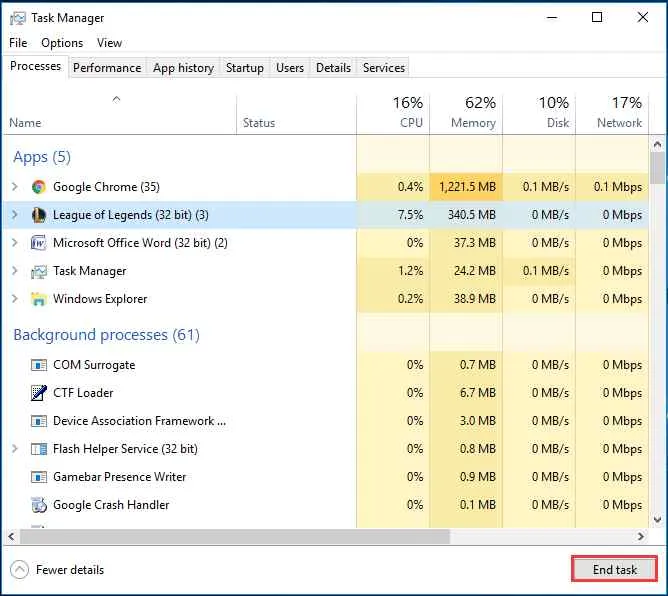
Use Task Manager to kill RiotClientServices.exe, LeagueCrashHandler.exe, and Vanguard. A background process might be holding a file open, preventing the repair from completing.
Check Disk Space and Folder Permissions
Ensure the folder where PBE is installed is not set to "Read-Only." Right-click the folder, go to Properties, and uncheck the Read-Only box.
Prevent Antivirus From Removing Repaired Files
Some antivirus programs see the rapid writing of new Unreal files as a "ransomware" behavior and block it. Temporarily disable your antivirus during the repair process.
Clear Outdated PBE Cache and Version Data
Navigate to C:\Users\[YourUser]\AppData\Local\Riot Games\Riot Client\Data and delete the Config folder. This forces the client to rebuild its configuration from scratch.
Reinstall TFT PBE When Repair Keeps Repeating
If you've downloaded 50GB and it's still looping, your installation directory is likely corrupted beyond simple repair. A clean install is the only solution.
Part 9: How to Enhance Your Game Experience with LagoFast Game Booster
The TFT Set 18 Unreal migration isn't just hard on your hard drive; it's hard on your network. The new engine requires more consistent data packets to stay synced with the server. If your connection is unstable, you are more likely to trigger version check errors or get disconnected during the patching process.
Why Use LagoFast for TFT Set 18?
- Stable Patching: LagoFast optimizes your route to the Riot CDN, ensuring that your 34GB download doesn't fail halfway through due to a timeout.
- Unreal Engine Optimization: The new engine is sensitive to jitter. LagoFast(LagoFast Game Booster - Get No Lag and Lower Ping) reduces network fluctuations, preventing the "handshake" errors that cause the "No Game Version" message.
- Global Access: Since the PBE is in North America, players from other regions face massive lag. LagoFast provides dedicated gaming nodes to bring your ping down to playable levels.
Steps to Use LagoFast for TFT Set 18 PBE:
Click the Free Trial button to download and install LagoFast Free Trial.
Boost PBE: Search for "TFT PBE" and click the Boost button.
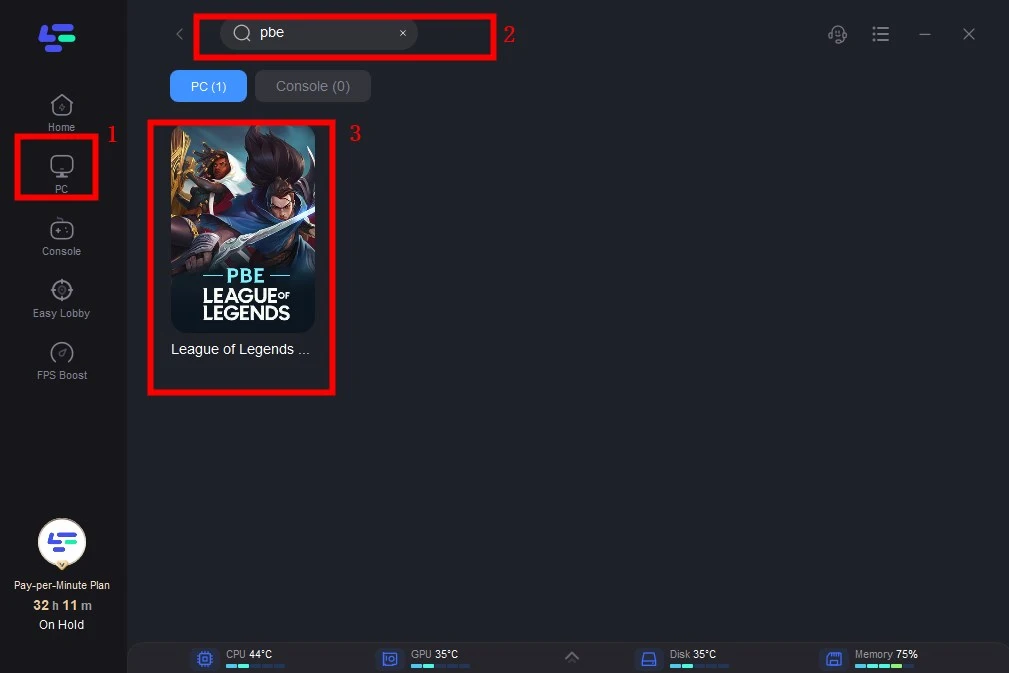
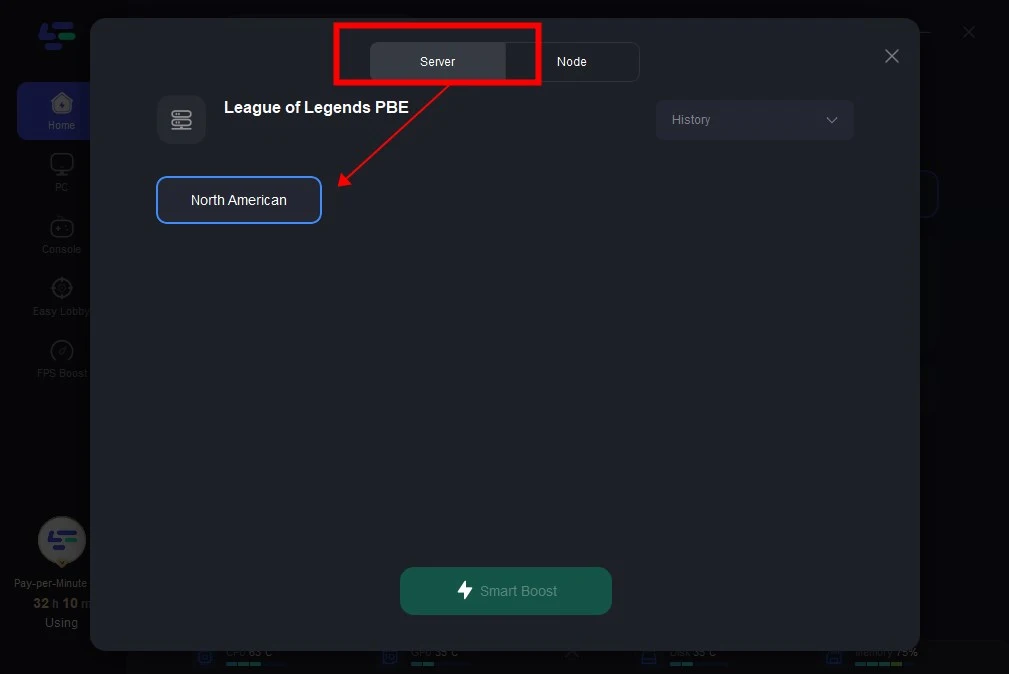
Select Node: Choose a North American node (like Los Angeles) to get the best connection to the PBE servers.
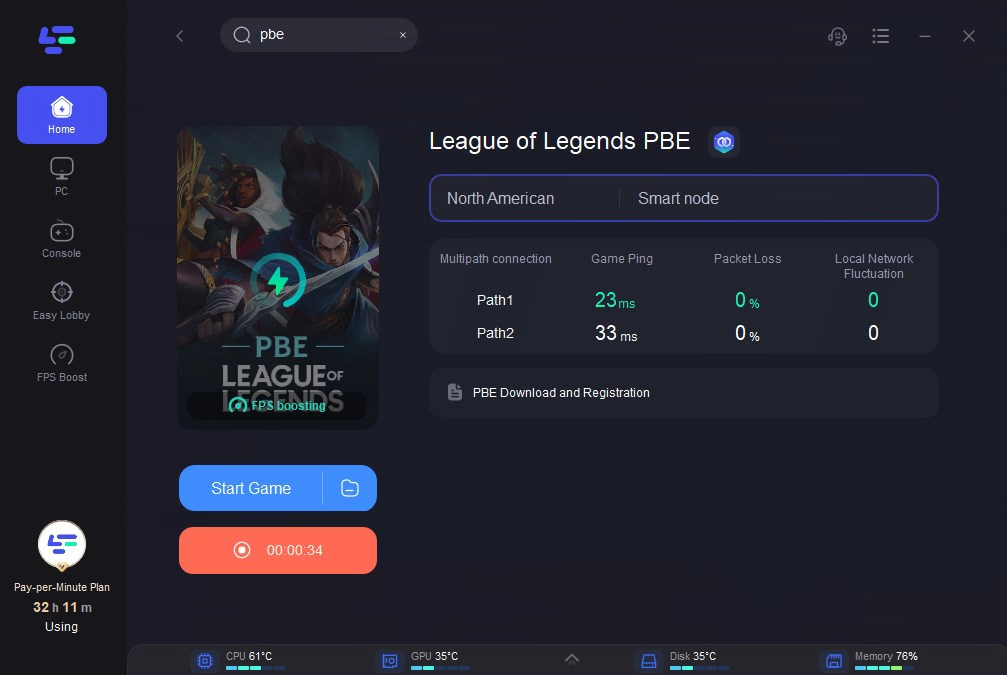
Launch Client: Open the Riot Client while the boost is active. This ensures the version check happens over an optimized connection, helping you bypass the "Requires Patching" bug.
Additionally, many players have reported running into the "Incomplete Version" client error after the latest PBE update. To address this issue, LagoFast Game Booster now includes a Fixed Version Error tool, which can be accessed from the right-hand panel of the client to quickly repair the problem.
Part 10: TFT Set 18 Requires Patching FAQ
1. Why is my PBE update 34GB?
Because Set 18 is moving to the Unreal Engine, the client must replace almost every existing game asset. This is essentially a full game download.
2. I repaired the game, but it still says Set 17. What now?
You likely have a cached version manifest. Delete the Riot Client folder in %localappdata% and restart the client to force a fresh check.
3. Can I play TFT Set 18 on mobile PBE?
Yes, but the mobile client often receives patches a few hours after the PC client. If you see the "Requires Patching" error on mobile, you must wait for the App Store or Play Store to provide the update, as there is no "Repair" button on mobile.
4. Does "No Game Version" mean I'm banned from PBE?
No. It is a purely technical error related to your local files. Your account is fine; your installation just needs to be updated.
5. How long does the Set 18 repair take?
Depending on your internet speed and SSD, it can take anywhere from 10 minutes to an hour. Given the size of the Unreal assets, be patient.
Key Takeaway
- Repair is Mandatory: The Unreal Engine update for Set 18 is too large for a standard "auto-patch" to always work. Use the Riot Client Repair tool immediately.
- Clear the Cache: If repair fails, manually delete the Metadata and Riot Client AppData folders to force a fresh version check.
- Check Disk Space: Ensure you have 50GB+ of free space for the new engine assets.
- Stabilize Your Network: Use LagoFast Game Booster to ensure your connection to the PBE patch server is stable and fast.
- Admin Rights: Always run the Riot Client as an Administrator to ensure it has the permissions to overwrite old Set 17 files.
Boost Your Game with LagoFast for Epic Speed
Play harder, faster. LagoFast game booster eliminates stutter and lags on PC, mobile, or Mac—win every match!
Quickly Reduce Game Lag and Ping!
Boost FPS for Smoother Gameplay!