
Quick Answer
If you leave TBH running overnight, an auto chest opener can help reduce manual clicking and prevent chest rewards from piling up due to cooldowns or inventory limits.
Many TBH Task Bar Hero players have reported issues such as advanced chests not opening automatically, chest rewards not appearing, or loot seemingly stopping after long AFK sessions. In most cases, the problem isn't that chest drops have stopped—it usually comes down to chest cooldowns, full inventories, mailbox delays, or Steam inventory synchronization. This guide explains how the chest system works, why these issues happen, and how to manage chests more efficiently during AFK farming.

- ✅ Reduce Lag and High Ping.
✅ Boost FPS at the Same Time.
✅ Support 8000+ Popular Online Games.
✅ Change Server without Latency.
✅ Boost Game Loading Speed.
Part 1: Why Chests Matter in TBH Task Bar Hero
Part 2: Can You Auto Open Chests in TBH Task Bar Hero?
Part 3: Why Advanced Chests Do Not Auto Open
Part 4: How to Manage Chest Cooldowns
Part 5: Why Chests Stop Dropping or Showing Up
Part 6: How to Fix Chest Not Showing in Mailbox
Part 7: Best Settings for Long AFK Chest Farming
Part 8: How to Avoid Losing Loot When Your Inventory Is Full
Part 1: Why Chests Matter in TBH Task Bar Hero
Chests are one of the main ways players earn rewards in TBH Task Bar Hero. Whether you're actively playing or leaving the game running in the background, a large portion of your progression comes from the loot stored inside chests.
Depending on your farming activity, chests can contain:
- Equipment for upgrades and progression
- Crafting and alchemy materials
- Resources used to improve higher-tier gear
- Items that can be sold or traded
- Additional rewards earned during long AFK sessions
The longer you farm, the more valuable chests become. A few hours of AFK grinding can generate dozens of chest drops, making them an important source of resources and gear. That's why many players pay close attention to chest opening, cooldowns, and inventory management to make sure they're getting the most out of their farming time.

Part 2: Can You Auto Open Chests in TBH Task Bar Hero?
Yes, but there are some important limitations.
While TBH can handle some regular chest openings on its own, advanced chests often still require manual interaction. After several hours of AFK farming, it's common to end up with a backlog of unopened chests, especially if your inventory starts filling up.
That's why many players look for ways to automate chest opening and keep rewards flowing while they're away.
Part 3: Why Advanced Chests Do Not Auto Open
Advanced chests do not auto open because they are handled differently from regular chest drops in TBH Task Bar Hero.
The main reasons are:
- The game's built-in auto-open feature only supports certain regular chests.
- Advanced chests are not included in the default chest automation system.
- Enabling automatic chest opening does not affect advanced chests.
Because of these limitations, advanced chests will remain unopened unless they are processed manually or through an automation tool.
Part 4: How to Manage Chest Cooldowns
Chest cooldowns can slow down reward collection, especially during long AFK farming sessions. While the cooldown itself cannot be removed, you can reduce its impact by keeping your chest flow running smoothly.
Some simple ways to manage chest cooldowns include:
- Open pending chests before starting a long AFK session.
- Keep enough inventory space available for new rewards.
- Clear unnecessary items from your backpack and storage regularly.
- Check your mailbox if rewards seem delayed.
- Use automation tools to process chests and inventory while you're away.
Good chest management won't eliminate cooldowns, but it can help prevent rewards from backing up and improve overall farming efficiency.
Part 5: Why Chests Stop Dropping or Showing Up
Many players assume chest drops have stopped when they no longer see new rewards appearing. However, in most cases, the chests are still being earned, and the problem is related to how rewards are being processed or displayed.
Common causes include:
- Inventory is full – New chest rewards may not be processed if there is no available space.
- Storage has reached its limit—Loot can become backed up when both your inventory and storage are crowded.
- Mailbox rewards are delayed—Some chest rewards may take time to appear in the mailbox.
- Steam inventory synchronization issues – Rewards may not show up immediately if Steam inventory data fails to refresh properly.
- Temporary server synchronization delays – Chest rewards can sometimes appear after restarting the game or refreshing the mailbox.
Before assuming chest drops have stopped entirely, check your inventory, storage, mailbox, and Steam inventory status first. In many cases, the rewards are still there—they just haven't been displayed or processed yet.
Part 6: How to Fix Chest Not Showing in Mailbox
If your chest rewards are not appearing in the mailbox, the issue is often related to inventory synchronization rather than missing loot. Several players have reported recovering delayed rewards using the methods below.
Refresh Your Mailbox
The first thing to try is refreshing the mailbox.
Open the mailbox, close it, and then reopen it after a few seconds. In some cases, delayed rewards will appear once the mailbox refreshes.
Use "Steam Inventory Issue Resolved."
Many TBH players have reported that missing chest rewards reappeared after using the built-in inventory refresh option.
Navigate to:
Settings → Others → Steam Inventory Issue Resolved
This feature forces the game to recheck your Steam inventory status and can help restore rewards that are not displaying correctly.
Restart the Game
If rewards still do not appear, completely close and restart the game.
Starting a new session can trigger another inventory synchronization check and may cause delayed mailbox rewards to show up.
Wait for Steam Synchronization
Sometimes the issue is simply a delay between the game and Steam inventory services.
If you've already refreshed the mailbox and used the inventory recovery option, give the system some time to synchronize. Rewards may appear automatically once the inventory update is completed.
Part 7: Best Settings for Long AFK Chest Farming
If you plan to leave TBH running for several hours, setting up chest automation correctly can help reduce interruptions and keep rewards flowing.
Recommended settings and priorities include:
- Enable automatic chest opening for supported chests.
- Keep inventory management features active whenever available.
- Regularly process materials and equipment to avoid inventory congestion.
- Store excess items to prevent backpack capacity issues.
- Check mailbox rewards before starting a long AFK session.
- Monitor advanced chests separately, since they are not covered by the default auto-open system.
These settings won't eliminate every chest-related limitation, but they can help reduce reward bottlenecks during extended AFK farming sessions.
Part 8: How to Avoid Losing Loot When Your Inventory Is Full
One of the biggest challenges during long AFK farming sessions is keeping chest rewards, materials, and equipment flowing without filling up your inventory. Once your backpack and storage become overloaded, chest rewards may stop being processed, reducing your overall farming efficiency.
For players who want a more hands-off experience, LagoFast offers an Auto AFK Assistant designed specifically for TBH Task Bar Hero.
Use LagoFast Auto AFK Assistant for TBH
For players who regularly leave TBH running overnight, LagoFast's Auto AFK Assistant can help automate several repetitive tasks during long AFK farming sessions:
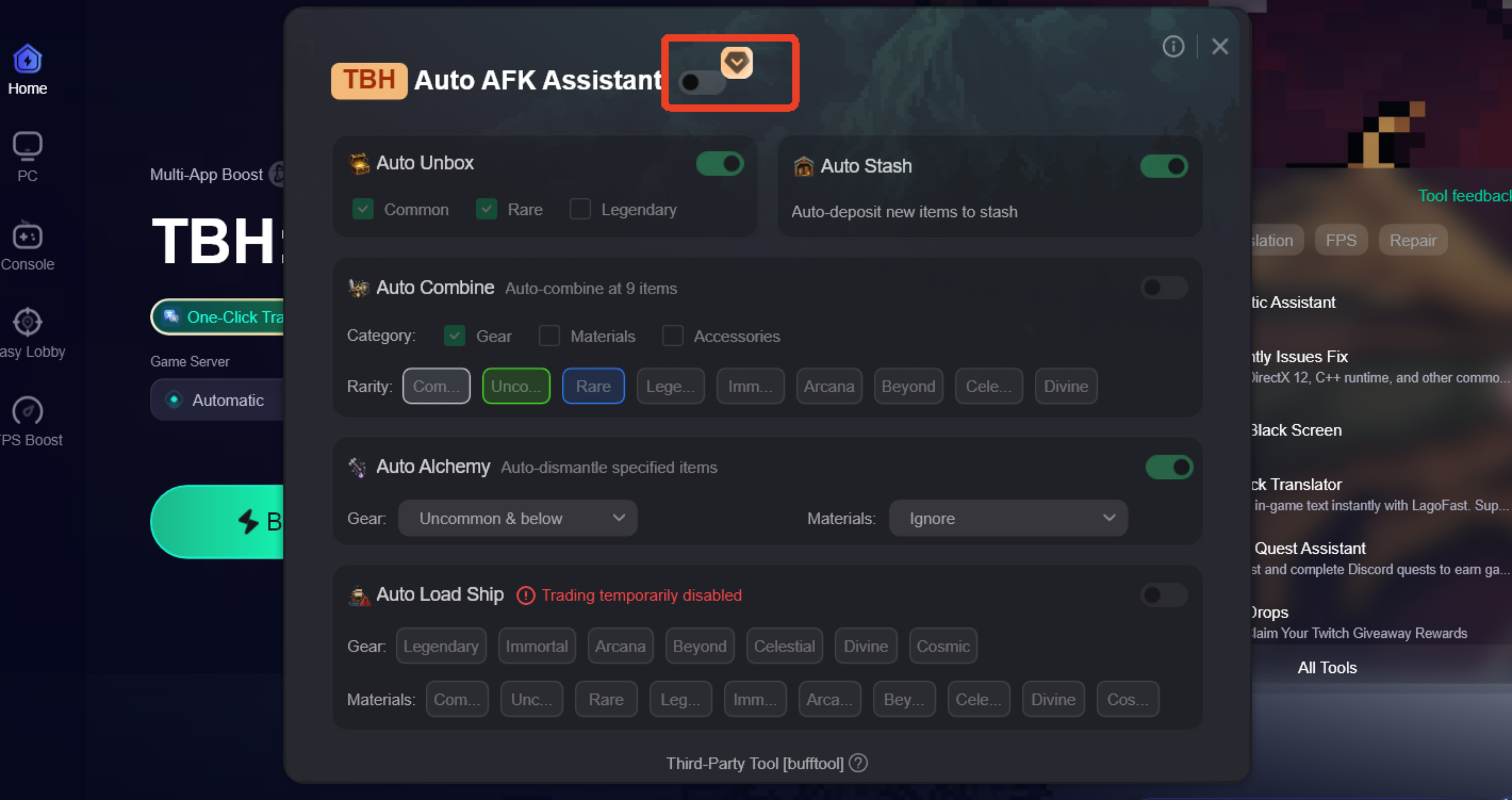
- Taskbar Hero Auto Chest and Storage Helper – Automatically opens chest drops, including advanced chests, and stores items to help prevent reward bottlenecks.
- Taskbar Hero Inventory Full Fix Tool – Automatically moves equipment and materials into storage when inventory space becomes limited.
- Taskbar Hero AFK Farming Assistant – Automatically combines equipment, upgrades materials, and performs alchemy based on your settings.
- Taskbar Hero Chest Tracker and Inventory Manager – Helps keep chest rewards, materials, and equipment organized during extended farming sessions.
- Taskbar Hero Auto Trading Helper – Automatically lists eligible equipment and materials on the Steam Market, helping reduce inventory clutter during long AFK runs.
These features can help reduce manual management and keep your AFK farming running more smoothly.
How to Use LagoFast Auto AFK Assistant tool
Step 1: Click the Free Trial button to download and install LagoFast.
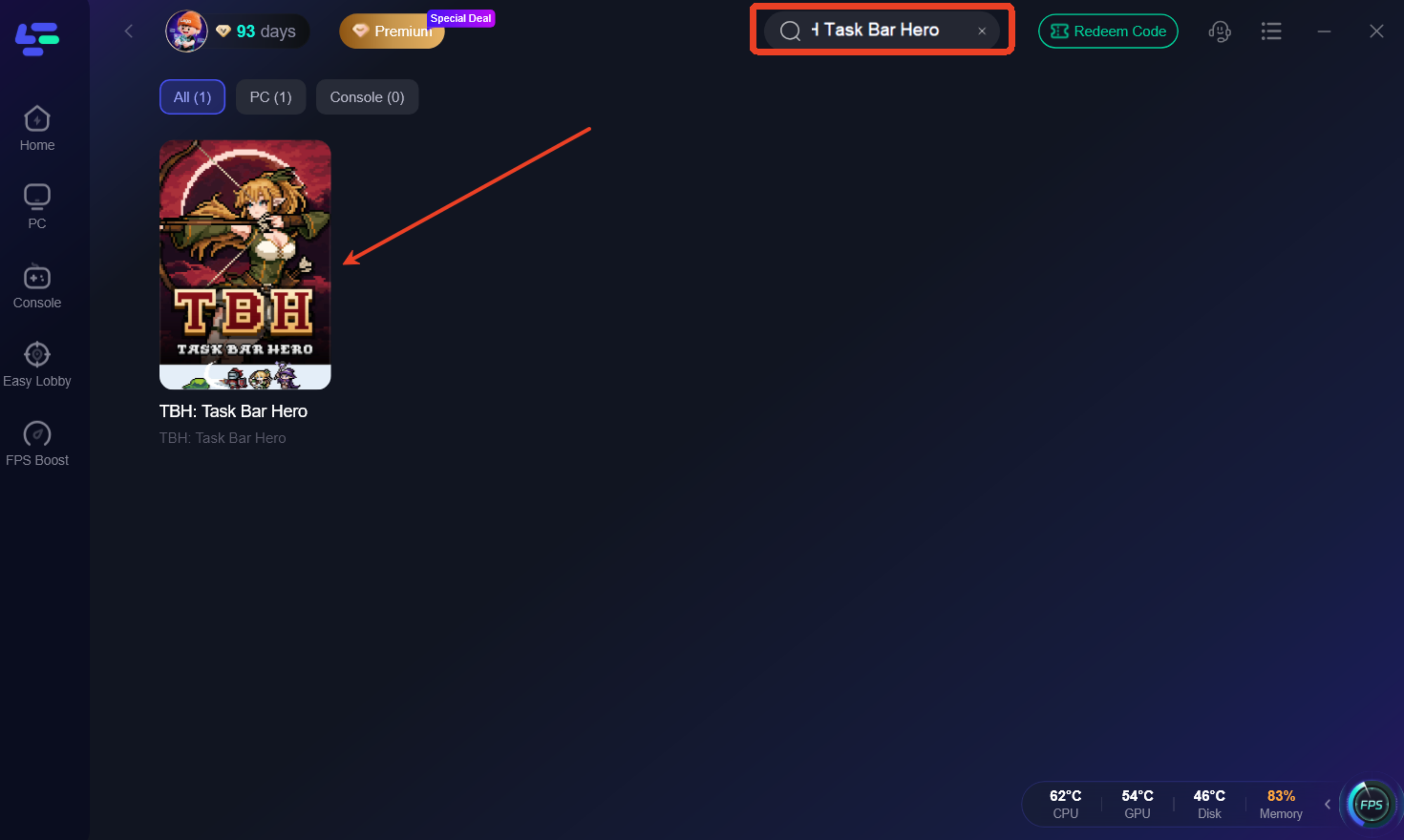
Step 2: After installation, search for "TBH Task Bar Hero" in the search bar and select the game.
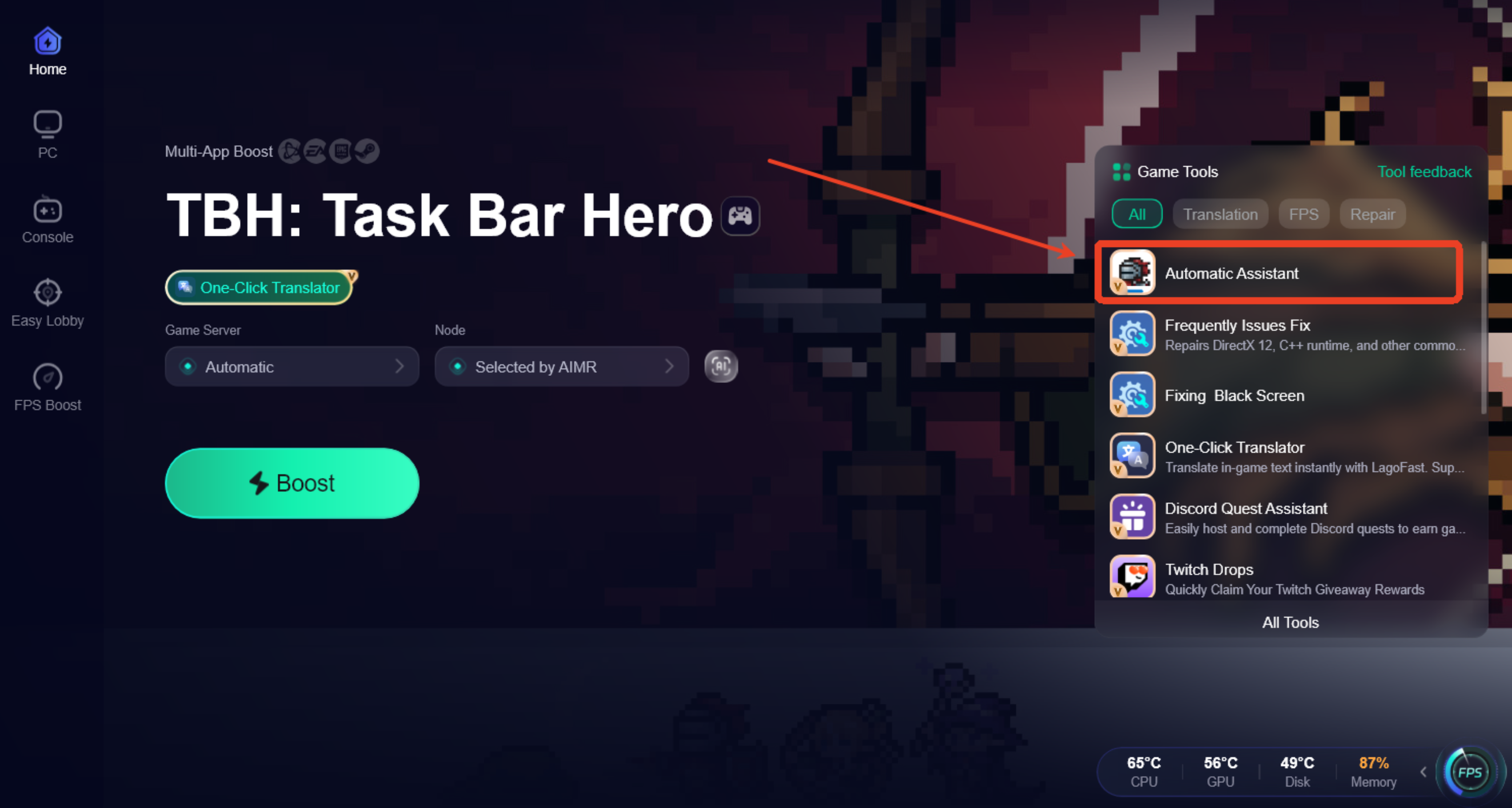
Step 3: Click the Automatic Assistant tool from the toolbar in the bottom-right corner.
Step 4: Enable Auto AFK Assistant and configure features such as Auto Open Chest, Auto Combine & Alchemy, Auto Store Items, and Auto Trading according to your preferences.
Additional Features for a Smoother TBH Experience
Besides automation tools, LagoFast also includes features that can help improve overall gameplay stability and connection quality:
- Reduce high ping and lag spikes.
- Fix packet loss and unstable connections.
- Optimize network routes for smoother gameplay.
- Improve connection stability during long gaming sessions.
- Provide additional gaming tools designed to enhance the overall experience.
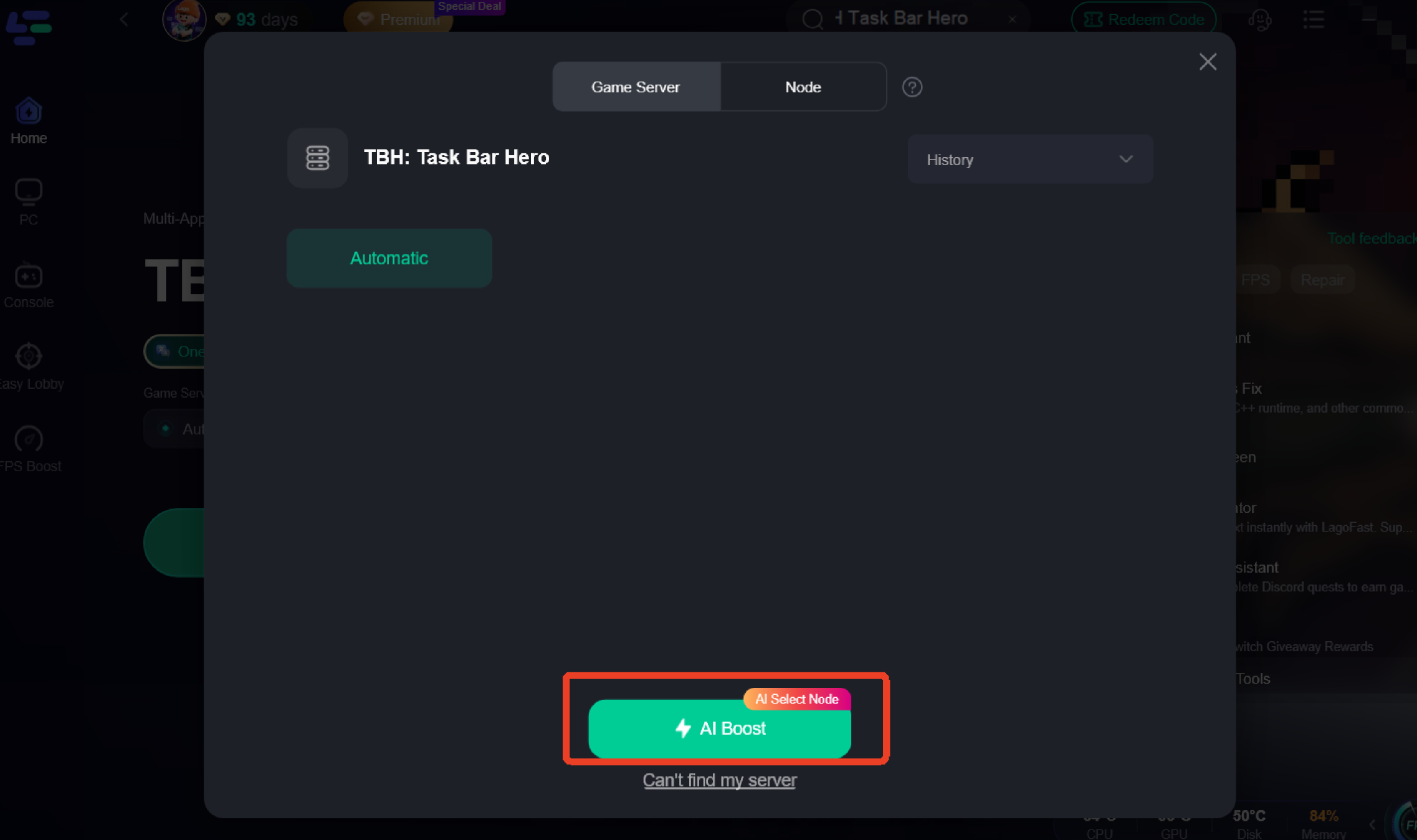
Step 1: Choose your preferred server node and click "Smart Boost" to start optimizing.
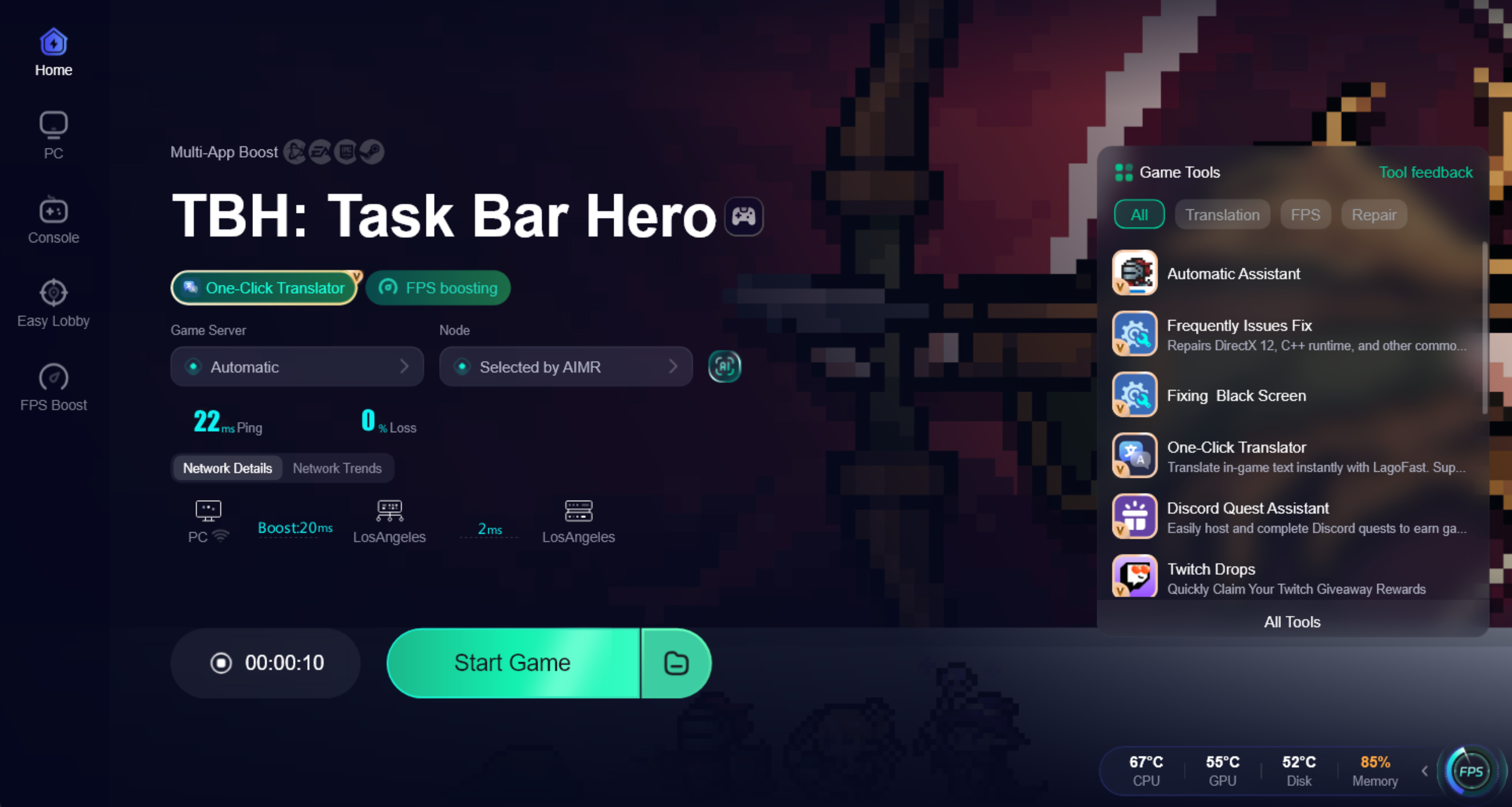
Step 2: Launch your game and enjoy smooth, optimized gameplay with lower ping and no stutter.
Part 9: FAQ
Is there a chest limit in TBH Task Bar Hero?
There is no widely reported chest limit. However, inventory space and storage capacity can affect how efficiently rewards are collected during long farming sessions.
What is the best setup for overnight AFK farming?
Keep enough inventory space available, clear pending rewards, and manage advanced chests before starting a long AFK session.
Do unopened chests disappear in TBH Task Bar Hero?
Unopened chests do not typically disappear immediately, but large numbers of pending rewards can make inventory management more difficult.
Can I earn chest rewards while offline?
Most chest rewards are earned while the game is running and your character is actively farming.
Final Thoughts
While TBH Task Bar Hero's chest system is fairly straightforward, long AFK sessions can sometimes lead to issues such as unopened advanced chests, delayed rewards, or inventory bottlenecks. Understanding how these systems work can help you troubleshoot common chest problems and keep your farming sessions running more smoothly.

Boost Your Game with LagoFast for Epic Speed
Play harder, faster. LagoFast game booster eliminates stutter and lags on PC, mobile, or Mac—win every match!
Quickly Reduce Game Lag and Ping!
Boost FPS for Smoother Gameplay!