
Splitgate 2 officially launched its Beta test on May 22nd, but within less than 24 hours of its release, players began reporting issues such as being unable to make purchases from the in-game store and experiencing slow system performance, indicating that there were anomalies in Splitgate 2 server status.
In this article, we will focus on providing you with essential information about Splitgate 2 server status, including how to check the server status, common server-related problems and their corresponding solutions, as well as the best ways to optimize your Splitgate 2 gaming experience. Discover all this and more!

- ✅ Reduce Lag and High Ping.
- ✅ Boost FPS at the Same Time.
- ✅ Support 2000+ Popular Online Games.
- ✅ Provide Different Game Tools.
- ✅ Stable Server Connetctions.
Part 1: Understanding Splitgate 2 Server Status
Part 2: How to Check Splitgate 2 Server Status
Part 3: Common Causes and Fixes of Splitgate 2 Server Issues
Part 4: How to Enhance Gaming Experience of Splitgate 2
Part 1: Understanding Splitgate 2 Server Status
The Splitgate 2 beta test was officially released on May 22nd. However, within less than a day of its launch, Splitgate 2 posted a message on X (formerly Twitter) about server status anomalies. As of the time this article was written, Splitgate 2's servers were still offline. To address the server status issues, the developer, 1047 Games, has temporarily shut down all active servers of the game and has issued an apology to the eagerly anticipating players who participated in the beta test.
The estimated time for restoration is still contingent upon the speed at which the developers can roll out a fix patch. And now, after nearly three days of repairs, the development team has finally fixed the official servers, and players can now smoothly connect to the servers and join the game!
Part 2: How to Check Splitgate 2 Server Status
For players eager to stay informed about the server status of Splitgate 2 in a timely manner, here are several reliable methods to check:
- Splitgate 2's Official Social Media: 1047 Games posts the latest server status updates on its official social media platforms. Players simply need to follow their official X account and ensure they refresh frequently to stay updated on the Splitgate 2 server status.
- Official Website: Players can also visit the official website of Splitgate 2 to check for updates on the game's official server status or maintenance schedules.
- Official Game Community or Reddit Discussions: Engaging with the Splitgate 2 community forum or participating in discussions on the Splitgate 2 subreddit on Reddit allows players to interact with other players. This helps them exchange information and experiences regarding Splitgate 2 server status, discuss more related topics, and share potential solutions.
Part 3: Common Causes and Fixes of Splitgate 2 Server Status Issues
If players encounter abnormal Splitgate 2 server status issues with its official servers, they simply need to wait patiently for the official fix. However, if the official servers have completed maintenance and are operating normally, but players still experience server status issues, they should consider whether the problem lies on their end. Here are common causes of server-related problems in Splitgate 2, along with corresponding fixes:
Network Connection Issues
Cause: Insufficient network bandwidth, too many devices connected to the same network, or other network connection problems can prevent players' devices from connecting properly to the official servers, leading to unstable server status.
Fix: Players can try switching to a network with higher bandwidth, reducing the number of devices connected to the network, or switching to an Ethernet connection to ensure a stable and secure network connection, thereby fixing the abnormal Splitgate 2 server connection issue.
Firewall and Security Software Blocking
Cause: Various firewalls or antivirus security software installed by players to ensure device security may detect unsafe information during server connections and block the connection, causing abnormal server status.
Fix: Temporarily disable these firewalls or antivirus security software to see if it successfully fixes the abnormal Splitgate 2 server status issue. If effective, players can add Splitgate 2 to the trust list of these security software or firewalls to avoid connection errors in the future.
Corrupted Game Files or Lost Game Cache
Cause: Problems such as corrupted game installation packages or abnormal game cache during updates or downloads of Splitgate 2 can lead to abnormal server status issues.
Fix: Verify the integrity of Splitgate 2's game files through Steam or the game settings. If necessary, redownload and reinstall the game.
Outdated Network Drivers
Cause: Outdated or malfunctioning network drivers on players' gaming devices can cause abnormal server connection issues.
Fix: Update the device's network drivers. Press "Win + I" to open "Settings," select "Update and Security," and click "Check for updates." The system will automatically search for and install the latest updates, including driver updates.
Game Memory Issues
Cause: Overcrowded memory on players' devices can prevent Splitgate 2 from running smoothly, making it unable to connect to the official servers and causing server problems.
Fix: Players can clear the cache within their devices, delete unnecessary programs or files, and reserve sufficient space for Splitgate 2 to run smoothly.
Part 4: How to Enhance Gaming Experience of Splitgate 2
After the official Splitgate 2 servers are repaired and back online, players can smoothly connect to the servers and dive into the thrilling and adrenaline-pumping shooting game. Don't forget to use LagoFast Game Booster to give your shooting and movement in the game a boost. It's tailored to provide players with the perfect gaming experience in Splitgate 2, whether you're a newbie or a seasoned veteran, helping you secure victories in battles quickly.
DLSS Booster
To ensure that players don't miss any crucial details that could lead to victory in the game, LagoFast has equipped players with the DLSS Booster tool. This tool helps deliver the sharpest and highest-quality graphics, allowing players to clearly spot every trace of their enemies and seize every opportunity!
Click the "Free Trial" button to get LagoFast for free.
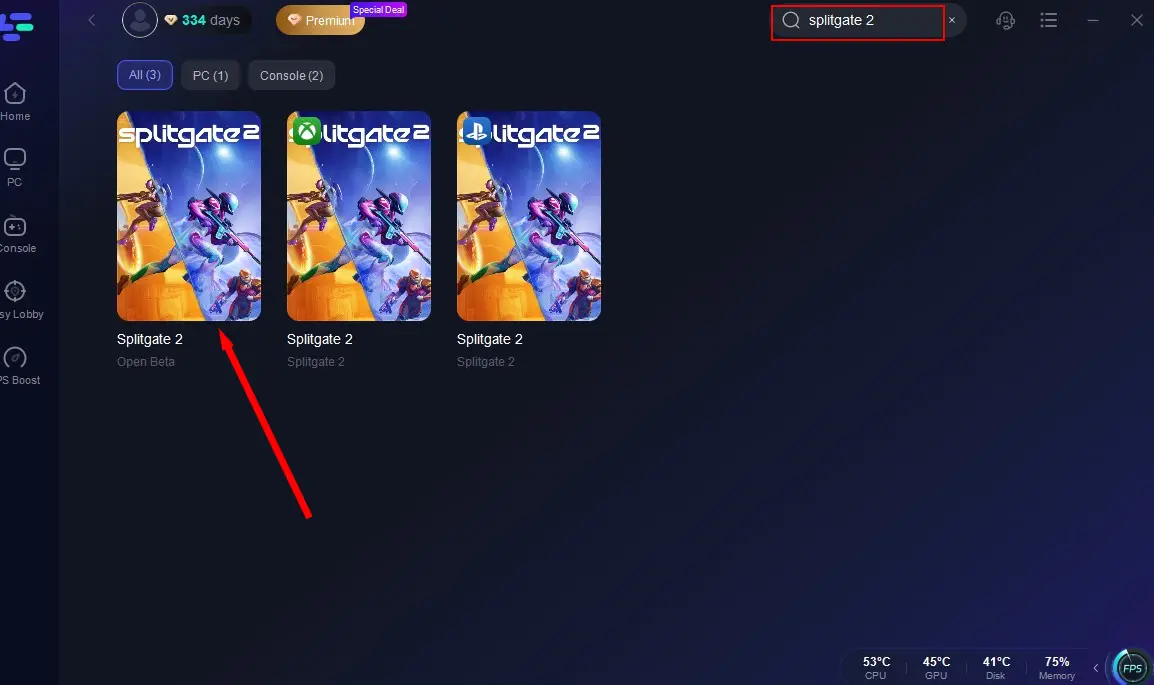
Search for "Splitgate 2" and click on the search result.
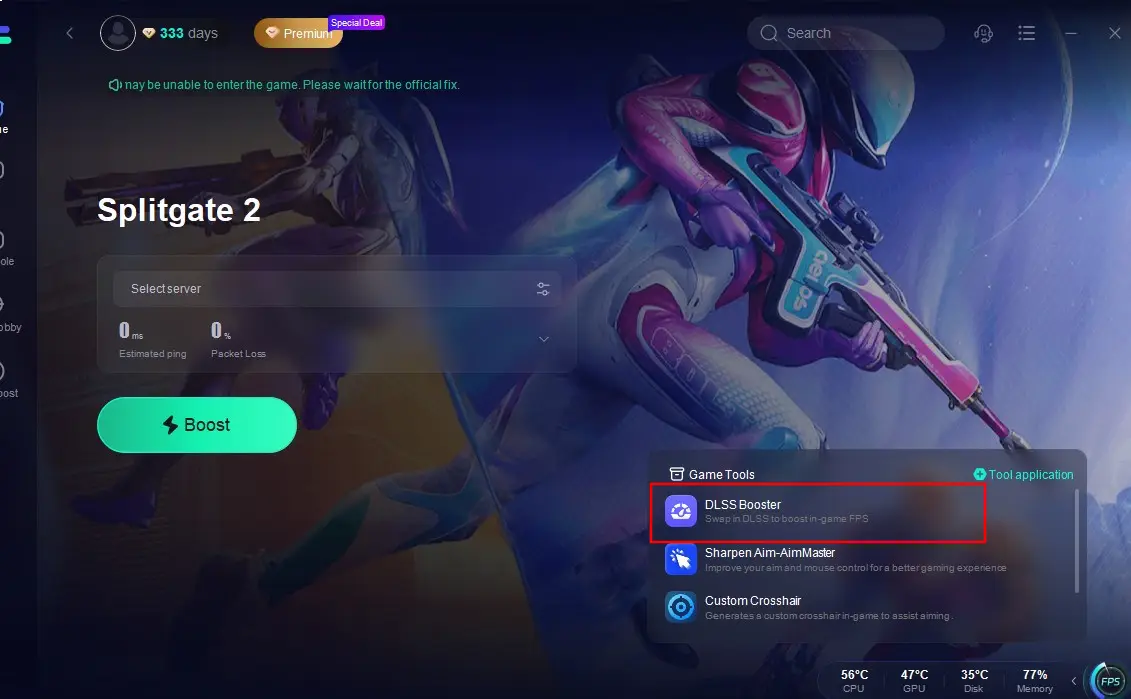
Click on the DLSS Booster tool located at the bottom right of the screen.
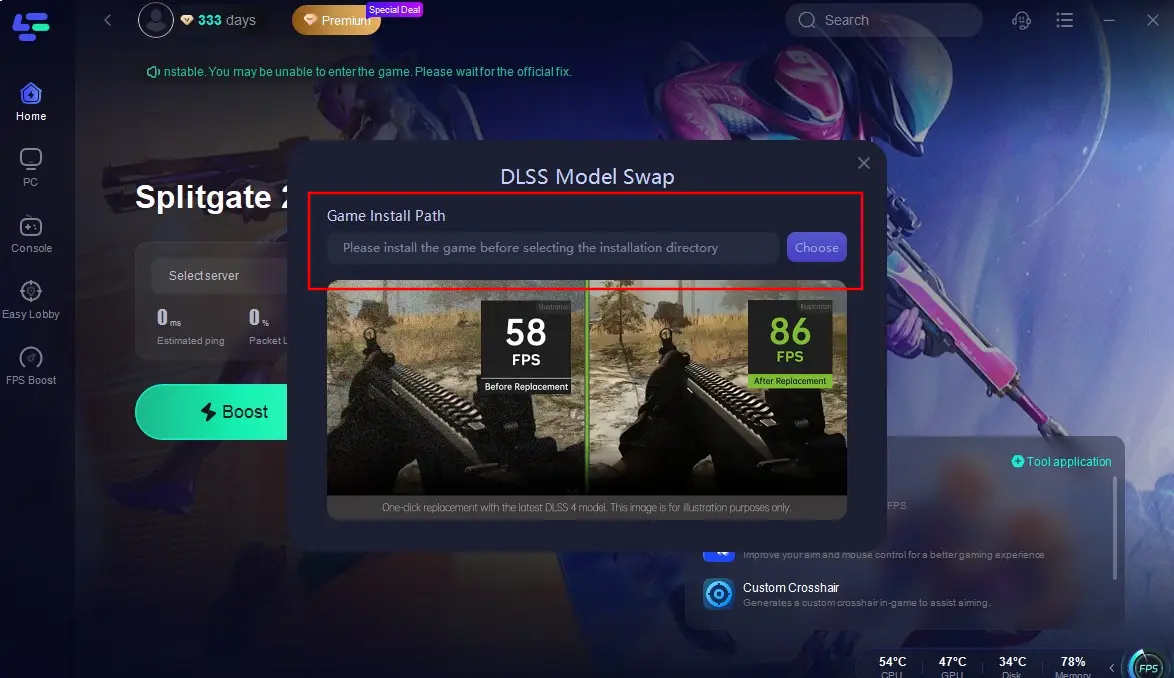
Select the installation path for Splitgate 2 and complete the settings. Then, you can enjoy a crystal-clear shooting battle!
Sharpen Aim - AimMaster
This is a gaming tool designed to enhance your mouse performance. During intense battles with opponents, players often encounter errors due to mouse operation delays. LagoFast has taken this into account and provided this tool to help improve mouse performance and responsiveness, ensuring smoother operations without any risk of cheating.
Click on the "Sharpen Aim - AimMaster" tool located at the bottom right of the screen.
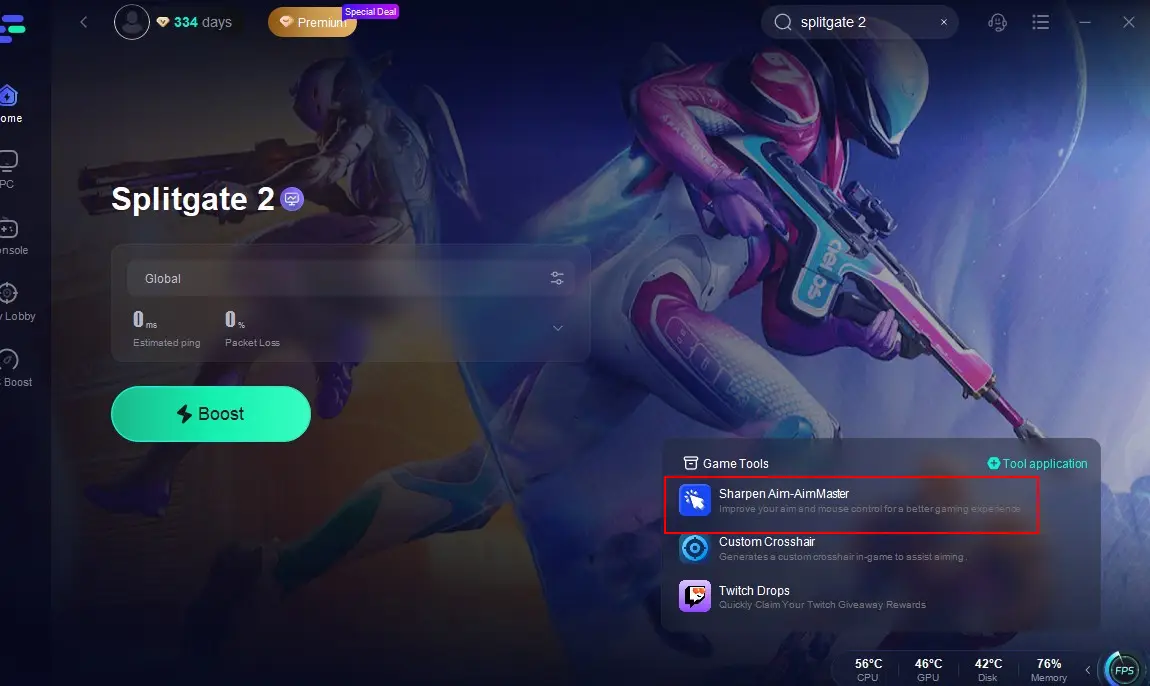
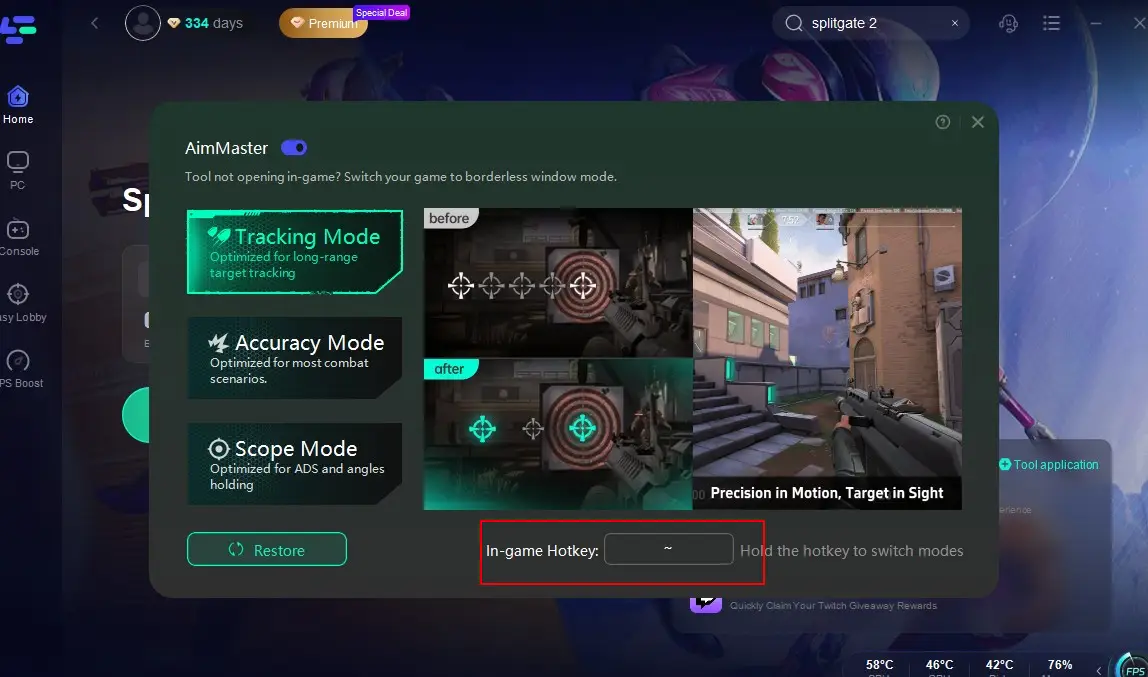
Choose one of the three modes provided by LagoFast that best suits your combat style, and complete the in-game hotkey settings. Return to the game, and your mouse will be upgraded into your most powerful weapon, delivering lethal blows to your enemies.
In addition to these excellent gaming tools, don't forget to use LagoFast to create a lag-free gaming experience and stable connection in Splitgate 2. After all, LagoFast offers the following advantages:
- Reduced Ping: Minimizes latency for smoother gameplay.
- Stable Connection: Reduces packet loss and connection drops.
- Optimized Routing: Selects the best server routes for optimal performance.
Free download and install LagoFast.
Launch the program after installation, search for Splitgate 2 in its search box, and click.
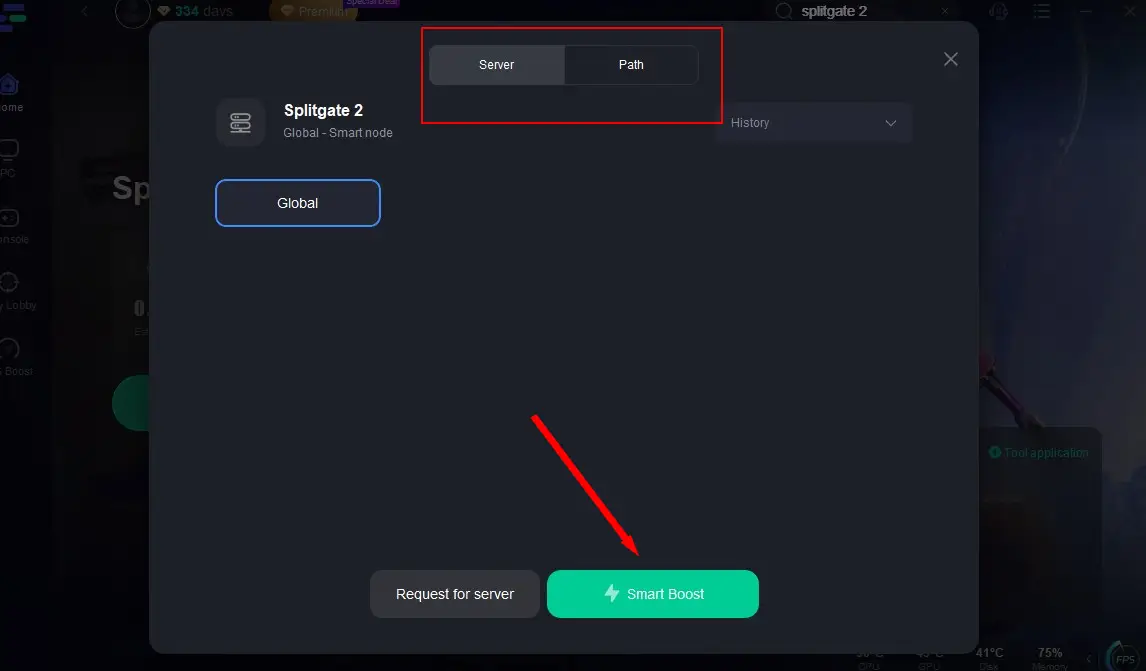
Select an optimal server, click "Smart Boost" to start real-time optimization.
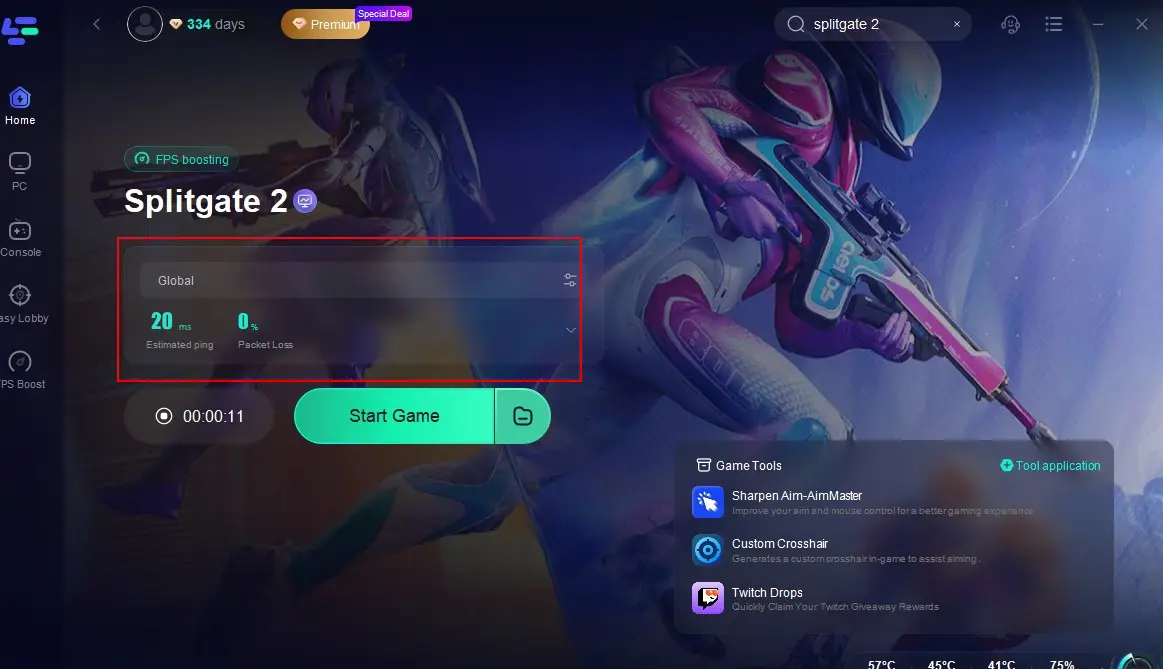
Confirm that the real-time packet loss rate and ping have been optimized, then click "Start Game" and dive back into the action!
Conclusion
The temporary downtime of Splitgate 2 servers, while inconvenient for eager players, is a necessary step towards ensuring a high-quality gaming experience. Once the Splitgate 2 servers are back up and running, don't forget to use LagoFast and its thoughtful tools to enhance your gaming experience!
Boost Your Game with LagoFast for Epic Speed
Play harder, faster. LagoFast game booster eliminates stutter and lags on PC, mobile, or Mac—win every match!
Quickly Reduce Game Lag and Ping!
Boost FPS for Smoother Gameplay!