
In MMORPGs, nothing is more frustrating than being unable to connect to the server just when you want to dive into your world. When Aion 2 launches—with its action-oriented combat, unrestricted flight, and expansive world—players will expect seamless connectivity and stable realms. But new or beta MMORPGs often suffer from server connection issues: login failures, timeouts, authorization errors, lag spikes, or sudden disconnections.
In this article, we’ll walk you through the most common server connection problems you might face in Aion 2, analyze why they happen, and provide a comprehensive set of fixes—especially focusing on how to use LagoFast Game Booster to optimize your network route and dramatically reduce “unable to connect” errors.

- ✅Less ping and crashes.
- ✅ Higher FPS and better PC performance.
- ✅ Support for 3000+ games.
- ✅ Stable connection and region switching.
Part 2: Common Server Connection Issues in Aion 2
Part 3: Why Do I Keep Getting Unable to Connect to the Server?
Part 4: How to Fix Aion 2 Connection Issues
Part 5: Other Way to Fix Aion 2 Connection Issues
Part 1: Introduction
Aion 2 (set 900 years before the original Aion) is built with Unreal Engine 5 and features real-time action combat, flying across massive zones, and cross-platform support (PC + mobile). Its network architecture must handle large scale zones, many concurrent players, real-time updates, and reliable matchmaking. Because of that, players will inevitably face server connection issues—especially during launch phases, stress tests, or under heavy load.
To enjoy the game smoothly, it’s critical to know how to diagnose and solve these connectivity problems effectively.
Part 2: Common Server Connection Issues in Aion 2
Below are issues that players commonly experience (including in classic Aion) which are likely to carry over or reappear in Aion 2.
- “Unable to connect to server / login server”
You reach the game client, enter credentials, but then receive an error that you can’t connect to the authentication or login server. - Timeouts or connection drops mid-login
You may get stuck after selecting server or character, or get disconnected before you fully enter the world. - High latency / jitter / packet loss
While technically not a complete failure, fluctuations in network quality can manifest as “disconnects” or delays in server handshake. - IP blocked or restricted / anti-DDOS bans
The server’s anti-DDOS or firewall services might block certain IP ranges or flag your IP if it seems suspicious. Aion classic players reported that some IPs got auto-banned by anti-DDOS systems. - DNS, proxy or routing misconfigurations
Incorrect DNS settings, active proxies, or bad routing can prevent proper server IP resolution. - Firewall, antivirus, or software interference
Local security software might block game ports or the launcher’s ability to communicate. Many users of legacy Aion reported “cannot connect to update server” errors due to firewall rules. - Server instability or scheduled maintenance
Sometimes the issue is entirely on the server side—downed login servers, overloaded instances, or maintenance windows. The official forums frequently show users reporting “Cannot connect to authorization server” when servers are undergoing maintenance. - Corrupted game client or launcher problems
Broken patches, mismatched versions, or corrupted data can lead to inability to connect. Legacy Aion communities often advise repairing or reinstalling the client.
Because Aion 2 is new, expect some of these issues to appear more often initially, so being prepared is key.
Part 3: Why Do I Keep Getting Unable to Connect to the Server?
Understanding why a connection error recurs helps you pick the right solution faster. Here are deeper causes, especially relevant for an ambitious game like Aion 2.
1. Network route inefficiencies
Your ISP’s path to the game server might be long, congested, or poorly routed. Even if your local connection is stable, a suboptimal path can lead to timeouts or handshake failures.
2. IP blocking by server security
Modern game servers deploy anti-DDOS layers, IP filters, or firewall rules to protect against attacks. If your IP falls into a flagged range (e.g. dynamic IP, VPN exit node, or unusual routing), you might get blocked.
3. Overloaded server or instance
During launch or peak hours, the login or world server might not be able to handle the number of connections. This causes queuing, timeouts, or refusal to let new connections in.
4. Misconfigured DNS or proxy settings
If your DNS cannot resolve the server’s address properly, or if you have a proxy or VPN interfering, the client might try to connect to incorrect or stale IPs.
5. Software interference
Firewall, antivirus, or network monitoring tools may block essential ports, intercept packets, or drop connections unexpectedly.
6. Client version mismatch / corrupted files
If your client or launcher is out of sync with the server version, the handshake protocol can fail. Corrupted patches or missing files exacerbate this.
7. Local hardware or OS network stack issues
Faulty network adapters, driver bugs, IPv6/IPv4 misconfiguration, or caching issues may degrade or break connectivity.
Particularly in the early stages, the combination of server security and route inefficiencies often accounts for the majority of “unable to connect” complaints. Several Aion classic threads highlight how users’ IPs get flagged or dropped by anti-DDOS systems.
Hence, the first line of defense is optimizing your route and connection path—and this is where a booster like LagoFast becomes a powerful tool.
Part 4: How to Fix Aion 2 Connection Issues
1. Use LagoFast Game Booster to Optimize Connection
Because many connection failures are due to poor routing, congestion, or IP filtering, using LagoFast game booster often fixes “unable to connect” errors by rewriting or re-routing your network path.
LagoFast not only optimizes network paths, but also provides several Aion-specific tools that solve connection and login failures more effectively:
- One-Click Translation – Instantly translates Purple launcher UI and in-game system messages, making error codes, login prompts, or server notices easier to understand.
- PURPLE Launcher Optimization Tool – Enhances update routing, stabilizes launcher startup, and prevents “stuck on loading/update” issues.
- Fix Purple Login Failure Tool – Repairs login loops, timeout errors, and Purple → Aion authentication failures.
- Free TW Account Tool – Generates a ready-to-use Taiwan account if your original TW region was merged into Global or can no longer access the Taiwan server list.
- Fix High Latency – Reduces abnormal ping, stuttering, and slow skill response by bypassing congested or faulty ISP routes, helping even Taiwan players with fast internet restore stable, low-latency gameplay.
These tools work together to address both network instability and Purple launcher region/authentication errors, significantly improving overall connectivity.
How to Use LagoFast with Aion2
Step 1: Begin by clicking the Free Trial button to download and install the LagoFast Free Trial.
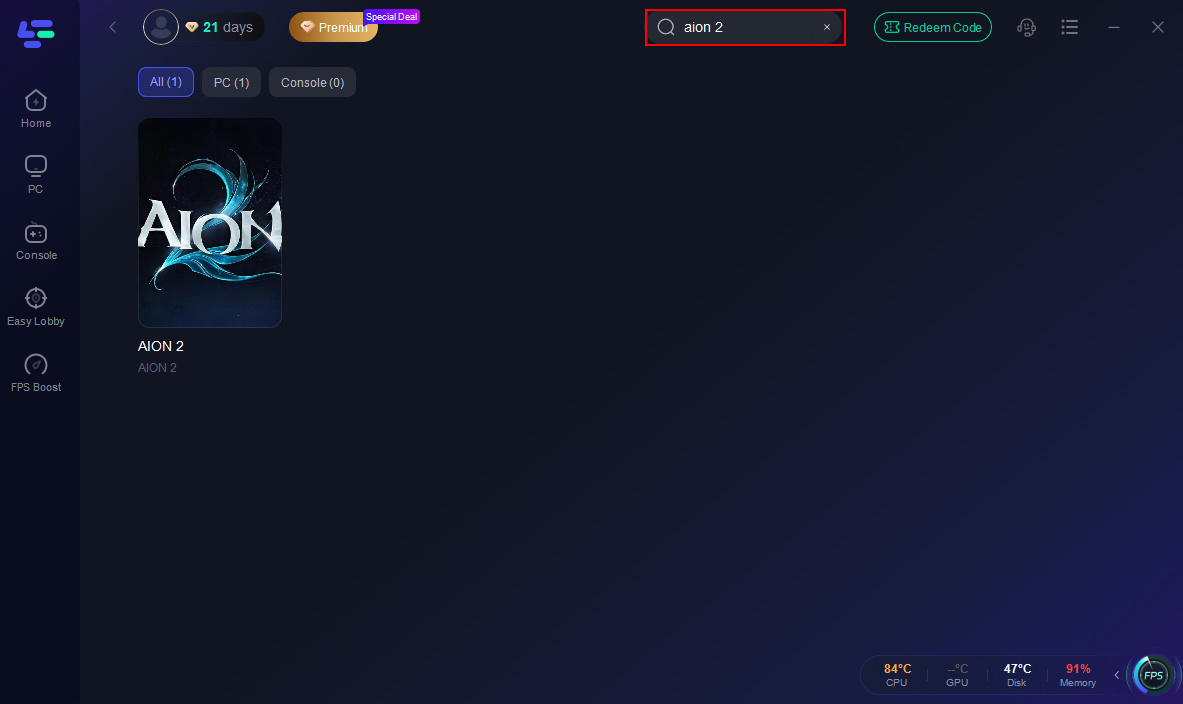
Step 2: Search for Aion2: Open LagoFast and use the search bar to find Aion2.
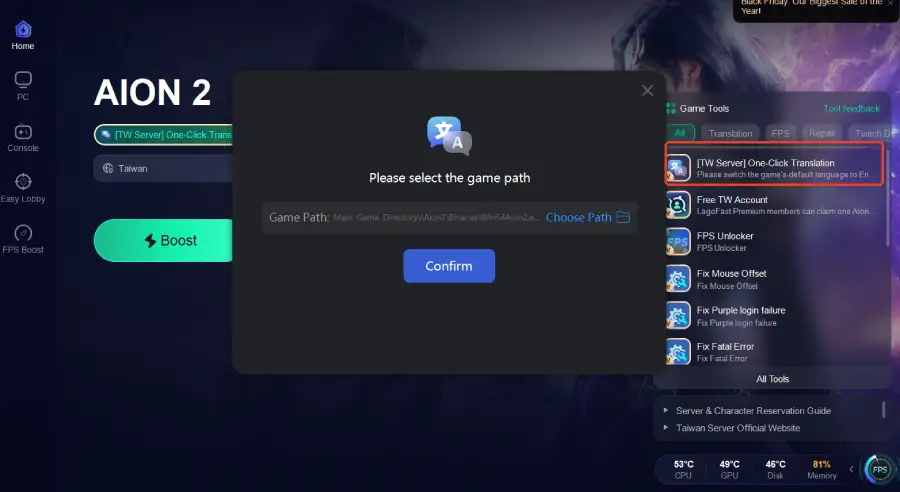
Step 3: Enable the One-Click Translation feature to translate the game into your preferred language.
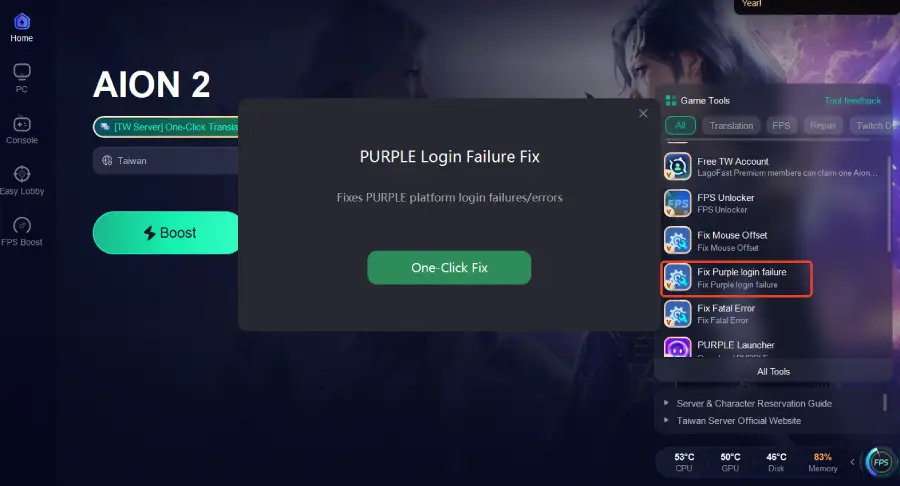
Step 4: Enable Fix Purple Login Failure to resolve login errors and ensure smooth access to the Taiwan server.
Step 5: Use the PURPLE Launcher Tool to ensure smoother updates and stable login.
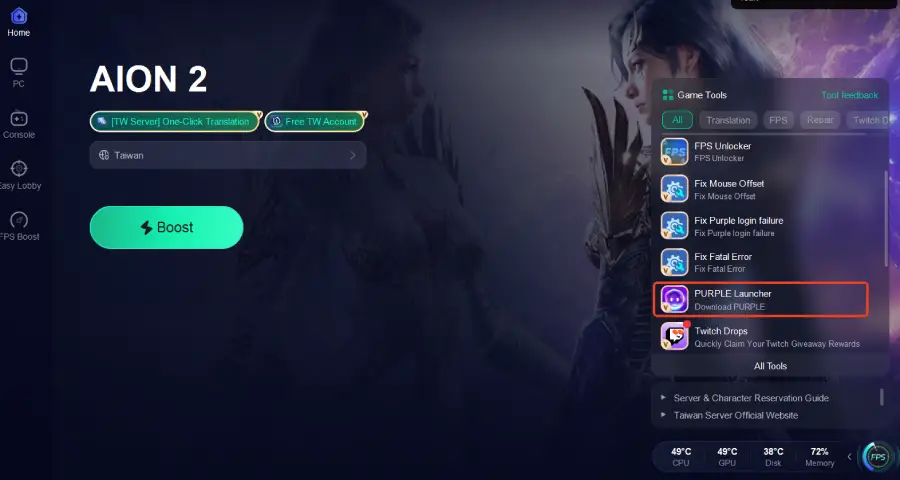
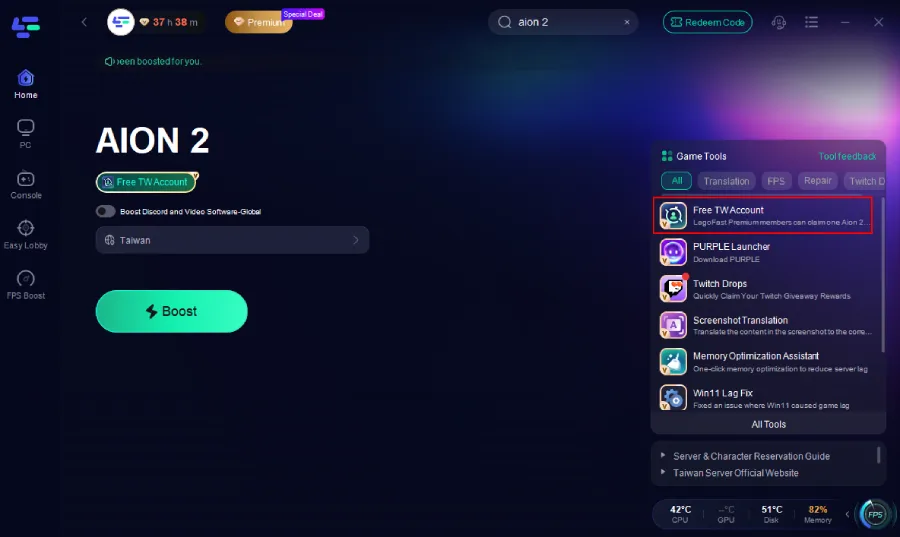
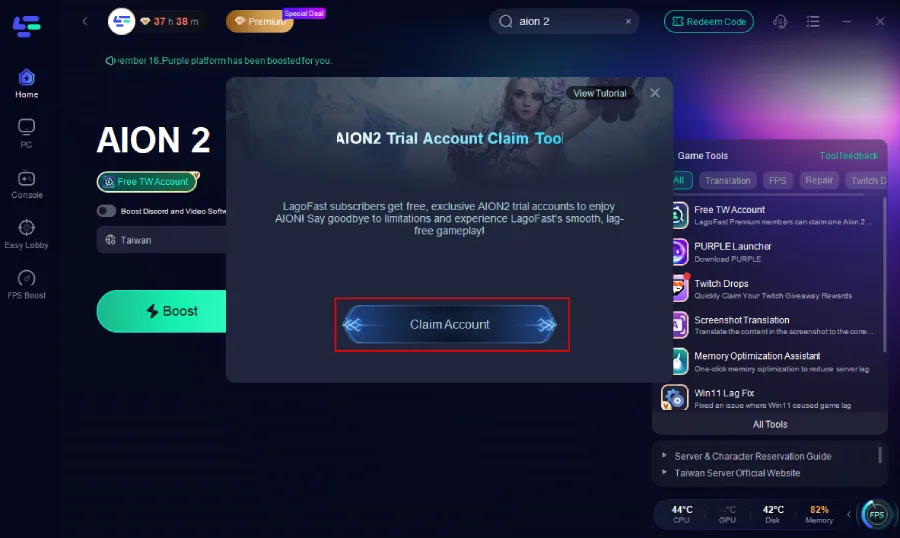
Step 6: On the right side, select the Free TW Account Tool.Inside the tool, click Claim Account.An account will be automatically generated and assigned to you.
Step 7: Optimize Network Settings: LagoFast will automatically select the optimal server and settings to reduce latency and packet loss.
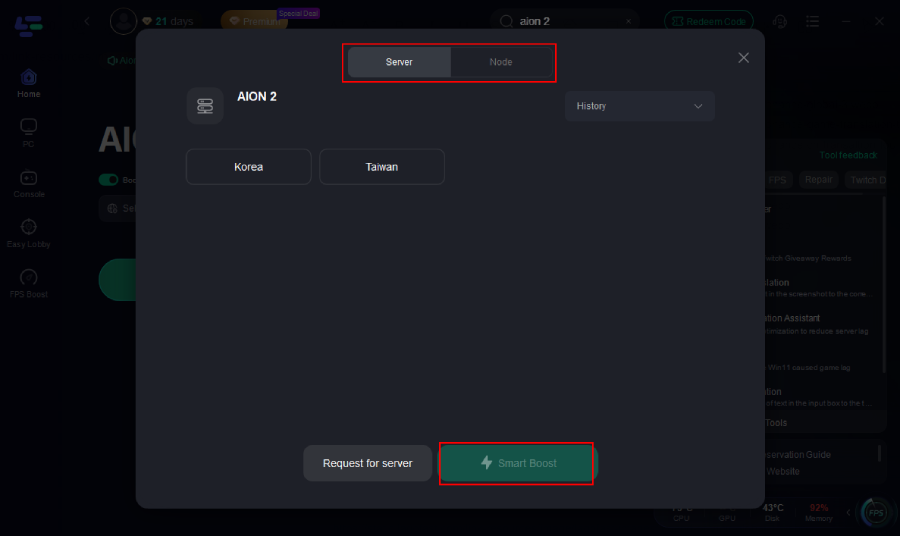
Step 8: Launch Aion 2 through LagoFast—this ensures the booster is active from the handshake phase onward.
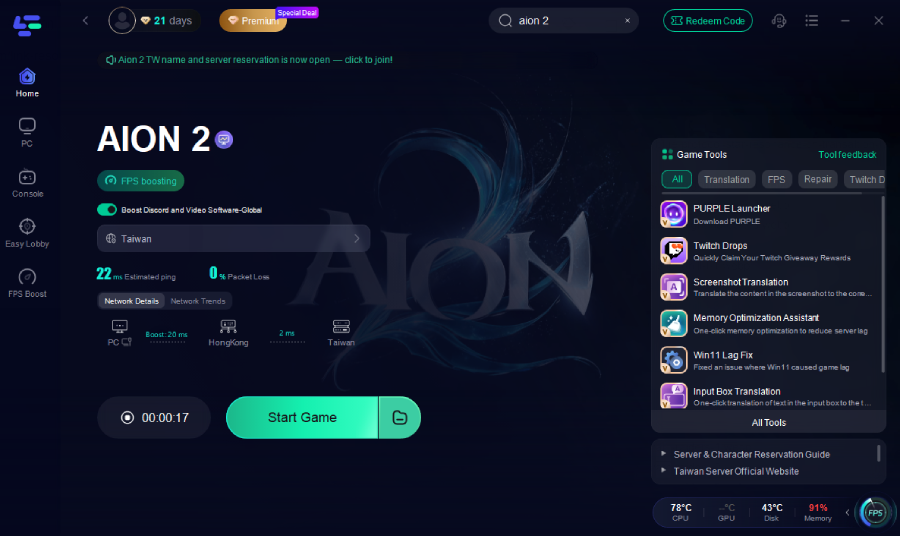
Using LagoFast is especially useful in regions far from official server locations, or when your ISP routing is suboptimal.
Part 5: Other Way to Fix Aion 2 Connection Issues
1. Switch or Reset Network (Hotspot / Modem Restart)
- Turn off Wi-Fi, and use wired Ethernet if possible. Wired is more stable.
- If you have a mobile phone with good data, create a hotspot and try connecting from that network—if this works, the issue is likely with your ISP or home routing.
- Restart your router/modem (power off 30 seconds, then reboot). This clears cache and resets routing.
2. Use a Stable Public DNS
Switch to Google DNS (8.8.8.8 / 8.8.4.4) or Cloudflare DNS (1.1.1.1). This may resolve server IPs consistently when your ISP’s DNS is slow or unreliable.
3. Disable Firewall, Antivirus, or Security Apps Temporarily
Turn off Windows Firewall, or add exceptions for Aion 2 and its launcher. Also disable antivirus, VPNs, or network filtering tools to test if they’re blocking traffic.
4. Ensure No Proxy or VPN Conflicts
In Windows → Internet Options → Connections → LAN settings, ensure that “Use a proxy server” is unchecked. Legacy Aion users have fixed “cannot connect to authorization server” by disabling proxy settings.
5. Repair or Reinstall the Game Client / Launcher
- Use the game’s repair tool if available
- Re-download the launcher, replace corrupted files
- Sometimes fully reinstalling clears version mismatch or file corruption issues (as seen in legacy Aion forums)
6. Contact Support & Report IP Blocking
If everything local fails, open a support ticket with NCsoft or your regional Aion 2 team. Provide your ISP, external IP, logs, and screenshots. If your IP is blocked by their anti-DDOS system, support may whitelist it (some legacy Aion users reported needing support to unblock IPs).
7. Wait or Change Server During Maintenance
If the issue is server-side (maintenance, overload), all clients will fail to connect. Monitor server status announcements, wait out maintenance windows, or try different region servers if supported.
By applying booster routing first (LagoFast), then layering the network and client fixes, you maximize your chance of resolving connection issues swiftly.
Beyond the core fixes above, here are additional methods and good practices to keep in mind:
- Use IPv4 rather than IPv6 if Aion 2 does not fully support IPv6 routing in your region
- Close background bandwidth hogs like downloads, streaming, cloud backups
- QoS / traffic prioritization at router level: assign Aion 2 or your gaming PC priority in your router settings
- Update network adapter drivers, or try a different network card
- Check with your ISP if they block game ports or restrict traffic
- Use a VPN (as fallback) if routing is severely broken—though sometimes VPNs are themselves blocked
- Test from alternative network (friend’s house, different ISP) to isolate whether problem is local
- Monitoring tools (WinMTR, PingPlotter) to see hop delays and where packet loss starts
- Check game patch notes or forums to see if server changes or new IP ranges are in effect
- Use Offline / fallback mode (if available) to test whether problem is purely server access, not client logic
These additional steps help when standard methods don’t suffice, especially in harder edge cases.
Part 6: FAQs
Q: Should I always use Ethernet over Wi-Fi?
Yes—Ethernet is more stable, less prone to interference or packet loss. Use Wi-Fi only as fallback. If possible, use wired during launch phases or critical connectivity periods.
Q: What if I still can’t connect after all fixes?
It’s likely a server-side issue or your IP is blocked. Wait for official announcements, try a different server or region, or contact support for IP whitelisting.
Q: Will connection issues disappear after global launch?
Not necessarily. Launch phases often see huge load. Post-launch, network upgrades, infrastructure scaling, and optimized routing (from boosters or CDNs) help. But occasional issues can persist.
Q: How do I know whether problem is local or server side?
Use tools like PingPlotter, WinMTR, or check server status pages. If many players report the same “cannot connect” error or official maintenance message, it’s likely server-side. If only you are affected, local problems more likely.
Conclusion
Connection issues are among the most painful barriers in MMORPGs, especially in ambitious titles like Aion 2. But many “unable to connect” errors boil down to routing inefficiencies, IP blocks, or client misconfiguration. Starting with a network booster like LagoFast Game Booster—which optimizes your path to the server—is a powerful first step. Then systematically work through DNS, firewall, proxy, repair, and ISP checks to restore stable access.

Boost Your Game with LagoFast for Epic Speed
Play harder, faster. LagoFast game booster eliminates stutter and lags on PC, mobile, or Mac—win every match!
Quickly Reduce Game Lag and Ping!
Boost FPS for Smoother Gameplay!