
Rust can throw a lot of errors that stop you from playing — from Steam Load Error and EAC 30005 to crashes, reconnect loops, and startup failures. This guide collects proven fixes for players. Whether your game won’t launch, gets stuck on loading, or shows network messages, you’ll find step-by-step solutions here to fix Rust errors fast.

- ✅ Reduce Lag and High Ping.
- ✅ Boost FPS at the Same Time.
- ✅ Support 2000+ Popular Online Games.
- ✅ Change Server without Latency.
- ✅ Boost Game Loading Speed.
- ✅ Fix Game Crashing Issues
Part 1. Rust Loading, Startup & Launch Errors
Part 2. Fatal & Client Integrity Errors in Rust
Part 3. Network, RPC & Reconnect Errors in Rust
Part 4. Launch & SSL Errors in Rust
Part 5. EAC 30005 & Injection Errors in Rust
Part 6. Rust Compiler & Build Errors
Part 7. Rust Runtime & Programming Errors
Part 8. Shock & Unknown Hard Errors in Rust
Part 9. LagoFast Optimization for Rust
Part 1. Rust Loading, Startup & Launch Errors
Rust Loading Error / Rust Startup Error / Launch Error Rust
Symptom: Game opens but hangs at loading screen or main menu.
Likely causes: Corrupted Steam_api64.dll, bad cfg, incomplete patch, overlay conflicts.
Fix:
- Close Steam & Rust.
- Delete
Steam_api64.dllin Rust folder (…\Steam\Steamapps\common\Rust\orRustClient_Data\Plugins\x86_64\) and verify game files in Steam. - Delete cfg folder and verify files again.
- Disable overlays (Steam, Discord, GeForce Experience, Xbox Game Bar).
- Reboot Steam and PC. Switch off Staging Branch or re-toggle for clean sync if needed.
Steam Error Rust / Steam Load Error – “Is Steam Open?”
Symptom: Popup indicates Steam isn’t open.
Fix:
- Close Rust and Steam.
- Delete
Steam_api64.dll. - Steam → Rust → Properties → Installed Files → Verify Integrity.
- Delete cfg folder, verify files.
- Try another Steam account if persistent.
Part 2. Fatal & Client Integrity Errors in Rust
Fatal Error Rust
Symptom: Immediate crash with “Fatal Error.”
Fix:
- DLL + cfg steps above.
- Update GPU drivers; disable overclocking.
- Run Rust as admin; add exceptions in AV for Rust.exe, RustClient.exe, EAC.
- Reset mods/launch options.
Client Integrity Violation Rust Error / EAC Error
Symptom: Kicked with “Client Integrity Violation” or “EAC: Client Integrity Violation.”
Fix:
- Verify game files.
- Repair EAC via
…\Steam\steamapps\common\Rust\EasyAntiCheat\EasyAntiCheat_EOS_Setup.exe → Repair. - Remove custom DLLs, plugins, mods.
- Whitelist Rust and EAC in firewall/antivirus.
- Clean reinstall if needed.
Part 3. Network, RPC & Reconnect Errors in Rust
Invalid Packet Client Command Rust Error
Symptom: Disconnected with “Invalid Packet: Client Command.”
Fix:
- Clear maps/temp folders in Rust directory.
- Verify game files.
- Try another server.
- Use wired connection; restart router.
- Update Rust client to match server patch.
RPC Error Rust / Rust Runtime Error
Symptom: In-game RPC/network errors, disconnects.
Fix:
- Verify game files.
- Disable VPN/overlays; try wired Ethernet.
- Power-cycle router; change DNS (8.8.8.8 / 1.1.1.1).
- Try a different server if server-specific.
Reconnect Error No Address Rust / What to Do
Symptom: Reconnect loop with “no address.”
Fix:
- Remove server from Favorites; re-add via fresh IP/port.
- Clear maps/temp folders; relaunch.
- Launch via Steam directly if using a booster.
- Try a different server (server-side issue common).
Part 4. Launch & SSL Errors in Rust
Launch Error Settings JSON Not Found Rust
Symptom: Missing settings JSON prevents launch.
Fix:
- Delete cfg folder; verify files (Rust regenerates defaults).
- Ensure Windows path/username has no unusual characters.
- Run once as admin.
SSL Error Rust / SSL CA Certificate Error Rust
Symptom: SSL handshake or CA errors.
Fix:
- Check system date/time.
- Temporarily disable SSL-inspecting antivirus/firewall; add Rust/EAC exceptions.
- Disable corporate proxy or trust org CA at OS level.
Part 5. EAC 30005 & Injection Errors in Rust
Rust Error 30005 / Error 30005 Createservice Failed with 32 Rust
Symptom: EAC blocks launch.
Fix:
- Repair EAC via
…\Rust\EasyAntiCheat\EasyAntiCheat_EOS_Setup.exe. - Delete
RustClient.exe.eac. - Exclude Rust/EAC in AV/firewall; close overlays.
- Stop conflicting services; repair again.
An Error Occurred While Injecting Rust
Symptom: Injection/anti-cheat initialization failed.
Fix:
- Uninstall overlays/hooks.
- Run Steam and Rust as admin; ensure no kernel-level anti-cheat conflicts.
Part 6. Rust Compiler & Build Errors
Error Can’t Find Rust Compiler
Fix:
- Install via Rustup.
- Ensure cargo bin folder is on PATH.
Error Linker Link EXE Not Found Rust
Fix:
- Install Visual Studio Build Tools → Desktop development with C++.
- Use stable MSVC toolchain.
Rust Compile Error
Fix:
- Check first compiler error.
- Clear cache:
cargo clean; update crates:cargo update. - Verify edition and crate versions.
Part 7. Rust Runtime & Programming Errors
Rust Runtime Error
Fix:
- Run with backtrace:
Rust_BACKTRACE=1. - Replace unwrap()/expect() with proper error handling.
- Use Result/Option + thiserror/anyhow.
Rust Result Error / Rust Return Error / Rust Custom Error / Rust Error Handling
Fix/Guidelines:
- Return
Result<T, E>and propagate errors with?. - Use
anyhow::Result<T>for app code. - Libraries: define typed errors with
thiserror. - Add context with
anyhow::Contextoreyre::WrapErr. - Validate I/O branches with
std::io::ErrorKind.
Part 8. Shock & Unknown Hard Errors in Rust
Shock Rust Error
Fix:
- Verify files; remove custom launch flags.
- Try different servers; may be plugin-related.
Unknown Hard Error Rust
Fix:
- Check disk (chkdsk), RAM (MemTest), drivers.
- Disable overclock; run SFC/DISM.
- Reinstall/verify Rust.
Part 9. LagoFast Optimization for Rust
LagoFast is a network optimization tool designed for gamers. It reduces Rust’s latency, jitter, and packet loss, speeds up loading, stabilizes connections, and ensures Easy Anti-Cheat runs properly. LagoFast works on both PC and mobile, providing one-click network boosts for smoother gameplay in PvP and co-op modes.
Using LagoFast on Mobile
Step 1: Click here to download the APK File of LagoFast mobile.
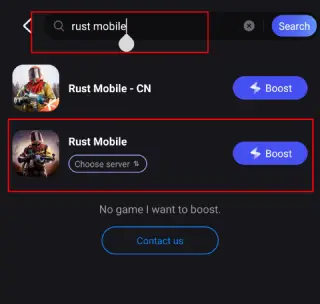
Step 2. Search for your game and select it.
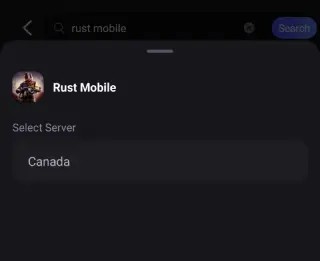
Step 3. Pick the server that suits you best.
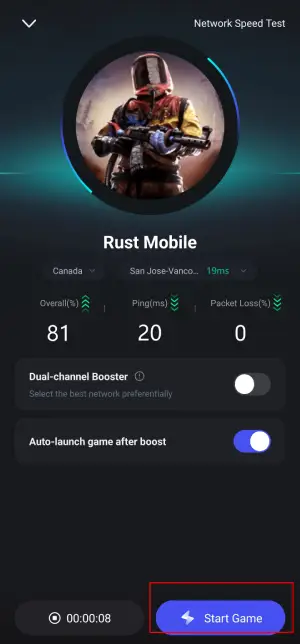
Step 4. Tap Boost, and LagoFast will display real-time ping and packet loss stats.
Using LagoFast on PC
Step 1: Click the Free Trial button to download and install LagoFast.
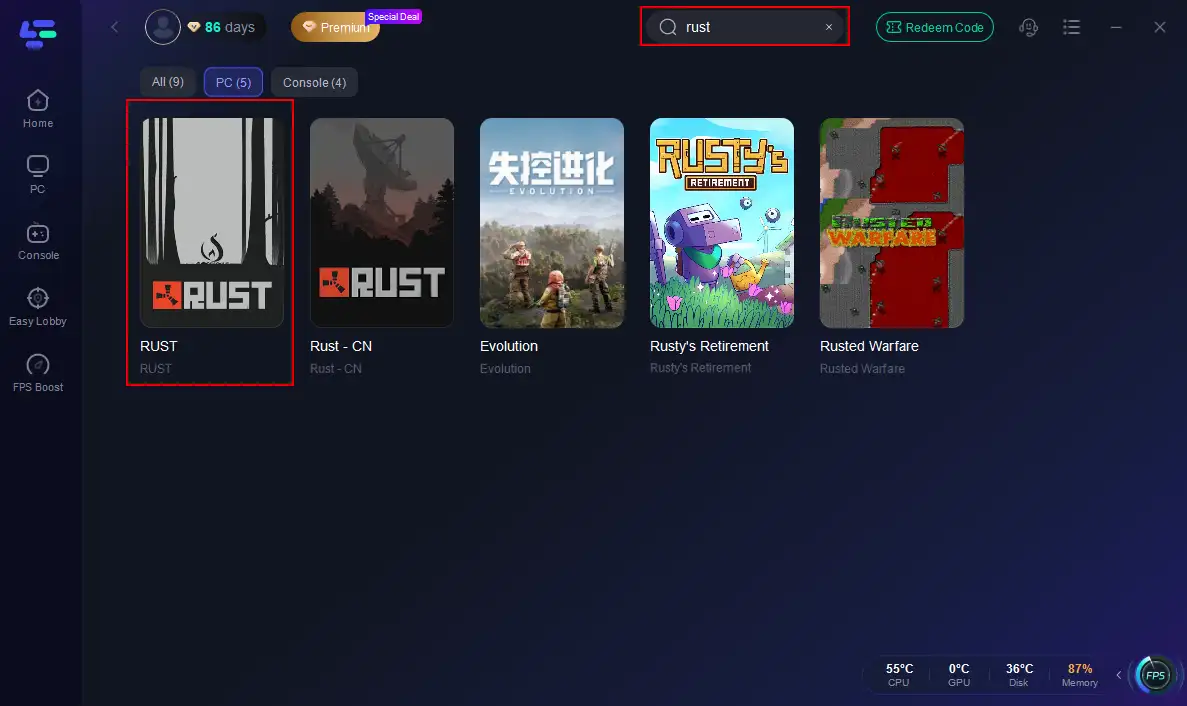
Step 2: Open LagoFast, then click the PC button on the left and search for Rust in the search bar, and click it after it appears.
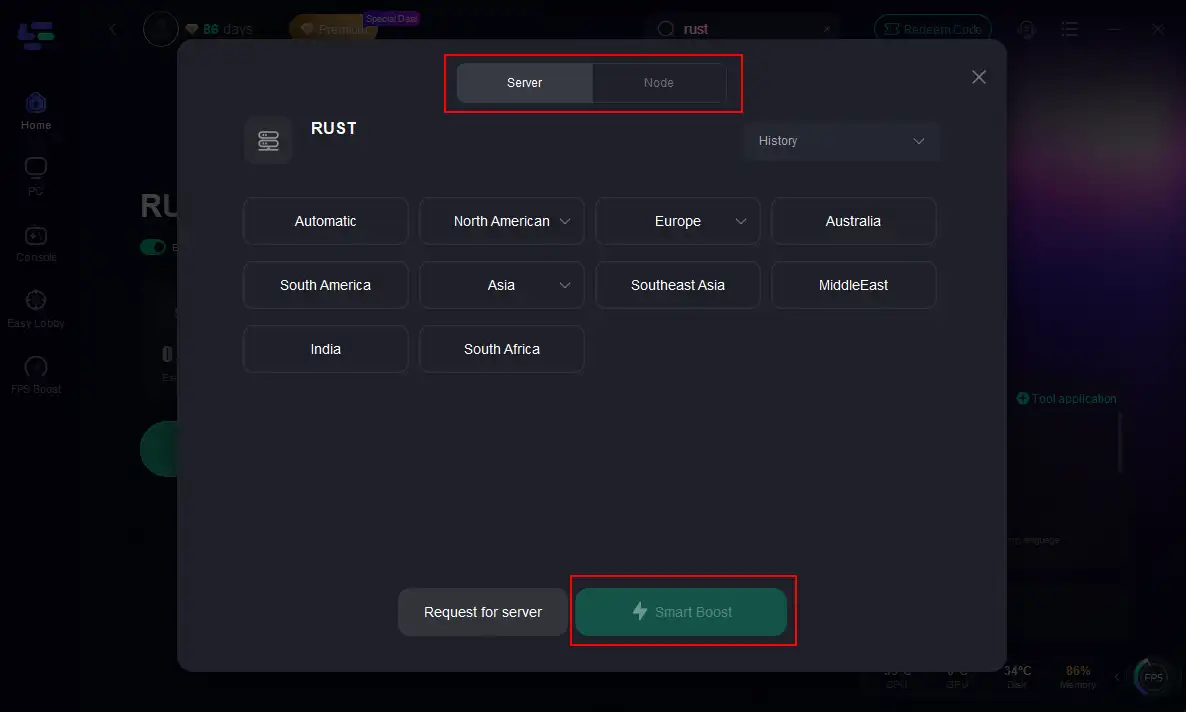
Step 3: Click on “Server” to change to a better server that maximizes the gaming experience, then click on “Smart Boost”.
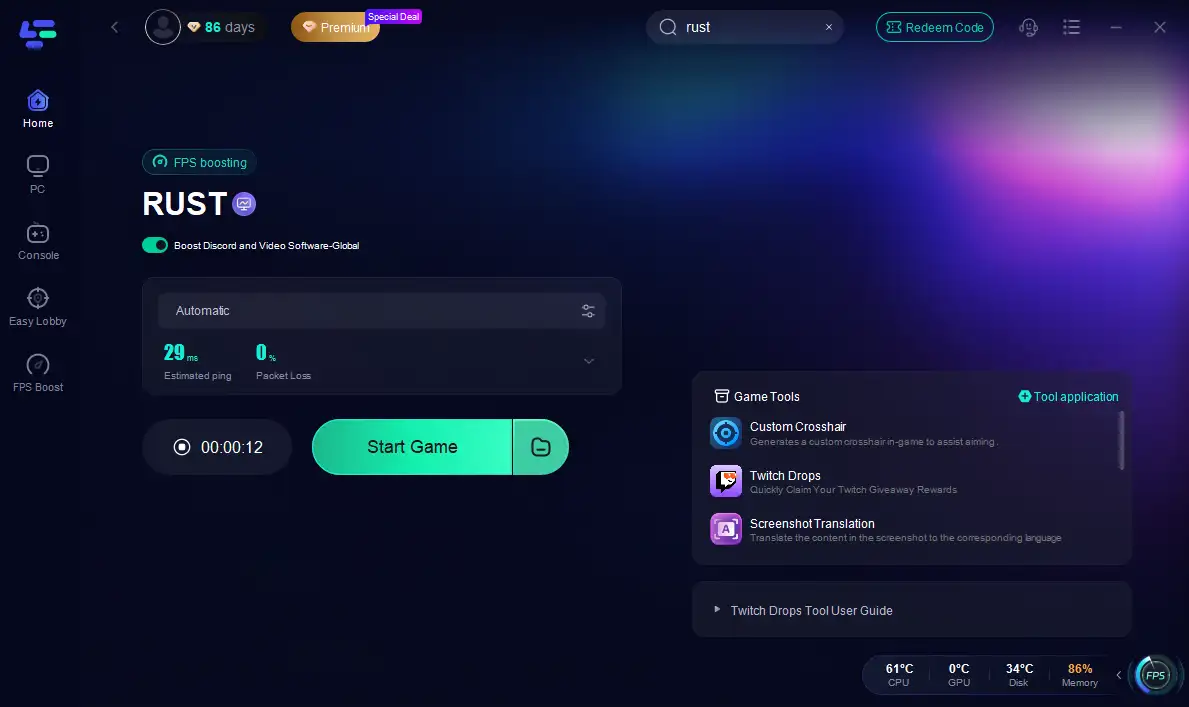
Step 4: Check the specific game ping, packet loss, and multiple path connections on the right side. Finally, click the “Start Game” to play Rust.
Conclusion
Rust errors can be frustrating, but most issues — from Steam load errors to EAC failures and reconnect loops — have reliable fixes. Clear corrupted files, verify the game, and adjust a few settings to solve most problems without full reinstall. Keep this guide handy to spend less time troubleshooting and more time surviving.
Boost Your Game with LagoFast for Epic Speed
Play harder, faster. LagoFast game booster eliminates stutter and lags on PC, mobile, or Mac—win every match!
Quickly Reduce Game Lag and Ping!
Boost FPS for Smoother Gameplay!