
Since June 2025, Rocket League players in Russia have been experiencing serious problems connecting to online servers. The situation is especially acute in the regions of Siberia, the Urals, and the Far East. For many users, the game stops loading the match, error 71 appears, or it is impossible to connect to the servers at all - while the menu and single-player mode work without failures.
This guide will help you understand the most common connection problems in Rocket League and explain how to solve them - especially with the help of the powerful LagoFast tool.

- ✅ Reduce Lag and High Ping.
- ✅ Boost FPS at the Same Time.
- ✅ Support 2000+ Popular Online Games.
- ✅ End Stuck & Crashing Issues.
Main complaints from players
- Unable to connect to online matches
- Error 71 appears when trying to enter the game
- Players get stuck in the main menu or see an endless loading
- The game works in the menu and offline mode, but does not connect to online servers
- Users can launch the game and enter the menu, but matchmaking does not work
- Offline mode continues to work without problems
- Problems began suddenly - around June 10-11, 2025
- Complaints became widespread in mid-June
- Affected regions: Novosibirsk, Irkutsk, Tolyatti, Yekaterinburg, Perm, Saratov, Ufa, Yakutsk and others
- General scenario: “Everything worked before, now matchmaking does not start”
Part 1: Why do Rocket League server connection errors occur?
Rocket League connection errors are most often caused by the following reasons:
1. Incorrect network settings
Solution:
- Go to network settings
- Run connection diagnostics
- Reconnect after diagnostics are complete
- Restart your computer if necessary
2. Rocket League and Cloudflare servers are blocked
Solution:
- Try changing the server region in the Epic Games settings or the game itself
- If this does not help, restart your computer and try again
3. Incorrectly set system time
Solution:
- Open Control Panel → Clock and Region → Date and Time
- Go to the Internet Time tab
- Click Change settings → enable Sync with an Internet time server
- Select a time server, click Update now, then OK
Part 2: How to fix Rocket League server connection errors
One of the most reliable solutions to Rocket League connection problems is LagoFast, a specialized game booster, which helps to eliminate:
- High ping
- Lag and latency spikes
- Packet loss
- Timeout disconnections
Why use LagoFast?
LagoFast offers:
- Proprietary data transfer protocol for a stable connection
- Smart routing to the server with minimal ping
- One-click optimization for all popular online games
- Flexible and affordable payment - per-minute tariff
- The lowest monthly tariff among similar solutions
How to use LagoFast
Step 1: Download LagoFast
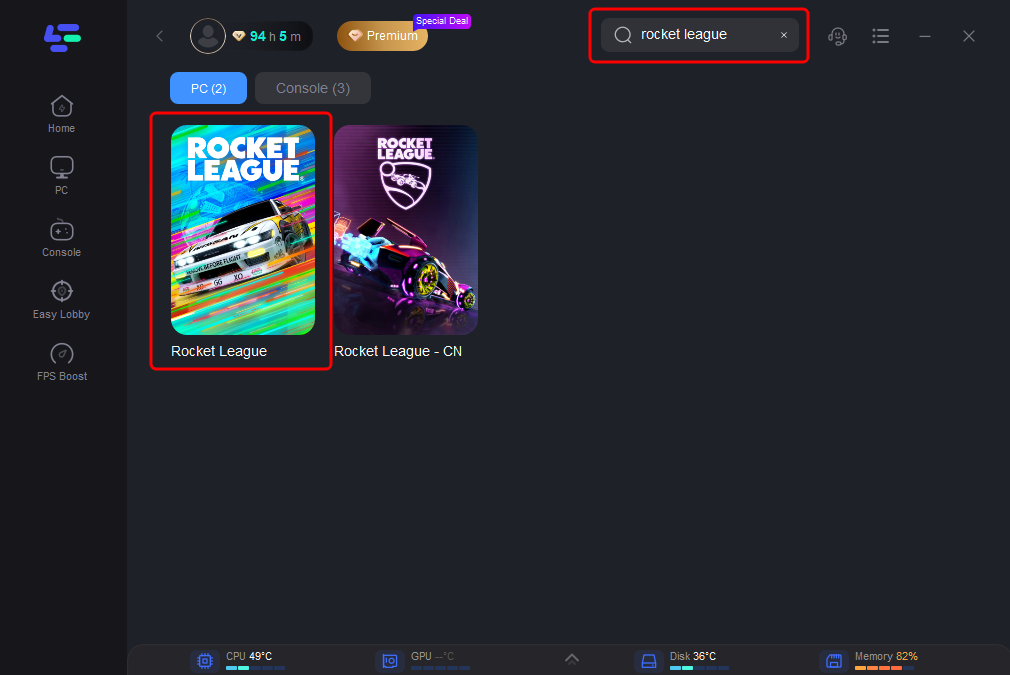
Step 2: Launch the application, type Rocket League in the search bar and select the game
Step 3: Select the recommended server (or any other if you wish)
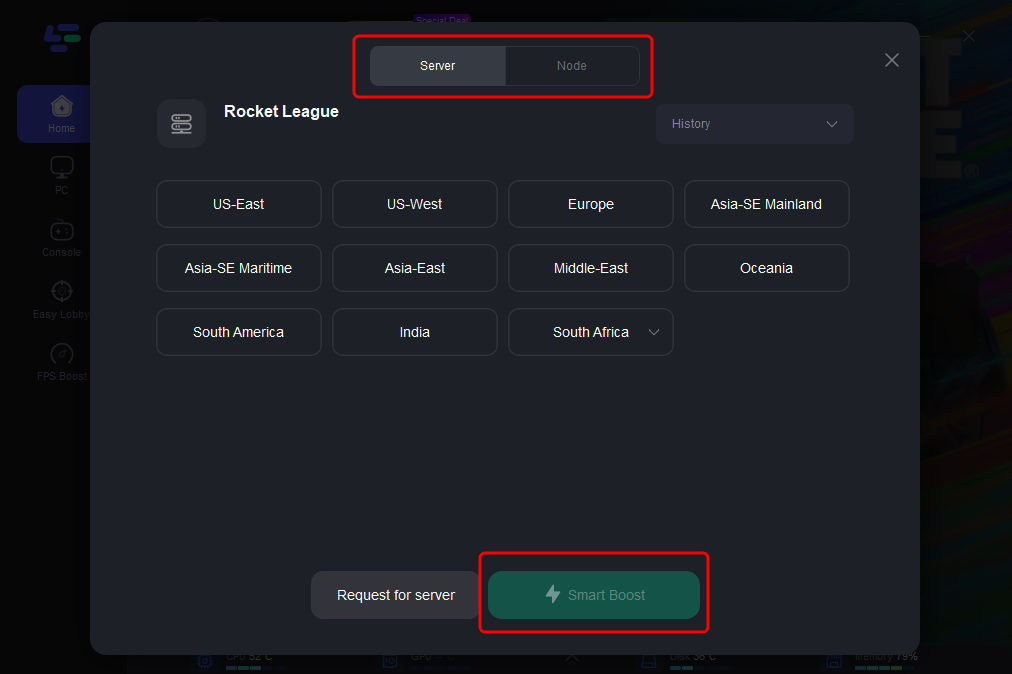
Step 4: Click the Smart Boost button to start optimization. You will see up-to-date metrics - ping, packet loss, etc.
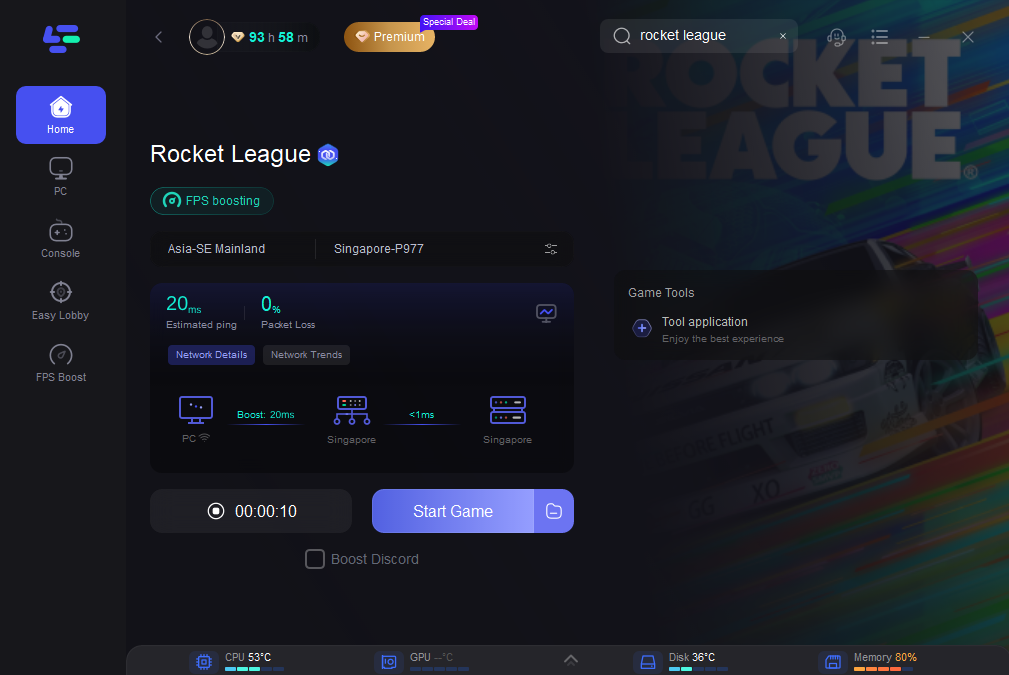
Step 5: Launch Rocket League via LagoFast or manually
Once connected, the game should run smoother and more stable. If you still have issues, try changing servers and re-enabling Smart Boost.
Part 3: Other Common Rocket League Issues and How to Fix Them
Problem: High Ping
Having too many applications running on your computer can negatively impact Rocket League performance.
Solution:
- Open Task Manager
- Close unnecessary background programs
- Free up RAM and network resources
Problem: Lag and latency spikes
Wi-Fi may be unstable due to interference or distance from the router.
Solution: Use a wired Ethernet connection for a more stable connection
If Ethernet is not possible:
- Try to move your computer closer to the router
- Reduce the number of devices connected to the network
Conclusion
Rocket League is a fast-paced game that requires a reliable and fast connection. Using tools like LagoFast and making simple changes to your system settings, you can significantly reduce lag, avoid connection drops, and enjoy a stable, uninterrupted game.
Boost Your Game with LagoFast for Epic Speed
Play harder, faster. LagoFast game booster eliminates stutter and lags on PC, mobile, or Mac—win every match!
Quickly Reduce Game Lag and Ping!
Boost FPS for Smoother Gameplay!