
As players eagerly await the release of REMATCH, an online multiplayer football game from Sloclap, many are excited to jump into the intense action. However, experiencing lag during gameplay can be incredibly frustrating, especially in a fast-paced environment where split-second decisions matter.
This article will explore the common causes of lag on PS5 and PS4, provide detailed steps to fix lag issues using LagoFast, and offer additional solutions to enhance your gaming experience.

- ✅ Reduce Lag and High Ping.
- ✅ Boost FPS at the Same Time.
- ✅ Stable Server Connection.
- ✅ End Stuck, Crashing Issues.
- ✅ Support Cross-Platform Gameplay.
Part 2: Why Are REMATCH Lagging on PS5/PS4
Part 3: How To Fix REMATCH Lagging on PS5/PS4
Part 4: Other Solutions to Reduce REMATCH Lag on PS5/PS4
Part 5: Advanced Tips for Reducing Lag
Part 1: Introduction
Sloclap, the studio behind Sifu and Absolver, is redefining online sports gameplay with their upcoming title REMATCH—a 5v5 and 4v4 online multiplayer football experience. Set to launch on June 19, 2025, REMATCH delivers a fast-paced, tactical twist on the beautiful game with no fouls, no offsides, and a laser focus on player control, team coordination, and skill.
However, while REMATCH promises an adrenaline-fueled competitive environment, lag and performance issues on PS5/PS4 have become a common frustration for players, especially during fast-paced online matches. Given that this game thrives on precision and real-time decision-making, any delay in input or rubber-banding can ruin the experience.
In this guide, we’ll explore why REMATCH lags on PS5/PS4, and provide step-by-step solutions to fix the lag—especially using LagoFast, a top-tier game booster known for stabilizing network connections, reducing ping, and optimizing matchmaking. Whether you're an aspiring competitive player or a casual football fan, reducing lag is crucial for getting the most out of REMATCH.
Part 2: Why Are REMATCH Lagging on PS5/PS4
Lag in REMATCH on PS5/PS4 can be caused by a variety of issues. Here are the most common culprits:
1. Unstable Internet Connection
Online multiplayer games rely on real-time server communication. If your connection fluctuates or has high ping, it can lead to input delays, stuttering, or even disconnection.
2. High Network Traffic
Sharing your network with multiple devices streaming, downloading, or gaming at the same time can congest bandwidth, leading to lag spikes in REMATCH.
3. Server Location & Routing
As REMATCH is built for fast-paced multiplayer matches, poor routing to Sloclap’s servers—especially if you’re far from the regional server—can cause latency and lag.
4. Console Performance Limitations (PS4)
Although REMATCH is designed for next-gen performance, PS4 users may encounter lag due to hardware constraints, thermal throttling, or background processes.
5. Software Conflicts or Background Downloads
Game updates, system software downloads, or app installations can quietly run in the background, consuming system or network resources.
Part 3: How To Fix REMATCH Lagging on PS5/PS4
If you're facing consistent lag while playing REMATCH, LagoFast is one of the most effective solutions available, designed specifically for reducing ping, eliminating packet loss, and finding smoother lobbies in competitive online games.
Here’s how to use LagoFast Box to fix REMATCH lag on PS5/PS4:
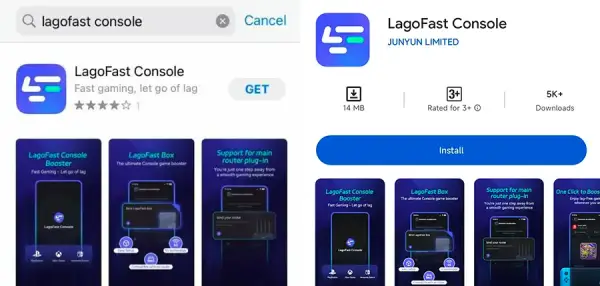
Step 1: Download the LagoFast Console App on your phone to control the LagoFast Box.
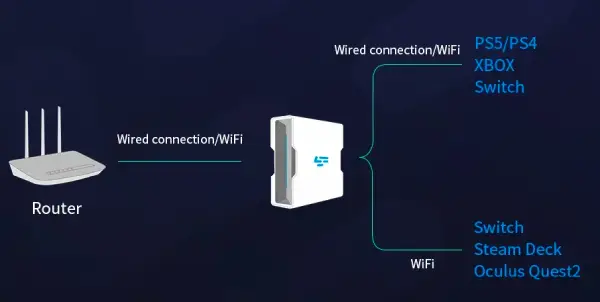
Step 2: Establish a connection between your LagoFast Box, router, and console, choosing between a wired or wireless connection.
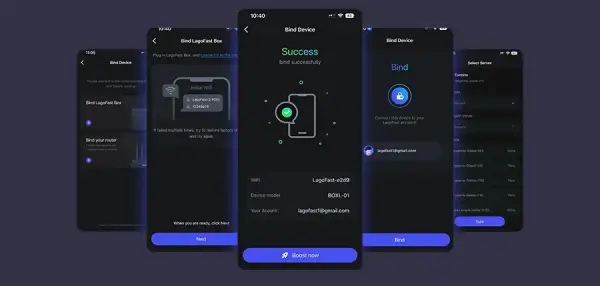
Step 3: Launch the LagoFast Console App and boost REMATCH. Once you have completed the binding process with the LagoFast Box, proceed to boost this game within the LagoFast Console App.
Why LagoFast Works:
- Ping Optimization: LagoFast intelligently routes your traffic via optimized paths, avoiding congested nodes.
- Server Region Selector: Helps find lobbies with less congestion.
- FPS & System Boosting: Reduces system background tasks for smoother console play (when console is routed through PC).
Part 4: Other Solutions to Reduce REMATCH Lag on PS5/PS4
Regularly Restart Your Console and Router
A basic, yet highly effective way to combat lag in REMATCH is to give both your PlayStation and router a fresh reboot. Temporary software glitches or memory leaks can build up over time and affect online performance. Restarting these devices can help reestablish a cleaner and more stable connection to the servers.
Step 1. Restart Your PS5/PS4:
Shut down your console completely (don’t just put it in Rest Mode), and wait a couple of minutes before powering it back on. This clears the system cache and resets any temporary processes that might be contributing to lag.
Step 2. Power Cycle Your Router:
Unplug your router from the power source and wait for at least 30 seconds before reconnecting it. Give it a few minutes to fully restart and reestablish its internet connection. This simple action can help improve connection stability and reduce latency during gameplay.
Optimize PS4/PS5 System Settings
Your console's internal settings can have a surprisingly large impact on how smoothly REMATCH runs. Making a few strategic adjustments may help lower input delays and enhance frame consistency.
Step 1. Keep Your Firmware Updated:
Always ensure your PlayStation is running the latest system software. Firmware updates released by Sony frequently include performance improvements and bug fixes that could resolve lag-related issues.
Step 2. Tweak Your Display Options:
Consider adjusting your resolution settings or turning off demanding visual enhancements. Lowering resolution or disabling HDR (if enabled) can reduce the strain on your hardware and offer a smoother gaming experience.
Step 3. Activate TV Game Mode:
If your television supports it, enable its built-in “Game Mode.” This mode is specifically designed to reduce display input lag by cutting down on post-processing effects, which helps your console respond more quickly to your inputs.
Optimize In-Game Settings
In-game configurations in REMATCH can be just as important as system-level settings when it comes to eliminating lag. Adjusting graphical fidelity and disabling non-essential features can deliver noticeable improvements.
Step 1. Reduce Graphic Detail:
If you're encountering stutters or frame drops, consider scaling back the game's graphics settings. Lowering things like shadow quality, crowd density, or environmental effects can lighten the load on your PS4/PS5 hardware.
Step 2. Modify Frame Rate Cap:
If the game offers frame rate options, setting a cap (e.g., 30 FPS instead of 60) can prevent your system from overexerting itself and produce a more consistent performance profile.
Step 3. Turn Off Visual Extras:
Disabling features such as motion blur, film grain, depth of field, or ultra-high texture resolution can help reduce rendering demands, thereby minimizing lag or sudden frame dips.
Part 5: Advanced Tips for Reducing Lag
If you’ve already tried basic fixes but still find your matches plagued by sluggish performance or lag spikes, it’s time to dive into more technical solutions. These advanced steps are aimed at players seeking a more stable and responsive REMATCH experience.
Configure Quality of Service (QoS) on Your Router
If your router supports QoS settings, use them to prioritize your PlayStation’s traffic over other devices in your household. By allocating bandwidth specifically for gaming, you’ll reduce the chances of lag caused by background downloads, video streaming, or multiple users on the same network.
Upgrade Your Internet Package
An outdated or insufficient internet plan can be the root cause of recurring lag, especially during online multiplayer matches. Look into upgrading to a higher-tier package that offers faster download/upload speeds and lower latency to ensure smoother gameplay.
Invest in a Gaming Router
Standard routers may not offer the reliability or low-latency performance needed for competitive gaming. Consider switching to a router specifically designed for gamers. These often include features such as dedicated gaming ports, better signal strength, and optimization tools to reduce ping and packet loss.
Conclusion
Reducing lag in REMATCH on your PS5 or PS4 often requires a combination of software tweaks, hardware restarts, and internet optimizations. Start with basic fixes like restarting your system or adjusting in-game settings, then move toward more advanced solutions such as using QoS or upgrading your hardware setup. With these strategies in place, you’ll be better equipped to enjoy a smooth and competitive REMATCH experience.

Boost Your Game with LagoFast for Epic Speed
Play harder, faster. LagoFast game booster eliminates stutter and lags on PC, mobile, or Mac—win every match!
Quickly Reduce Game Lag and Ping!
Boost FPS for Smoother Gameplay!