
In the fiercely competitive world of mobile battle royales, PUBG MOBILE Lite has carved out its niche by delivering high‑quality FPS gameplay on low‑end devices. But what really excites players are the occasional redeem codes—promo codes that unlock free cosmetics, silver fragments, Challenge Points, UC, and more. These codes are officially released during events, livestreams, or tournaments, making them a hot commodity for free rewards.
This guide will walk you through everything you need to know about the latest codes, how to redeem them, why they sometimes fail, and how to optimize your gameplay experience using LagoFast Game Booster.

Part 1. Introduction to PUBG Lite
Part 2. Latest PUBG Mobile Lite Codes
Part 3. How to redeem PUBG Mobile Lite codes
Part 4. Codes Not Working? Check Out the Reasons
Part 5. How to Enhance PUBG Mobile Lite Game Experience with LagoFast Game Booster
Part 1: Introduction to PUBG Lite
PUBG MOBILE Lite is a streamlined version of the flagship PUBG MOBILE, optimized for Android devices with less advanced hardware. It retains the classic Battle Royale experience but with smaller maps, shorter matches, and reduced system requirements. This makes it ideal for players in regions with older phones or slower internet. Official redeem codes serve as a key incentive—offering free rewards uniquely during specific promotions or collaborations.
Part 2: Latest PUBG Mobile Lite Codes
As of early July 2025, no active redeem codes have been officially released for PUBG MOBILE Lite. Fans and community members searching through Facebook groups or Reddit have not uncovered valid, unexpired Lite-specific codes. Bluestacks coverage notes there are currently no active codes for PUBG MOBILE globally, which extends to the Lite version as well.
However, several PUBG MOBILE (Global) codes are live and may work if redeemable on Lite's server redemption mechanism (if supported). These include:
- PGMB20 – 3,000 Silver Fragments
- PUBGMBGCCTODAY – Random Top Weapon
- PUBGGAMECODECITY – 1,000 UC
- PUBGMOBGIFTFREE – Elite Royale Pass
- CMCKZBZBAW – Sea Breeze Myth Voucher
- PUBGMBRAUC – Brazil Championship Outfit
- Challenge‑point codes like CLPOZFZ56S, CLPOZEZVEG, CLPOZDZ6PP, and others.
It’s essential to check whether these codes are accepted by the Lite redemption portal, as some codes differentiate between PUBG MOBILE and PUBG MOBILE Lite.
Part 3: How to redeem PUBG Mobile Lite codes
Step‑by‑Step Guide:
- Open PUBG MOBILE Lite and locate your UID/Character ID via your profile screen.
- Visit the PUBG redemption center—the same site used for global PUBG MOBILE.
- Input your UID, the redeem code, and the verification captcha correctly.
- Submit the form—if successful, rewards will be delivered to your in-game mailbox.
- Open the Lite app and retrieve your items.
Important: Each code is only redeemable once per account, must be typed precisely (case-sensitive), and may be region-restricted.
Part 4: Codes Not Working? Check Out the Reasons
If you face a failure message after submitting a code, here are the likely causes:
- Expired Code: Most codes are valid for a limited time or until a redemption cap is reached.
- Case Sensitivity / Spacing: Manual typing errors or undesired spaces can invalidate codes.
- Already Used: A code can only be redeemed once per account.
- Server or Region Restriction: Some codes are limited to certain global servers (e.g., not available in Vietnam, China, Japan, etc.).
- Wrong Platform Code: PUBG MOBILE Lite may not support codes intended for the full global version.
Part 5: How to Enhance PUBG Mobile Lite Game Experience with LagoFast
While redeem codes are fun, nothing beats smooth gameplay. LagoFast Game Booster can significantly reduce lag and packet loss when playing PUBG MOBILE Lite.
Key Benefits:
- Low latency routing: Automatically selects optimal network paths.
- Stable connection: Ensures consistent pings—crucial for real-time gunplay.
- Smart Boost: One-click optimization for chosen server location.
How to use LagoFast Game Booster on Mobile
Step 1: Download LagoFast Mobile through the Google Play Store or App Store, or you can scan the QR code below.

Step 2: Complete downloading and installing LagoFast Mobile on your phone.
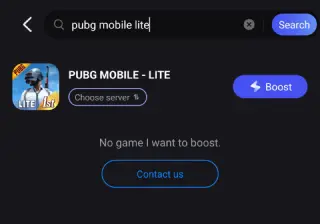
Step 3: Open LagoFast Mobile and search PUBG LITE in its search bar (Take the global version for an example; there are also different versions of PUBG, you can choose the preferred version according to your needs).
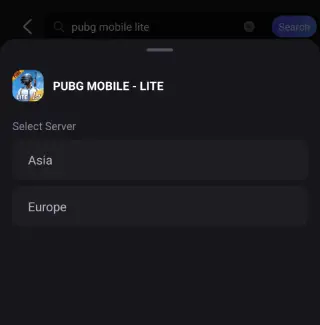
Step 4: Choose a better server for it.
Step 5: Confirm that the real-time game data has been optimized, click the Start Game button to play PUBG.
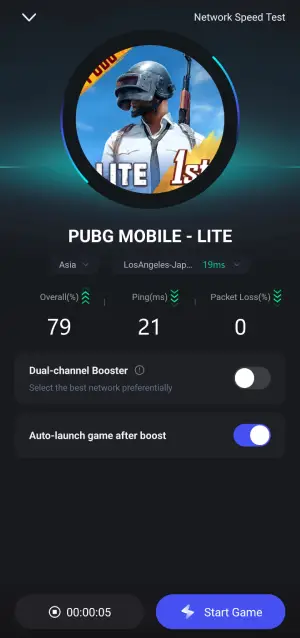
Even if you're playing solo or redeeming codes, a stable connection helps reduce timeouts and failures when retrieving rewards.
Part 6: FAQs
Q1: Are any dedicated PUBG MOBILE Lite redeem codes active now?
A1: Not currently. Official sources confirm no active Lite-specific codes as of July 2025.
Q2: Can PUBG MOBILE global codes work on Lite?
A2: They might, depending on if the Lite redemption portal accepts them. It's worth trying using the same global redemption center.
Q3: How many times can I redeem a code?
A3: Only once per account. Attempts to reuse the same code will fail.
Q4: Why do I keep getting invalid code or region errors?
A4: Likely due to expiration, regional restriction, or incorrect entry (case-sensitive or extra space errors).
Conclusion
Even without active PUBG MOBILE Lite-specific redeem codes, the broader PUBG MOBILE coupon ecosystem offers valuable rewards if compatible. Following this guide ensures you're ready to redeem new codes as they drop—quickly and efficiently.
Boost Your Game with LagoFast for Epic Speed
Play harder, faster. LagoFast game booster eliminates stutter and lags on PC, mobile, or Mac—win every match!
Quickly Reduce Game Lag and Ping!
Boost FPS for Smoother Gameplay!