
Silver and Blood has quickly gained traction among RPG fans for its dark fantasy setting, in-depth character development, and intense real-time combat. While it’s primarily a mobile game, many players are now looking to play Silver and Blood on PC for better visuals, smoother controls, and a more immersive gaming experience. If you’re one of them, you’re in the right place.

- What Is Silver and Blood?
- Why Play Silver and Blood on PC?
- How to Play Silver and Blood on PC
- Optimize Your Game Connection with LagoFast
- FAQs About Playing Silver and Blood on PC
1. What Is Silver and Blood?
Silver and Blood is a dark fantasy mobile RPG developed by NEOCRAFT, featuring a rich narrative, gothic aesthetic, and deeply strategic combat. Set in a cursed world where players must rise as “Hunters” to battle corrupted monsters and unravel hidden conspiracies, the game blends stylish visuals with brutal challenge.
Core Gameplay Elements:
- Class-Based Combat: Choose from diverse classes like Warrior, Assassin, Archer, and Mage, each offering unique skill sets and tactical depth.
- Real-Time PvE and PvP: Battle through story-driven missions, world bosses, and player-versus-player arenas in fast-paced, real-time action.
- Deep Character Customization: Upgrade skills, equip powerful gear, and build unique talent trees tailored to your playstyle.
- Dark Narrative Themes: Inspired by Western gothic lore and Victorian horror, the story is layered with betrayal, redemption, and mystery.
- Stunning Visuals: Featuring high-end mobile graphics, dramatic lighting, and cinematic animations.
Whether you’re here for the lore, the loot, or the leaderboard, Silver and Blood delivers a complex and rewarding RPG experience that shines even brighter on PC.
2. Why Play Silver and Blood on PC?
Playing Silver and Blood on your PC gives you a huge advantage:
- Larger screen for improved visuals and UI clarity
- Keyboard and mouse controls for better precision
- Higher FPS and performance than most mobile devices
- No battery drain or overheating issues
- Multi-instance gameplay for managing multiple accounts
Whether you’re grinding through PVE chapters or facing off in PVP arenas, the PC experience takes Silver and Blood to a whole new level.
3. How to Play Silver and Blood on PC
You can’t install Silver and Blood directly on Windows like a native PC game—but using a trusted Android emulator is the next best thing. Here’s a step-by-step guide:
Step 1: Download an Android Emulator
Choose a reliable emulator that suits your system. Top choices include:
- BlueStacks – Most popular, feature-rich, and beginner-friendly
- LDPlayer – Optimized for gaming, low CPU usage
- MuMuPlayer – Lightweight, great for low-end PCs and macOS users
Step 2: Install and Set Up the Emulator
- Follow the installation instructions on the emulator’s website.
- Launch the emulator and log in with your Google account.
Step 3: Search and Install Silver and Blood
- Open the Google Play Store inside the emulator.
- Search for “Silver and Blood” or “Silver and Blood: Requiem” (global version).
- Click Install and wait for the game to finish downloading.
Step 4: Launch the Game and Customize Controls
- Open the game from your emulator’s home screen.
- Use the emulator’s built-in keymapping tool to assign keyboard and mouse controls.
- Adjust resolution, FPS, and graphics settings for optimal performance.
4. Optimize Your Game Connection with LagoFast
If you’re dealing with lag spikes, high ping, or unstable servers while gaming, LagoFast offers a simple, powerful way to stabilize your connection and enhance performance. Especially useful for competitive and mobile games, LagoFast ensures smoother gameplay with minimal setup required.
How to Use LagoFast Effectively
Step 1: Click the Free Trial button to download and install LagoFast.
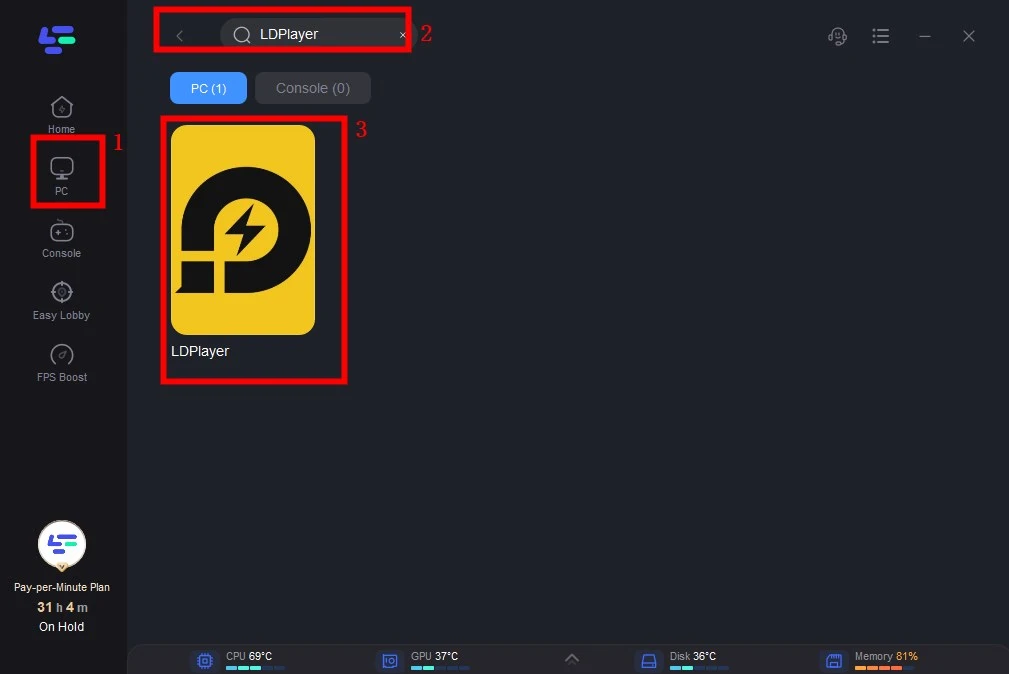
Step 2: Open LagoFast then click the PC button on the left and search the emulator you utilized like LDPlayer in the search bar, click it after appearing.
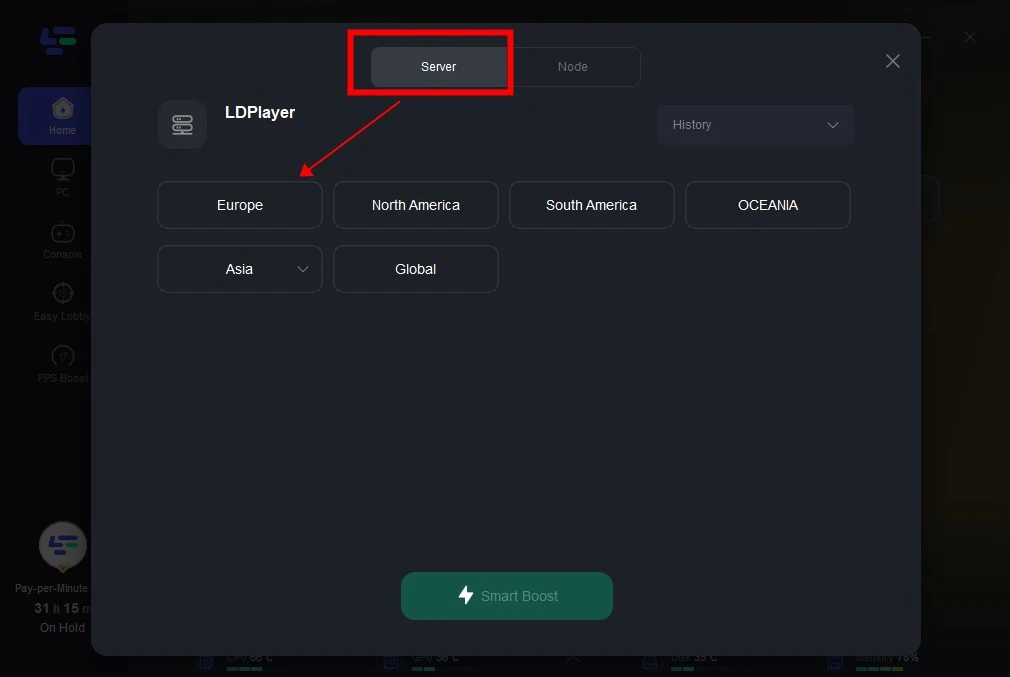
Step 3: Click on “Server” to change to a better server that ensures smooth gameplay, then click on “Smart Boost”.
Step 4: Check the specific game ping, packet loss, and multiple path connection on the right side. Finally, click the “Start Game” to play the game.
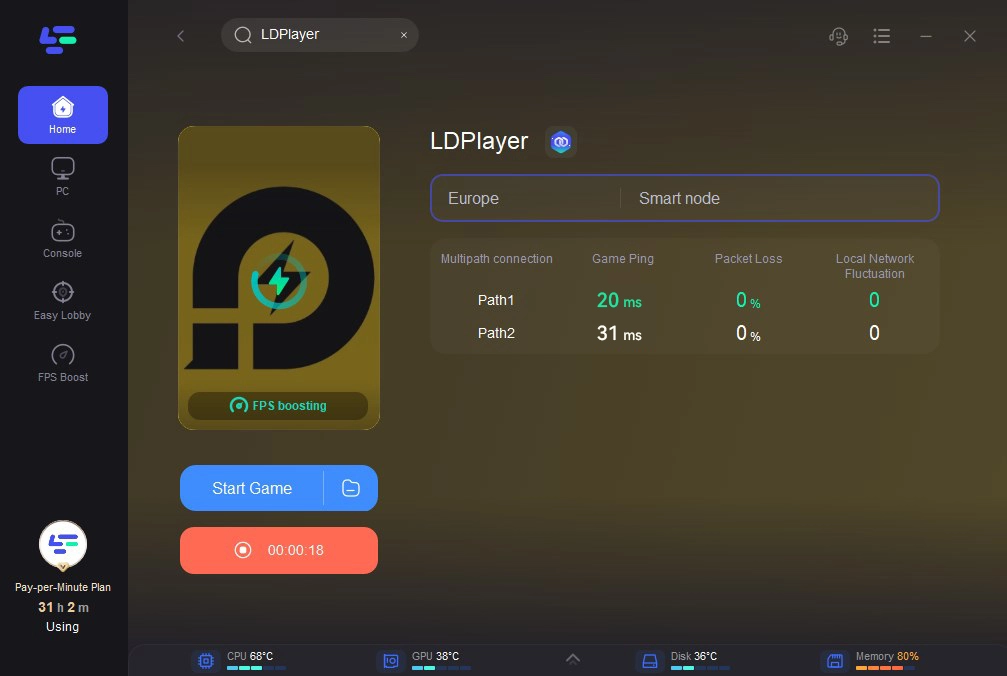
It’s that easy—no technical knowledge required.
Why Use LagoFast?
- Reduce ping & packet loss
- Bypass region locks and blocked servers
- Faster, smoother gameplay in PvP and ranked modes
- Smart routing adapts to your network in real time
- Supports both PC and mobile gaming
With LagoFast, you don’t need to dive into router settings, mess with DNS tweaks, or manually test dozens of servers just to get a decent connection. Its one-click Smart Boost feature handles everything behind the scenes—analyzing your network in real time and routing your traffic through the most stable, lowest-latency paths available.
5. FAQs About Playing Silver and Blood on PC
Is Silver and Blood available as a native PC game?
No, the game is currently available only for Android and iOS. PC players must use an emulator.
Will my progress transfer to PC?
Yes, if you log in with the same account (e.g., Google or guest account), your progress will sync across devices.
Is it safe to play Silver and Blood on an emulator?
Absolutely. Using trusted emulators like BlueStacks or MuMuPlayer is safe and widely accepted by players and game publishers.
Does it support controllers on PC?
Yes, most emulators allow controller mapping. Check your emulator’s settings for customization.
Conclusion
Whether you’re chasing power in Silver and Blood’s chaotic battlefield or immersing yourself in its rich narrative, playing the game on PC enhances every aspect of the experience. With a reliable Android emulator and optional performance boosters like LagoFast, you’re all set to dominate the dark world of Silver and Blood with style and stability.
Boost Your Game with LagoFast for Epic Speed
Play harder, faster. LagoFast game booster eliminates stutter and lags on PC, mobile, or Mac—win every match!
Quickly Reduce Game Lag and Ping!
Boost FPS for Smoother Gameplay!