
When you're excited to jump into NBA 2K26 but find yourself stuck on the loading screen, it can be incredibly frustrating. Whether you're launching the game, entering MyCAREER, Rec Center, or simply trying to get past the intro screen, the freeze can come unexpectedly. In this guide, we'll walk you through the root causes, using LagoFast to optimize your connection, alternative solutions, prevention tips, and more.

Part 1: Understanding the NBA 2K26 Stuck on Loading Screen Issue
Part 2: Fix 2K25 Stuck on Loading Screen Issue with Game Booster — LagoFast
Part 3: Other Solutions to Fix NBA 2K26 Stuck on Loading Screen
Part 4: How to Prevent Future Loading Screen Issues
Part 1: Understanding the NBA 2K26 Stuck on Loading Screen Issue
Loading freezes can be triggered by various factors, such as system glitches, corrupted game files, cloud sync conflicts, or networking issues. Reddit users have repeatedly reported this challenge, particularly on consoles:
- “If it doesn't fix itself after you dashboard, restarting the console fixed it for me.”
- “Delete reserved data from console (NOT everywhere).”
- “Hard reset the console (took the power cord out…), then slowly pressing buttons got me through.”
These anecdotes reveal that syncing issues, cache problems, or temporary glitches often cause the loading screen to hang, rather than corrupted system files or installation problems.
On the PC side, Microsoft’s OneDrive integration can interfere with file updates, leading to infinite loading cycles. 2K Support suggests unlinking or pausing OneDrive sync—especially for the “Documents” folder—to prevent it from blocking essential game data updates.
Part 2: Fix NBA 2K26 Stuck on Loading Screen Issue with Game Booster — LagoFast
- An exclusive accelerated channel for game data, which creates an independent transmission path for NBA 2K26, prioritizing the processing of loading data and avoiding network congestion to ensure smooth transmission.
- Real-time network diagnosis and repair, which dynamically detects and resolves potential network configuration issues like port blockages and protocol conflicts, eliminating hidden obstacles that affect loading.
- Adaptive bandwidth allocation, which intelligently regulates system resources to prevent other programs from hogging excessive bandwidth, ensuring stable resource support during the game’s loading phase and avoiding loading stalls caused by resource competition.
How to Use LagoFast for PC Players
Step 1: Download LagoFast by clicking the Download button below and activate the free trial.
Step 2: Launch LagoFast and search for NBA 2K26 in the search bar.
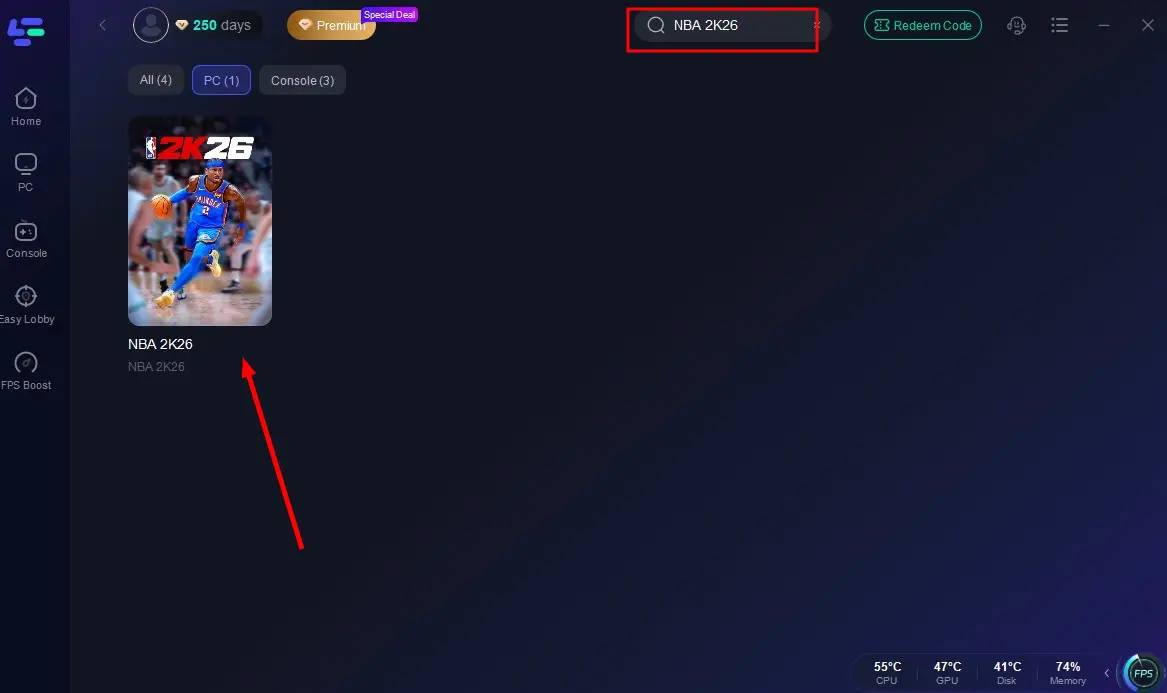
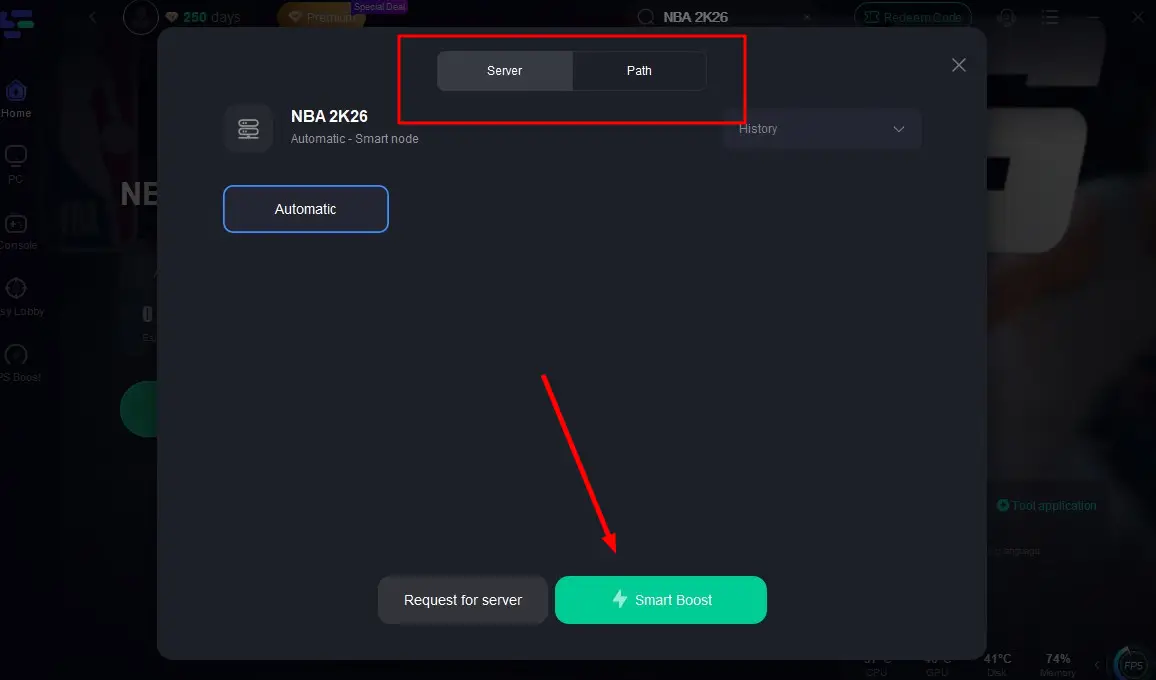
Step 3: Select the server with the best connection and choose the optimal Node. Click "Smart Boost" to start optimizing your connection.
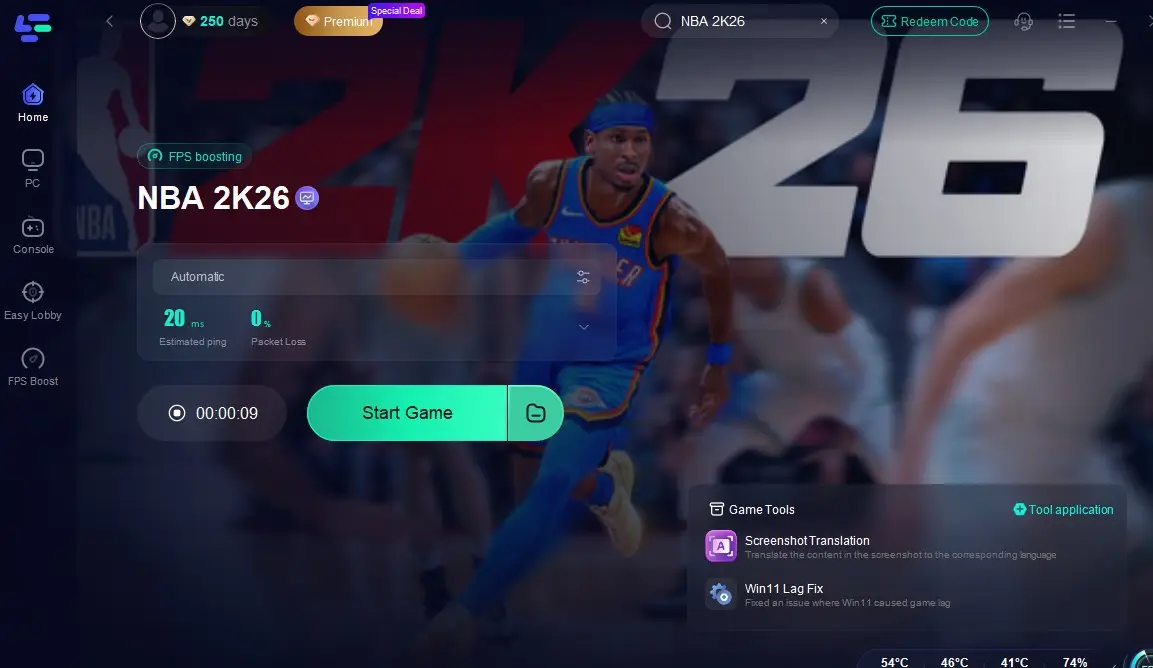
Step 4: Check real-time stats such as ping, packet loss, and network performance, then click the "Start Game" to play NBA 2K26 without any lag!
And for console players, here's your unique tool - LagoFast Box. LagoFast Box is a powerful tool designed to ensure a smooth, lag-free gaming experience on your console.
LagoFast Box for Console Players
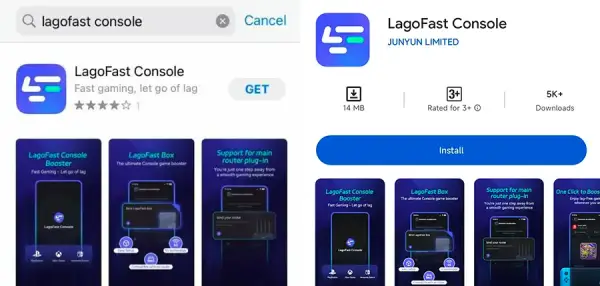
Step 1: Download the LagoFast Console App on your phone to control the LagoFast Box.
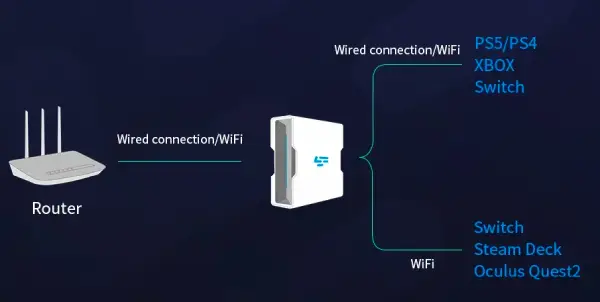
Step 2: Establish a connection between your LagoFast Box, router, and console, choosing between a wired or wireless connection.
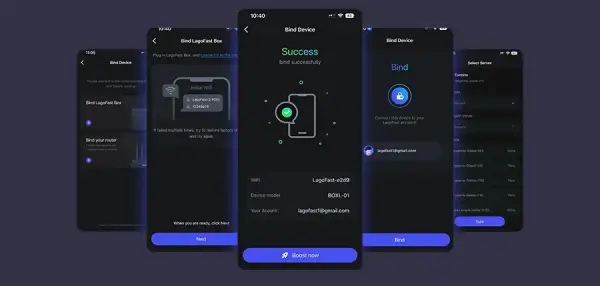
Step 3: Launch the LagoFast Console App and boost NBA 2K26. Once you have completed the binding process with the LagoFast Box, proceed to boost this game within the LagoFast Console App.
This approach targets underlying connection instability rather than just treating symptoms—meaning your game not only loads correctly but stays responsive during matches.
Part 3: Other Solutions to Fix NBA 2K26 Stuck on Loading Screen
1. Restart or Hard Reset Your Console
Often, simply quitting the game completely and restarting the console fixes loading issues. For Xbox, hold the power button, shut down the system, unplug for 10–15 seconds, then power it back on.
2. Clear Reserved Data or Local Cache
On Xbox, go to “Manage game & add-ons” and delete reserved data specifically on the console (not everywhere). This has resolved freezes for many players.
3. Remove from Quick Resume (Xbox Series X|S)
If you're using Quick Resume, remove NBA 2K26 from the list to avoid corrupted state issues when resuming.
4. Clear Cache on Console or PC
Use 2K's official troubleshooting guides to clear console or PC cache—this resets temporary files that may be causing freezes.
5. Verify or Reinstall Game Files
On PC, verify file integrity via Steam (right-click > Properties > Local Files > Verify Integrity). On consoles, consider uninstalling and reinstalling the game if the issue persists.
6. Pause OneDrive Sync (PC)
To avoid file conflicts, unlink or pause OneDrive (especially for synced folders like Documents).
7. Avoid Background Apps on PC
Disable overlays (Discord, Steam overlay), antivirus scans, or other intensive apps that might interfere with loading sequences.
Part 4: How to Prevent Future Loading Screen Issues
- Keep your system and graphics drivers up to date.
- Maintain sufficient free storage space—particularly important on consoles and SSD systems.
- Regularly perform full shutdowns instead of sleep/standby to clear residual memory or cached data.
- Avoid Quick Resume bugs—take care to fully close NBA 2K26 rather than suspending it.
- Implement LagoFast early, especially for online gameplay sessions prone to network lag or loading delays.
- Pause OneDrive sync during upgrades or large file updates to avoid files being locked or corrupted mid-process.
Part 5: FAQs
Q1: Will LagoFast fix any loading screen issue?
Not entirely—LagoFast helps when network instability causes loading freezes, but system or file corruption issues need other fixes like cache clearing.
Q2: Is this retriable or permanent?
Multiple users report repeated fixes through console restarts or reserved data clearing, but systemic updates from 2K may introduce new issues. Regular maintenance helps.
Q3: Do I lose progress when the game freezes?
Not always, but unsaved progress in modes like MyCAREER or MyNBA can be lost if the game crashes mid-session. It’s best to hard save often.
Q4: Can I avoid OneDrive interference entirely?
Yes—unlinking the game’s folder from OneDrive, or pausing sync during gameplay, significantly reduces file access conflicts.
Q5: Should I contact 2K support?
If nothing works after trying these fixes, reach out to 2K Support with logs and screenshots. Meanwhile, community fixes often surface quicker.
Conclusion
Loading screen freezes in NBA 2K26 are a common yet solvable issue. The key is understanding the cause—whether it's syncing, cache, game file corruption, or network glitches—and applying the right fix. Using LagoFast for network stabilization, combined with system maintenance strategies (cache clearing, restarts, verifying files), can significantly reduce the frequency of these freezes.

Boost Your Game with LagoFast for Epic Speed
Play harder, faster. LagoFast game booster eliminates stutter and lags on PC, mobile, or Mac—win every match!
Quickly Reduce Game Lag and Ping!
Boost FPS for Smoother Gameplay!