
If you have spent any time in community forums or Discord channels recently, you have seen these exact complaints echoing across the player base.
- "Why are NA servers still region locked?”
- "No NA servers if your Steam is not NA based?”
- "Why can’t I select NA server?”
- "I live in Canada, but my Steam account is from another region.”
- "I have lower ping to NA, but the game forces me onto Europe.”
- "Why am I unable to choose the server myself?”
You download the game, eager to dive into the dark fantasy world, only to realize your localized server is completely missing from the menu. This guide explains why you cannot see or select the North American server, how Steam store licensing impacts your game client, and what you can actually do about it.

- ✅ Reduce Lag and High Ping.
- ✅ Boost FPS at the Same Time.
- ✅ Support 8000+ Popular Online Games.
- ✅ Stable connection and region switching.
Part 1: Is the Mistfall Hunter NA Server Region Locked?
Part 2: Why Is the Mistfall Hunter NA Server Not Showing?
Part 3: Mistfall Hunter NA Build vs Global Build
Part 4: How to Check Your Steam Store Region
Part 5: How to Unlock NA Server in Mistfall Hunter
Part 6: Can You Change Your Steam Region to Access the Mistfall Hunter NA Server?
Part 7: Can a VPN Unlock the Mistfall Hunter NA Server?
Part 8: What to Do If You Are Forced onto a High-Ping Server
Part 9: Mistfall Hunter NA Server Region Lock FAQ
Part 1: Is the Mistfall Hunter NA Server Region Locked?
Navigating server restrictions in modern multiplayer games can be an incredibly frustrating experience, especially when you just want to queue up with your friends without suffering through unbearable lag. For many players, the inability to choose a local server feels like a technical bug, but the reality is tied directly to regional publishing agreements and account-level client distribution. Let us examine how these restrictions actually function behind the scenes.
Official North American Build Restrictions
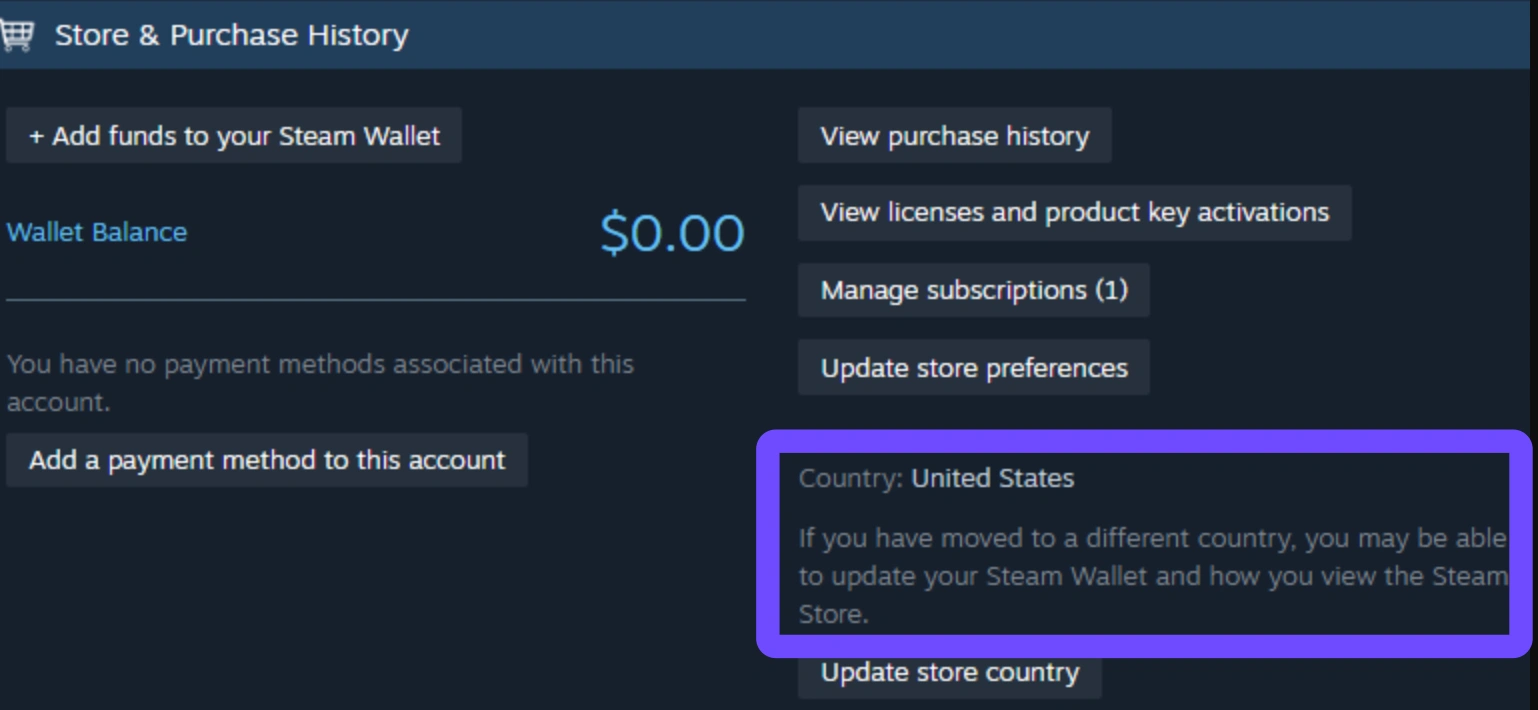
Yes, Mistfall Hunter currently enforces strict server access based on regional client builds. Unlike traditional games where a single global client allows you to freely toggle between North America, Europe, or Asia from an in-game drop-down menu, access here is segmented. The game checks your regional entitlement upon download. If your account is not flagged for the North American ecosystem, the client simply hides or blocks access to NA server nodes entirely.
Which Steam Store Regions Receive the NA Build?
Steam does not look at your current GPS location when deciding which version of a game to hand you. Instead, it looks strictly at your Steam Store Country. To receive the North American client build, your Steam account must be officially registered to a North American storefront, primarily the United States, Canada, and select associated territories. If your account is set to any other region, you will automatically receive the Global or European build.
Which Server Can the North American Build Access?
When you launch the North American build of the game, your server matchmaking is locked to North American data centers. Designed to keep local latency low and segregate regional publishing boundaries, this specific client prevents you from manually hopping over to European or Asian servers. You are tethered to the infrastructure dedicated specifically to the NA region.
Part 2: Why Is the Mistfall Hunter NA Server Not Showing?
Staring at a server selection screen that forces you into a high-ping overseas region while your local servers remain entirely invisible is a surefire way to ruin your gaming session. When a server does not show up on your list, it is rarely a random glitch; it is almost always the result of an account mismatch, a specific client installation error, or backend server maintenance. Below is a breakdown of why this happens.
|
Potential Cause |
What Actually Happens |
How to Check |
|
Store Region Mismatch |
Steam assigns the Global build because your store currency is not NA-based. |
Check Account Details; select Store Country in Steam. |
|
Physical vs. Account Gap |
You live in NA, but your Steam account was created in Europe or Asia. |
Compare your physical IP with your Steam billing currency. |
|
Wrong Client Build |
You downloaded the Global client during a travel period or via an alt account. |
Verify game files and check the build version string in-game. |
|
Server Outage |
The NA matchmaking nodes are temporarily offline for patching or maintenance. |
Check official Discord announcements for downtime notices. |
Your Steam Store Account Is Registered Outside North America
The most common culprit is your account's permanent store region. If you originally created your Steam account in Germany, Brazil, or Japan, or if you set your store currency to euros or yen, Steam tags you as a Global user. Even if you move to New York tomorrow, Steam will continue serving you the non-NA game client until your store billing address officially changes.
Your Physical Location Does Not Match Your Steam Store Region
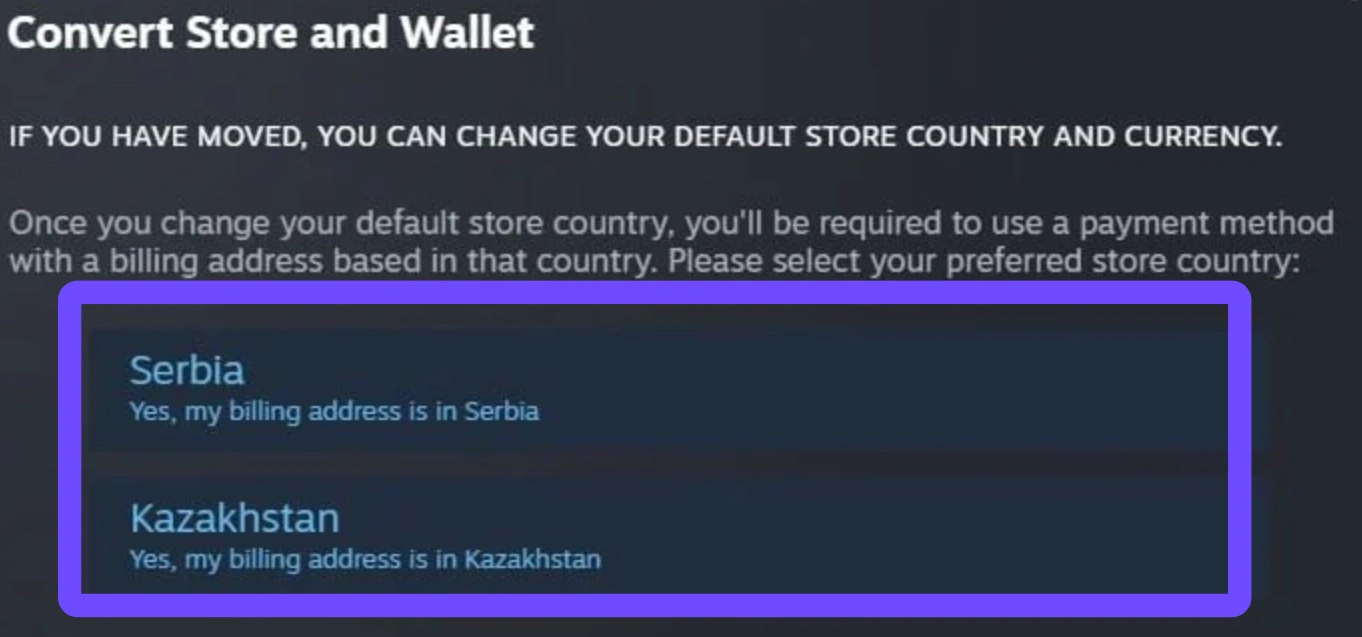
Imagine an international student living in Toronto. Physically, they are sitting in North America with a blazing-fast fiber connection to NA servers. However, because their Steam account is still linked to their home country's banking system, the platform denies them the North American client. Your physical IP address is entirely overridden by your account's registered payment region.
You Are Using the Global Build Instead of the North American Build
Because of how regional publishing works, there are distinct client IDs on the backend. If you installed the game while logged into a European account, your hard drive holds the Global build. This version literally lacks the routing permissions to communicate with NA matchmaking servers, leaving the option completely absent from your UI.
The NA Server Is Temporarily Unavailable
Occasionally, the problem is not on your end at all. During beta tests, early access launches, or routine weekly maintenance, developers may take specific regional clusters offline to deploy hotfixes or expand server capacity. When NA nodes go down, the client may temporarily hide the option rather than letting players queue into a dead connection.
The Client Has Not Updated Your Region Information
If you recently transitioned your Steam account to a North American billing address, the game client might still be caching your old regional credentials. Until the local cache clears and Steam communicates your new entitlement to the game's authentication servers, the NA option will remain locked away.
Part 3: Mistfall Hunter NA Build vs Global Build
Understanding the divide between different game builds is crucial for making sense of why you cannot play with certain friends or access specific regional infrastructure. Developers frequently separate game clients to comply with regional publishing rights, localize monetization structures, and manage server loads effectively. Let us compare how the North American build stacks up against its Global counterpart.
|
Feature / Specification |
North American (NA) Build |
Global / EU Build |
|
Primary Target Audience |
United States, Canada, Mexico |
Europe, Asia, South America, Oceania |
|
Available Servers |
NA East / NA West Nodes |
EU Central, Asia East, SA Nodes |
|
Cross-Region Play |
No (Locked to NA ecosystem) |
No (Locked to Global/EU ecosystem) |
|
Account Requirement |
NA-registered Steam Store Country |
Any non-NA Steam Store Country |
What Is the Mistfall Hunter North American Build?
The North American build is a dedicated software package tailored specifically for players residing within the NA publishing jurisdiction. It routes all authentication, matchmaking, and player data through North American server clusters, ensuring that local players experience minimal packet transit times and responsive combat gameplay.
Which Countries Download the NA Build?
When you hit the download button on Steam, the platform checks your store country against a strict whitelist. Accounts registered with billing addresses in the United States, Canada, and select North American territories are automatically served this specific regional package.
Which Servers Are Available on the NA Build?
Players logged into the NA client will see local server options, typically divided into NA East (Virginia/Ohio clusters) and NA West (Oregon/California clusters), depending on total player density. You will not see European or Asian servers listed in this build.
Can the NA Build Access EU, Asia, or Brazil Servers?
No. To prevent cross-regional ping abuse and maintain fair gameplay conditions in competitive PvPvE environments, the NA build strictly quarantines players within North American server nodes. You cannot use this client to join a friend who is playing on the European or Asian servers.
Can the Global Build Access the NA Server?
Just as a one-way street blocks return traffic, the Global build is completely barred from connecting to NA infrastructure. Even if you have a 20ms ping to Chicago, launching the Global client forces your matchmaking requests across the Atlantic or Pacific, connecting you exclusively to EU or Asia server clusters.
Part 4: How to Check Your Steam Store Region
Since your ability to access the North American server hinges entirely on how Steam categorizes your account, verifying your backend account details is the very first diagnostic step you should take. Many players assume their region updates automatically when they travel or move, but Steam requires explicit manual confirmation before altering your store identity. Here is how to inspect your profile.
Check Your Steam Account Details
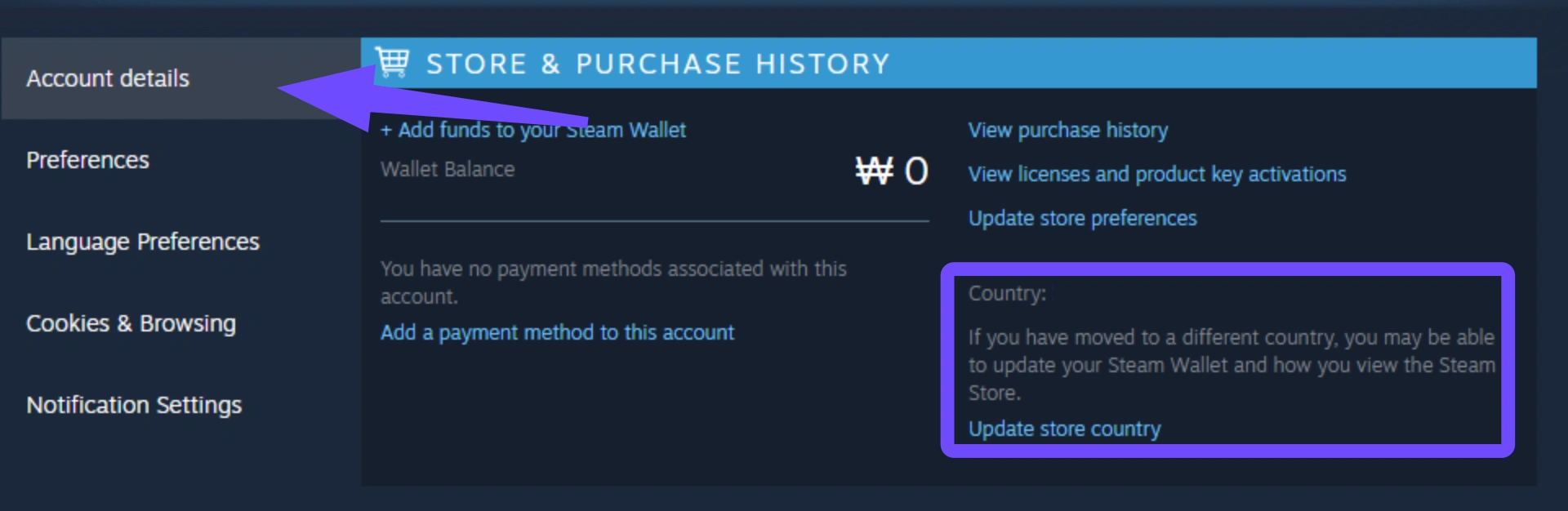
Open your Steam desktop client and look at the top-right corner of the window. Click on your profile name and select Account details from the drop-down menu. This page serves as the master record for your account's legal and financial standing on the platform.
Check Your Store Country and Currency
On the Account Details page, look directly under the Country / Region heading. You will see a specific country listed alongside your primary wallet currency (for example, United States - USD or Germany - EUR). This single line of text dictates which version of Mistfall Hunter you are allowed to download.
Confirm Whether Your Account Qualifies for the NA Build
If your listed country is the United States or Canada, your account officially qualifies for the North American build. If any other country is listed, you are currently disqualified from receiving the NA client, which explains why you cannot see or select the NA server in-game.
Verify That Your Payment Region Is Correct
Steam links your store region directly to your payment methods to prevent regional price exploitation. If you recently relocated to North America, your account will still display your old country until you make a purchase using a valid North American credit card, debit card, or localized payment method tied to a local billing address.
Part 5: How to Unlock NA Server in Mistfall Hunter
If you have verified your account details and believe you should have legitimate access to the North American server, there are several practical troubleshooting steps you can follow to force the client to recognize your eligibility. While you cannot magically bypass licensing rules, you can resolve local caching errors and authentication glitches safely.
Restart Steam and Update Mistfall Hunter
Never underestimate the power of a clean client restart. Close the game entirely, right-click the Steam icon in your system tray, and select Exit Steam. Re-launch the platform as an Administrator to force Steam to check for pending client updates and refresh your backend account entitlements.
Confirm Your Steam Store Country
Double-check that your store country hasn't reverted or been locked due to recent billing discrepancies. Ensure that your store region explicitly reflects a North American territory before attempting to launch or reinstall the game client.
Check Whether You Installed the Correct Game Build
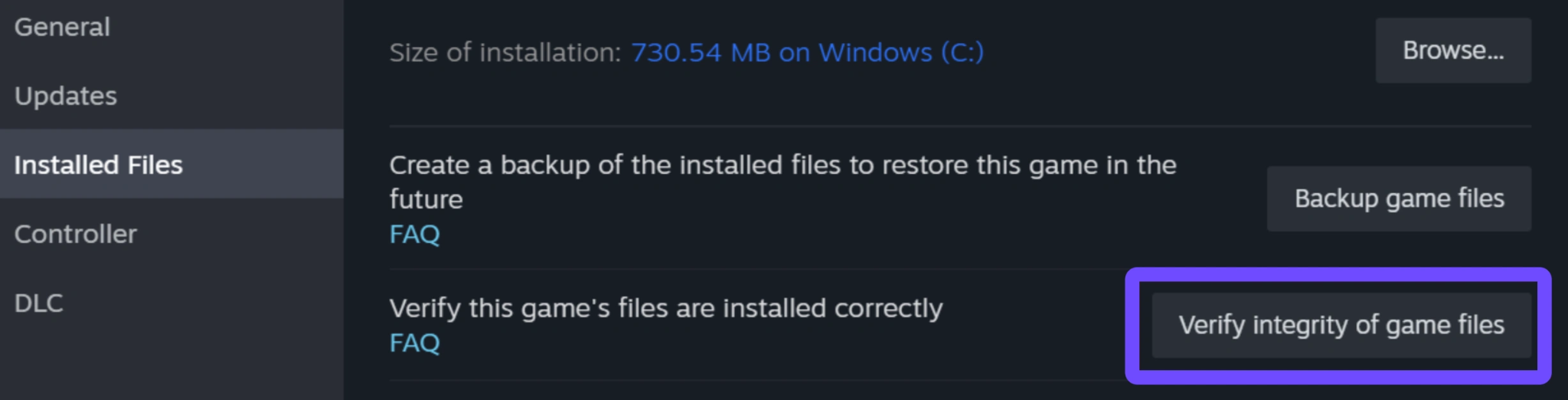
If your store region recently changed to NA, you may still have the old Global build sitting on your hard drive. Right-click Mistfall Hunter in your Steam library, select Properties, navigate to Installed Files, and click Verify integrity of game files. In severe cases of client mismatch, uninstalling the game completely and redownloading it after confirming your NA store status is the only way to pull the correct regional build.
Contact Mistfall Hunter Support
When technical workarounds fail, reach out directly to the publishing support team. Game developers maintain administrative tools that can check which client ID your Steam account is pulling and identify whether a backend authentication error is blocking your server access.
Submit Your Steam Region and Physical Location
When opening a support ticket on the official Discord or support portal, provide clear documentation immediately to save time. Include a screenshot of your Steam Account Details showing your NA store region, along with your current physical ISP location, to prove that you are experiencing an erroneous region lock.
Wait for an Official Region-Unlock or Server-Selection Update
In many cases, strict region locks deployed during closed betas or early launch windows are eventually relaxed or modified based on player feedback. Keep a close eye on official patch notes and developer dev blogs to see if universal server selection is planned for future updates.
Part 6: Can You Change Your Steam Region to Access the Mistfall Hunter NA Server?
When faced with a hard region lock, many players immediately wonder if they can simply jump into their Steam settings and swap their country to the United States to grab the NA build. While changing your store region is technically possible, doing so without following strict platform regulations carries significant risks to your digital library.
Steam Requirements for Changing Store Country
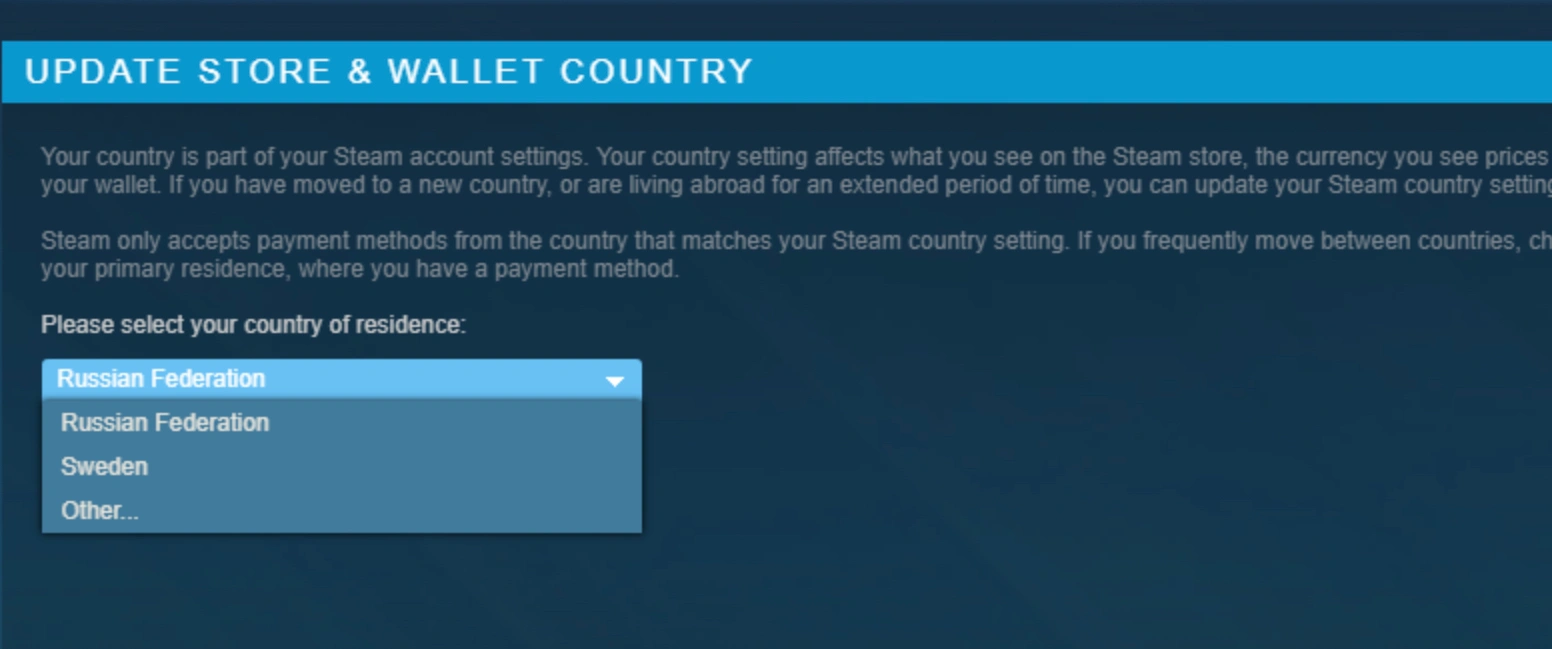
Steam does not allow you to change your region on a whim. To successfully migrate your store country to North America, you must be physically present in that region and you must complete a purchase using a local payment method tied to a verifiable residential billing address in that specific country.
Why You Should Not Use a Fake Address or Payment Method
Attempting to trick Steam by using virtual credit cards, fake billing generators, or borrowed payment methods is a direct violation of the Steam Subscriber Agreement. Valve employs aggressive fraud detection algorithms; using fraudulent credentials to alter your regional pricing or game access can result in an immediate, permanent account ban.
Why Changing Steam Region Is Not a Reliable Temporary Fix
Even if you successfully change your store region, Steam enforces a strict 3-month cooldown period between region changes. You cannot switch your account to North America just to play a weekend playtest of Mistfall Hunter and then flip it back to Europe on Monday. You will be stuck with North American store pricing and payment restrictions for a quarter of a year.
What Travelers and Relocated Players Should Do
If you genuinely moved to North America for work or study, update your store region legitimately using your new local bank account or credit card. If you are merely traveling on a short vacation, it is best to leave your Steam region untouched and accept that you will need to play on your home region's servers until you return home.
Part 7: Can a VPN Unlock the Mistfall Hunter NA Server?
The internet is flooded with advice claiming that toggling on a standard VPN will instantly shatter region locks and grant you access to any server worldwide. However, when dealing with store-entitlement restrictions like those in Mistfall Hunter, standard VPNs often fall short of player expectations. It is vital to separate IP routing from account permissions.
|
Network Tool |
Modifies Steam Account Region? |
Fixes Store-Locked Game Builds? |
Optimizes In-Game Routing & Ping? |
|
Standard VPN |
No (Only masks IP address) |
No (Steam checks billing currency) |
Rarely (Often adds routing encryption overhead) |
|
LagoFast Game Booster |
No (Respects platform TOS) |
No (Cannot override account licensing) |
Yes (Dedicated multi-path gaming nodes) |
A VPN Changes Your Connection Route, Not Necessarily Your Steam Store Region
A traditional VPN routes your internet traffic through an encrypted server in another city or country, masking your physical IP address. However, launching Steam with a US VPN IP does not magically transform your European Steam account into an American one. Steam still reads your backend billing history and serves you the exact same Global client build.
Why the NA Server May Still Be Missing
Because your game build is dictated by your store account rather than your live IP address, turning on a VPN before launching the game will rarely cause the missing NA server to suddenly appear in your menu. You are simply routing your Global client connection through an American proxy while still being forced to queue into European or Asian matchmaking servers.
When a Network Optimizer Can Reduce NA Server Ping
Where specialized network tools do shine is in stabilizing your latency once you are connected to a server. If you are a North American player who legitimately owns the NA build but suffers from routing spikes, or if you are forced to play on a distant server and want to trim away every possible millisecond of delay, an optimizer streamlines your data transit.
Region Access Problems vs Network Connection Problems
We must draw a clear line in the sand: Account permission problems cannot be solved by routing tools. If Steam denies you the NA build, no network software can rewrite your account licensing. However, network connection problems, such as high ping, packet loss, routing loops, and jitter on accessible servers, are precisely what dedicated game boosters are engineered to resolve.
Part 8: What to Do If You Are Forced onto a High-Ping Server
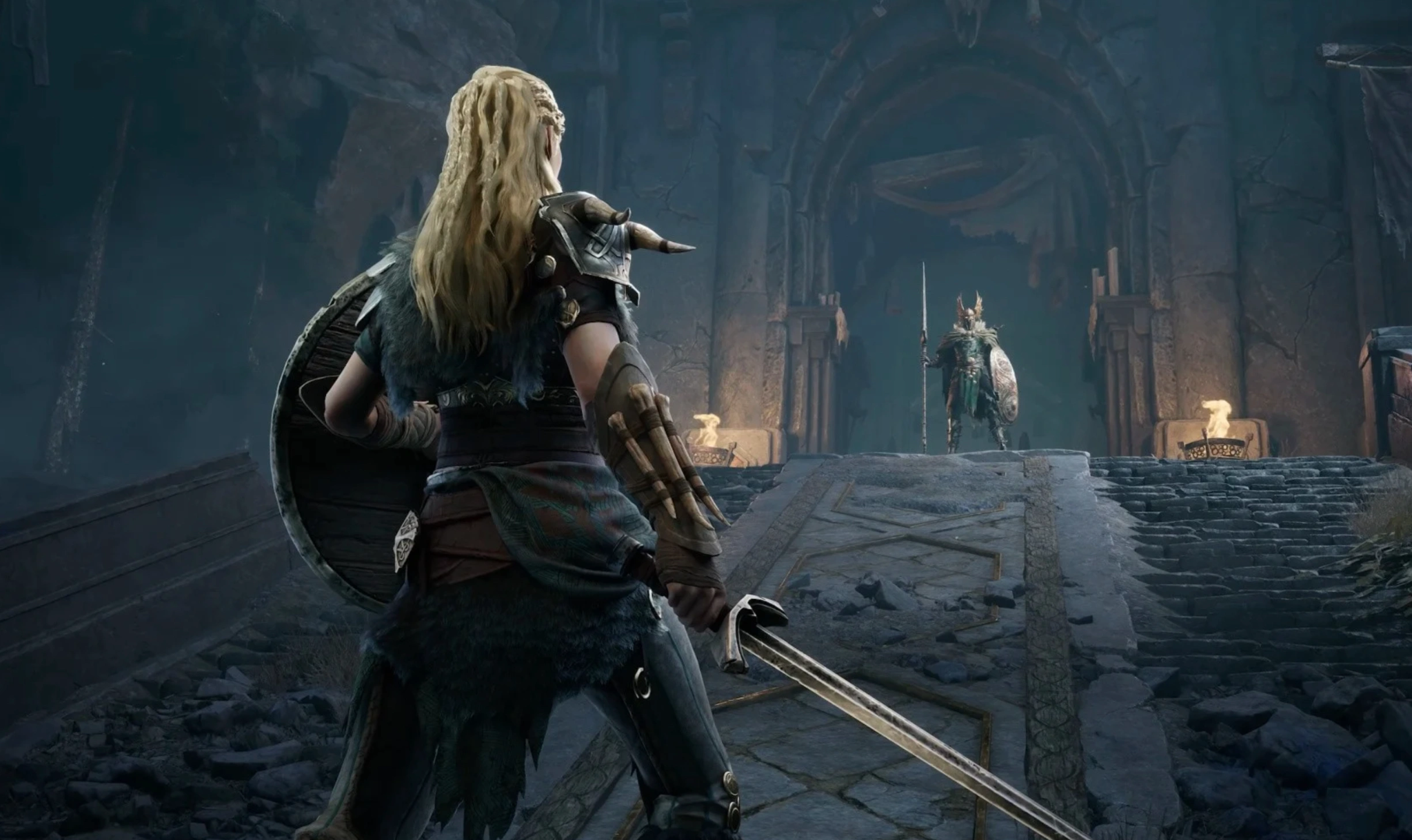
When account restrictions or regional publishing boundaries leave you with no choice but to play on a distant server, your immediate priority shifts from unlocking regions to surviving high-latency combat. Playing a precision-based game with 150ms+ ping is brutal, but you can drastically improve your responsiveness by optimizing your connection path. This is where LagoFast steps in as an essential tool for your gaming setup.
While LagoFast cannot alter your Steam store country or force-download a restricted regional client build, it is the ultimate solution for fixing high ping, packet loss, and unstable routing on the servers you can access.
Select the Closest Server Available to Your Build
If the NA server is completely out of reach, open your game menu and test the latency to every region your client does allow you to select. For many North American players stuck on the Global build, EU Central or South America might offer significantly better stability than Asian clusters. Always lock in the lowest base-latency server available before tweaking your network.
Optimize the Connection to the Available Server
Standard internet Service Providers (ISPs) route your gaming data through congested, cheap public nodes, leading to massive latency spikes. By booting up LagoFast, you bypass public internet congestion entirely. LagoFast uses real-time multi-path optimization to analyze global traffic and redirect your game packets down dedicated, fiber-optic gaming highways, shaving off critical milliseconds of delay.
Reduce Packet Loss and Network Jitter
High ping is annoying, but packet loss and network jitter are what actually cause your character to rubber-band across the map or miss crucial melee swings. LagoFast actively stabilizes your data transmission, ensuring a consistent data flow between your PC and the game server. By eliminating routing fluctuations, LagoFast transforms a sluggish, high-ping connection into a smooth, playable experience where your inputs actually register on time.
Report Incorrect Server Assignment to Support
While utilizing LagoFast to stabilize your gameplay, do not forget to advocate for a permanent solution. Submit feedback through official community channels detailing your physical latency vs. your forced server assignment. The more data developers receive about displaced players suffering from regional build locks, the more likely they are to implement unified server selection in future updates.
Tutorial: Use LagoFast to Fix High Ping in Mistfall Hunter
Step 1: Download and Install LagoFast.
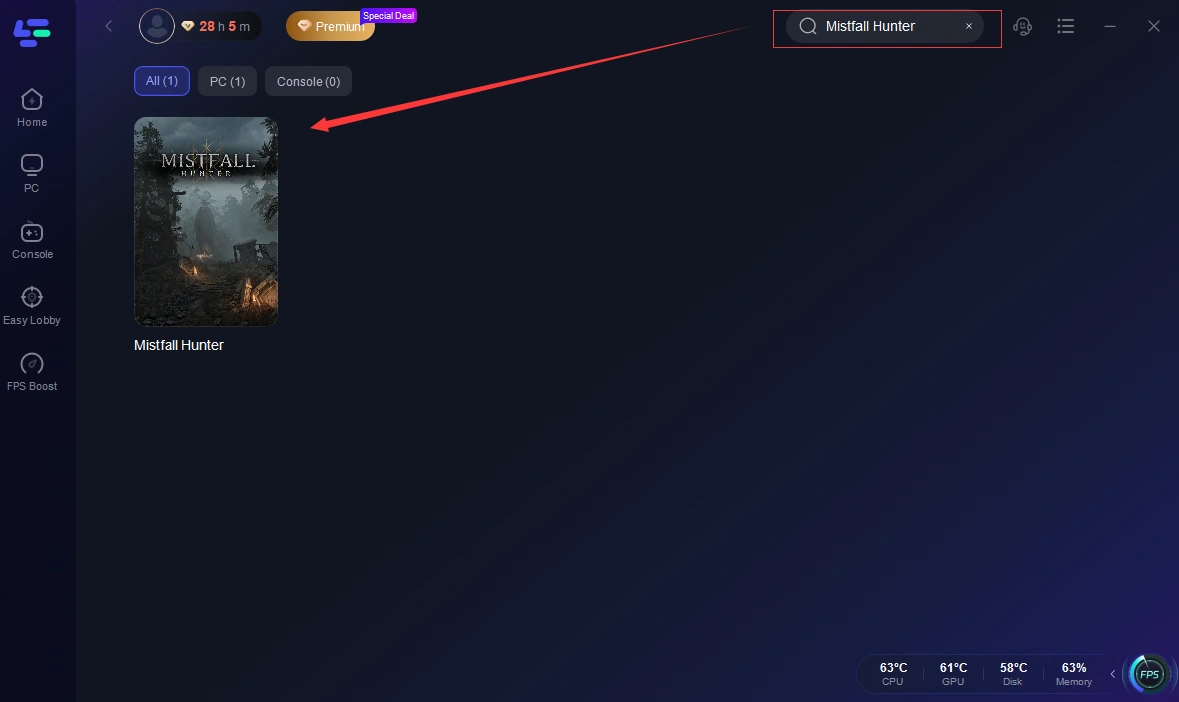
Step 2: Search for "Mistfall Hunter": Type Mistfall Hunter into the main search bar within the LagoFast dashboard. Select the game title from the resulting drop-down list to open its specific optimization page.
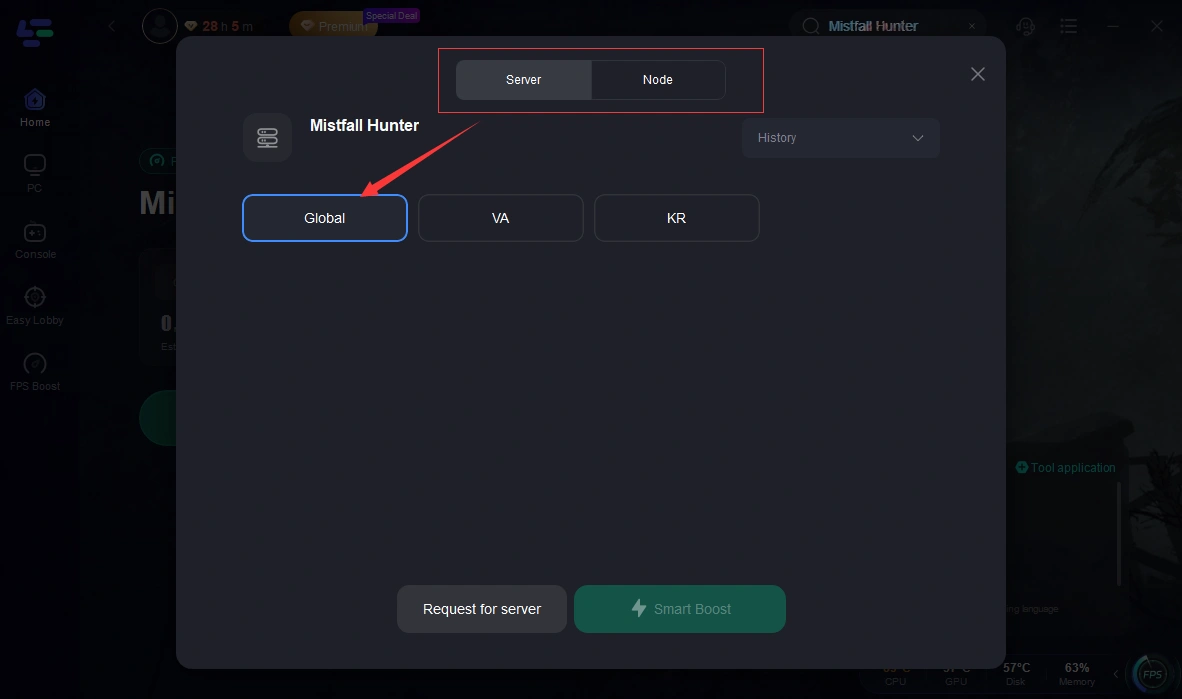
Step 3: Choose Your Server and Node:
- Select Server: Choose the closest available server node permitted by your current game build (or the server where your data center connection is routed).
- Select Node: Click on the optimal server node, or let LagoFast automatically pick the lowest-ping path using its intelligent multi-path routing system.
Step 4: Boost Your Connection: Click the "Boost" button. LagoFast will instantly analyze your network path, bypass public ISP congestion, and establish a dedicated high-speed connection.
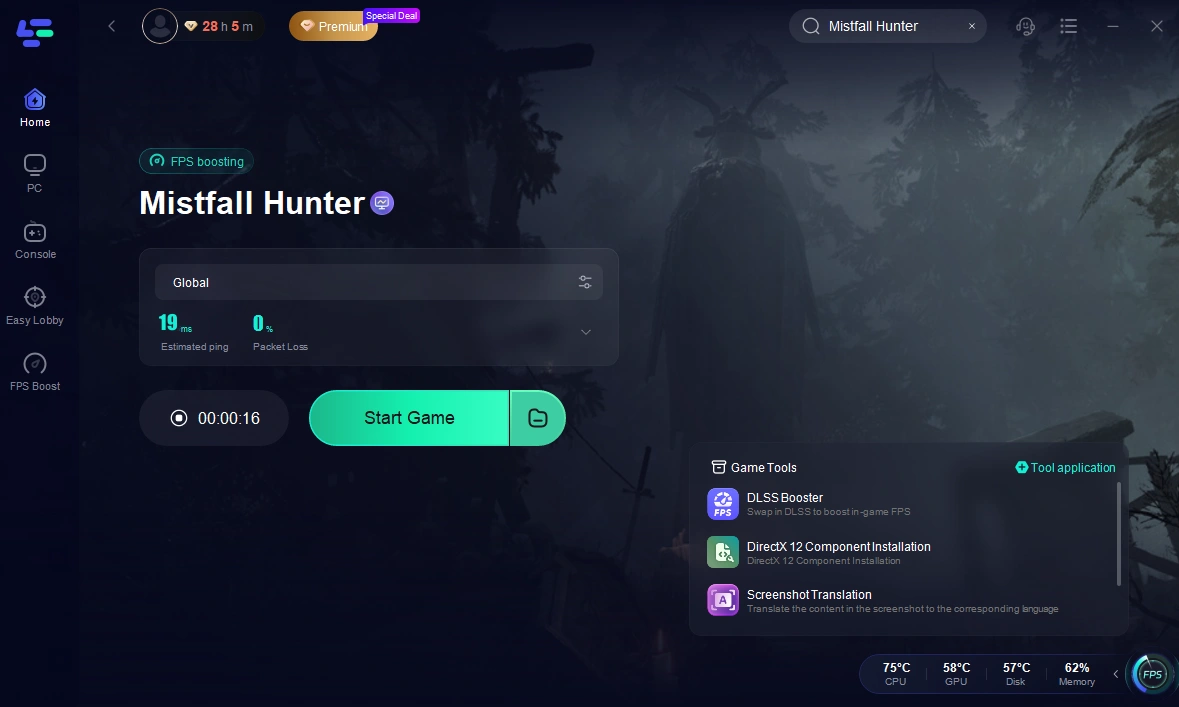
Step 5: Launch the Game: With the boost active, launch Mistfall Hunter through Steam. Enjoy a stabilized connection free from jitter, rubber-banding, and high-ping spikes.
Part 9: Mistfall Hunter NA Server Region Lock FAQ
Why can't I see the NA server in Mistfall Hunter?
You likely cannot see the NA server because your Steam account is registered to a store country outside of North America. The game distributes different client builds based on your Steam store currency. If you have the Global build, the NA server nodes are completely hidden from your matchmaking menu.
Can I use a standard VPN to unlock the NA server?
No, a standard VPN will not unlock the NA server if your Steam account is registered to a non-NA country. Steam checks your backend billing credentials, not your active IP address, when deciding which game client to let you download.
Why is my ping so high on accessible servers?
When you are forced onto a server outside your physical geographical region (like an American playing on European nodes), your data must travel thousands of miles across ocean cables. This sheer physical distance, combined with inefficient ISP routing, causes high ping and noticeable input delay.
Does LagoFast change my Steam account region?
No. LagoFast is a specialized network routing optimizer, not an account modification tool. It strictly abides by Steam's Terms of Service and cannot alter your store currency or unlock restricted client builds.
How does LagoFast help if I am stuck on a high-ping server?
Once you connect to an available server, LagoFast redirects your game traffic through dedicated, high-speed gaming nodes. This eliminates ISP routing bottlenecks, reduces packet loss, and ensures you get the absolute lowest possible latency to that server.
Will Mistfall Hunter remove the NA region lock in the future?
While developers often enforce strict regional client separations during betas and early testing phases to manage publishing rights and server loads, community feedback frequently leads to more flexible server selection options after launch. Keep monitoring official announcements for updates.
Conclusion
Dealing with region locks and missing server options in Mistfall Hunter can be a major roadblock, especially when your Steam store country prevents you from accessing the North American client build. While you cannot bypass Steam's legal account licensing restrictions, you do not have to settle for unplayable lag. By understanding how your client build operates and utilizing LagoFast to streamline your network routing, you can eliminate packet loss, stabilize your ping, and enjoy the best possible gaming performance on the servers available to you. Prepare your connection, optimize your route, and dive into the hunt with confidence.

Boost Your Game with LagoFast for Epic Speed
Play harder, faster. LagoFast game booster eliminates stutter and lags on PC, mobile, or Mac—win every match!
Quickly Reduce Game Lag and Ping!
Boost FPS for Smoother Gameplay!