
Marvel Rivals is a fast-paced, multiplayer game that combines the exciting world of Marvel superheroes with intense real-time combat. However, like any online multiplayer game, players sometimes encounter technical issues that can disrupt their gaming experience. One such problem is the Marvel Rivals version mismatch error. If you’ve found yourself facing this issue, don’t worry! In this article, we’ll explain what causes the version mismatch in Marvel Rivals, how to fix it, and tips for avoiding it in the future.

- What is the Marvel Rivals Version Mismatch Error?
- How to Fix Marvel Rivals Version Mismatch
- Preventing Future Version Mismatches
- Boost Your Connection and Fix Lag with LagoFast
1. What is the Marvel Rivals Version Mismatch Error?
A version mismatch occurs when your game version does not match the version of the game that other players or the server are using. This can prevent you from joining matches, lead to disconnections, or even cause game crashes. The version mismatch issue can arise due to several factors, but it’s most commonly caused by:
- Outdated game client: Your game client may not be up to date with the latest patches and updates.
- Inconsistent server updates: Sometimes the server may be running on a different version than your game client.
- Failed or incomplete patch installation: If the game didn’t fully download or install a patch, it might result in a version mismatch.
- Cross-platform discrepancies: If you’re playing Marvel Rivals on multiple devices, such as console and PC, version mismatches can occur if they aren’t synchronized.
2. How to Fix Marvel Rivals Version Mismatch
Luckily, there are several solutions you can try to resolve the version mismatch error in Marvel Rivals. Here’s how you can fix it:
1. Update Your Game Client
One of the easiest fixes is ensuring that you’re using the latest version of Marvel Rivals. To do this, follow these steps:
For PC (Steam/Epic Games):
- Launch your game client (Steam or Epic Games Store).
- Check for any available updates and allow the game to automatically download the latest patch.
For Consoles (PlayStation, Xbox):
- Go to the game’s icon on your console’s home screen.
- Check for an available update and install it.
Keeping your game updated ensures that you’re using the correct version to connect to servers and play with others.
2. Restart the Game and Your Device
Sometimes, a simple restart can fix the version mismatch issue:
- Close and relaunch the game: Exit Marvel Rivals completely, restart your game client, and try launching the game again.
- Restart your device: Whether on PC or console, restart your device to ensure that any ongoing updates or processes are completed and the latest version is applied.
3. Verify the Game Files
If your version mismatch is caused by missing or corrupt files, verifying the integrity of the game files can help. Here’s how you can do this:
For Steam:
- Open Steam and go to your Library.
- Right-click on Marvel Rivals and select Properties.
- Under the Local Files tab, click Verify Integrity of Game Files.
- Steam will check for any missing or corrupted files and download them if necessary.
For Epic Games Store:
- Open the Epic Games Launcher and go to your Library.
- Click on the three dots next to Marvel Rivals and select Verify.
4. Check Server Status
Sometimes, version mismatches can be caused by server-side issues. If the game servers haven’t updated yet or if there’s maintenance in progress, the mismatch may occur. You can check the official Marvel Rivals Twitter or other social media channels for server status updates. If the servers are down for maintenance, all you can do is wait until they’re back up.
5. Reinstall the Game
If none of the above solutions work, you might want to try reinstalling Marvel Rivals. Sometimes, a fresh installation can resolve issues caused by corrupted files or incomplete patches.
- Uninstall the game from your platform.
- Reinstall it from your respective store or client.
Reinstalling can help resolve deeper issues like corrupt installation files that may be causing the version mismatch.
3. Preventing Future Version Mismatches
While version mismatch errors can be frustrating, there are steps you can take to avoid them in the future:
- Enable automatic updates: Ensure that automatic updates are enabled for Marvel Rivals to avoid playing on outdated versions.
- Regularly check for updates: If you’re playing across multiple platforms, make sure that all devices are updated simultaneously.
- Monitor server maintenance schedules: Be aware of scheduled maintenance or patch updates by following Marvel Rivals’ official social media or community pages.
4. Boost Your Connection and Fix Lag with LagoFast
If you’re struggling with lag, high ping, or connection issues while playing Marvel Rivals, LagoFast can provide a simple solution to stabilize your network and enhance your gaming experience. LagoFast is designed to optimize your connection by selecting the best route to the game server, reducing ping, and ensuring smooth gameplay. Here’s how to get started in just a few steps.
How to Use LagoFast
Follow these simple steps to boost your connection:
Step 1: Click the Free Trial button to download and install LagoFast.
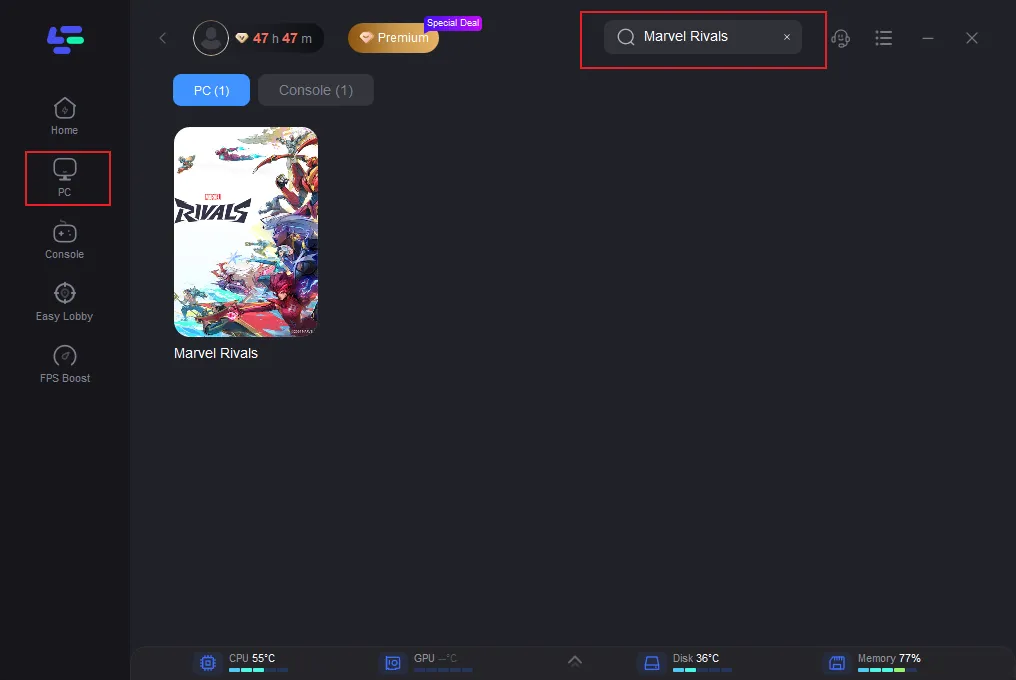
Step 2: Open LagoFast then click the PC button on the left and search Marvel Rivals in the search bar, click it after appearing.
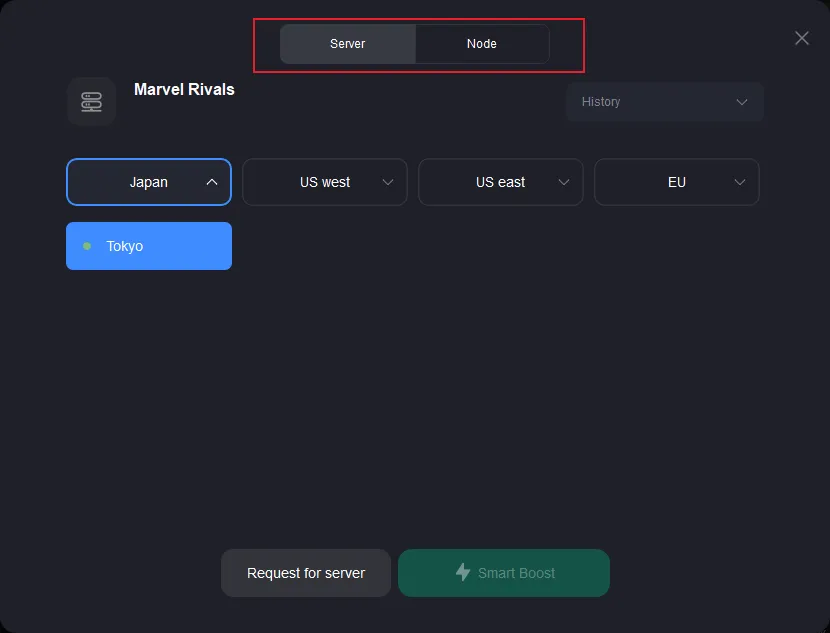
Step 3: Click on “Server” to change to a better server that improves the gaming experience, then click on “Smart Boost”.
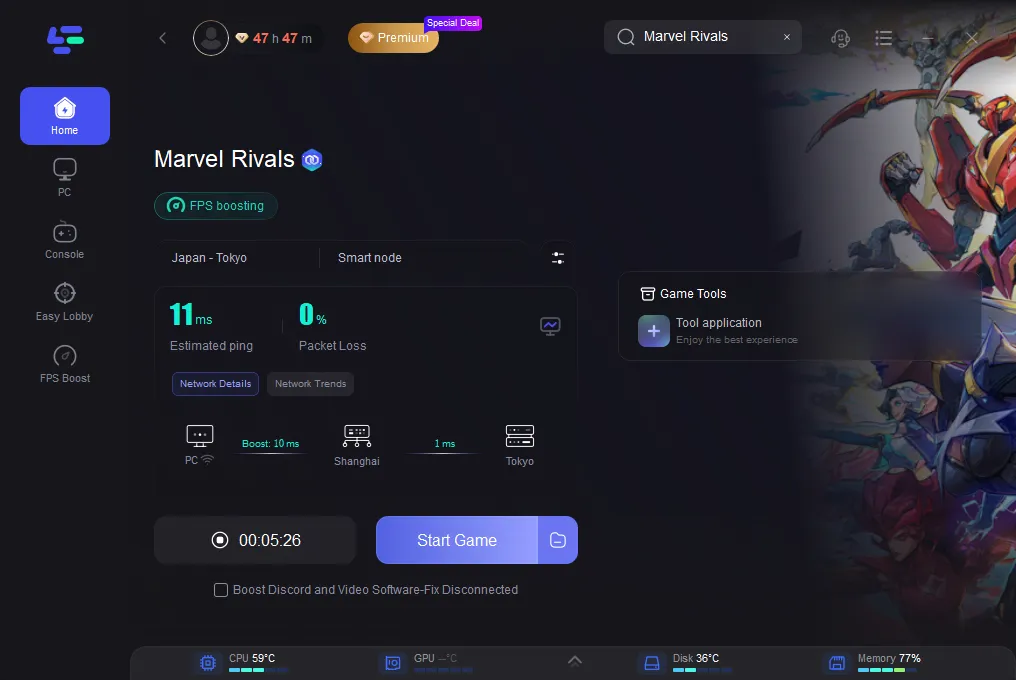
Step 4: Check the specific game ping, packet loss, and multiple path connection on the right side. Finally, click the “Start Game” to play the game.
Why Use LagoFast?
- Lower Ping for faster, more responsive gameplay
- Bypass region blocks to connect to servers worldwide
- Real-time monitoring of connection health (ping, packet loss, etc.)
- Smart optimization that automatically selects the best routing path
- Compatible with multiple online games across various platforms
By following these simple steps, LagoFast optimizes your network for smoother gameplay, bypassing region restrictions and reducing lag, giving you a better overall gaming experience. Whether you’re playing Marvel Rivals or any other online title, LagoFast keeps you ahead of the competition with minimal effort.
Conclusion
The Marvel Rivals version mismatch error is a common issue that can be easily fixed by ensuring your game client is up to date, restarting the game, or verifying the integrity of your game files. If the issue persists, it’s possible that the problem lies with server-side updates, or you may need to reinstall the game. By staying updated and aware of patch schedules, you can minimize the chances of encountering this frustrating error in the future. Happy gaming, and may the Marvel heroes and villains fight for you, not against your connection!
Boost Your Game with LagoFast for Epic Speed
Play harder, faster. LagoFast game booster eliminates stutter and lags on PC, mobile, or Mac—win every match!
Quickly Reduce Game Lag and Ping!
Boost FPS for Smoother Gameplay!