
If you’ve tried to log into Marathon recently, you may have hit Marathon Error Code: Currant. The game might crash during server verification, show a black screen, or kick you back to desktop without warning. Players report that the problem seems random—even with a stable internet connection. Luckily, in most cases, the error isn’t your PC; it’s the game failing to complete its online authentication. This guide explains why currant happens and what you can do to fix it.

- ✅ Reduce Lag and High Ping.
- ✅ Boost FPS at the Same Time.
✅ Support 2000+ Popular Online Games.
✅ Change Server without Latency.
✅ Boost Game Loading Speed.
Part 1: What Players Are Experiencing
Part 2: Why Marathon Error Code: currant Happens
Part 3: How LagoFast Can Fix Marathon Error Code: currant
Part 4: Step-by-Step Fixes for Marathon Error Code: currant
Part 1: What Players Are Experiencing
Here’s what the community is saying about Marathon Error Code: currant:
- “Currant pops up every time I try to join a match—so annoying!”
- “I have stable internet, but the game won’t let me past server check.”
- “It worked yesterday, now currant shows and I can’t log in.”
- “Click Play, wait 5 seconds, then black screen and back to desktop.”
- “No error code before, but currant keeps appearing after the update.”
- “Every time I restart the launcher, it sometimes works, but then currant comes back.”
The common theme: the error appears early, before you even reach the main menu, and usually there’s no detailed message explaining it.
Part 2: Why Marathon Error Code: currant Happens
Understanding the cause helps you know how to tackle it:
Server Overload During Server Slam
The Currant testing phase is pushing Marathon servers to their limits. High traffic can make authentication fail, triggering currant.
Connection Instability
Even minor packet loss, jitter, or route instability between your device and the game servers can prevent login verification.
Firewall or VPN Interference
Some players’ firewalls, VPNs, or strict NAT settings interfere with server handshake, increasing currant errors.
Temporary Patch or Backend Adjustments
Frequent updates during Server Slam can cause short-term login failures that show as currant.
Part 3: How LagoFast Can Fix Marathon Error Code: currant
Marathon Error Code: currant often appears when your network interrupts the game’s login verification. LagoFast can help by stabilizing your connection, lowering ping, reducing packet loss, and optimizing routing to Marathon servers. It also smooths out latency spikes, helps maintain steady FPS, and includes other practical tools to enhance your overall gaming experience, giving Marathon a better chance to complete authentication without errors.
Tutorial to Use LagoFast
Step 1: Click the Free Trial button to download and install LagoFast.
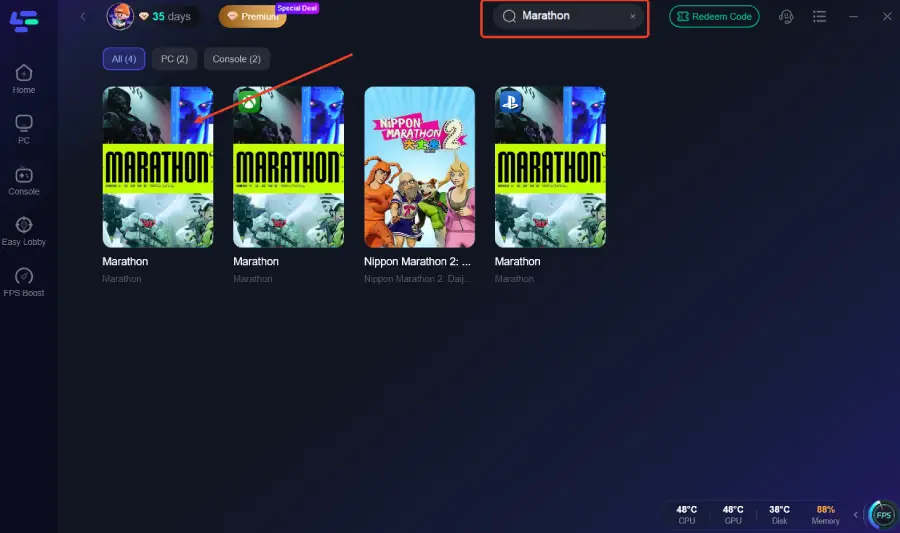
Step 2: After installation, search "Marathon" in the search bar and select the game.
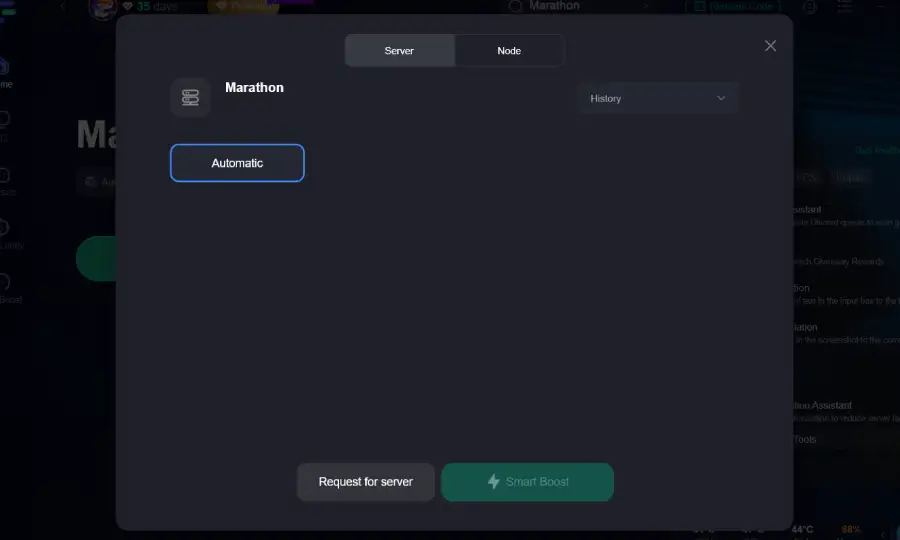
Step 3: Choose your preferred server node and click "Smart Boost" to start optimizing.
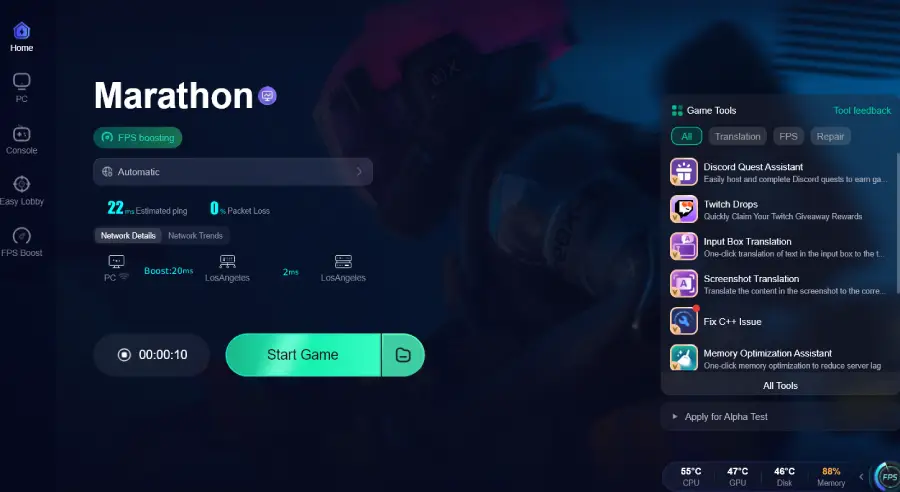
Step 4: Launch your game and enjoy smooth, optimized gameplay with lower ping and no stutter.
Part 4: Step-by-Step Fixes for Marathon Error Code: currant
Try these fixes one by one; each addresses a common cause of Marathon Error Code: currant:
Restart the Launcher
Completely close Marathon and reopen it. This resets the login handshake and can clear temporary authentication glitches that trigger currant.
Switch to Wired Internet
Using an Ethernet connection is more stable than Wi-Fi. It reduces packet loss and prevents network interruptions that often cause the error.
Disable VPNs or Proxies
Extra routing through VPNs or proxies can interfere with authentication. Turning them off ensures a direct connection to Marathon servers.
Verify Game Files
Run your platform launcher’s file integrity check. Missing or corrupted files can prevent proper login, so repairing them can resolve the error.
Restart Network Equipment
Power cycle your modem and router, then wait a few minutes before reconnecting. This refreshes your connection path and often fixes handshake failures.
Adjust Firewall or NAT Settings
Make sure Marathon is allowed through your firewall and your NAT type isn’t too strict. Proper network permissions help the game complete authentication without triggering currant.
Conclusion
Marathon Error Code: currant usually happens because the game can’t complete its online authentication, not because of your PC. By following the steps above—checking files, stabilizing your network, avoiding VPNs, and repairing connections—you can often clear the error and get back into the game quickly. Once your connection and settings are in order, Marathon should launch normally without currant interruptions.
Boost Your Game with LagoFast for Epic Speed
Play harder, faster. LagoFast game booster eliminates stutter and lags on PC, mobile, or Mac—win every match!
Quickly Reduce Game Lag and Ping!
Boost FPS for Smoother Gameplay!