
Downloading a massive game like League of Legends can sometimes feel like an eternity, especially when you're excited to jump into the action. If you’ve ever sat watching the progress bar crawl forward at a snail’s pace, you’ve probably wondered: How do I speed up my download speed? Or why does League of Legends take so long to download? You’re not alone. Many players experience slow download speeds when installing or updating League of Legends.
In this complete guide, we’ll walk you through how to make League of Legends download faster, why download speeds might be slow, and give you proven solutions. Whether you’re dealing with an update stuck at 0% or just want to know how to download the LoL game faster for the first time, you’ll find all the answers right here.\
Vietnamese Version: Cách làm cho League of Legends tải xuống nhanh hơn

Part 1: How Long Does League of Legends Take to Download?
Part 2: The Best Solution to Make League of Legends Download Faster on PC
Part 3: Other Methods to Speed Up League of Legends Downloads
Part 1: How Long Does League of Legends Take to Download?
The answer really depends on your internet connection, your PC’s hardware, and whether the Riot servers are experiencing heavy traffic. Typically, the full League of Legends client download is around 12-15 GB. If you have a high-speed internet connection (over 100 Mbps), it might only take 15-20 minutes to download the base game files. However, if your internet speed is slower (around 10–20 Mbps), you could be looking at an hour or more.
Other factors that influence the download time include:
- Server congestion (especially during new patch releases)
- Firewall or antivirus interference
- Poor Wi-Fi connection
- Outdated network drivers
- Limited PC resources during download
If your download seems abnormally slow compared to your internet plan, there are definitely things you can do to fix League of Legends slow download speed, and we’ll cover them all below.
Part 2: The Best Solution to Make League of Legends Download Faster on PC
While there are several manual tweaks you can try, if you want a guaranteed and easy solution, using LagoFast is by far the best option available.
LagoFast is a professional game booster and network optimizer specifically designed for players who want to fix League of Legends download/update slow issues without diving into complicated settings. By optimizing your network routes, prioritizing game traffic, and reducing latency, LagoFast can dramatically improve your download speed and overall experience.
Unlike basic VPNs or simple boosters, LagoFast offers a unique data transmission protocol and dedicated game acceleration technology, making it an ideal choice for gamers who need faster downloads, lower ping, and smoother gameplay.
When you install LagoFast, you don’t have to spend hours tweaking your PC settings manually, it automatically finds the best network path to the Riot Games servers for you.
Features of LagoFast:
- Exclusive LOL Game Acceleration: Designed specifically to optimize Riot Games and League of Legends traffic.
- Smart Routing: Chooses the fastest and most stable network route for your downloads and gameplay.
- Download and Update Booster: Speeds up not just downloads, but game patches and updates too.
- Global Server Coverage: Access multiple acceleration nodes worldwide for the best connection anywhere.
- No Risk of Bans: LagoFast uses a legit, secure system that won’t get you flagged or banned.
- Real-Time Monitoring: See your real-time ping, speed, and packet loss statistics.
With LagoFast, you’ll not only fix League of Legends download issues quickly but also enjoy faster matchmaking and smoother ranked matches afterward.
Follow the tutorial to use LagoFast to download LoL faster in EPIC Games:
Step 1: Click Free Trial to Download LagoFast.
Step 2: Search Epic Games in LagoFast before you launch it, click the Game Boost button, and then search it in the search bar.
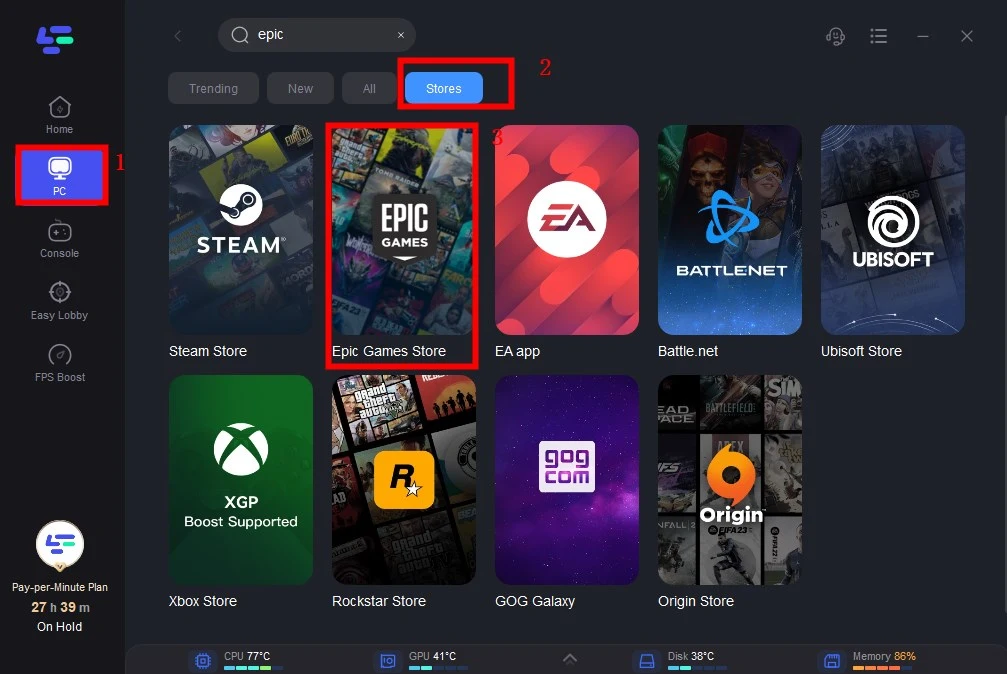
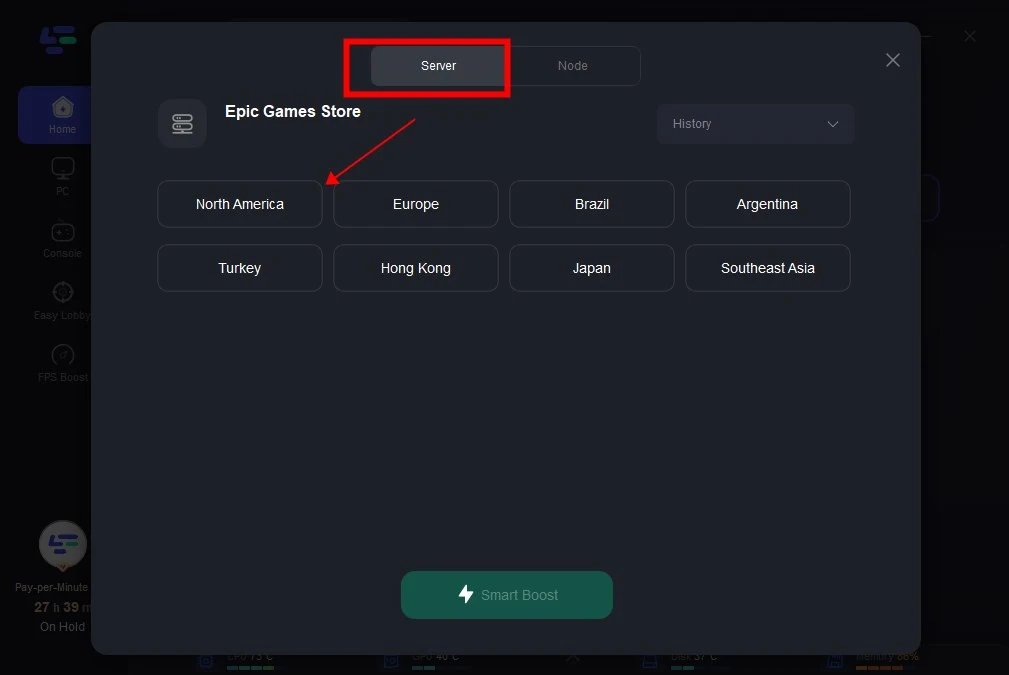
Step 3: Click on Select Server so you can choose better servers to ensure faster download speed, then click on the Node on the right, you can also choose the best Node, and then click the Smart Boost button.
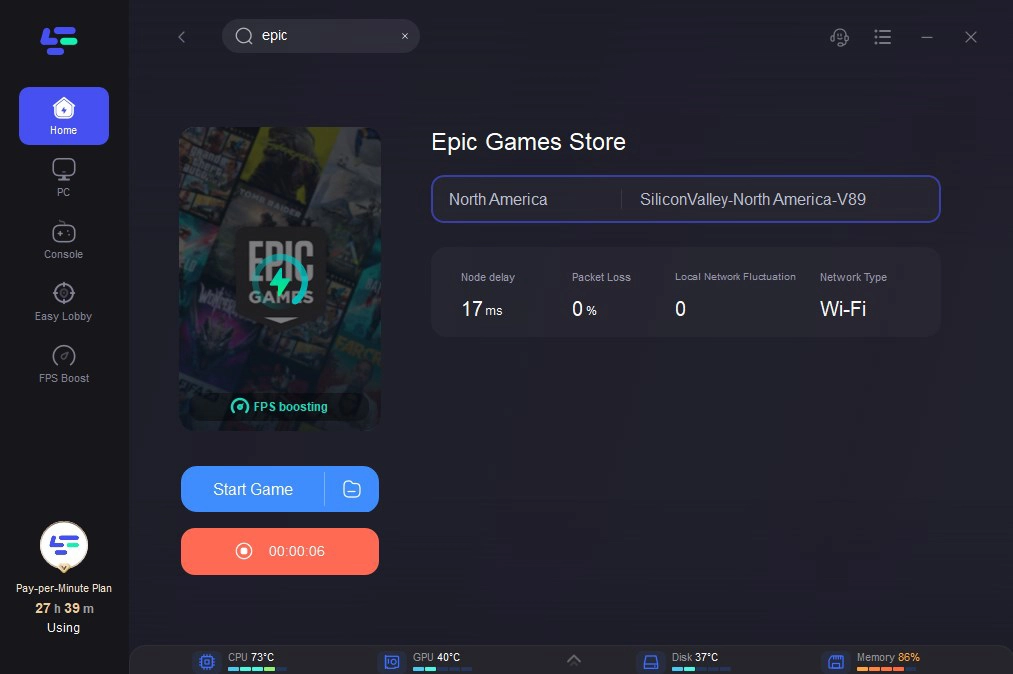
Step 4: By clicking the Smart Boost button, you can see the specific game ping, packet loss, and network type on the right side. Finally, click the Start Game button to start Epic Games. Then you can start downloading LOL at a faster speed.
Part 3: Other Methods to Speed Up League of Legends Downloads
While LagoFast is the simplest solution, there are several manual ways you can also try to fix League of Legends slow download speed yourself. Here are 7 proven methods, each with at least 6 detailed steps for you to follow:
Pause and Resume the Download
Sometimes, League of Legends might just be stuck in a traffic jam on the server side. Pausing and resuming can refresh your session.
Step 1: Open the Riot Client.
Step 2: Click on the 'Pause' button next to the downloading bar.
Step 3: Wait 10–15 seconds.
Step 4: Click Resume.
Step 5: Observe if the download speed improves.
Step 6: Repeat a few times if necessary.
Switch to a Wired Ethernet Connection
Wi-Fi might be convenient, but it's often unstable for large downloads.
Step 1: Locate a LAN/Ethernet cable
Step 2: Plug one end into your PC and the other into your router.
Step 3: Disable your Wi-Fi connection temporarily.
Step 4: Restart your PC to ensure it prioritizes the Ethernet connection.
Step 5: Reopen the Riot Client.
Step 6: Check if download speeds increase.
Set League of Legends as a High-Priority Task
Giving League of Legends more CPU and network priority can help.
Step 1: Press Ctrl + Shift + Esc to open Task Manager.
Step 2: Go to the 'Details' tab.
Step 3: Find RiotClientServices.exe or LeagueClient.exe.
Step 4: Right-click it and select Set Priority - High.
Step 5: Confirm the priority change.
Step 6: Monitor download speeds after adjustment.
Turn Off Unnecessary Applications
Background programs can steal bandwidth and slow down downloads.
Step 1: Press Ctrl + Shift + Esc to open Task Manager.
Step 2: Check Processes for anything using high network usage.
Step 3: Right-click and End Task on heavy apps (browsers, Steam, torrents).
Step 4: Pause cloud services like OneDrive or Dropbox temporarily.
Step 5: Close unnecessary tabs if using a browser.
Step 6: Resume the League of Legends download and see if speeds improve.
Update Your Network Drivers
Outdated network drivers can bottleneck your internet speed without you knowing.
Step 1: Press Windows + X and select Device Manager.
Step 2: Expand the Network adapters section.
Step 3: Right-click your adapter (like Intel(R) Ethernet) and click Update driver.
Step 4: Choose Search automatically for drivers.
Step 5: Install any available updates.
Step 6: Restart your PC before downloading League of Legends again.
Clear DNS Cache
Old DNS records can sometimes cause connection issues.
Step 1: Press Windows + R to open the Run dialog.
Step 2: Type cmd and open Command Prompt as administrator.
Step 3: Type ipconfig /flushdns and press Enter.
Step 4: Wait for the confirmation message.
Step 5: Restart your PC.
Step 6: Launch the Riot Client and retry the download.
Temporarily Disable Antivirus/Firewall
Overprotective antivirus programs can slow down downloads.
Step 1: Open your antivirus program settings.
Step 2: Look for Real-time protection and turn it off temporarily.
Step 3: Open Windows Firewall settings via Control Panel.
Step 4: Turn off the Firewall for private and public networks temporarily.
Step 5: Restart the Riot Client and monitor speeds.
Step 6: Remember to re-enable antivirus and firewall after the download finishes!
Conclusion
Waiting endlessly for League of Legends to download or update can be incredibly frustrating, but it doesn't have to be. Now you know exactly how to make League of Legends download faster using both automatic tools like LagoFast and manual optimization methods. Whether it’s switching to a wired connection, clearing your DNS cache, or prioritizing your Riot Client in Task Manager, every small tweak adds up. If you want a true plug-and-play solution that guarantees results, LagoFast remains the first recommendation. It's designed to eliminate slow download issues, fix Riot Games' slow download problems, and help you get into Summoner’s Rift quicker than ever.
Boost Your Game with LagoFast for Epic Speed
Play harder, faster. LagoFast game booster eliminates stutter and lags on PC, mobile, or Mac—win every match!
Quickly Reduce Game Lag and Ping!
Boost FPS for Smoother Gameplay!