

The wait is finally over — Lost Ark Mobile is on its way, giving fans a chance to dive back into Arkesia anytime, anywhere. With the Closed Beta Test (CBT) opening soon, players can finally experience the game’s signature action combat and world exploration on mobile.
If you’re wondering how to join the CBT, when it starts, or how to play smoothly without lag or ping issues, this guide has you covered. From official test details to sign-up instructions and performance tips, here’s everything you need to get started and enjoy a seamless Lost Ark Mobile adventure.

- ✅ Reduce Lag and High Ping.
✅ Boost FPS at the Same Time.
✅ Support 2000+ Popular Online Games.
✅ Change Server without Latency.
✅ Boost Game Loading Speed.
Part 1 : Lost Ark Mobile Release Date & CBT Details
Part 2: How to Sign Up for Lost Ark Mobile CBT
Part 3: Lost Ark Mobile CBT System Requirements
Part 4: Optimize Your Lost Ark Mobile Experience with LagoFast
Part 1 : Lost Ark Mobile Release Date & CBT Details
The Lost Ark Mobile Closed Beta Test (CBT) has been officially announced!
According to the official site, here are the confirmed schedules:
- CBT Recruitment Period: October 17 – November 6, 2025
- CBT Test Period: November 13 – November 16, 2025
This short test window gives players a first hands-on experience with Lost Ark Mobile’s combat, classes, and visual style before its full release.
While a global release date hasn’t been confirmed yet, the CBT indicates the mobile version is in its final development stage — suggesting a full launch could follow soon after in late 2025 or early 2026.
If you want to join the test, visit the official Lost Ark Mobile CBT page and sign up during the recruitment period.
Part 2: How to Sign Up for Lost Ark Mobile CBT
Joining the Lost Ark Mobile Closed Beta Test is quick and straightforward — but spots are limited, so timing is key. Follow these simple steps to make sure you don’t miss out:
1. Visit the official Lost Ark Mobile website.
Head over to the official CBT page for the latest test details and announcements.
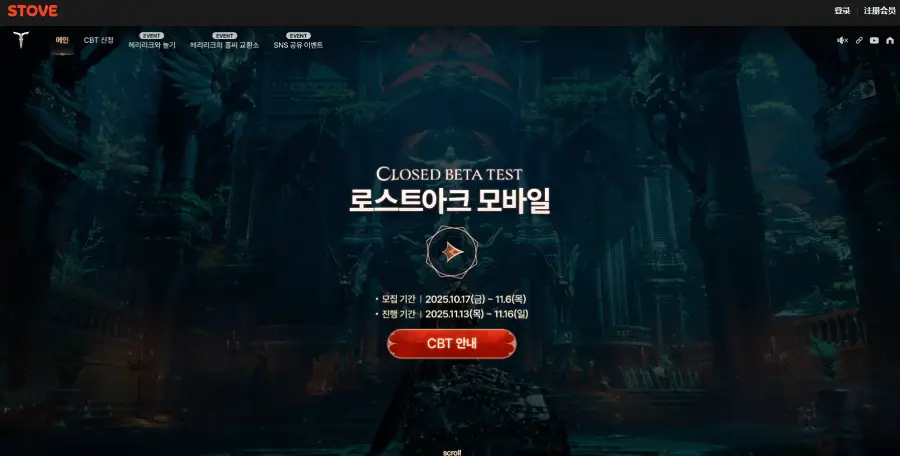
2. Log in or create a Stove account.
You’ll need a valid Stove account (the same platform used for Lost Ark PC). If you don’t have one yet, registration only takes a minute.
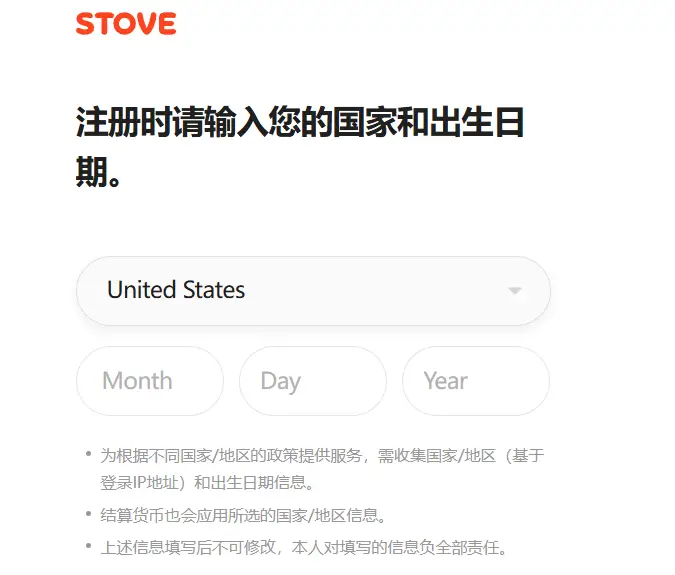
3. Fill out the CBT application form.
Enter your region, device type (Android or iOS), and contact email. Make sure the info matches your actual device — incorrect details may affect your eligibility.
4. Confirm your registration.
Once you submit, check your email inbox for a confirmation message. This ensures your spot is officially recorded.
5. Wait for the selection results.
If you’re chosen, you’ll receive another email with download links, activation steps, and exact test times.
Pro tip: Apply as early as possible! CBT access is usually first-come-first-served, and once the slots fill up, late entries are locked out.
Part 3: Lost Ark Mobile CBT System Requirements
Before joining the CBT, make sure your device or PC meets the required specs to ensure smooth gameplay and stable performance.
Minimum System Requirements
- Processor: Intel® Core™ i3 / AMD® Ryzen™ 3 (64-bit)
- Operating System: Windows® 10 64-bit
- Memory: 8 GB RAM
- Graphics: NVIDIA® GeForce® GTX 460 or equivalent
- DirectX: Version 11
- Network: Broadband Internet connection
- Storage: 60 GB or more of available space
- Additional Notes: Internet connection required; in-game purchases available
Recommended System Requirements
- Processor: Intel® Core™ i5 / AMD® Ryzen™ 5 (64-bit)
- Operating System: Windows® 10 64-bit
- Memory: 16 GB RAM
- Graphics:
- 1080p (FHD): NVIDIA® GeForce® GTX 1050 / AMD® Radeon™ RX 560 (2GB)
- 1440p (QHD): NVIDIA® GeForce® RTX 2070 / AMD® Radeon™ RX 5700 XT
- 4K (UHD): NVIDIA® GeForce® RTX 2080 / AMD® Radeon™ RX 6800
- DirectX: Version 11
- Network: Broadband Internet connection
- Storage: 60 GB or more of available space
If you’re planning to play on high settings or 4K resolution, make sure your GPU meets the upper-tier specs. Even at lower settings, maintaining a stable internet connection is crucial for smooth performance during CBT events.
Part 4: Optimize Your Lost Ark Mobile Experience with LagoFast
Even with a good phone or emulator, Lost Ark Mobile may still lag or show high ping during the CBT when servers are crowded. Missing a combo or raid due to delay is frustrating — and that’s where LagoFast helps.
LagoFast is a smart game accelerator that lowers ping, reduces lag, and keeps your connection stable through its global network. It offers smoother combat, faster response, and fewer disconnects — so you can enjoy Lost Ark Mobile without interruptions, no matter where you play.
How to Use LagoFast to Enhance Your Lost Ark Mobile Experience:
Step 1. Download LagoFast Mobile from Google Play or the App Store, or scan the QR code below.

Step 2. After installation, search for "Lost Ark " in LagoFast's search bar.
Step 3. Click boost and select a suitable server node to connect to.
Step 4. Once optimized performance is confirmed, click "Start Game" to launch the game.
Conclusion
The Lost Ark Mobile CBT marks an exciting step toward the game’s full global release, giving fans an early look at its polished combat and mobile-friendly design. Whether you’re signing up for the test or preparing your setup, following this guide will help you get in early and play without frustration.
If you want to make sure lag, ping spikes, or disconnections don’t ruin your CBT experience, LagoFast is your go-to fix — helping you enjoy seamless battles and fast matchmaking anytime, anywhere.
Get ready to explore Arkesia on mobile — smoother, faster, and better than ever.
Boost Your Game with LagoFast for Epic Speed
Play harder, faster. LagoFast game booster eliminates stutter and lags on PC, mobile, or Mac—win every match!
Quickly Reduce Game Lag and Ping!
Boost FPS for Smoother Gameplay!