

For many players, getting into Lineage Classic is not as smooth as expected. Login failures, network errors, and endless loading screens have made Lineage Classic connection issues a frequent topic among PC gamers, especially those playing outside East Asia.
If you are encountering messages like Lineage Classic can't connect to server, Lineage Classic a connection error has occurred, or situations where Lineage Classic won’t connect to network, this article will help you understand why these problems happen and how to fix them in a practical way. The focus here is on PC and Steam users, with solutions that actually work for overseas players.

- ✅ Reduce Lag and High Ping.
✅ Boost FPS at the Same Time.
✅ Support 2000+ Popular Online Games.
✅ Change Server without Latency.
✅ Boost Game Loading Speed.
Part 1. Common Lineage Classic Server Connection Issues
Part 2. Why Lineage Classic Connection Issues Happen
Part 3. How to Fix Lineage Classic Connection Issues and Improve Stability
Part 1. Common Lineage Classic Server Connection Issues
Most Lineage Classic connection issues appear during the login or server selection stage. Players commonly report the following problems:
- The game launches normally, but fails to connect after clicking Start
- Error messages such as Lineage Classic a connection error has occurred appear repeatedly
- Server lists load very slowly or fail to load at all
- The game freezes on the loading screen and disconnects
- Steam users experience Lineage Classic can t connect online Steam, even though Steam itself is online
These problems are widely discussed as Lineage Classic connection issues PC, since they mainly affect desktop players using international networks. In many cases, the issue is not caused by weak hardware or low internet speed, but by how the connection travels from your location to the game servers.
Part 2. Why Lineage Classic Connection Issues Happen
Primary Cause: Server Region Limitation
The most critical reason behind Lineage Classic connection issues is the current server deployment.
At present, Lineage Classic servers are only available in Korea and Taiwan. There are no official servers located in North America, Europe, or other regions. This means that players outside these areas must connect through long-distance international routes.
Longer routes naturally increase latency and the risk of packet loss. As a result, overseas players are far more likely to encounter Lineage Classic can't connect to server errors, unstable logins, or sudden disconnections. Even with a fast local internet connection, the distance and routing quality play a major role in connection reliability.
This regional limitation also explains why some players can connect without any issues while others cannot — different ISPs use different international routing paths, and not all of them are optimized for East Asia.
Secondary Causes That Worsen the Problem
Beyond server location, several additional factors can contribute to Lineage Classic connection issues:
- ISP routing instability: Some internet providers use congested or inefficient routes to Korea and Taiwan, leading to frequent timeouts or failed connections.
- Local network conditions: Wi-Fi interference, shared household bandwidth, or unstable routers can interrupt the connection handshake process.
- Firewall and security software restrictions: Firewalls or antivirus programs may block certain game-related network traffic, causing login failures.
- Server congestion or maintenance periods: Even if servers are technically online, high traffic or backend updates can temporarily prevent new connections.
- PC network configuration problems: Outdated drivers, DNS cache issues, or Windows networking errors can also result in Lineage Classic won’t connect to network situations.
When multiple factors occur at the same time, players may repeatedly encounter connection errors despite restarting the game or their PC.
Part 3. How to Fix Lineage Classic Connection Issues and Improve Stability
Below are effective methods to reduce disconnections and improve your chances of connecting successfully.
1. Improve Network Routing with LagoFast Game Booster
For players outside Korea and Taiwan, improving routing is often the most impactful solution.
LagoFast Game Booster helps optimize the network path between your PC and the Lineage Classic servers by selecting more stable routes and reducing packet loss. It does not alter the game files but focuses on connection quality, which can significantly reduce Lineage Classic connection issues, especially during login and peak hours.
How to Use LagoFast to Enhance Lineage Classic Connection:
Click the "Free Trial" button to download LagoFast and complete the installation.
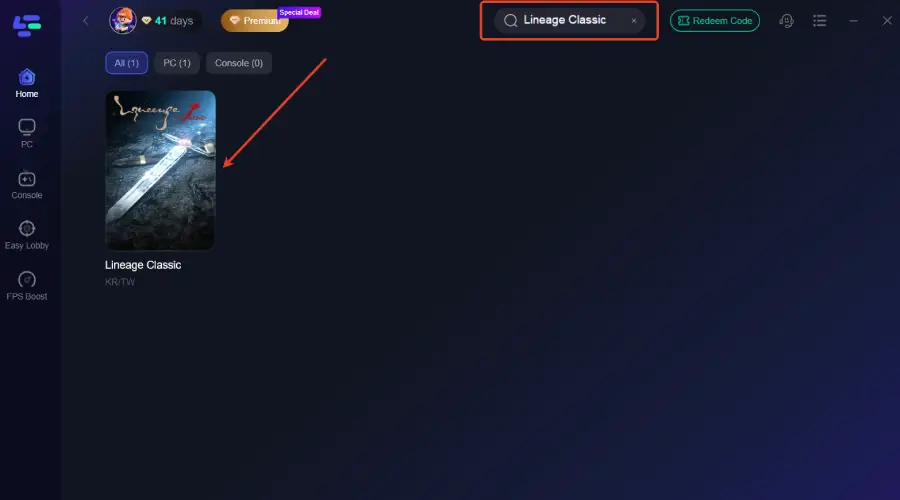
Use the search bar to find Lineage Classic and click on the search result.
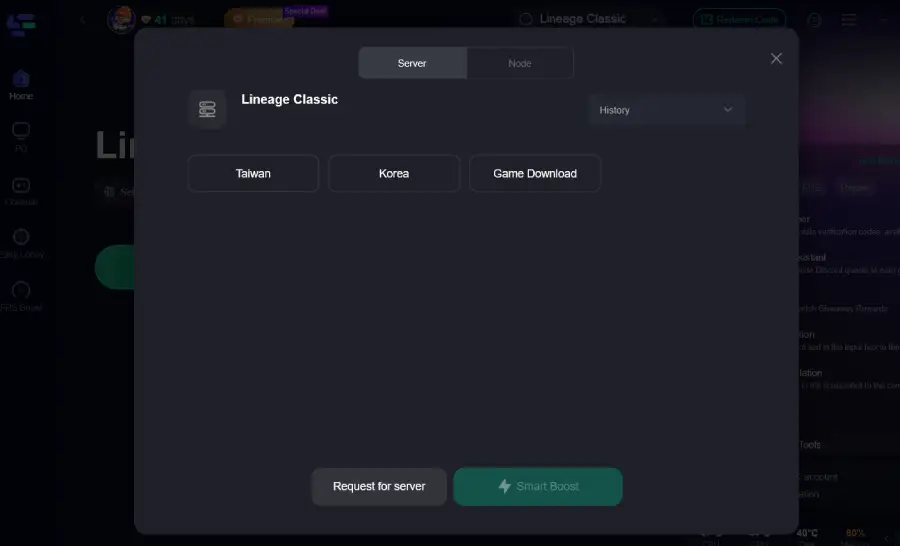
Choose the best server location based on your geographical area and desired gaming performance, then click "Smart Boost" to initiate real-time optimization.
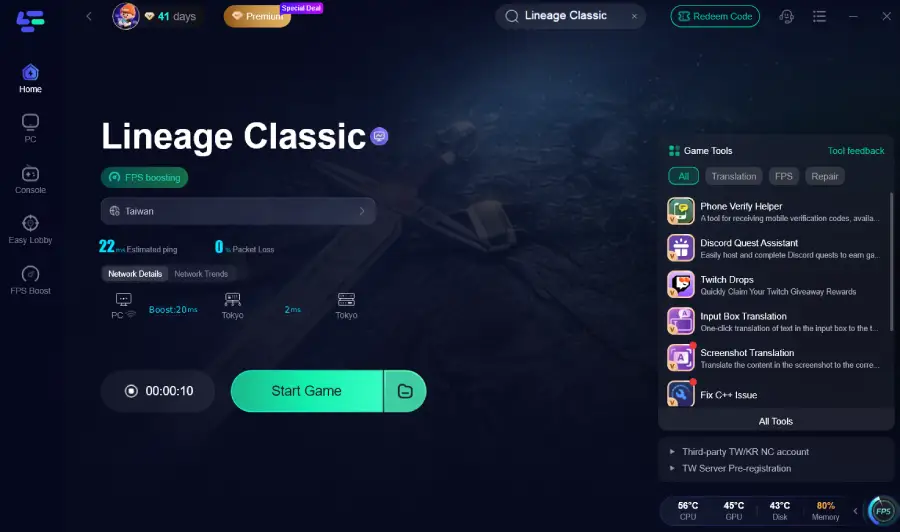
Verify your real-time ping and packet loss rates, then click "Start Game" to dive into the intense battles of Battlefield 6!
2. Always Check Lineage Classic Server Status
Before troubleshooting your own setup, always confirm the current Lineage Classic server status. If servers are undergoing maintenance, region-specific testing, or experiencing unusually high traffic, connection failures are expected and usually temporary. Checking server announcements first helps you avoid wasting time adjusting local settings when the issue is on the server side.
3. Use a Wired Ethernet Connection
Wireless connections are more vulnerable to interference, signal drops, and packet loss, especially in crowded networks. Switching to a wired Ethernet connection provides a more stable data path, which can significantly reduce login timeouts and random disconnects during the connection process.
4. Close Background Applications Using Bandwidth
Background downloads, cloud synchronization tools, and video streaming services can silently consume bandwidth and disrupt game traffic. Closing these applications before launching Lineage Classic helps ensure that your network resources are prioritized for the game, improving connection stability during login.
5. Verify Game Files and Keep the Client Updated
Corrupted or missing game files can prevent the client from completing server authentication. If you are using Steam or an official launcher, run the file verification tool to repair any issues. Always make sure the game client is fully updated, as version mismatches can also block successful connections.
6. Review Firewall and Antivirus Settings
Firewalls and antivirus software may mistakenly block Lineage Classic’s network traffic. Ensure the game is added to the allowed list, and temporarily disabling security software for testing can help determine whether it is interfering with the connection process.
7. Reset Network Settings on Your PC
Network configuration problems such as corrupted DNS cache or incorrect adapter settings can cause repeated connection failures. Resetting your network settings and refreshing DNS can clear these hidden issues and restore stable connectivity.
8. Follow Community Reports and Updates
If connection issues continue, check community forums, social platforms, or player groups. When many players report similar problems at the same time, it usually points to regional routing issues or server-side instability rather than a problem with your own setup.
Conclusion
Lineage Classic connection issues are largely caused by limited server regions and long-distance international routing, which affects overseas players far more than those located in Korea or Taiwan. Secondary factors such as ISP routing quality, local network stability, and PC configuration can further increase the likelihood of connection errors.
If you experience connection problems in Lineage Classic, such as failing to reach the server, repeated connection errors, or network timeouts, the most effective way to fix them is to check the server status, ensure your local network is stable, and use a network optimization tool like LagoFast Game Booster to improve routing.
With the right setup and expectations, most connection problems can be minimized, allowing you to enjoy Lineage Classic with fewer interruptions and a smoother overall experience.

Boost Your Game with LagoFast for Epic Speed
Play harder, faster. LagoFast game booster eliminates stutter and lags on PC, mobile, or Mac—win every match!
Quickly Reduce Game Lag and Ping!
Boost FPS for Smoother Gameplay!