

League of Legends, despite being one of the most popular games out there, isn’t immune to technical issues. And one of the most frustrating ones? Crashes. Whether it's during the loading screen, after champ select, or mid-game freezes, it’s enough to make anyone rage-quit before the match even begins.
What’s worse is that sometimes everything else seems fine: your PC is solid, your connection is stable, and your drivers are up to date, yet League still crashes. If you’ve ever found yourself scouring Reddit threads for answers (we’ve all been there), you’ll know just how common this problem is, and how difficult it can be to find a one-size-fits-all fix.
In this article, we’re going to break it all down. Let’s get into why League of Legends keeps crashing, where to find crash reports, how to check logs, and—most importantly—how to actually fix the issue.
Vietnamese version: Sự cố League of Legends: Chuyện gì đang xảy ra?

- ✅ Reduce Lag and High Ping.
- ✅ Boost FPS at the Same Time.
- ✅ Support 2000+ Popular Online Games.
- ✅ Support Easy Lobby in all Cod Games without Lag
Part 1: Why Does League of Legends Keep Crashing?
Part 2: Where Are League of Legends Crash Reports?
Part 3: How to Check League of Legends Crash Logs?
Part 4: How to Fix League of Legends Crashing Issues
Part 1: Why Does League of Legends Keep Crashing?
If League keeps crashing on your PC, the causes can vary widely. Here are some of the most common culprits, many of which are backed up by frustrated players on forums and Reddit:
1. Graphics Driver Issues
A classic one. If your GPU drivers are outdated or corrupted, League might crash at random. Nvidia and AMD frequently update their drivers to maintain game compatibility, so always check for updates.
2. Game Files Corruption
Even a single corrupt file can bring the entire game down. This can happen during updates, from interrupted downloads, or from changes made by third-party software.
3. Riot Client or Vanguard Conflicts
Many players on Reddit have reported issues not with League itself, but with Riot's other software like the Riot Client or Vanguard (from Valorant). If either of those is bugged or bloated (e.g., 1.2 TB as one player shared), League can crash on launch.
4. Windows Compatibility
After a Windows 11 update, many players started seeing issues. In some cases, League wouldn’t even open or would show an empty taskbar icon. Compatibility issues or OS corruption may be the underlying issue.
5. Fullscreen Optimization
Windows sometimes mismanages fullscreen apps, leading to crashes or freezes. Disabling fullscreen optimization has helped numerous players in the past.
6. Hardware or Memory Issues
Less commonly, hardware issues like bad RAM or overheating can cause League to crash. Tools like chkdsk /r or MemTest86 can help verify if your PC is the issue.
Part 2: Where Are League of Legends Crash Reports?
If League is crashing, the best way to troubleshoot is to find the crash reports. Riot Games stores logs locally on your PC, and these files can help pinpoint what went wrong.
To find League of Legends crash logs:
Location:
C:\Riot Games\League of Legends\Logs\GameLogs
Each game session will have a folder named after the date and time. Inside, you’ll find:
- r3dlog.txt – detailed event logs for the match
- crash_report.txt – generated if a crash occurred
- network_info.log – if the crash is network-related
Reddit users often share snippets from these logs to get help, and Riot support sometimes asks for them too. So if you’re seeing a consistent crash at a specific point (e.g., champion select or game launch), these logs are your first stop.
League of Legends Crashing Scenarios - Reddit
1. League Crashing on Loading Screen
"Right after champ select, the screen just freezes, then the game closes. No error. Nothing."
This one is super common. The client behaves normally, champ select goes smoothly, but when the game tries to launch, nothing happens, just a silent crash.
2. League Game Crashes After Champion Select
"The client closes after champ select, then won’t reopen unless I restart the PC. I’ve tried reinstalling twice."
This can happen if Vanguard or Valorant is interfering. One user even had to uninstall every Riot-related product before League would work again.
3. League Crashes When Game Starts
"I get an empty taskbar icon, and the game never starts. Eventually it crashes."
This is usually related to Windows 11 updates or broken compatibility. Switching to Windows 10 or running the game in Windows 8 compatibility mode has worked for some.
4. League Freezes In-Game for a Few Seconds
"FPS drops to 0, everything freezes for a second, then comes back. Happens every few minutes."
This type of issue is more performance-related. Check background processes, turn off unnecessary overlays (like Discord, GeForce Experience), and adjust your in-game settings.
Part 3: How to Check League of Legends Crash Logs?
Besides checking the folder we mentioned earlier, there’s another way to use Riot’s Hextech Repair Tool to scan and collect logs automatically.
Using the Hextech Repair Tool:
Step 1. Download from Riot’s official site.
Step 2. Run it and check the boxes for:
- Reinstalling the game
- Gathering logs
Step 3. Start the scan
This tool will bundle your logs, identify potential issues, and even send reports directly to Riot support if needed. It’s not magic, but it’s definitely useful especially if you’re not sure what’s causing the crashes.
Part 4: How to Fix League of Legends Crashing Issues
Here’s the real meat of the article. Let’s go over what actually works, based on what Reddit users and long-time players have tested.
1. Update Everything
- GPU drivers (Nvidia/AMD)
- Windows OS
- Riot Client & League
This is step one for a reason. It might sound basic, but it fixes way more issues than you’d expect.
2. Disable Fullscreen Optimization
Step 1. Go to your LeagueClient.exe
Step 2. Right-click, select Properties, click Compatibility tab
Step 3. Check: "Disable fullscreen optimizations"
Step 4. Apply changes
Players report significantly fewer crashes and freezes after this tweak.
3. Run in Compatibility Mode
Step 1. Go to your LeagueClient.exe
Step 2. Right-click, select Properties, click Compatibility tab
Step 3. Check: "Run this program in compatibility mode for: Windows 8 or 7"
Helps especially on Windows 11 machines.
4. Use LagoFast to Stabilize Performance
LagoFast is a tool designed for gamers struggling with lag, stutters, and crash-prone performance, especially in games like League of Legends.
Why LagoFast?
- Boosts FPS by optimizing system performance
- Reduces latency and packet loss
- Helps avoid crashes caused by overloaded memory or unstable networks
Reddit users who’ve tried it claim that not only does it help with gameplay smoothness, but it also helps reduce those weird in-game freezes and random disconnects. It’s not just a VPN or a lag reducer, it’s an all-in-one performance tool.
Pro Tip: Try running League through LagoFast before launching, many players found it fixed intermittent crashes instantly.
Follow the tutorial to use LagoFast to fix crashes issue:
Step 1: Click the Free Trial button to download and install LagoFast.
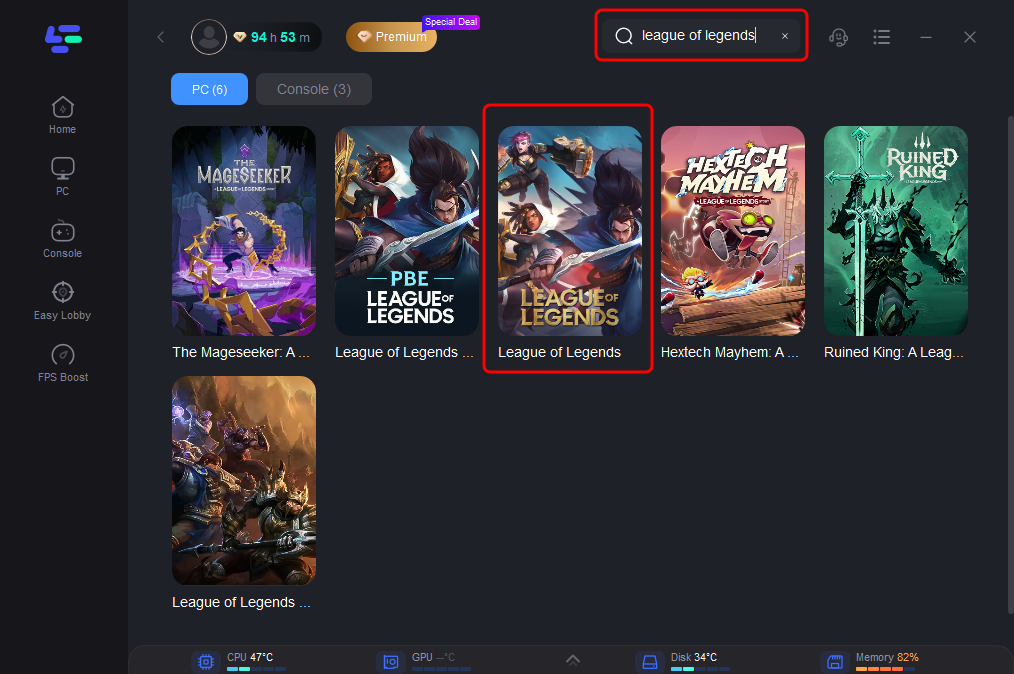
Step 2: Open LagoFast, then click the PC button on the left and search for League of Legends in the search bar, click it after it appears.
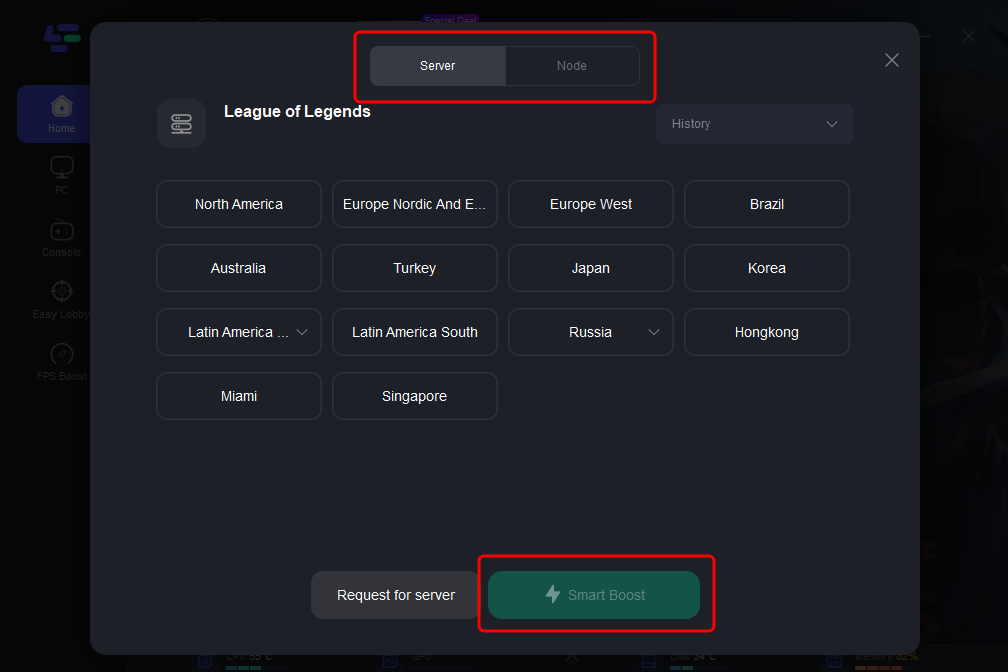
Step 3: Click on "Server" to change to a stable server that can fix crashes, then click on "Smart Boost".
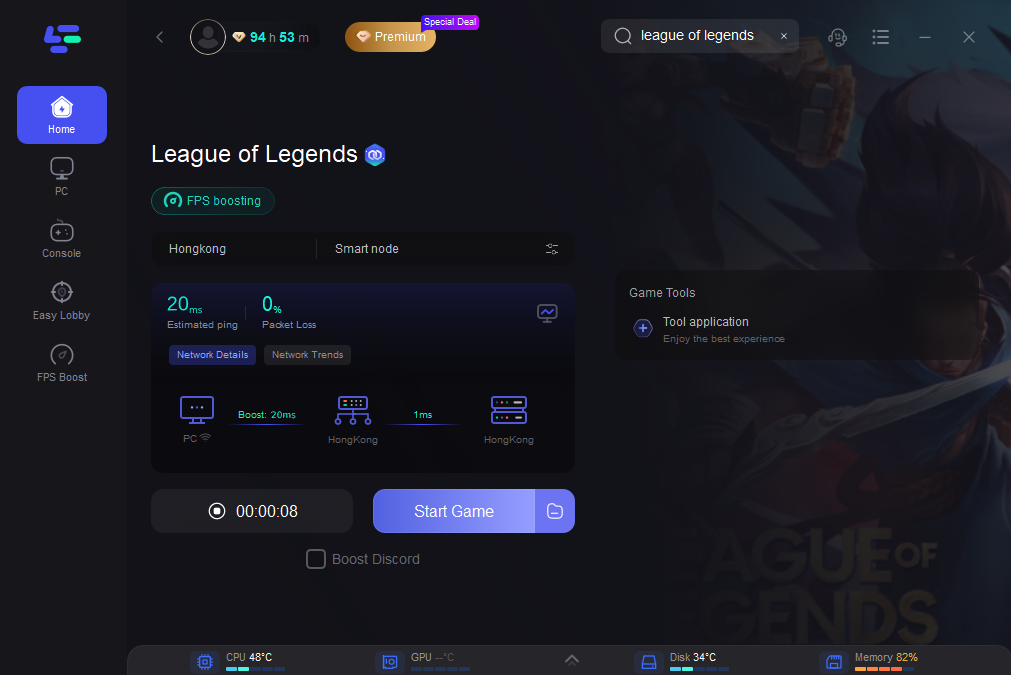
Step 4: Check the specific game ping, packet loss, and multiple path connection on the right side. Finally, click the "Start Game" to play the game.
5. Reinstall EVERYTHING Riot-Related (When Nothing Else Works)
This one’s from a top Reddit thread where a user detailed their months-long struggle with crashing after champ select. "What finally worked for me was fully uninstalling every Riot product: League, PBE, Valorant, Vanguard, Riot Client. Then reinstalling from scratch. Only then did the League work."
Sometimes, one Riot game (like Valorant) can corrupt shared files that affect League.
6. Repair League Installation
Step 1. Open the Riot Client
Step 2. Go to League of Legends, and click Settings
Step 3. Click "Initiate Full Repair"
Step 4. This will scan and repair any corrupted files.
7. Clean Boot Windows
Eliminate third-party software conflicts by performing a clean boot:
Step 1. Press Windows + R and type msconfig
Step 2. Go to "Services", Hide Microsoft Services, then Disable all
Step 3. Restart the PC and launch League
If the crashes stop, it means something you had running in the background was causing them.
Conclusion
Dealing with League of Legends crashes is beyond frustrating, especially when you're just trying to enjoy a game or grind ranked. But the good news is that most issues can be fixed, even if it takes a bit of trial and error. From updating drivers to digging through crash logs, and even wiping every Riot game off your system, there’s no shortage of solutions. But if you want a quick fix with noticeable results, give LagoFast a try. For a lot of players, it’s been the game-changer they needed.

Boost Your Game with LagoFast for Epic Speed
Play harder, faster. LagoFast game booster eliminates stutter and lags on PC, mobile, or Mac—win every match!
Quickly Reduce Game Lag and Ping!
Boost FPS for Smoother Gameplay!