
If you’re seeing a Last Epoch login error, you’re not alone. Many players have reported issues logging into their accounts, whether due to server downtime, incorrect credentials, or network problems. This guide will walk you through the common causes and provide practical solutions to help you fix the problem and start playing again.

- Common Causes of Last Epoch Login Error
- How to Fix Last Epoch Login Error
- When to Contact Last Epoch Support
- Solve Login Errors with LagoFast Game Booster
1. Common Causes of Last Epoch Login Error
Before diving into solutions, it’s helpful to understand what might be causing the login error in Last Epoch:
- Server Issues: If the servers are down or under maintenance, login attempts may fail.
- Incorrect Email or Password: Typos or outdated credentials can prevent you from logging in.
- Network Problems: Poor or unstable internet connections can interfere with authentication.
- Firewall or Antivirus Blocks: Security software may block the game’s access to servers.
- Corrupted Game Files: Damaged installation files can cause login attempts to fail.
2. How to Fix Last Epoch Login Error
Here are several methods you can try to resolve the Last Epoch login error:
1. Check Server Status
First, verify if the problem is on the server side:
- Visit the official Last Epoch website or check their social media pages (e.g., Twitter, Discord) for maintenance announcements or outage reports.
- You can also check third-party websites like Downdetector to see if other players are experiencing the same issue.
2. Double-Check Login Credentials
- Ensure that you are entering the correct email and password:
- Be mindful of case sensitivity.
- Avoid using autofill if it’s inserting outdated credentials.
- If you’ve forgotten your password, use the “Forgot Password” option to reset it.
3. Restart the Game and Launcher
- Sometimes, a simple restart can resolve temporary issues:
- Close the game completely.
- Exit the launcher (if applicable), then relaunch it and try logging in again.
4. Check Your Internet Connection
- A weak or unstable connection can prevent you from connecting to the login server:
- Use a wired connection if possible.
- Restart your router or modem.
- Avoid heavy bandwidth usage (e.g., downloads, streaming) while trying to log in.
5. Disable Antivirus or Firewall Temporarily
- Security software can sometimes block Last Epoch’s access to the login servers:
- Temporarily disable your antivirus or firewall and try logging in again.
- If successful, add Last Epoch to the software’s whitelist or exception list.
6. Verify Game Files
- Corrupted files can interfere with game processes, including logging in:
- If you’re using Steam, right-click on Last Epoch in your library.
- Go to Properties > Local Files > Verify Integrity of Game Files.
- Let Steam fix or replace any broken files.
7. Reinstall the Game
- As a last resort, uninstall and reinstall Last Epoch to ensure a clean, updated installation:
- Uninstall the game from your system.
- Re-download it from the official source (Steam or the Last Epoch launcher).
- Install and try logging in again.
3. When to Contact Last Epoch Support
If you’ve tried all the above fixes and are still encountering the Last Epoch login error, it may be time to reach out to the official support team. Here’s when and how to do it:
Situations That Warrant Contacting Support:
- You’ve confirmed the servers are online, but you still can’t log in.
- You’ve reset your password, but the login screen still rejects your credentials.
- Your account may be suspended or locked due to security issues.
- The error persists even after reinstalling the game and checking your network.
How to Contact Support:
- Visit the official Last Epoch Support Center.
- Submit a support ticket detailing your issue, including:
- Your account email
- A description of the error
- Any troubleshooting steps you’ve already tried
- Screenshots, if available
Their support team usually responds within a few business days. While waiting, you can also ask for help in the Last Epoch Discord server or community forums, where experienced players or moderators may offer quick tips.
4. Solve Login Errors with LagoFast Game Booster
If your Last Epoch login error is related to unstable network conditions, packet loss, or high ping, LagoFast can help fix the issue quickly. It optimizes your internet route and stabilizes your connection, making the login process smoother and more reliable.
Here’s how to use LagoFast:
Step 1: Free Trial Download.
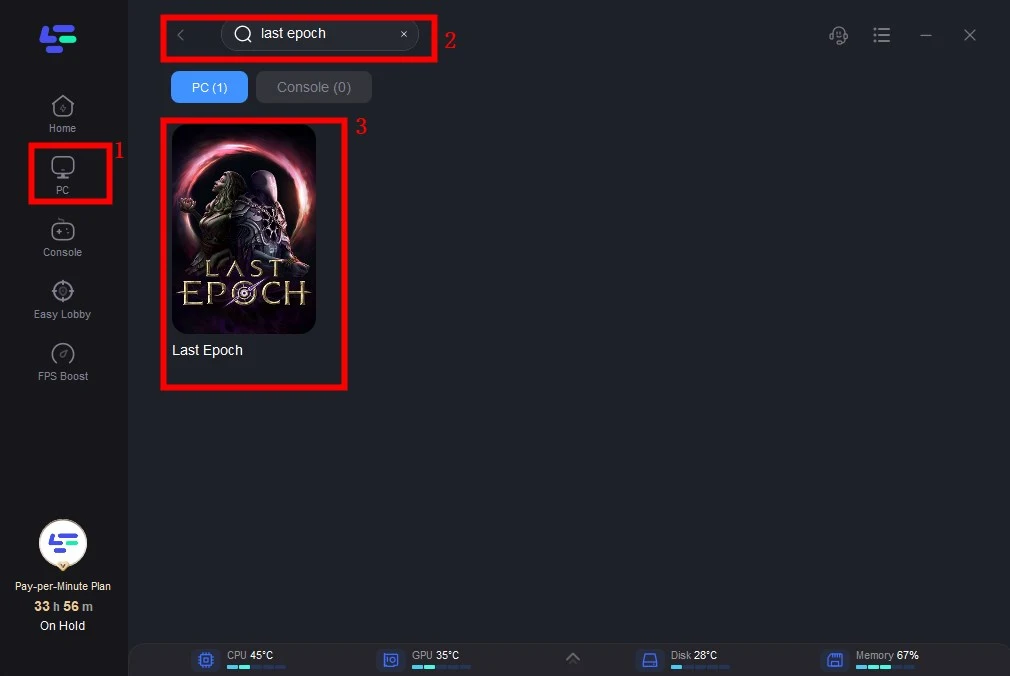
Step 2: Click the Game Boost Button on the left and search Last Epoch in the top search bar.
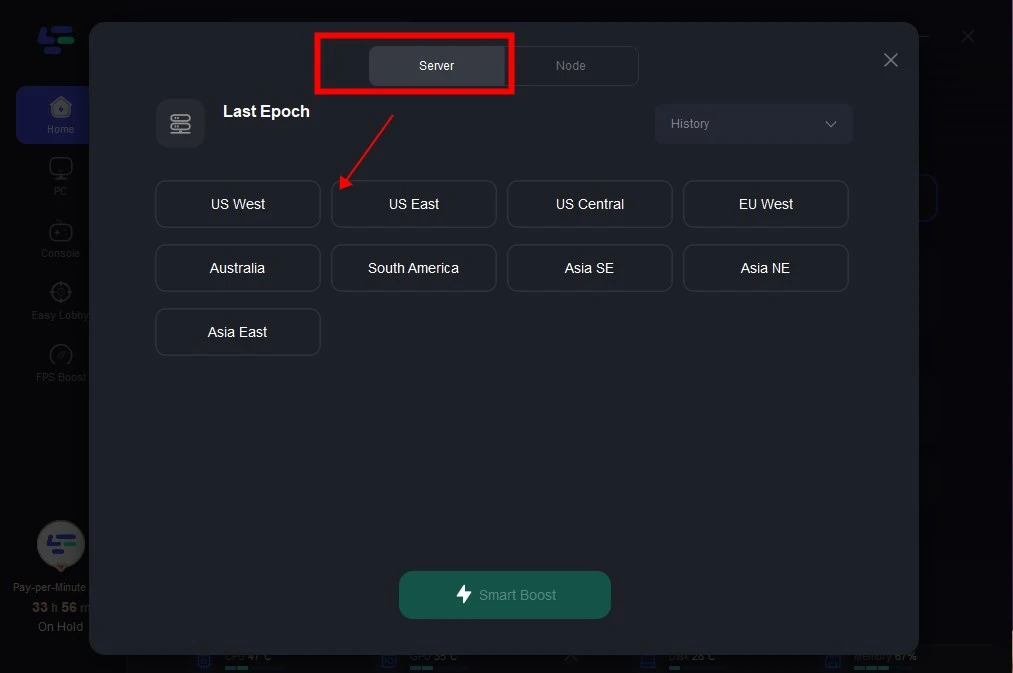
Step 3: Click on Select Server to choose a stable server, then click on the Node on the right, select a good Node, and then click the Smart Boost button.
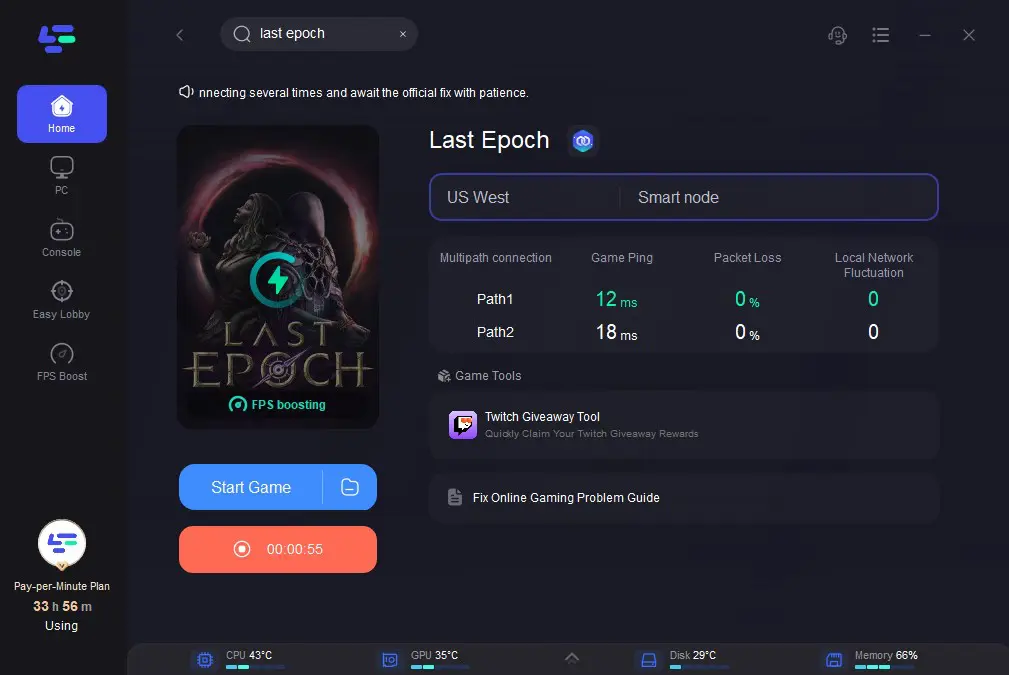
Step 4: By clicking the Smart Boost button, specific game ping, packet Loss, and network type are shown on the right side.
Finally, you can enjoy a lag-free experience with FPS Boosting.
Using LagoFast can significantly reduce the chance of connection-related login failures and improve overall game responsiveness. A stable and optimized network is key to avoiding login issues in Last Epoch. LagoFast provides a quick, effective fix by reducing lag and ensuring a more stable connection. Try it out to enjoy a seamless login experience.
Conclusion
Facing a Last Epoch login error can be frustrating, but with the right steps, most issues can be resolved quickly. Whether it’s a server outage, incorrect login details, or network instability, this guide gives you the tools to troubleshoot effectively. If you’re still experiencing problems, consider reaching out to Last Epoch’s support team or trying a network optimizer like LagoFast for added stability.
Boost Your Game with LagoFast for Epic Speed
Play harder, faster. LagoFast game booster eliminates stutter and lags on PC, mobile, or Mac—win every match!
Quickly Reduce Game Lag and Ping!
Boost FPS for Smoother Gameplay!