
Experiencing connection issues in Killing Floor can ruin the cooperative fun and intense wave-based action the game is known for. Whether you’re facing disconnections, high ping, or server timeouts, these problems can stem from various causes. This guide will walk you through the main reasons behind Killing Floor connection issues and provide effective solutions to fix them.

- Common Killing Floor Connection Issues
- How to Fix Killing Floor Connection Issues
- Use LagoFast to Fix Killing Floor Connection Issues
- FAQs
1. Common Killing Floor Connection Issues
1. Server Timeout or Disconnection
Players may suddenly get kicked from a match with a “Connection Lost” or “Server Timeout” message. This can be due to:
- Host server instability
- NAT type restrictions
- Firewall blocking game ports
- Game server desyncs
2. High Ping and Lag Spikes
High latency can cause teleporting enemies or delays in shooting and movement.
Main causes include:
- Playing on distant servers
- Background downloads or bandwidth-heavy apps
- ISP throttling during peak hours
- Poor router performance or outdated firmware
3. Matchmaking Errors
Sometimes, players encounter issues when joining matches or the game freezes during loading screens.
Possible causes:
- Corrupted game files
- Steam client bugs
- Version mismatch with host/server
- Incomplete updates or DLC sync issues
2. How to Fix Killing Floor Connection Issues
1. Check and Optimize Your Network
- Use a wired Ethernet connection instead of Wi-Fi.
- Restart your router/modem to refresh your network.
- Close background apps (like torrents, streaming) that use bandwidth.
- Set your NAT type to Open (Type 1).
2. Adjust Steam and Game Settings
- Go to Steam > Settings > Downloads > choose a closer download region.
- Disable Steam overlay and in-game voice if performance is affected.
- Verify game file integrity in Steam:
- Right-click Killing Floor > Properties > Local Files > Verify Integrity.
3. Port Forwarding for Killing Floor
Make sure the following ports are open on your router:
|
Protocol |
Port Range |
|---|---|
|
TCP |
7707, 28852 |
|
UDP |
7707-7708, 28852 |
Forward these ports to your PC’s local IP address for better connectivity.
4. Update Game and System Drivers
- Always keep Killing Floor and Steam updated.
- Update network drivers and GPU drivers for optimal performance.
- Install Windows or OS security updates regularly.
5. Reinstall the Game
If the issue persists after trying all fixes, a fresh install may help:
- Back up your config files if needed.
- Uninstall the game via Steam.
- Delete any remaining folders in Documents\My Games\KillingFloor.
- Reinstall and try again.
3. Use LagoFast to Fix Killing Floor Connection Issues
If manual tweaks don’t solve the problem, using a game booster like LagoFast can help stabilize your connection instantly and ensure a seamless gaming experience. Game boosters like LagoFast optimize your network by rerouting your connection through the fastest possible server, reducing latency, and preventing packet loss. This means you can play Killing Floor without worrying about sudden disconnections, frustrating lag spikes, or inconsistent ping times.
Why Use LagoFast?
- Automatically finds the fastest server route for Killing Floor.
- Reduces ping and packet loss with smart routing.
- Real-time ping and network diagnostics.
- No configuration needed — just launch and boost.
How to Use LagoFast
Step 1: Download LagoFast by clicking on the Free Trial button.
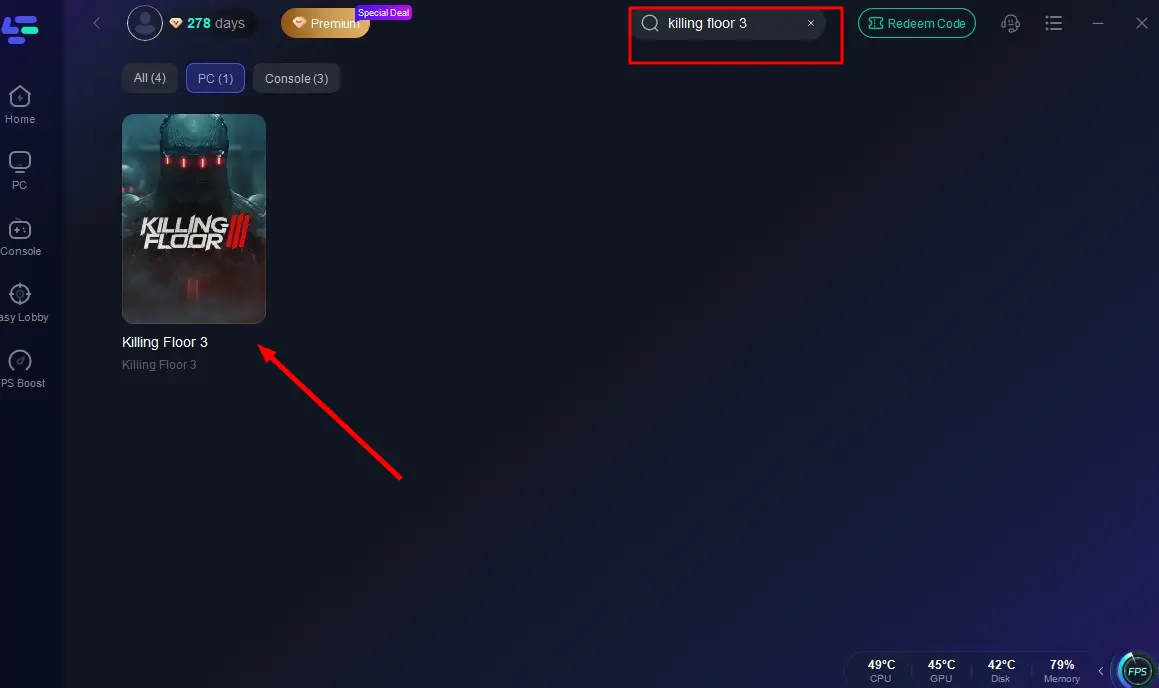
Step 2: Search for Killing Floor 3 in the LagoFast app before launching the game.
Step 3: Choose a stable server and select the best node for the lowest ping.
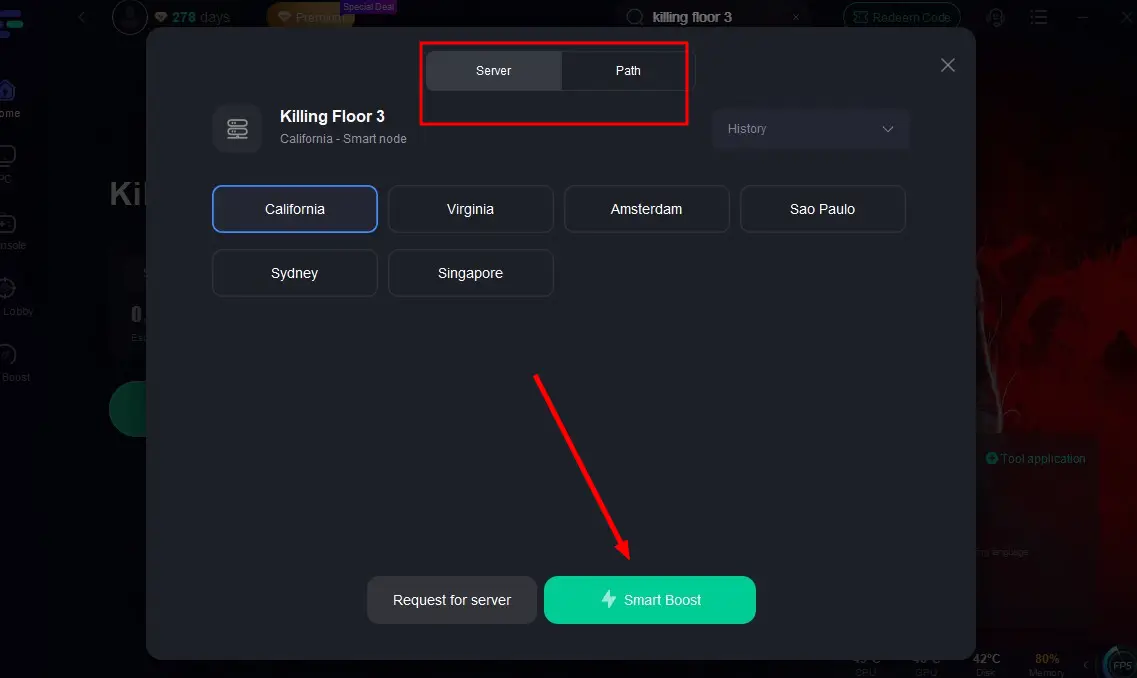
Step 4: Click the “Smart Boost” button to view your connection stats and activate optimization.
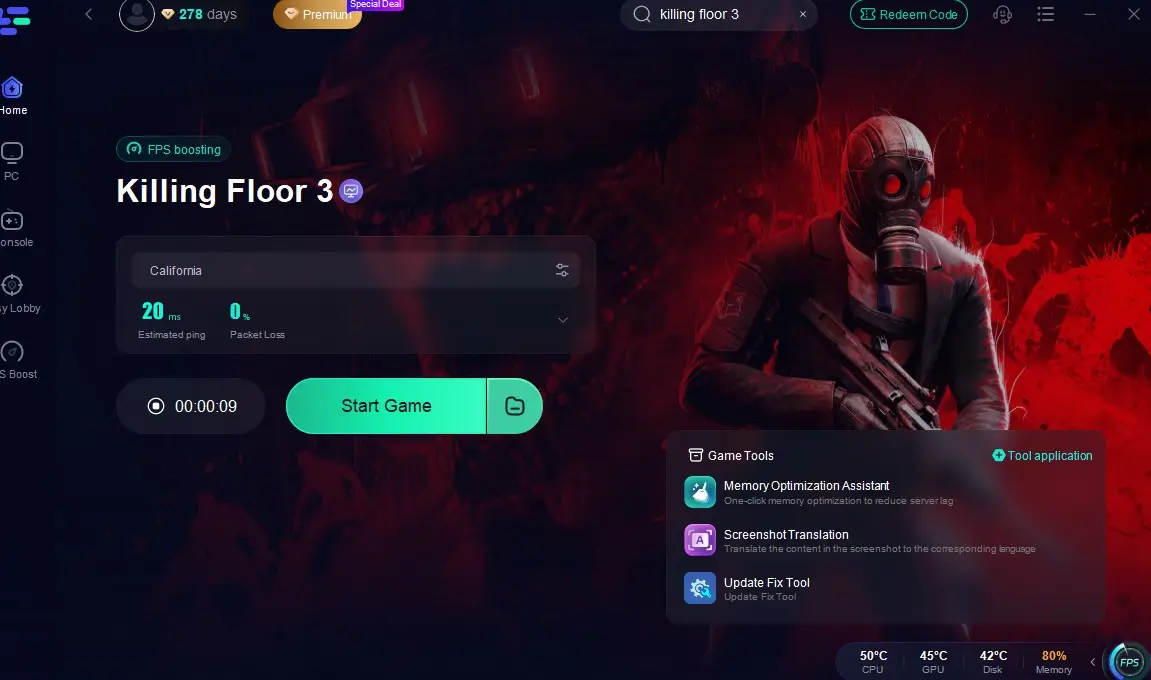
With LagoFast, you can enjoy smoother gameplay without disconnections or high ping ruining the match. You’ll have the edge in tight moments where every shot counts, and you can fully immerse yourself in the game without frustrating interruptions. By providing real-time diagnostics and adaptive network optimization, LagoFast ensures you’re always connected to the most stable server for your region. This makes it an invaluable tool for players who want to get the most out of Killing Floor’s action-packed experience.
4. FAQ
Why do I get disconnected from Killing Floor servers?
This is often due to unstable host servers, strict NAT settings, or firewall issues.
Can I play Killing Floor with friends in other regions?
Yes, but you may experience high ping. Use a game booster like LagoFast to reduce latency.
How much internet speed do I need for Killing Floor?
At least 3 Mbps for download and 1 Mbps for upload is recommended for stable play.
Is LagoFast safe to use?
Yes, LagoFast is a trusted third-party tool with thousands of users worldwide.
Conclusion
Killing Floor connection issues can stem from many factors, but most of them are fixable with the right tools and settings. Whether you’re a casual survivor or a hardcore Zed slayer, ensuring a stable connection enhances the co-op experience significantly. For a quick and effective solution, LagoFast offers one of the best ways to reduce lag and stay connected throughout the game.

Boost Your Game with LagoFast for Epic Speed
Play harder, faster. LagoFast game booster eliminates stutter and lags on PC, mobile, or Mac—win every match!
Quickly Reduce Game Lag and Ping!
Boost FPS for Smoother Gameplay!