
When trying to test or play Rust—especially during its dual PC and mobile beta phases—connection issues can be frustrating. This guide helps you identify whether Rust servers are down or if the problem is on your end, and provides step-by-step fixes with LagoFast and other troubleshooting methods.

- ✅ Reduce Lag and High Ping.
- ✅ Boost FPS at the Same Time.
- ✅ Support 2000+ Popular Online Games.
- ✅ Change Server without Latency.
- ✅ Boost Game Loading Speed.
Part 1. Why Rust Servers Go Down
Part 2. How to Fix Server Connection Issues in Rust with LagoFast
Part 3. Other Solutions to Solve Rust Server Connectivity Issues
Part 1. Why Rust Servers Go Down
Rust servers, whether official or private, may become unavailable for several reasons:
Planned Maintenance or Updates
Developers occasionally take servers offline for patches or wipes. Official channels usually provide advance notices.
Scheduled or Automatic Restarts
Many servers auto-restart after crashes or as part of routine resets. These typically last 5–10 minutes.
Unexpected Crashes or Overloads
Servers may crash due to resource strain or bugs, requiring manual intervention.
Hardware or ISP Issues
Problems with the server host infrastructure or your ISP may block or throttle connections.
Community & Private Server Downtime
For community-hosted servers, check tools like BattleMetrics or Discord groups. Players note that servers often reboot within 5–30 minutes but may also shut down permanently without notice.

Part 2. How to Fix Server Connection Issues in Rust with LagoFast
If servers are online but you’re still having trouble connecting, LagoFast can significantly improve network reliability.
How it Helps
- Reroutes your connection through optimized paths, minimizing ISP routing inefficiencies.
- Reduces latency and packet loss, leading to fewer disconnects or timeouts.
- Connects you through the least congested routes during launch and matchmaking.
How to Use LagoFast on Mobile
For mobile players (e.g., joining Rust’s Chinese mobile test on Android or iOS):
Step 1. Click here to download LagoFast Mobile APK File.
Step 2. Search for the game and select it.
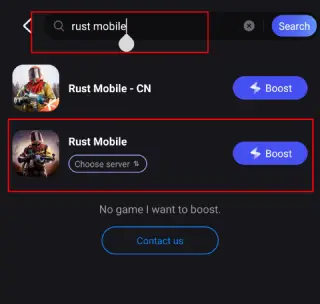
Step 3. Choose a server and tap Boost.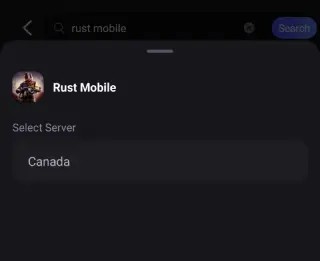
Step 4. Enjoy smoother FPS and stable connections.
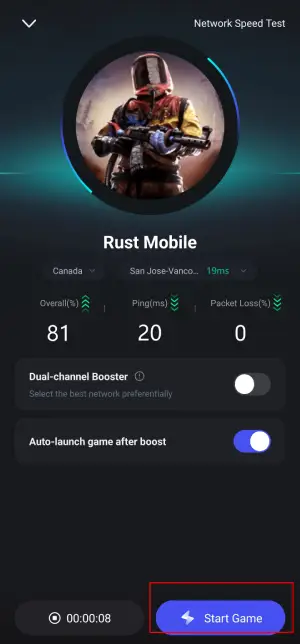
LagoFast ensures smoother mobile gameplay by reducing routing delays and authentication failures.
If you’re switching from mobile to PC testing, LagoFast offers the same optimization benefits with its desktop client—making it easy to maintain a stable experience across both platforms.
How to Use LagoFast on PC
Step 1. Download and install LagoFast free trial.
Step 2. Search for Rust and select it.
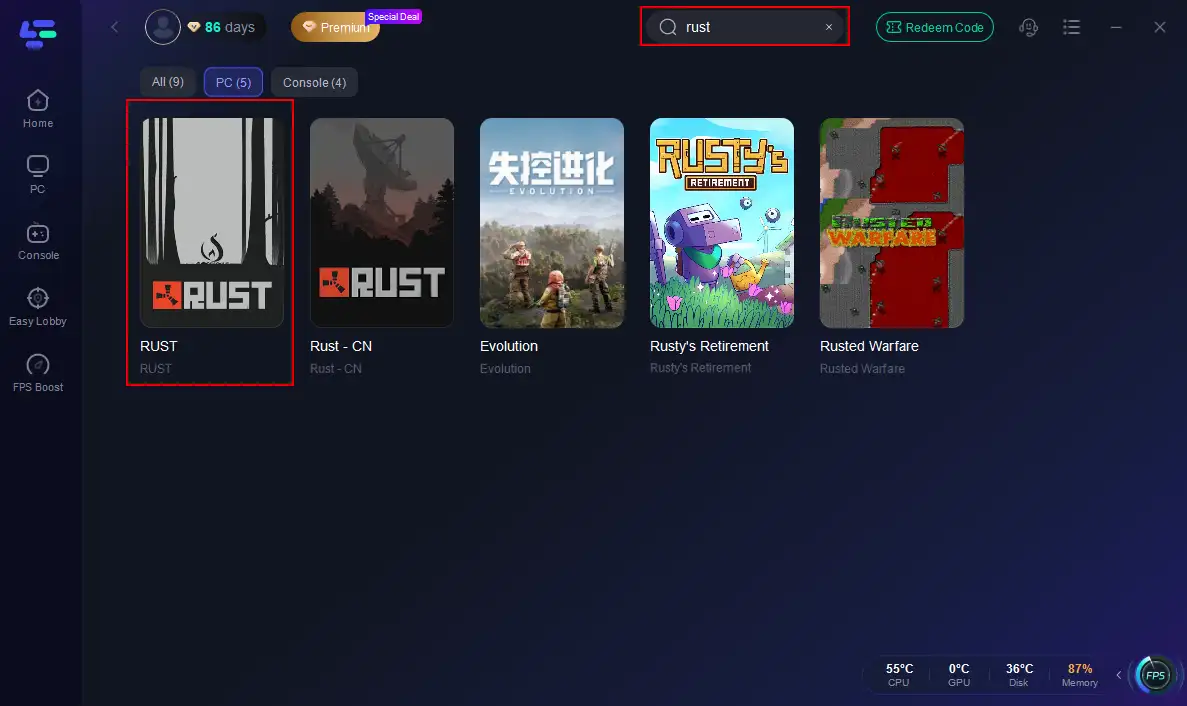
Step 3. Choose a low-latency node matching your region.
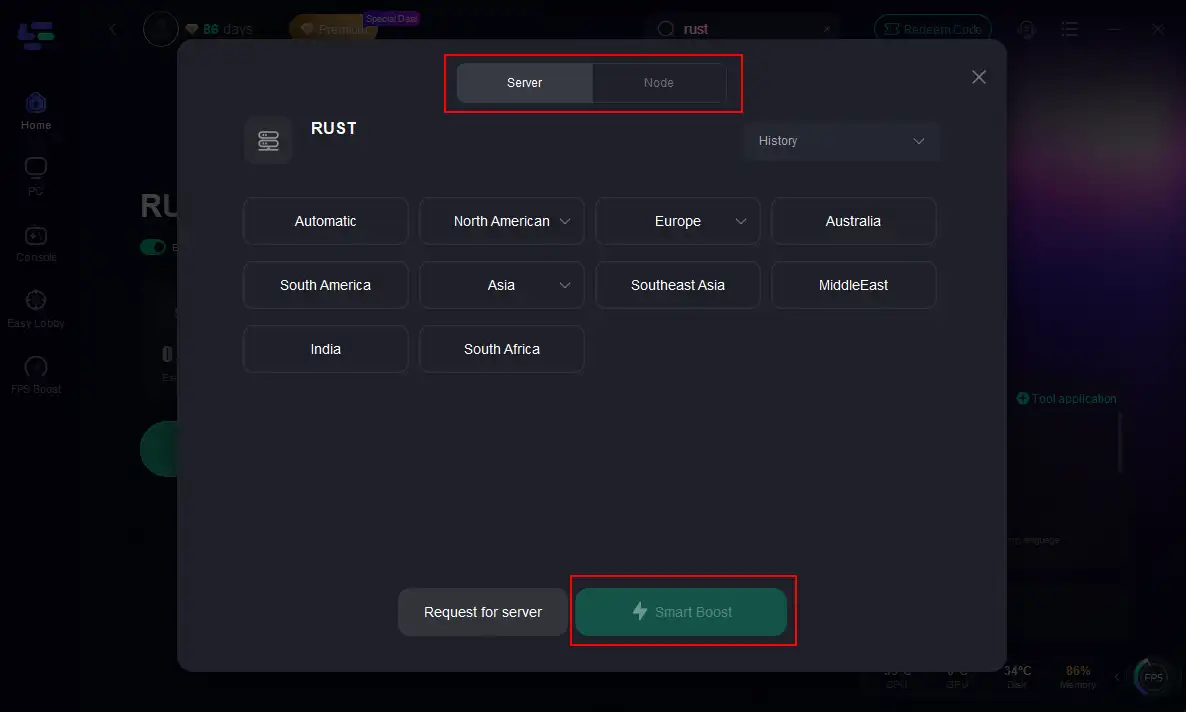
Step 4. Click Smart Boost to optimize ping, packet loss, and routing.
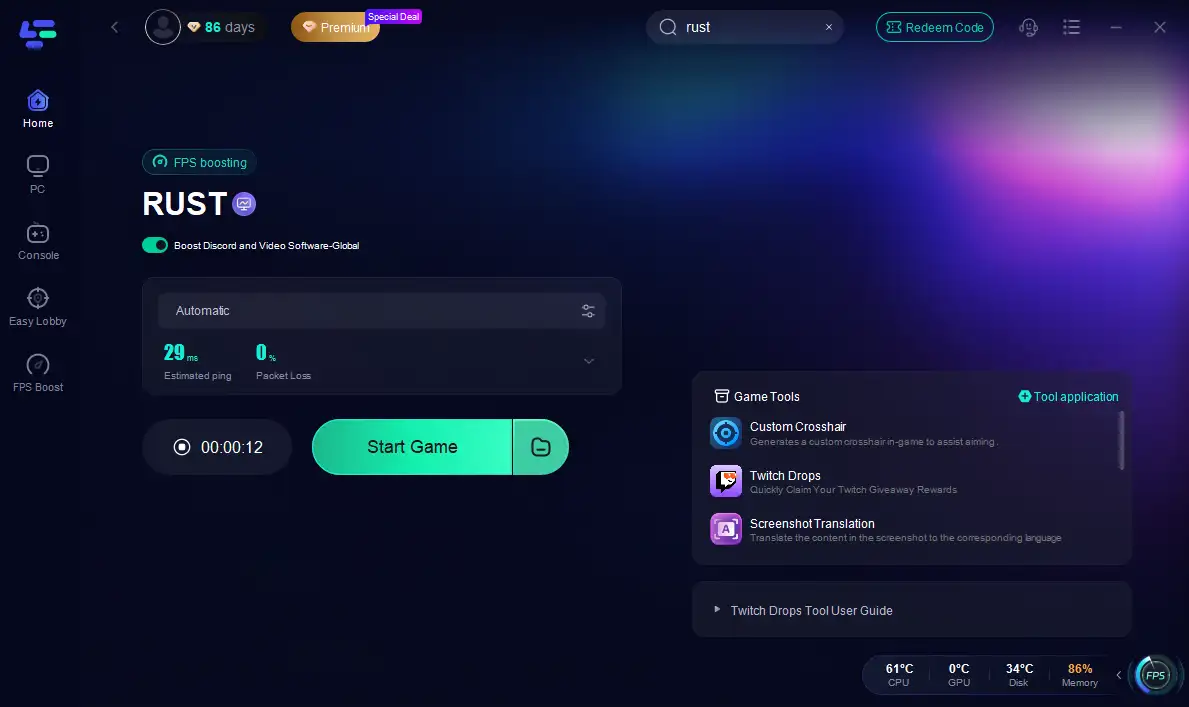
LagoFast routes traffic through more stable networks, reducing timeouts and load failures while ensuring smoother packet delivery.
Part 3. Other Solutions to Solve Rust Server Connectivity Issues
Check Server Status and Outages
Use DownDetector, GameChampions, or similar tools to see if others report Rust outages.
- RustEz provides color-coded server health (Green = Online, Orange = Restarting, Red = Offline).
- Official Rust social media often posts updates during major outages.
Network and Client-Side Fixes
- Restart your router, modem, and device to clear temporary issues.
- Whitelist Rust and Easy Anti-Cheat in your firewall/antivirus, or temporarily disable them.
- Switch DNS servers (Google DNS: 8.8.8.8 / 8.8.4.4) to bypass resolution issues.
- Use a wired Ethernet connection or move closer to your Wi-Fi router.
- Clear PC network cache with commands like
netsh winsock reset.
Part 4. FAQs
Q: How can I tell if Rust servers are down globally or it’s just me?
Use tools like Downdetector, GameChampions, or check Rust’s Twitter/Discord.
Q: How long do maintenance or reboot downtimes usually last?
Most restarts last 5–10 minutes. Full wipes or updates can take up to 30 minutes.
Q: Can LagoFast fix Steam authentication or disconnection errors?
Yes—by reducing packet loss and optimizing paths, LagoFast improves authentication success and connection reliability.
Q: Are community servers handled differently than official ones?
Yes. Community servers depend on their host. Use BattleMetrics or Discord for their specific status.
Q: What if nothing works?
Try a clean reinstall of Rust, reset your network settings, and test with another network or hotspot to rule out local issues.
Conclusion
When Rust won’t connect, start by checking if servers are globally down via tools like Downdetector, RustEz, or official channels. If servers are online, optimize your connection using LagoFast on both mobile and PC for smooth routing. Combine this with firewall fixes, DNS changes, and client restarts to resolve most issues quickly.
Boost Your Game with LagoFast for Epic Speed
Play harder, faster. LagoFast game booster eliminates stutter and lags on PC, mobile, or Mac—win every match!
Quickly Reduce Game Lag and Ping!
Boost FPS for Smoother Gameplay!