

If you can’t log in to EA Sports FC 26, get kicked out of Ultimate Team, or see “Unable to connect to EA servers,” you’re not alone. Many players ask the same question during peak hours: Is EA FC 26 server down? Server outages can strike during major updates, FUT Weekend League, or when EA’s infrastructure is overloaded. In this guide, we’ll show you how to check FC 26 server status, explain the common causes of downtime, and give you fixes for staying connected across PC, console, and mobile—plus how tools like LagoFast help you avoid false disconnects caused by unstable routes.

- ✅ Reduce Lag and High Ping.
- ✅ Boost FPS at the Same Time.
- ✅ Support 2000+ Popular Online Games.
- ✅ Change Server without Latency.
- ✅ End Stuck & Crashing Issues.
- How to Check If EA FC 26 Servers Are Down
- Common Reasons EA FC 26 Servers Go Down
- Fixes for Connection Issues on PC
- Fixes for Console (PS5, Xbox Series X/S)
- Fixes for Mobile (FC 26 Mobile)
- What to Know About EA Sports FC 26
- How LagoFast Helps You Stay Connected
1. How to Check If EA FC 26 Servers Are Down
If you suspect downtime, here’s where to confirm:
- EA Help Server Status Page – EA’s official site updates live server availability.
- @EAFCDirect Twitter/X – The official FC channel posts outage and maintenance alerts.
- Downdetector – A third-party tool showing real-time user reports of login or gameplay issues.
- In-Game Error Messages – If it says “Cannot connect to EA servers,” it could be server downtime or your network.
2. Common Reasons EA FC 26 Servers Go Down
- Scheduled Maintenance – EA often brings servers offline for patches and updates.
- Weekend League Traffic – Heavy loads during FUT Champions cause congestion.
- Unexpected Outages – Network failures or DDoS attacks on EA servers.
- Regional Issues – Some data centers may go down while others stay up.
- Local ISP Problems – Not every disconnect means servers are offline; sometimes it’s your route.
3. Fixes for Connection Issues on PC
If servers aren’t globally down but you still can’t connect:
- Restart Game & Client – Refresh EA App/Steam/Epic launcher.
- Switch to Wired Connection – Ethernet is more stable than Wi-Fi.
- Change DNS Settings – Try Google DNS (8.8.8.8) or Cloudflare (1.1.1.1).
- Check Background Apps – Shut down bandwidth-heavy downloads or streams.
4. Fixes for Console (PS5, Xbox Series X/S)
- Restart Console & Router – A reset often clears temporary issues.
- Check NAT Type – Open NAT improves server communication.
- Use Wired LAN – Reduces packet loss compared to wireless.
- Change Server Region – Switch region settings to avoid overloaded hubs.
5. Fixes for Mobile (FC 26 Mobile)
- Stay on Reliable Networks – Use strong Wi-Fi or 5G, avoid public hotspots.
- Restart App & Device – Simple but effective.
- Close Background Apps – Free up bandwidth for FC 26.
- Play During Off-Peak Hours – Avoid peak congestion that mimics “server down.”
6. What to Know About EA Sports FC 26
EA Sports FC 26 is the latest entry in EA’s football franchise, building on the rebrand from FIFA to EA Sports FC. It continues to push online play as its core focus, which makes server stability more important than ever.
Key features that rely heavily on servers include:
- Ultimate Team (FUT 26): Building squads, trading on the transfer market, and competing in Division Rivals or Weekend League.
- Clubs Mode: Forming teams with friends across platforms and playing competitive matches.
- VOLTA Football: Street-style matches that need stable matchmaking to function smoothly.
- Crossplay Support: PC, PlayStation, and Xbox players competing together in most modes.
Because these modes are all server-dependent, any outage or connection instability can directly impact gameplay. That’s why tools like LagoFast and proper network setup are crucial—so you can stay connected even when servers are under pressure.
7. How LagoFast Helps You Stay Connected
Sometimes EA’s servers aren’t truly down—your connection route is unstable. LagoFast helps solve this by bypassing bad ISP routing and connecting you through the most stable path to EA’s servers. This reduces false disconnects and improves stability during high-traffic times.
Key Benefits of Using LagoFast for FC 26
- Avoid False Disconnects – Stay connected even when traffic spikes.
- Lower Ping & Stable Routing – Smooth gameplay during FUT matches.
- Real-Time Monitoring – Track ping, packet loss, and server quality.
- Cross-Platform Support – Works on PC, mobile, and console.
- Easy Setup – Quick install, simple boost button, instant results.
How to Use LagoFast on PC
Step 1. Download LagoFast by clicking the "Free Trial" button.
Step 2. Before you start your game, search for it within the LagoFast application to ensure it's supported.
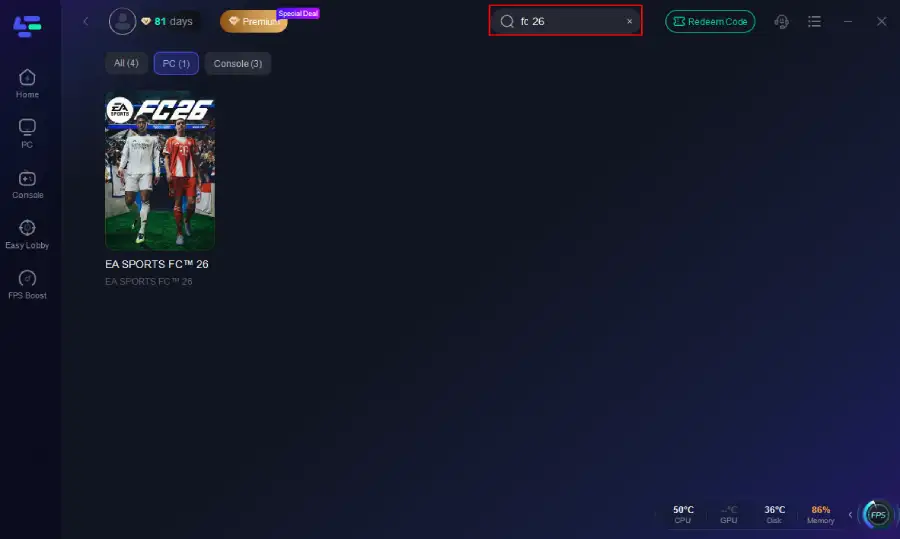
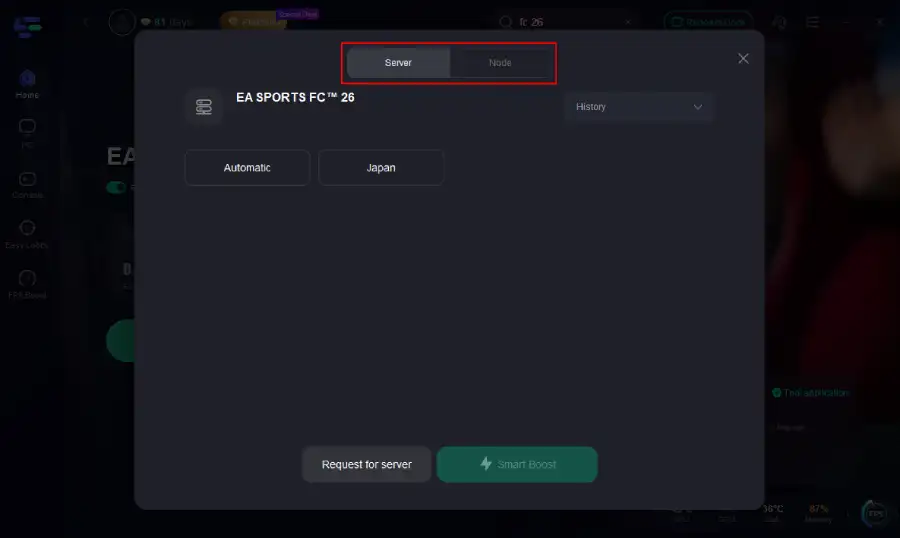
Step 3. Navigate to "Select Server" to choose the most stable server. Follow up by selecting the best Node available on the right to optimize your connection.
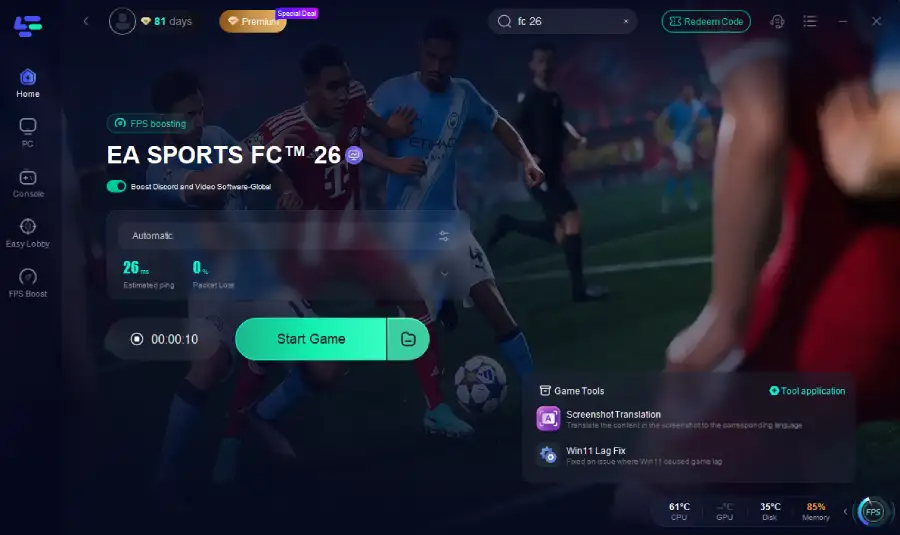
Step 4.Click the "Smart Boost" button to get real-time data on your game's ping, packet loss, and network type, which helps in monitoring and adjusting for optimal performance.
How to boost FC 26 with LagoFast on Console
Console gamers can take advantage of the LagoFast Box:
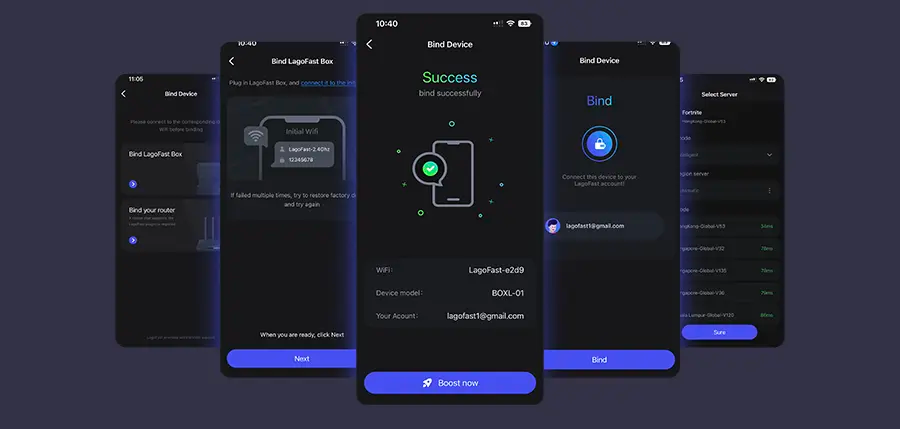
Step 1: Download the LagoFast Console App on your phone to control the LagoFast Box.
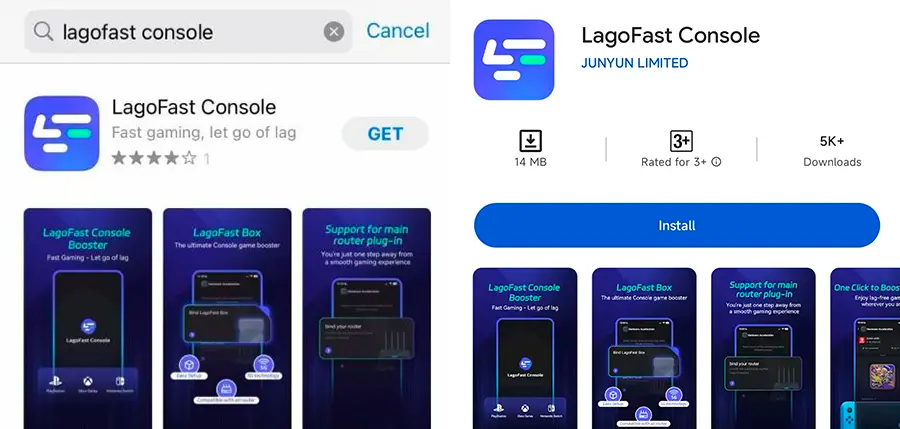
Step 2: Establish a connection between your LagoFast Box, router, and console, choosing between a wired or wireless connection.
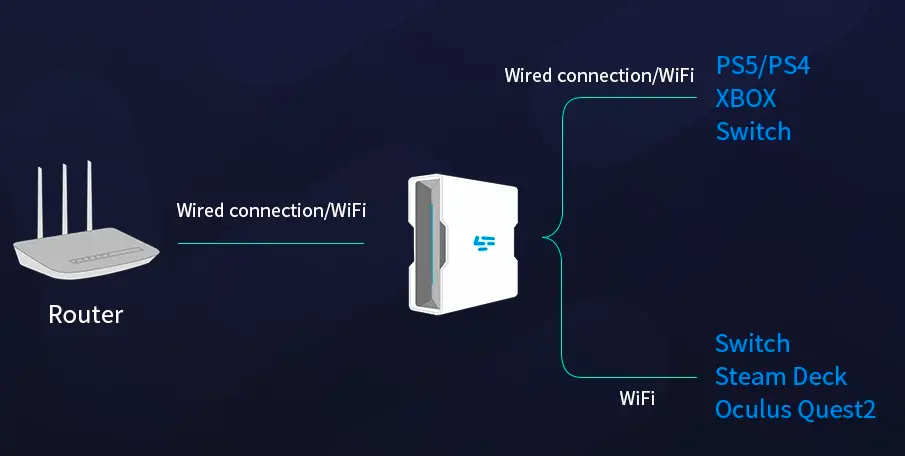
Step 3: Launch the LagoFast Console App and boost FC 26. Once you have completed the binding process with the LagoFast Box, proceed to boost this game within the LagoFast Console App.
LagoFast on Mobile
- Install the LagoFast Mobile Booster.
- Search for FC 26 and pick a stable server.
- Tap Boost to lower ping and prevent sudden drops.
Conclusion
Next time you wonder “Is EA FC 26 server down?”, check EA’s official channels before panicking. Outages do happen—but many connection problems come from unstable routes, not server failures. By combining best practices with LagoFast, you can reduce disconnects, avoid false error messages, and keep your FC 26 matches running smoothly. Winning in FC 26 should be about skill, not server errors. Stay connected, stay sharp, and let LagoFast handle the rest.
Boost Your Game with LagoFast for Epic Speed
Play harder, faster. LagoFast game booster eliminates stutter and lags on PC, mobile, or Mac—win every match!
Quickly Reduce Game Lag and Ping!
Boost FPS for Smoother Gameplay!