

Dead by Daylight supports crossplay across PC and consoles, making it easy to play with friends on different platforms. However, cross-progression works differently and doesn’t always carry over your progress between systems. Many players also run into issues with invites, matchmaking, or connection stability. Here’s how everything actually works.

- ✅ Reduce Lag and High Ping.
✅ Boost FPS at the Same Time.
✅ Change Server Without Latency.
✅ Multiplatform: PC, Console, Mobile.
✅End Stuck, Disconnection and Crashing Issues
Part 1: Is Dead by Daylight Crossplay?
Part 2: Dead by Daylight Crossplay vs Cross-Progression
Part 3: Does Dead by Daylight Support Cross-Progression?
Part 4: Dead by Daylight Supported Platforms
Part 5: Why Can't You Play With Friends?
Part 6: Improve Dead by Daylight Crossplay Stability with LagoFast
Part 1: Is Dead by Daylight Crossplay?

Yes, Dead by Daylight supports crossplay, allowing PC and console players to be matched together in the same games. Whether you’re playing Survivor or Killer, you can still queue with friends across platforms as long as crossplay is enabled.
It works across:
Steam
Epic Games Store
Windows PC
PlayStation 4 & 5
Xbox One & Series X|S
Nintendo Switch
Crossplay is usually enabled by default, but you can toggle it in settings if needed.
Part 2: Dead by Daylight Crossplay vs Cross-Progression
A lot of players mix these two up, but they actually solve completely different problems in the game.
|
Feature |
What It Actually Means |
|
Crossplay |
Lets you play matches with friends on different platforms (PC, PlayStation, Xbox, Switch) |
|
Cross-Progression |
Lets your progress, unlocks, and cosmetics carry over between supported platforms |
The key difference is simple: crossplay is about who you play with, while cross-progression is about what you keep.
For example, you can play with a friend on Xbox while you’re on Steam with no issue thanks to crossplay. But your DLC, cosmetics, Bloodpoints, and character progress won’t automatically transfer just because you’re on different platforms.
That’s why many players get confused—it looks like everything should carry over, but in reality only matchmaking is fully shared.
Part 3: Does Dead by Daylight Support Cross-Progression?
Yes. Cross-progression in Dead by Daylight allows you to sync parts of your inventory and progress across multiple platforms using a Behavior Account.
Supported platforms include:
- Steam
- Epic Games Store
- Windows Store
- PlayStation 4
- PlayStation 5
- Xbox One
- Xbox Series X|S
- Nintendo Switch
However, what actually carries over depends on platform pairing and specific restrictions. Not everything transfers, especially when it comes to certain purchases, DLC, or platform-locked content.
To use cross-progression, you need to link your Behavior Account first. Once connected, your eligible progress can be shared across supported systems.
Just keep in mind that while many platforms are included, the sync is not fully identical everywhere due to platform policies.
Part 4: Dead by Daylight Supported Platforms

Dead by Daylight supports crossplay across all major platforms, allowing players to match together regardless of device. Below is a clear overview of the currently supported systems:
- Steam
- Epic Games Store
- Windows Store
- PlayStation 4
- PlayStation 5
- Xbox One
- Xbox Series X|S
- Nintendo Switch
All of the platforms above share the same matchmaking pool through crossplay, so players can easily team up or go against each other no matter which system they are using.
Part 5: Why Can't You Play With Friends?
Even with crossplay enabled, Dead by Daylight players can still run into issues when trying to invite or join friends. Most of these problems are not caused by crossplay itself, but by settings, account sync, or network stability.
DBD Crossplay Not Working
If crossplay suddenly stops working or matchmaking feels off:
- Make sure Crossplay is enabled in settings
- Update the game to the latest version
- Restart the game client
- Check if servers are under maintenance
DBD Can't Invite Friends
If you can’t send or receive invites:
- Confirm both players are online and on the same game version
- Re-add friends through in-game or platform friend list
- Restart Steam, Xbox Network, PlayStation Network, or Epic Games Launcher
DBD Friend Invite Not Working
If invites are sent but never appear:
- Log out and back into your Behavior Account
- Refresh your friends list
- Temporarily disable VPN or network filters
- Restart the game
DBD Can't Join Friends
If you get errors when joining a lobby:
- Strict NAT type blocking connection
- Packet loss or unstable network
- Server or matchmaking issues
- Region mismatch
Switching the lobby host or retrying often fixes it.
DBD Connection Error
If connection errors keep happening:
- Use a wired Ethernet connection instead of Wi-Fi
- Restart your router or modem
- Close downloads or background apps
- Select the nearest matchmaking region
Part 6: Improve Dead by Daylight Crossplay Stability with LagoFast
Dead by Daylight crossplay can feel unstable when issues like high ping, packet loss, or poor routing affect your connection, leading to lag, failed invites, or disconnects.
LagoFast is a game booster that helps optimize your network route for games like Dead by Daylight, making your connection to servers more stable and efficient.
By improving routing, LagoFast can help reduce ping, fix packet loss, and stabilize your connection during matchmaking and crossplay sessions, resulting in smoother and more consistent gameplay.
If you often experience lag or connection issues when playing with friends, LagoFast can help improve overall stability without changing your in-game settings.
How to Use LagoFast for Dead by Daylight
Step 1: Click the Free Trial button to download and install LagoFast.
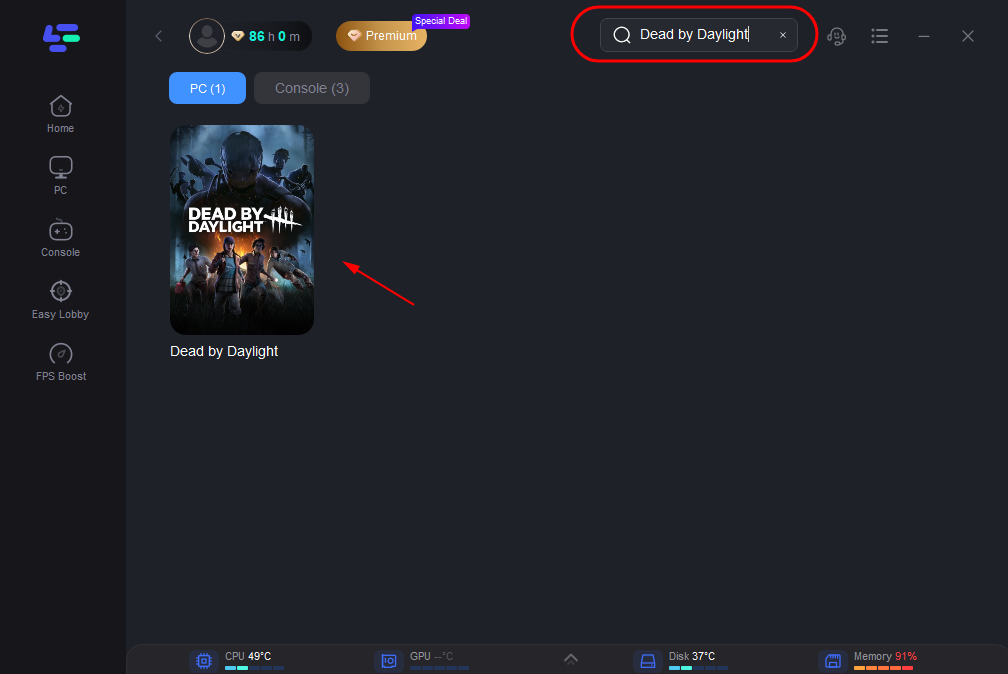
Step 2: After installation, search "Dead by Daylight" in the search bar and select the game.
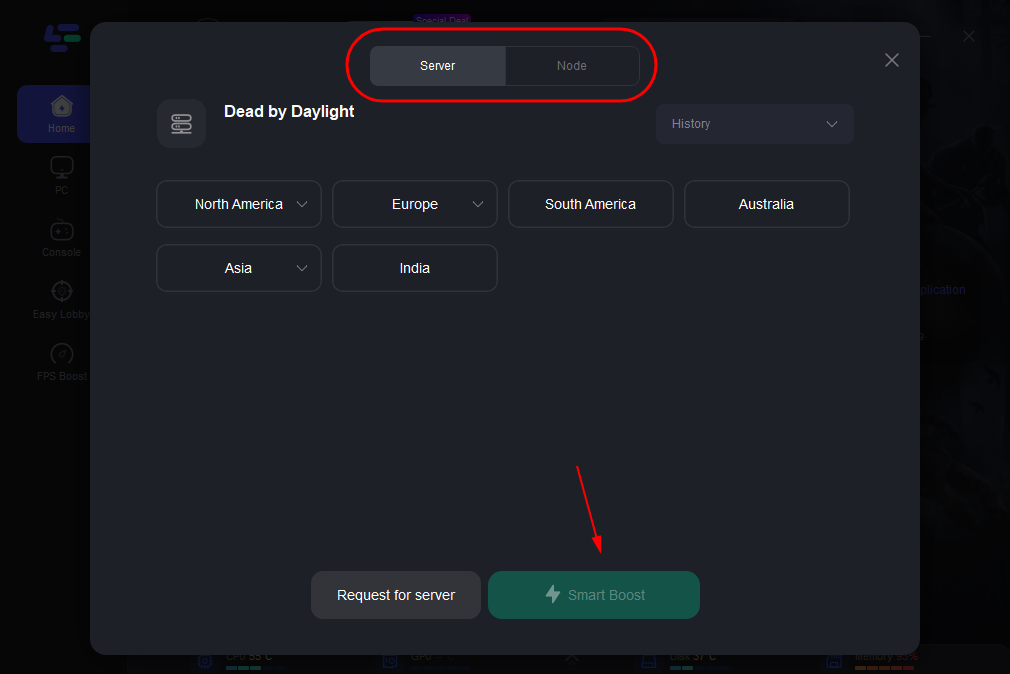
Step 3: Choose your preferred server node and click "Smart Boost" to start optimizing.
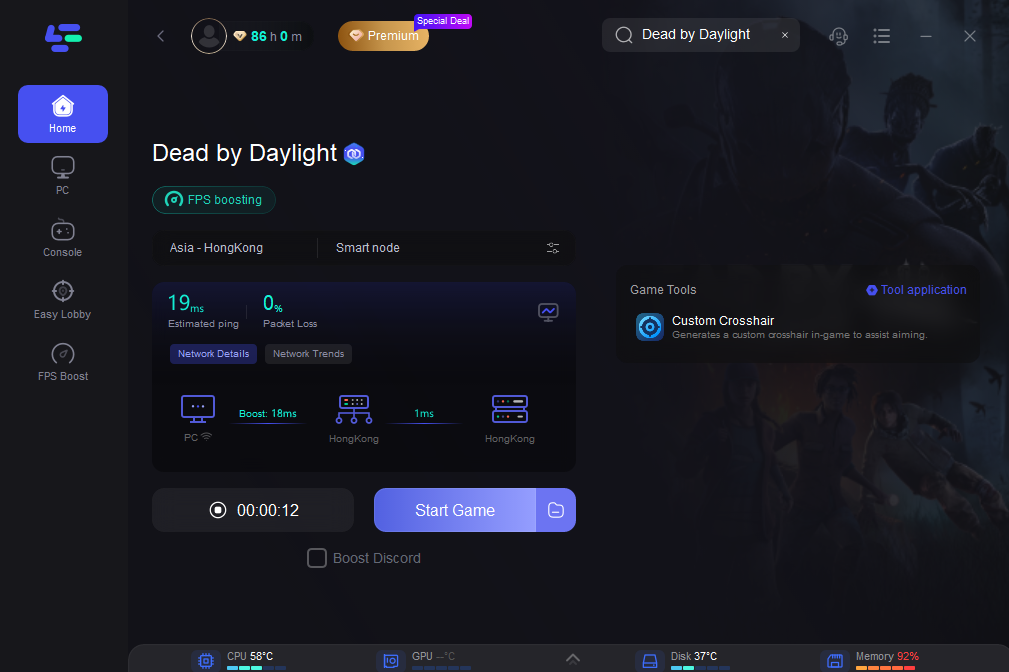
Step 4: Launch your game and enjoy smooth, optimized gameplay with lower ping and packet loss.
Part 7: FAQs
Is Dead by Daylight crossplay enabled by default?
Yes. Crossplay is enabled by default for most players. If needed, you can also turn it on or off in the in-game settings.
Can I play Dead by Daylight with friends in other regions?
Yes, but matchmaking quality can vary depending on distance, server load, and network conditions. Playing across regions may sometimes result in higher ping.
Do I need a Behavior Account for crossplay?
No. You don’t need a Behavior Account for crossplay. However, it is required if you want to use cross-progression or link your progress across platforms.
Why can’t I see my friend in Dead by Daylight?
This usually happens when:
- One player is on a different game version
- Crossplay is disabled on one side
- Friends list hasn’t synced properly
- Temporary server or platform issues
Does crossplay affect matchmaking speed?
Not directly. Matchmaking speed mainly depends on player population, region, and time of day. In some cases, crossplay can even help by increasing the number of available players.
Final Thoughts
Dead by Daylight’s crossplay makes it easy to play with friends across PC and consoles, but cross-progression is still limited and depends on platform support. Most issues players run into come from confusion between these systems or simple network and settings problems. Once you understand how crossplay and progression actually work, it’s much easier to avoid frustration and enjoy smoother matches.

Boost Your Game with LagoFast for Epic Speed
Play harder, faster. LagoFast game booster eliminates stutter and lags on PC, mobile, or Mac—win every match!
Quickly Reduce Game Lag and Ping!
Boost FPS for Smoother Gameplay!